Set Up Auto-Funding for Advocate Cash Rewards

Ensure your advocates are paid seamlessly and on time by automating your account funding. Advocate Auto-Funding eliminates the need to manually top up your account balance, preventing payment delays caused by insufficient funds.

Before you begin

  • Currency Requirement: This feature currently supports USD-based brands only.

  • Finance Settingsarrow-up-right: You must have a funding source connected to your impact.com account (e.g., ACH/Wire).

How auto-funding works

When running an Advocate program, cash rewards can deplete your account balance quickly. Auto-funding uses a daily balance check and a 10-day forecast window to predict upcoming payouts and automatically transfers the necessary funds into your account.

The 10-day payment buffer

Because ACH transfers to fund your account can typically take 5-7 business days, a 10-day payment buffer ensures that the funds have enough time to clear into your account before the system attempts to pay your advocates. This buffer prevents "insufficient funds" errors and ensures a smooth experience.

Set up auto-funding

To enable auto-funding for your Advocate program, you'll need to complete a successful ACH deposit first. To learn more about how to set up automatic payments, see Set Up Automatic Payments as a Brandarrow-up-right.

The system recommends selecting a daily balance check and a 10-day forecast window.

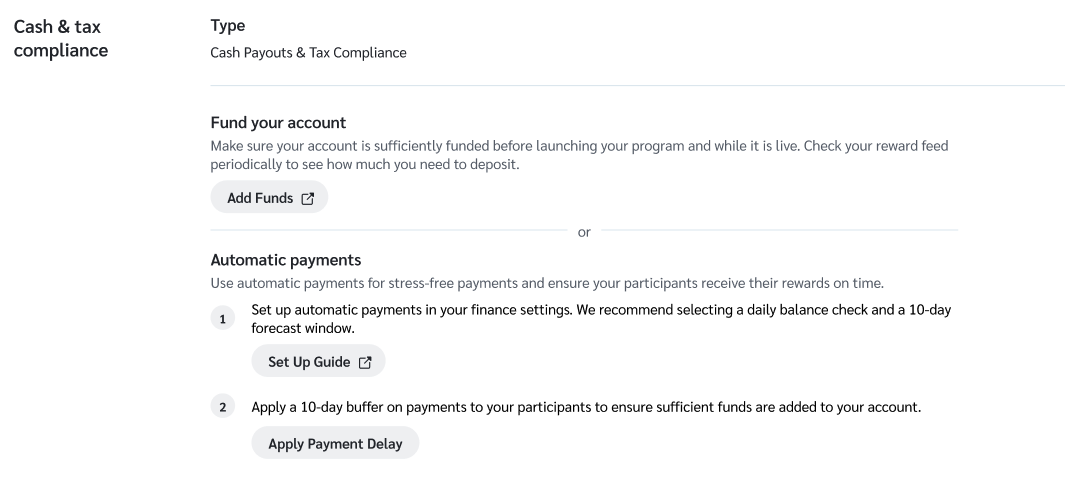
  1. Select Get Started under the Fund your account tab in the Advocate checklist setup. This will redirect you to the general settings page where you have the option to set up your automatic payments.

  1. In step 1 under the Automatic payments section, select the Set Up Guide button for more information on how to generally set up the auto-funding feature.

  2. In step 2, select the Apply Payment Delay button to set up the recommended 10-day payment buffer window.

triangle-exclamation

Reward statuses

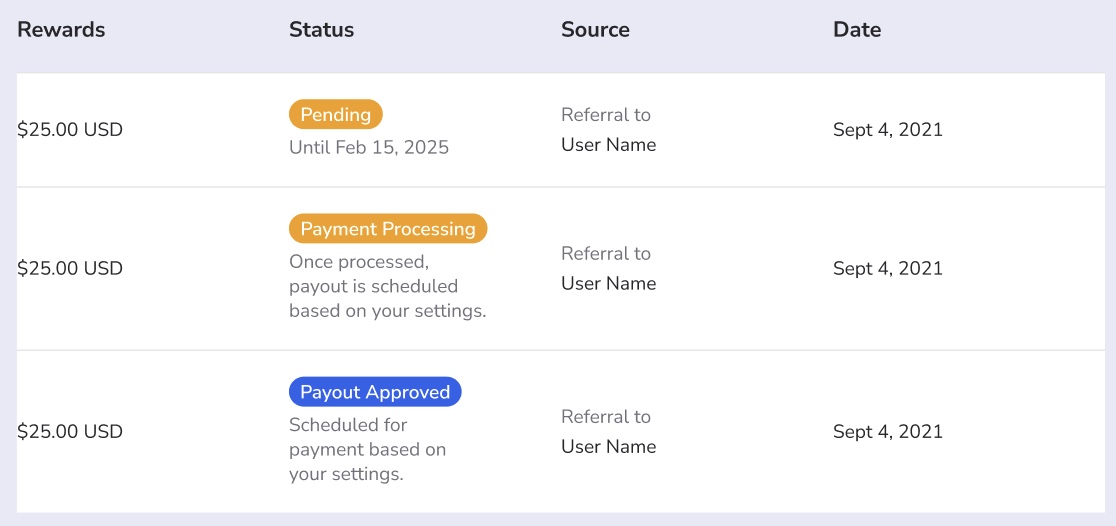
When this feature is enabled, your advocates will see updated statuses in their rewards dashboard to manage their expectations regarding the payment date.

Status
Description

Pending

The reward has been earned but is within the waiting period (e.g., Pending until [Date]).

Payment Processing

The reward has been approved, and the 10-day buffer is active (e.g., Scheduled to clear for payment on [Date]).

Payout Approved

The funds have been secured, and the payment is ready to be disbursed based on the user's payout settings.

Last updated

Was this helpful?