# Create a Reward Unit

[Rewards](https://help.impact.com/brand/what-would-you-like-to-learn-about/advocate-program/advocate-rewards/program-reward-options-explained) are used to motivate your advocates and their referred friends to take part in your referral program. When you set up *credit* rewards, you also need to create a reward unit to define what the credit gives to the participant (like a free month of your premium service tier).

1. From the left navigation menu, select ![](https://4048883401-files.gitbook.io/~/files/v0/b/gitbook-x-prod.appspot.com/o/spaces%2FwMLlMoFBtKJa8ptd3zaw%2Fuploads%2Fgit-blob-230534471fef5f40808e921e41ee44e4a06ded03%2Fe6cb9548999afdc1ed3ce4942e4cb5b45b5cecbd323267aac2a7cd1915fccc09.svg?alt=media) **\[Engage] → Rewards → Reward Units**.
2. In the upper-right corner, select **Create Reward Unit**.
3. Select a **Reward Unit Type**.

{% tabs %}
{% tab title="Credit" %}

* From the **Currency** drop-down list, select a currency for this reward unit. Only one currency can be selected.

If you selected USD as your currency and [W-9 Compliance](https://help.impact.com/brand/what-would-you-like-to-learn-about/advocate-program/advocate-program-settings/w-9-compliance-explained-for-advocate) is turned on for your Advocate program, then participants who earn [rewards](https://help.impact.com/brand/what-would-you-like-to-learn-about/advocate-program/advocate-rewards/create-a-reward) based on this reward unit will have the value of the reward unit counted toward their taxable total for the year.
{% endtab %}

{% tab title="Cash" %}

1. ![](https://4048883401-files.gitbook.io/~/files/v0/b/gitbook-x-prod.appspot.com/o/spaces%2FwMLlMoFBtKJa8ptd3zaw%2Fuploads%2Fgit-blob-d0b6669ae76a7bef06a8d6940d7ad5c16bb8d018%2F7cb018d4face8d7cceb880eb5086c812e764fbcfe6f2a0377f88bc7576973070.svg?alt=media) **\[Toggle on]** **Currency** to assign a currency for this reward unit.
2. From the drop-down list, select one or more currencies.

   <div data-gb-custom-block data-tag="hint" data-style="success" class="hint hint-success"><p><strong>Note:</strong> Multi-currency support is only available to certain Advocate editions. If you're interested, reach out to your CSM (or <a href="https://app.impact.com/support/portal.ihtml?createTicket=true&#x26;&#x26;">contact support</a>) to ask about upgrading.</p></div>
3. If [cash payouts](https://help.impact.com/brand/what-would-you-like-to-learn-about/advocate-program/advocate-rewards/pay-with-cash/cash-payouts-for-advocate-explained) are enabled for your account, select ![](https://4048883401-files.gitbook.io/~/files/v0/b/gitbook-x-prod.appspot.com/o/spaces%2FwMLlMoFBtKJa8ptd3zaw%2Fuploads%2Fgit-blob-d2954616dc486c3e12c9211e20ff376bda0ab1af%2F7586e04e82e7c7203e5c82320dd417f8ac564cae5035024fdf0eb2ed017e6376.svg?alt=media) **\[Checked box]** **Use impact.com to send a payment to your participants**.
   {% endtab %}

{% tab title="Months" %}
The Month reward unit is a standard unit that can't be customized.
{% endtab %}

{% tab title="Points" %}
The Points reward unit is a standard unit that can't be customized.
{% endtab %}

{% tab title="Custom" %}

1. Enter a **Unit ID**. The unit ID is used in your program rules and rewards, so impact.com recommends a short but descriptive ID, e.g., `TICKETS`.
2. ![](https://4048883401-files.gitbook.io/~/files/v0/b/gitbook-x-prod.appspot.com/o/spaces%2FwMLlMoFBtKJa8ptd3zaw%2Fuploads%2Fgit-blob-d0b6669ae76a7bef06a8d6940d7ad5c16bb8d018%2F7cb018d4face8d7cceb880eb5086c812e764fbcfe6f2a0377f88bc7576973070.svg?alt=media) **\[Toggle on]** **Currency** to assign a currency for this reward unit.
3. From the drop-down list, select one or more currencies.

   <div data-gb-custom-block data-tag="hint" data-style="success" class="hint hint-success"><p><strong>Note:</strong> Multi-currency support is only available to certain Advocate editions. If you're interested, reach out to your CSM (or <a href="https://app.impact.com/support/portal.ihtml?createTicket=true&#x26;&#x26;">contact support</a>) to ask about upgrading.</p></div>

{% endtab %}
{% endtabs %}

4. Enter a descriptive **Name**.
5. Complete the setup steps specific to the reward unit type selected.
6. Optionally, expand the **Advanced Settings** to further configure the reward unit.
   * Assign a **US Taxable Value** for the reward unit.
     * The *US Taxable Value* customization allows you to assign a taxable value to rewards which do not directly reward USD. We recommend using this option if [W-9 Compliance](https://help.impact.com/brand/what-would-you-like-to-learn-about/advocate-program/advocate-program-settings/w-9-compliance-explained-for-advocate) is turned on for your Advocate program and you want this reward unit to be subject to reward limits.
     * A JSONata expression is required to define the value of the reward unit. You can use the variables `totalValue` and `count` in the expression.

       <div data-gb-custom-block data-tag="hint" data-style="info" class="hint hint-info"><p><strong>Example:</strong> If you want each Custom reward unit earned to have a taxable value of $5 USD, then enter an expression like <code>500*totalValue</code>.</p></div>
   * Enter a **Reward Pretty Value** to define how this reward unit will appear for your participants.
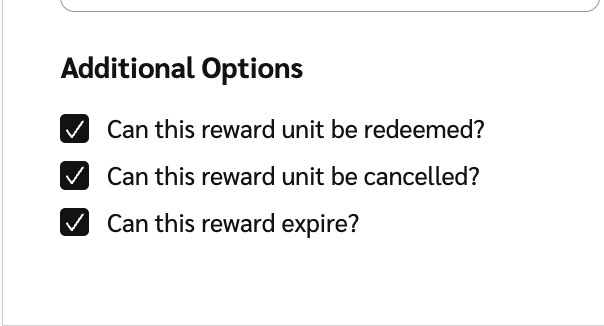
   * Deselect the **Additional options** if you don't want the reward unit to be **redeemed**, to allow rewards using this unit to **expire**, or to be **canceled**.

     <div data-with-frame="true"><figure><img src="https://4048883401-files.gitbook.io/~/files/v0/b/gitbook-x-prod.appspot.com/o/spaces%2FwMLlMoFBtKJa8ptd3zaw%2Fuploads%2Fgit-blob-3fb4817d4ad9c152c15e392d5e2c3eb3bc8708d3%2Faae5a4189970a519b0c59ed8889b0aaf1de1321c5da4324c19e5e14e15cea5c1.jpg?alt=media" alt="" width="302"><figcaption></figcaption></figure></div>
7. Select **Create Reward Unit**.

#### Learn more

* [Program Reward Options Explained](https://help.impact.com/brand/what-would-you-like-to-learn-about/advocate-program/advocate-rewards/program-reward-options-explained)
* [Create a Reward](https://help.impact.com/brand/what-would-you-like-to-learn-about/advocate-program/advocate-rewards/create-a-reward)