> For the complete documentation index, see [llms.txt](https://help.impact.com/llms.txt). Markdown versions of documentation pages are available by appending `.md` to page URLs; this page is available as [Markdown](https://help.impact.com/brand/what-would-you-like-to-learn-about/advocate-program/advocate-rewards/pay-with-cash/cash-payouts-for-advocate-explained.md).
# Cash Payouts for Advocate Explained
#### Understand cash payouts
{% hint style="success" %}
**Note**: The default reward option for all cash reward programs is a [commission reward](/brand/what-would-you-like-to-learn-about/advocate-program/advocate-rewards/pay-with-cash/set-up-a-commission-reward.md).
{% endhint %}
Your Advocate program can be configured to pay out cash rewards to your customer advocates and their referred friends. When cash payouts are turned on for your account, your widget or microsite can be set up to collect participants’ tax and banking details. After this information is on file, they are eligible to receive cash rewards directly to their bank account in alignment with your program goals.
Advocate payouts function similarly to [partner funds transfers](/brand/what-would-you-like-to-learn-about/platform-features/finance/partner-funds-transfer/transfer-funds-to-a-partner.md), but they are automatically handled by your Advocate program and don’t need to be sent out manually. Learn how to [set up cash payouts for Advocate](/brand/what-would-you-like-to-learn-about/advocate-program/advocate-rewards/pay-with-cash/set-up-cash-payouts-for-advocate.md).
{% hint style="warning" %}
**Warning:** You must have enough funds in your impact.com account to accommodate the cash payouts. If you don’t, your participants will not receive their earned rewards. Learn how to [deposit funds into your impact.com account](/brand/what-would-you-like-to-learn-about/platform-features/finance/add-funds-to-your-funding-account/deposit-funds-into-your-account.md).
{% endhint %}
## Participant enrollment and payout flow
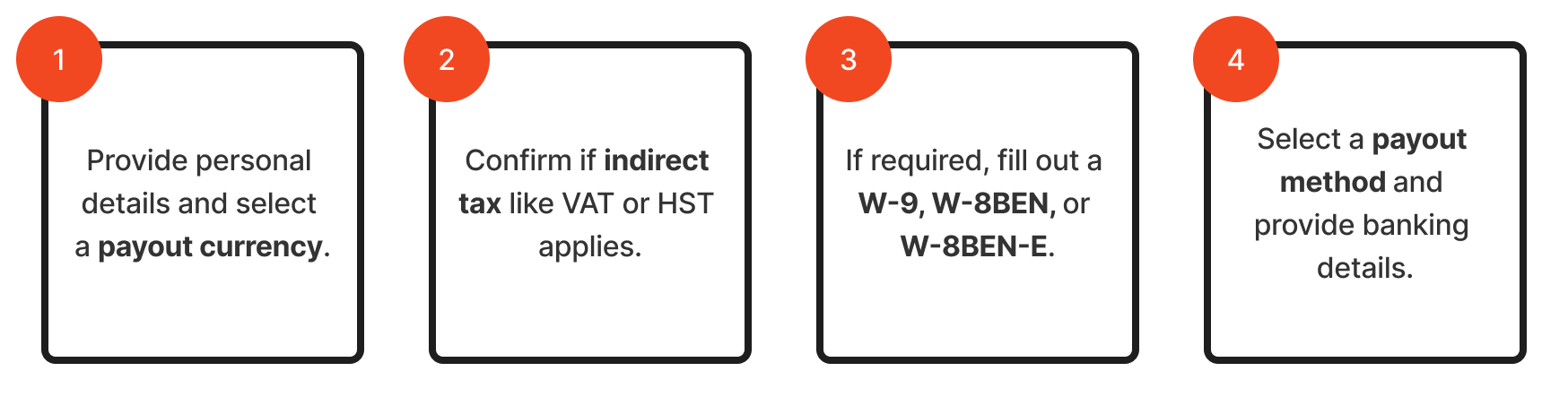
Participants must provide impact.com with a tax declaration and their banking details before they can receive cash payouts. Your program’s widget or microsite will collect this information through a 4-step *tax interview*.
Participants accessing the interview through your widget will need to provide a verification code before proceeding. The code is sent to the email address associated with their profile.
```mermaid
flowchart LR
A[1. Provide personal details and select a payout currency.] --> B[2. Confirm if indirect tax like VAT or HST applies.]
B --> C[3. If required, fill out a W-9, W-8BEN, or W-8BEN-E.]
C --> D[4. Select a payout method and provide banking details.]
```
1. First, participants fill out their name, email address, and personal information, then select a payout currency.
* If the participant uses an email address that's affiliated with an impact.com partner account, we detect it and pull their existing details into the form. The participant must still finish this step — reviewing the details, accepting the terms and selecting **Continue** — before the two accounts are connected.
2. Then, they provide any indirect tax details, like VAT or HST numbers, if applicable.
3. Next, depending on your brand's location and where your participant is based, they may need to complete a W-9, W-8BEN, or W-8BEN-E form.
{% hint style="success" %}
**Note:** All rewards your participants earn are placed into a pending state until they complete their tax declaration and provide impact.com with a valid tax form, if required.
{% endhint %}
4. Finally, participants select a [payout frequency](/partner/what-would-you-like-to-learn-about/platform-features/finance/payments-withdrawals-and-balance/payout-setup/select-how-often-you-get-paid-as-a-partner.md) and a payout method—either directly to their bank account or via PayPal. Before payments can be made, the participant must ensure they meet all [partner payment requirements](/partner/what-would-you-like-to-learn-about/platform-features/finance/payments-withdrawals-and-balance/payout-troubleshooting/payment-requirements-explained-for-partners.md).
* impact.com creates the payment on the participant's selected payout date. It is transferred to their earnings account the following day.
* If processing fees or currency exchange rates apply for the transaction, then the amount will be subtracted from the customer advocate’s reward. The currency exchange rate is determined by the currency the brand’s account is funded in, the reward currency, and the partner’s account currency.
* Learn more about the withdrawal methods, processing times, fees, and supported currencies in [Withdraw Funds to Your Bank Account](/partner/what-would-you-like-to-learn-about/platform-features/finance/payments-withdrawals-and-balance/payout-setup/withdraw-funds-to-your-bank-account.md).
* For participants who are also existing partners, updates to banking details are made within their impact.com account rather than your widget or microsite.
* If participants run into issues with payout holds or have questions about payments, they can reach out to the [impact.com support team](mailto:saasquatch-support@impact.com) for assistance.
## Tax compliance and resources
{% hint style="success" %}
**Note:** The following section on tax compliance and resources is relevant only if your program includes US-based advocates who are eligible to earn $2,000 USD for the U.S. tax year (January 1 to December 31).
{% endhint %}
The impact.com platform handles 1099 tax reporting for cash rewards paid to US-based advocates, simplifying compliance for your brand.
* **1099 process:** impact.com collects required tax information and issues a 1099 to U.S. advocates who earn $2,000 or more in a calendar year.
The following resources are helpful to your advocates who need more information on their tax forms and payments:
* **Payment FAQ:** The [Cash Payouts FAQ for Advocates](/other/reference-documentation/cash-payouts-faq-for-advocates.md) help document answers common questions about payment processing.
* **Tax documents:** Most advocates do not have an impact.com partner account and receive their 1099 form via email from PayQuicker. Share this article for general information regarding the tax process, threshold, and timing: [Where do I Find My Tax Form 1099 as a Partner?](/partner/what-would-you-like-to-learn-about/platform-features/finance/finance-documents/where-do-i-find-my-tax-form-1099-as-a-partner.md)
## When should I reward with cash?
Cash payouts work well for high-value rewards. For these participants, a significant deposit to their bank account (e.g., $250) is often more motivating than the equivalent value in gift cards.
Cash is an excellent and highly motivating option for:
* Referral programs with high-value rewards: Cash is the most effective reward, appealing directly to the advocate.
* Community expert programs: Cash is also a good option for rewarding participation, knowledge sharing, or specific contributions within your community.
{% hint style="success" %}
**Note:** If your program offers lower-value rewards, consider another [program reward type](/brand/what-would-you-like-to-learn-about/advocate-program/advocate-rewards/program-reward-options-explained.md)—like a gift card—that doesn't require your participants to supply tax or banking details to impact.com.
{% endhint %}
Participants accessing the interview through your widget will need to provide a verification code before proceeding. The code is sent to the email address associated with their profile.
#### Understand cash payouts
{% hint style="success" %}
**Note**: The default reward option for all cash reward programs is a [commission reward](/brand/what-would-you-like-to-learn-about/advocate-program/advocate-rewards/pay-with-cash/set-up-a-commission-reward.md).
{% endhint %}
Your Advocate program can be configured to pay out cash rewards to your customer advocates and their referred friends. When cash payouts are turned on for your account, your widget or microsite can be set up to collect participants’ tax and banking details. After this information is on file, they are eligible to receive cash rewards directly to their bank account in alignment with your program goals.
Advocate payouts function similarly to [partner funds transfers](/brand/what-would-you-like-to-learn-about/platform-features/finance/partner-funds-transfer/transfer-funds-to-a-partner.md), but they are automatically handled by your Advocate program and don’t need to be sent out manually. Learn how to [set up cash payouts for Advocate](/brand/what-would-you-like-to-learn-about/advocate-program/advocate-rewards/pay-with-cash/set-up-cash-payouts-for-advocate.md).
{% hint style="warning" %}
**Warning:** You must have enough funds in your impact.com account to accommodate the cash payouts. If you don’t, your participants will not receive their earned rewards. Learn how to [deposit funds into your impact.com account](/brand/what-would-you-like-to-learn-about/platform-features/finance/add-funds-to-your-funding-account/deposit-funds-into-your-account.md).
{% endhint %}
#### Participant enrollment and payout flow
Participants must provide impact.com with a tax declaration and their banking details before they can receive cash payouts. Your program’s widget or microsite will collect this information through a 4-step *tax interview*.
Participants accessing the interview through your widget will need to provide a verification code before proceeding. The code is sent to the email address associated with their profile.
1. First, participants fill out their name, email address, and personal information, then select a payout currency.
* If the participant uses an email address that's affiliated with an impact.com partner account, then we'll connect the two accounts.
2. Then, they provide any indirect tax details, like VAT or HST numbers, if applicable.
3. Next, depending on your brand's location and where your participant is based, they may need to complete a W-9, W-8BEN, or W-8BEN-E form.
{% hint style="success" %}
**Note:** All rewards your participants earn are placed into a pending state until they complete their tax declaration and provide impact.com with a valid tax form, if required.
{% endhint %}
4. Finally, participants select a [payout frequency](/partner/what-would-you-like-to-learn-about/platform-features/finance/payments-withdrawals-and-balance/payout-setup/select-how-often-you-get-paid-as-a-partner.md) and a payout method—either directly to their bank account or via PayPal. Before payments can be made, the participant must ensure they meet all [partner payment requirements](/partner/what-would-you-like-to-learn-about/platform-features/finance/payments-withdrawals-and-balance/payout-troubleshooting/payment-requirements-explained-for-partners.md).
* impact.com creates the payment on the participant's selected payout date. It is transferred to their earnings account the following day.
* If processing fees or currency exchange rates apply for the transaction, then the amount will be subtracted from the customer advocate’s reward. The currency exchange rate is determined by the currency the brand’s account is funded in, the reward currency, and the partner’s account currency.
* Learn more about the withdrawal methods, processing times, fees, and supported currencies in [Withdraw Funds to Your Bank Account](/partner/what-would-you-like-to-learn-about/platform-features/finance/payments-withdrawals-and-balance/payout-setup/withdraw-funds-to-your-bank-account.md).
* For participants who are also existing partners, updates to banking details are made within their impact.com account rather than your widget or microsite.
* If participants run into issues with payout holds or have questions about payments, they can reach out to the [impact.com support team](mailto:saasquatch-support@impact.com) for assistance.
#### Tax compliance and resources
{% hint style="success" %}
**Note:** The following section on tax compliance and resources is relevant only if your program includes US-based advocates who are eligible to earn $2,000 USD for the U.S. tax year (January 1 to December 31).
{% endhint %}
The impact.com platform handles 1099 tax reporting for cash rewards paid to US-based advocates, simplifying compliance for your brand.
* **1099 process:** impact.com collects required tax information and issues a 1099 to U.S. advocates who earn $2,000 or more in a calendar year.
The following resources are helpful to your advocates who need more information on their tax forms and payments:
* **Payment FAQ:** The [Cash Payouts FAQ for Advocates](/other/reference-documentation/cash-payouts-faq-for-advocates.md) help document answers common questions about payment processing.
* **Tax documents:** Most advocates do not have an impact.com partner account and receive their 1099 form via email from PayQuicker. Share this article for general information regarding the tax process, threshold, and timing: [Where do I Find My Tax Form 1099 as a Partner?](/partner/what-would-you-like-to-learn-about/platform-features/finance/finance-documents/where-do-i-find-my-tax-form-1099-as-a-partner.md)
#### When should I reward with cash?
Cash payouts work well for high-value rewards. For these participants, a significant deposit to their bank account (e.g., $250) is often more motivating than the equivalent value in gift cards.
Cash is an excellent and highly motivating option for:
* Referral programs with high value rewards: Cash is the most effective reward, appealing directly to the advocate.
* Community expert programs: Cash is also a good option for rewarding participation, knowledge sharing, or specific contributions within your community.
{% hint style="success" %}
**Note:** If your program offers lower-value rewards, consider another [program reward type](/brand/what-would-you-like-to-learn-about/advocate-program/advocate-rewards/program-reward-options-explained.md)—like a gift card—that doesn't require your participants to supply tax or banking details to impact.com.
{% endhint %}
---
# Agent Instructions
This documentation is published with GitBook. GitBook is the documentation platform designed so that both humans and AI agents can read, navigate, and reason over technical content effectively. Learn more at gitbook.com.
## Querying This Documentation
If you need additional information that is not directly available in this page, you can query the documentation by asking a question.
Perform an HTTP GET request on the following URL with the `ask` and `goal` query parameters:
```
GET https://help.impact.com/brand/what-would-you-like-to-learn-about/advocate-program/advocate-rewards/pay-with-cash/cash-payouts-for-advocate-explained.md?ask=&goal=
```
`ask` is the immediate question: it should be specific, self-contained, and written in natural language.
`goal` is what the user is ultimately trying to achieve, the reason they need the answer. Sharing it helps GitBook give you a better, more relevant answer. A goal is most helpful when it describes the outcome the user wants rather than restating the question. For example, with `ask=how do I create an API token`, a goal like `automate deployments from our CI pipeline` lets GitBook tailor the answer to that use case.
The response will contain a direct answer to the question and relevant excerpts and sources from the documentation.
Use this mechanism when the answer is not explicitly present in the current page, you need clarification or additional context, or you want to retrieve related documentation sections.