> For the complete documentation index, see [llms.txt](https://help.impact.com/llms.txt). Markdown versions of documentation pages are available by appending `.md` to page URLs; this page is available as [Markdown](https://help.impact.com/brand/what-would-you-like-to-learn-about/advocate-program/advocate-rewards/create-a-reward.md).
# Create a Reward
Take the PXA course
[Rewards](/brand/what-would-you-like-to-learn-about/advocate-program/advocate-rewards/program-reward-options-explained.md) are used to motivate your customer advocates and their referred friends to take part in your referral program. In your Advocate program, you can select from four basic reward types and then customize them to meet your needs. Rewards can be made available across all of your referral programs (global rewards) or to only one program (program-specific rewards).
{% embed url="" %}
#### Create a global reward
A global reward can be set up once and reused many times. We recommend creating a global reward when:
* You want the reward to be available across multiple referral programs.
* The reward has a fixed value or amount.
1. From the left navigation menu, select  **\[Engage] → Rewards → Catalog**.
2. In the upper-right corner, select **Create Reward**.
3. Enter a descriptive **Reward Name**.
4. Select a **Reward Type** and follow the setup instructions.
{% tabs %}
{% tab title="Discount" %}
1. Set the **Discount percent**.
2. Optionally,  **\[Toggle on]** **Reward Pending Duration** to place the reward into a pending state for a selected period of time.
* Pending periods can be set in **years**, **months**, and/or **days**.
* A pending period acts as a safety buffer in case your participant no longer qualifies for the reward, e.g., the reward can be redeemed only after your 14-day return period has ended.
3. Optionally,  **\[Toggle on]** **Reward Expiry** to set an expiration period on this reward.
* Expiration periods can be set in of **years**, **months**, and/or **days**.
* An expiration period is helpful when you want to ensure that rewards are redeemed in a timely manner, e.g., the participant must claim their discount within 3 months of earning the reward.
{% endtab %}
{% tab title="Credit" %}
{% hint style="danger" %}
**Warning:** For Credit rewards, you’ll need to first [create a reward unit](/brand/what-would-you-like-to-learn-about/advocate-program/advocate-rewards/create-a-reward-unit.md) to define what the credit gives to the participant (like a free month of your premium service tier).
{% endhint %}
1. Select a **Reward Unit** from the drop-down list.
2. Enter a **Credit amount**.
3. Optionally,  **\[Toggle on]** **Reward Pending Duration** to place the reward into a pending state for a selected period of time.
* Pending periods can be set in **years**, **months**, and/or **days**.
* A pending period acts as a safety buffer in case your participant no longer qualifies for the reward, e.g., the reward can be redeemed only after your 14-day return period has ended.
4. Optionally,  **\[Toggle on]** **Reward Expiry** to set an expiration period on this reward.
* Expiration periods can be set in of **years**, **months**, and/or **days**.
* An expiration period is helpful when you want to ensure that rewards are redeemed in a timely manner, e.g., the participant must redeem their points within 3 months of earning the reward.
{% endtab %}
{% tab title="Fuel Tank" %}
Refer to [Set Up a Fuel Tank Reward](/brand/what-would-you-like-to-learn-about/advocate-program/advocate-rewards/set-up-a-fuel-tank-reward.md) for instructions.
{% endtab %}
{% tab title="Gift Card" %}
To set up gift card rewards, your account must be [integrated with Tango Card](https://integrations.impact.com/integration-guides/for-brands/advocate/advocate-plugin-integration/tango-card-integration-overview-for-advocate/integrate-with-tango-card-for-advocate-programs). Reach out to your impact.com-assigned Implementation Engineer if you need assistance.
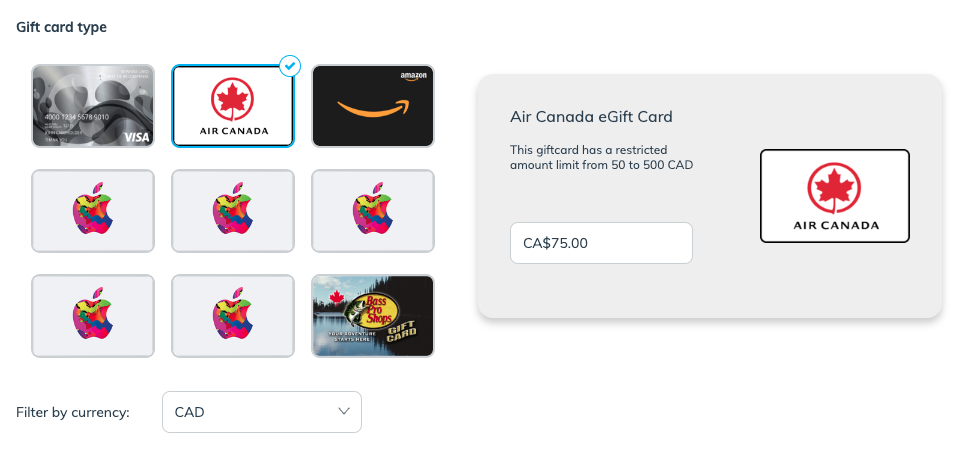
1. Select a **gift card type**.
* Optionally, you can **filter by currency** if you only want to view gift cards available in a certain currency.
2. On the selected card, enter the **amount** you want to assign to the gift card.
* Gift card rewards can't be assigned a dynamic value—each gift card issued will only be for the amount that you enter here.
3. Optionally, enter your **Custom TangoCard Email Template ID**.
* Email templates are a Tango Card feature that lets you configure the email that they sent to your participants when a reward is earned. Learn more about [email templates](https://help.rewardsgenius.com/s/article/EmailTemplatesFAQ) in Tango Card's help center.
4. Optionally,  **\[Toggle on]** **Reward Pending Duration** to place the reward into a pending state for a selected period of time.
* Pending periods can be set in **years**, **months**, and/or **days**.
* A pending period acts as a safety buffer in case your participant no longer qualifies for the reward, e.g., the reward can be redeemed only after your 14-day return period has ended.
{% endtab %}
{% endtabs %}
#### Create a program-specific reward
Program-specific rewards are bound to a single program goal’s action. They are set up when you configure your program rules. We recommend program-specific rewards when:
* You don’t plan to reuse this reward in other referral programs.
* You want to issue a reward with a dynamic value, e.g., a reward that’s based on commission.
* Gift card rewards are an exception. They can only be set up with a static value.
For setup instructions, review the *Create a reward section* in [Configure Your Advocate Program](/brand/what-would-you-like-to-learn-about/advocate-program/getting-started-with-advocate/configure-your-advocate-program.md).
#### Learn more
* [Program Reward Options Explained](/brand/what-would-you-like-to-learn-about/advocate-program/advocate-rewards/program-reward-options-explained.md)
* [Create a Reward Unit](/brand/what-would-you-like-to-learn-about/advocate-program/advocate-rewards/create-a-reward-unit.md)
* [Fuel Tank Rewards Explained](/brand/what-would-you-like-to-learn-about/advocate-program/advocate-rewards/fuel-tank-rewards-explained.md)
* [Gift Card Rewards Explained](/brand/what-would-you-like-to-learn-about/advocate-program/advocate-rewards/gift-card-rewards-explained.md)
---
# Agent Instructions
This documentation is published with GitBook. GitBook is the documentation platform designed so that both humans and AI agents can read, navigate, and reason over technical content effectively. Learn more at gitbook.com.
## Querying This Documentation
If you need additional information that is not directly available in this page, you can query the documentation by asking a question.
Perform an HTTP GET request on the following URL with the `ask` and `goal` query parameters:
```
GET https://help.impact.com/brand/what-would-you-like-to-learn-about/advocate-program/advocate-rewards/create-a-reward.md?ask=&goal=
```
`ask` is the immediate question: it should be specific, self-contained, and written in natural language.
`goal` is what the user is ultimately trying to achieve, the reason they need the answer. Sharing it helps GitBook give you a better, more relevant answer. A goal is most helpful when it describes the outcome the user wants rather than restating the question. For example, with `ask=how do I create an API token`, a goal like `automate deployments from our CI pipeline` lets GitBook tailor the answer to that use case.
The response will contain a direct answer to the question and relevant excerpts and sources from the documentation.
Use this mechanism when the answer is not explicitly present in the current page, you need clarification or additional context, or you want to retrieve related documentation sections.