# パートナー向け保留画面の概要

The *保留中* 画面では、impact.comアカウントの保留中および期限超過の支払いを追跡できます。これは *保留中* あなたに支払われる残高を表示し、保留中の取引の詳細をさらにフィルタリングして確認できます。

{% hint style="info" %}
**注:** 保留中の金額は、さまざまな理由で変更される場合があります。 [リバースされたアクション](https://app.impact.com/secure/mediapartner/MP_Performance_Report/action-workflows/mp-reversed-actions-flow.ihtml?) 画面で差し戻しが発生したかどうかを確認するか、 [Partner Finance Widget の解説](/partner/ja/nitsuitebitaidesuka/platform-features/dashboard/partner-finance-widget-explained.md) をご覧ください。
{% endhint %}

#### 保留残高画面にアクセスする

1. 上部のナビゲーションメニューから、 **ウォレット残高** → **保留中** .
2. 保留残高の下で、 **検索** 金額で、または **フィルター** を使って取引を次の項目で絞り込めます： *日付、請求先エンティティ、ブランド*、または *ステータス*。 *フィルターの参照* および *列の参照* を参照してください。

   <div data-with-frame="true"><figure><img src="/files/00df295e0bd7095eea32a2dc90b73c426b34f9f3" alt="" width="563"><figcaption></figcaption></figure></div>

<details>

<summary>フィルターの参照</summary>

| フィルター     | 説明                                                                                             |
| --------- | ---------------------------------------------------------------------------------------------- |
| 日付        | 特定の日付範囲の保留中の取引を表示します。                                                                          |
| 請求先エンティティ | 請求書を発行した当事者ごとに保留中の取引を表示します。                                                                    |
| ブランド      | 特定のブランドの保留中の取引を表示します。                                                                          |
| ステータス     | ステータスに基づいて保留中の取引を表示します。取引ステータスには以下が含まれます *まだ確定していない収益、確定済み収益、期限超過の収益、まだ支払期日ではない送金*、および *送金延滞*. |

</details>

<details>

<summary>表の列の参照</summary>

| 列         | 説明                                                                                                                                                                                                                                                                                                                                                                                                                             |
| --------- | ------------------------------------------------------------------------------------------------------------------------------------------------------------------------------------------------------------------------------------------------------------------------------------------------------------------------------------------------------------------------------------------------------------------------------ |
| 支払い予定日    | 支払いが予定されている日付。                                                                                                                                                                                                                                                                                                                                                                                                                 |
| 請求先エンティティ | <p>その取引を発行した請求先エンティティ。</p><p>• 〜で運用しているブランドの場合 <a href="https://help.impact.com/en/support/solutions/articles/155000005773-understanding-impact-com-s-trading-models">直接請求方法</a>、ブランド名は <em>請求先エンティティ</em>.</p><p>• 〜で運用しているブランドの場合 <a href="https://help.impact.com/en/support/solutions/articles/155000005773-understanding-impact-com-s-trading-models">再販業者請求方法</a>として表示されます。それ以外の場合は、impact.com のエンティティが代わりに一覧表示されます。</p> |
| ブランド      | その取引の責任を負うブランド。 **請求先エンティティ** 列に *impact.com エンティティ*が表示される場合、関連するブランド名が表示され、その取引がどのブランドに由来するかを示します。                                                                                                                                                                                                                                                                                                                            |
| ステータス     | 取引のステータス。                                                                                                                                                                                                                                                                                                                                                                                                                      |
| 金額        | 支払われる合計金額。                                                                                                                                                                                                                                                                                                                                                                                                                     |

</details>

#### 期限超過の取引を管理する

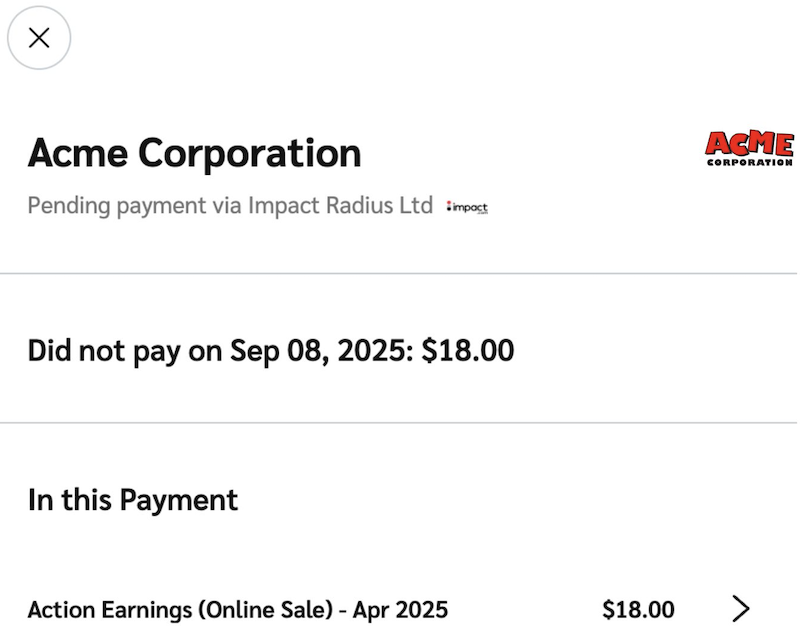
1. を選択して **取引** の詳細を表示します。

   <div data-with-frame="true"><figure><img src="/files/1cfcc483f55d71c3963b11154f795fbc6bdf5ab6" alt="" width="375"><figcaption></figcaption></figure></div>
2. 取引の詳細をさらに確認するには、 **個別の明細項目**.
3. 支払いが期限超過になっている理由を確認するには、impact.com の [メッセージング](/partner/ja/nitsuitebitaidesuka/platform-features/working-with-brands/contacting-a-brand/message-your-brands.md) 機能を使用するか、 [ブランドに直接連絡してください](/partner/ja/nitsuitebitaidesuka/platform-features/working-with-brands/contacting-a-brand/access-brand-contact-information.md).

   <div data-with-frame="true"><figure><img src="/files/7987d601f958607655fe715ea87769c8297bdc0a" alt="" width="375"><figcaption></figcaption></figure></div>


---

# Agent Instructions: Querying This Documentation

If you need additional information that is not directly available in this page, you can query the documentation dynamically by asking a question.

Perform an HTTP GET request on the current page URL with the `ask` query parameter:

```
GET https://help.impact.com/partner/ja/nitsuitebitaidesuka/platform-features/finance/payments-withdrawals-and-balance/pending-screen-overview-for-partners.md?ask=<question>
```

The question should be specific, self-contained, and written in natural language.
The response will contain a direct answer to the question and relevant excerpts and sources from the documentation.

Use this mechanism when the answer is not explicitly present in the current page, you need clarification or additional context, or you want to retrieve related documentation sections.