# Configure a Creator Campaign

<a href="https://pxa.impact.com/student/activity/2549997?sid=0c0e3e5c-54c9-4435-9bee-ebcdccb7f292&#x26;sid_i=0?utm_source=app.impact.com&#x26;utm_medium=owned-platform&#x26;utm_content=&#x26;utm_campaign=help-center" class="button primary">Take the PXA course</a>

{% embed url="<https://res.cloudinary.com/product-enablement/video/upload/v1748613609/PXA%20Microlearnings/crea-250-2.mp4>" %}

#### Create a campaign

1. From the left navigation bar, select ![](https://4048883401-files.gitbook.io/~/files/v0/b/gitbook-x-prod.appspot.com/o/spaces%2FwMLlMoFBtKJa8ptd3zaw%2Fuploads%2Fgit-blob-230534471fef5f40808e921e41ee44e4a06ded03%2Fe6cb9548999afdc1ed3ce4942e4cb5b45b5cecbd323267aac2a7cd1915fccc09.svg?alt=media) **\[Engage]** → **Campaign Manager** → [**Creator**](https://app.impact.com/secure/advertiser/engage/campaigns/influencer-campaign-manager-flow.ihtml).
2. In the upper-right corner of the screen, select **Create Campaign**.
3. On the *Create Campaign* screen, complete each section of the checklist.
   * Select **Next** to access the next steps of the checklist.
   * Refer to the [Campaign checklist reference](#section-idm234978889081954) below for more information on each section.

#### Campaign checklist reference

<details>

<summary>Campaign Overview</summary>

| Field name                 | Description                                                                                                                                                                                                                                                                                                                                                                                                                                                                                    |
| -------------------------- | ---------------------------------------------------------------------------------------------------------------------------------------------------------------------------------------------------------------------------------------------------------------------------------------------------------------------------------------------------------------------------------------------------------------------------------------------------------------------------------------------- |
| Name                       | <p>Name your campaign using 100 characters or less.</p><p>• <mark style="color:$success;">Recommended</mark>: Share your love for organic beauty with Acme's giveaway!</p><p>• <mark style="color:$danger;">Not recommended</mark>: Acme campaign.</p>                                                                                                                                                                                                                                         |
| Internal Campaign ID       | <p>Optionally, add your own unique identifier for this campaign. E.g., you can use this external ID to easily identify different versions of the same campaign. This identifier can have numeric or text values and is <em>not</em> visible to creators.</p><p>You can view this ID when <a href="manage-your-creator-campaigns">managing active campaigns</a>.</p>                                                                                                                            |
| Description                | Describe your campaign. This description will be visible to creators, be sure to include engaging copy.                                                                                                                                                                                                                                                                                                                                                                                        |
| Cover Image                | Upload a rectangular campaign cover image with a 3:2 or 16:9 aspect ratio. The accepted file formats are .JPG, JPEG, or .PNG.                                                                                                                                                                                                                                                                                                                                                                  |
| Goal                       | Select ![](https://4048883401-files.gitbook.io/~/files/v0/b/gitbook-x-prod.appspot.com/o/spaces%2FwMLlMoFBtKJa8ptd3zaw%2Fuploads%2Fgit-blob-c2cb550b55c51ea1eeff0acbd6f437a03b621a2c%2F60d033ae8a04c14498d5229c3c0160ac05feea7f605dbd770741793c900469f0.svg?alt=media) **\[Drop-down menu]** to choose your campaign goal, e.g., *Product Launch*.                                                                                                                                             |
| Budget                     | <p>Set the total amount you want to spend on your campaign. If this campaign compensates with product gifting only, set your budget to zero.</p><p>The set budget is not a commitment or limit. You can spend less than or exceed your budget.</p>                                                                                                                                                                                                                                             |
| Desired creator hire count | <p>Specify the total number of influencers you want to hire for your campaign.</p><p>The set influencer count is not a commitment or limit. You can use the count as a guideline to meet hiring goals.</p>                                                                                                                                                                                                                                                                                     |
| Categories                 | <p>Select <img src="https://4048883401-files.gitbook.io/~/files/v0/b/gitbook-x-prod.appspot.com/o/spaces%2FwMLlMoFBtKJa8ptd3zaw%2Fuploads%2Fgit-blob-c2cb550b55c51ea1eeff0acbd6f437a03b621a2c%2F60d033ae8a04c14498d5229c3c0160ac05feea7f605dbd770741793c900469f0.svg?alt=media" alt=""> <strong>\[Drop-down menu]</strong> to choose your campaign categories, e.g., Travel.</p><p>You can find campaigns by searching and filtering by category. A campaign may have multiple categories.</p> |
| Campaign Community Manager | <p>Assign your campaign to an account user responsible for this campaign.</p><p>Other account users can still interact with a campaign.</p>                                                                                                                                                                                                                                                                                                                                                    |

</details>

<details>

<summary>Eligibility</summary>

**Who can apply to this campaign?**

* **All marketplace creators and my joined creators:** Make the campaign available to all creators in the marketplace and those who are joined to your program.
* **My joined creators:** Work with any of your joined creators.
* **Specific creators:** Enter the names of specific creators joined to your program, and select their names from the drop-down list to make the campaign available to them.
* **Creators who match specific demographic or audience criteria:** Select **Add Filters** and use the *Personal* or *Audience* tabs below for filter options to target relevant creators.

| Filter              | Description                                               |
| ------------------- | --------------------------------------------------------- |
| Location            | Specify where the creator should be based geographically. |
| Gender              | Specify the creator's gender.                             |
| Age                 | Specify the creator's age group.                          |
| Ethnicity           | Specify the creator's ethnicity.                          |
| Household Income    | Specify creator's household income range.                 |
| Relationship Status | Specify the creator's marital or relationship status.     |
| Parental Status     | Specify the creator's parental status.                    |
| Education           | Specify the creator's level of education.                 |

1. ![](https://4048883401-files.gitbook.io/~/files/v0/b/gitbook-x-prod.appspot.com/o/spaces%2FwMLlMoFBtKJa8ptd3zaw%2Fuploads%2Fgit-blob-d0b6669ae76a7bef06a8d6940d7ad5c16bb8d018%2F7cb018d4face8d7cceb880eb5086c812e764fbcfe6f2a0377f88bc7576973070.svg?alt=media) **\[Toggle on]** a social platform to set your audience-level filters. Filter options vary based on the selected social platform.
2. Select **Apply** once you have set the requirements for the selected social platforms.

| Filter               | Description                                                                               |
| -------------------- | ----------------------------------------------------------------------------------------- |
| Followers            | Specify the amount of followers the creator has for each social channel.                  |
| Average Reach        | Specify the amount of unique users who see the creator's content for each social channel. |
| Average Engagement % | Specify the creator's engagement rate for each social channel.                            |
| Audience Age         | Specify what percentage of the creator's audience falls under your target age group.      |
| Audience Gender      | Specify what percentage of the creator's audience falls under your target gender group.   |
| Audience Location    | Specify what percentage of the creator's audience falls under your target country.        |

{% hint style="success" %}
**Note:** The number of creator matches found for your selected filters is capped at 10k on the UI display, but the actual number may be much higher.
{% endhint %}

* **Joined creators from my groups:** Make the campaign available to creators from your [created groups](https://help.impact.com/brand/what-would-you-like-to-learn-about/platform-features/reach-out-to-partners/partner-groups/create-and-manage-partner-groups).
* **Who we're looking for**: Describe the type of creator with whom you want to work.
* **Application requirements**: Optionally, select ![](https://4048883401-files.gitbook.io/~/files/v0/b/gitbook-x-prod.appspot.com/o/spaces%2FwMLlMoFBtKJa8ptd3zaw%2Fuploads%2Fgit-blob-d2954616dc486c3e12c9211e20ff376bda0ab1af%2F7586e04e82e7c7203e5c82320dd417f8ac564cae5035024fdf0eb2ed017e6376.svg?alt=media) **\[Checked box]** to require creators to motivate why they want to work on this campaign when applying.

</details>

<details>

<summary>Compensation</summary>

Choose a method for paying your creators:

{% hint style="success" %}
**Note:** Once your campaign starts, you won’t be able to change or adjust the flat fee compensation method (i.e., if you chose to pay partners with a flat fee of $2, then you cannot decrease, increase or remove this fee) or modify the product gifting setup. However, you’ll still be able to add performance-based compensation.
{% endhint %}

| **Method**        | Description                                                                                                                                                                                                                                                                                                                                                                                                                                                                                                                                                                                                                                                                                                                                                                                                                                                                                                                                                                                                                                                                           |
| ----------------- | ------------------------------------------------------------------------------------------------------------------------------------------------------------------------------------------------------------------------------------------------------------------------------------------------------------------------------------------------------------------------------------------------------------------------------------------------------------------------------------------------------------------------------------------------------------------------------------------------------------------------------------------------------------------------------------------------------------------------------------------------------------------------------------------------------------------------------------------------------------------------------------------------------------------------------------------------------------------------------------------------------------------------------------------------------------------------------------- |
| Flat fee          | <p>Reward creators with a fixed payment amount for completing campaign tasks.</p><p>• <strong>Creator bids</strong>: Allow the creator to suggest a flat fee rate. You can review applications and accept or reject bids at your discretion.</p><p>• <strong>Set rate</strong>: Set the flat fee. Optionally, allow creators to negotiate the rate.</p>                                                                                                                                                                                                                                                                                                                                                                                                                                                                                                                                                                                                                                                                                                                               |
| Performance-based | <p>The performance-based payment option rewards partners for driving traffic that results in conversions (online sales).</p><p>Performance-based compensation is only available for campaigns if you have at least one <a href="../../platform-features/event-types/validate-an-event-type">validated online sale event type</a> under the program.</p><p>There are a few options you can set:</p><p>• <strong>Pay joined creators' existing payout rates</strong>: Use this option to leverage your existing <a href="../../platform-features/contracts-and-template-terms/learn-about-template-terms-and-contracts">public template terms and contracts</a>.</p><p>• <strong>Pay a specific payout rate for this campaign</strong>: Use this option to create a custom performance-based payout for this campaign without needing to change existing terms or contracts. See <a href="../../platform-features/contracts-and-template-terms/template-terms/set-up-campaign-specific-payouts">Set Up Campaign-Specific Payouts</a> to learn how to configure this type of payout.</p> |
| Product gifting   | <p>Select this option to offer products that you specify as gifts to creators for completing campaign tasks.</p><p>1. Enter the number of free products offered for each hired creator participating in the campaign.</p><p>2. Enter details about available products for task completion, including any redemption restrictions and promo codes.</p>                                                                                                                                                                                                                                                                                                                                                                                                                                                                                                                                                                                                                                                                                                                                 |

</details>

<details>

<summary>Content Rights</summary>

| Field name                     | Description                                                                                                                                                                                                                                                                                                                                                                                                                                                                                                                                                                                                                                                                                                                                                                                                                                                                                                                                                                                                                                                                                                                                                                                                                                                                                                                                                                                                                                                                                                                                           |
| ------------------------------ | ----------------------------------------------------------------------------------------------------------------------------------------------------------------------------------------------------------------------------------------------------------------------------------------------------------------------------------------------------------------------------------------------------------------------------------------------------------------------------------------------------------------------------------------------------------------------------------------------------------------------------------------------------------------------------------------------------------------------------------------------------------------------------------------------------------------------------------------------------------------------------------------------------------------------------------------------------------------------------------------------------------------------------------------------------------------------------------------------------------------------------------------------------------------------------------------------------------------------------------------------------------------------------------------------------------------------------------------------------------------------------------------------------------------------------------------------------------------------------------------------------------------------------------------------------- |
| Usage Rights                   | <p>Optionally, <img src="https://4048883401-files.gitbook.io/~/files/v0/b/gitbook-x-prod.appspot.com/o/spaces%2FwMLlMoFBtKJa8ptd3zaw%2Fuploads%2Fgit-blob-d0b6669ae76a7bef06a8d6940d7ad5c16bb8d018%2F7cb018d4face8d7cceb880eb5086c812e764fbcfe6f2a0377f88bc7576973070.svg?alt=media" alt=""> <strong>\[Toggle on]</strong> to request specific usage rights for all content generated for this campaign.</p><p>Learn more about the <a href="content-rights-for-creator-campaigns-explained">usage right options</a>.</p><p><strong>Start Date</strong></p><p>Specify the trigger that signifies the start of usage rights for the campaign content:</p><p>• When content is published/goes live.</p><p>• When the final assets are delivered.</p><p><strong>Duration</strong></p><p>Specify the period of time you will have usage rights on the content for this campaign.</p><p>• From the <img src="https://4048883401-files.gitbook.io/~/files/v0/b/gitbook-x-prod.appspot.com/o/spaces%2FwMLlMoFBtKJa8ptd3zaw%2Fuploads%2Fgit-blob-c2cb550b55c51ea1eeff0acbd6f437a03b621a2c%2F60d033ae8a04c14498d5229c3c0160ac05feea7f605dbd770741793c900469f0.svg?alt=media" alt=""> <strong>\[Drop-down menu]</strong>, select the duration as perpetual or choose from the available monthly durations.</p><p>• Optionally, <strong>Allow creators to negotiate start date and duration</strong> of the content usage rights.</p><p>• Optionally, <strong>Allow creators to negotiate usage rights</strong>, that is, the <em>type</em> of usage rights.</p> |
| Exclusivity                    | <p>Optionally, <img src="https://4048883401-files.gitbook.io/~/files/v0/b/gitbook-x-prod.appspot.com/o/spaces%2FwMLlMoFBtKJa8ptd3zaw%2Fuploads%2Fgit-blob-d0b6669ae76a7bef06a8d6940d7ad5c16bb8d018%2F7cb018d4face8d7cceb880eb5086c812e764fbcfe6f2a0377f88bc7576973070.svg?alt=media" alt=""> <strong>\[Toggle on]</strong> to restrict creators from working with any competitors for a specific timeframe.</p><p>• Optionally, <strong>Allow creators to negotiate</strong> this exclusivity clause.</p>                                                                                                                                                                                                                                                                                                                                                                                                                                                                                                                                                                                                                                                                                                                                                                                                                                                                                                                                                                                                                                             |
| Brand Access                   | <p>Optionally, <img src="https://4048883401-files.gitbook.io/~/files/v0/b/gitbook-x-prod.appspot.com/o/spaces%2FwMLlMoFBtKJa8ptd3zaw%2Fuploads%2Fgit-blob-d0b6669ae76a7bef06a8d6940d7ad5c16bb8d018%2F7cb018d4face8d7cceb880eb5086c812e764fbcfe6f2a0377f88bc7576973070.svg?alt=media" alt=""> <strong>\[Toggle on]</strong> and specify dates for which you want access to your hired creators' content.</p><p>• Optionally, <strong>Allow creators to negotiate</strong> this brand access clause.</p>                                                                                                                                                                                                                                                                                                                                                                                                                                                                                                                                                                                                                                                                                                                                                                                                                                                                                                                                                                                                                                                |
| TikTok Spark Ads Authorization | <p>Optionally, <img src="https://4048883401-files.gitbook.io/~/files/v0/b/gitbook-x-prod.appspot.com/o/spaces%2FwMLlMoFBtKJa8ptd3zaw%2Fuploads%2Fgit-blob-d0b6669ae76a7bef06a8d6940d7ad5c16bb8d018%2F7cb018d4face8d7cceb880eb5086c812e764fbcfe6f2a0377f88bc7576973070.svg?alt=media" alt=""> <strong>\[Toggle on]</strong> and specify dates for which you want access to your hired creators' TikTok content.</p><p>• Optionally, <strong>Allow creators to negotiate</strong> this clause.</p><p>Learn more about <a href="https://ads.tiktok.com/help/article/spark-ads-creation-guide?lang=en">TikTok Spark Ads</a> or see impact.com's article on on how to <a href="boost-creator-content-with-tiktok-spark-ads">Boost Creator Content with TikTok Spark Ads</a>.</p>                                                                                                                                                                                                                                                                                                                                                                                                                                                                                                                                                                                                                                                                                                                                                                           |

</details>

<details>

<summary>Brief</summary>

1. **Task Timeline:** Optionally, ![](https://4048883401-files.gitbook.io/~/files/v0/b/gitbook-x-prod.appspot.com/o/spaces%2FwMLlMoFBtKJa8ptd3zaw%2Fuploads%2Fgit-blob-d0b6669ae76a7bef06a8d6940d7ad5c16bb8d018%2F7cb018d4face8d7cceb880eb5086c812e764fbcfe6f2a0377f88bc7576973070.svg?alt=media) **\[Toggle on]** to set a task completion timeframe. Choose either **Absolute Dates** for submission deadlines or **Relative Dates** for tasks due within a set time after hiring or task creation.
   1. **Absolute Dates**

      For either option, you can then select dates or time periods for each of the following:

      * **Draft Deadline**: Specify the date when the drafts are due.
      * **Post Window**: Specify the time frame in which creators are expected to publish or share content. This period can vary based on campaign requirements or deadlines and is important for ensuring timely delivery and engagement.
      * **Metrics Deadline**: Specify the date when the final deliverable’s metrics are due. This only applies to rare scenarios where the creators' social accounts aren't connected to impact.com.
   2. **Relative Dates**

      For either option, you can then select dates or time periods for each of the following:

      * **Draft Deadline**: Specify the date when the drafts are due.
      * **Post Window**: Specify the time frame in which creators are expected to publish or share content. This period can vary based on campaign requirements or deadlines and is important for ensuring timely delivery and engagement.
      * **Metrics Deadline**: Specify the date when the final deliverable’s metrics are due. This only applies to rare scenarios where the creators' social accounts aren't connected to impact.com.

        * **Hire** means the date the creator is hired to the campaign. If you select this option and then add tasks to the campaign *post-hire*, then impact.com will use the creator's original hire date to calculate the new task's due date.

          **Example:** You select a relative due date of 1 month after hire. You hire a partner on October 1, so the due date for their initial tasks is calculated as November 1. If you assign more tasks to this partner on October 15, the new tasks will also be due on **November 1** because you picked the date of hire as the date from which impact.com calculates relative due dates.
        * **Task creation**: Refers to the date a task is added to the campaign, regardless of when the creator was hired. If you choose this option and add tasks after hiring, impact.com will use the new task's creation date to set its due date.

          **Example:** You select a relative due date of 1 month after task creation. You hire a partner on October 1. The due date for their initial tasks is calculated as November 1 because the hire date is currently the same as the task creation date. If you assign more tasks to this partner on October 15, the new tasks will be due on **November 15** because you picked the date of task creation as the date from which impact.com calculates relative due dates.

        **Note:** If you're unable to proceed to the next screen, then double-check that you've included *link instructions* for any tasks requiring a link in bio or a *cadence duration* for any tasks that are recurring.
2. **Tasks**: Select a task and define the task specifications for creators to complete by the deadline in order to be paid.
   * Select ![](https://4048883401-files.gitbook.io/~/files/v0/b/gitbook-x-prod.appspot.com/o/spaces%2FwMLlMoFBtKJa8ptd3zaw%2Fuploads%2Fgit-blob-590bdf4e1ffbcc1fe86ad456bebab6a28c64af1f%2Ffd6e4291628446bb1fe27a831f7874b256a28cc84833d72cce2e73b94641edb7.svg?alt=media) **\[Radio button]** **Creator defines** if you want creators to define their own tasks during the negotiation phase.
   * Select ![](https://4048883401-files.gitbook.io/~/files/v0/b/gitbook-x-prod.appspot.com/o/spaces%2FwMLlMoFBtKJa8ptd3zaw%2Fuploads%2Fgit-blob-590bdf4e1ffbcc1fe86ad456bebab6a28c64af1f%2Ffd6e4291628446bb1fe27a831f7874b256a28cc84833d72cce2e73b94641edb7.svg?alt=media) **\[Radio button]** **I define** to define tasks you would like creators to complete.

**Add a task**

Proceed with these instructions if you opt to define your own tasks.

1. Select ![](https://4048883401-files.gitbook.io/~/files/v0/b/gitbook-x-prod.appspot.com/o/spaces%2FwMLlMoFBtKJa8ptd3zaw%2Fuploads%2Fgit-blob-c2cb550b55c51ea1eeff0acbd6f437a03b621a2c%2F60d033ae8a04c14498d5229c3c0160ac05feea7f605dbd770741793c900469f0.svg?alt=media) **\[Drop-down menu]** to specify a social platform.
2. Complete the information associated with each task. E.g., content type, and detailed instructions.

   <div data-gb-custom-block data-tag="hint" data-style="success" class="hint hint-success"><p><strong>Note</strong>: If you select <strong>Dedicated Video</strong> as a YouTube task type, you must provide the video length in minutes. For example, input <code>60</code> for a 1-hour video.</p></div>
3. Select the ![](https://4048883401-files.gitbook.io/~/files/v0/b/gitbook-x-prod.appspot.com/o/spaces%2FwMLlMoFBtKJa8ptd3zaw%2Fuploads%2Fgit-blob-d2954616dc486c3e12c9211e20ff376bda0ab1af%2F7586e04e82e7c7203e5c82320dd417f8ac564cae5035024fdf0eb2ed017e6376.svg?alt=media) **\[Checked boxes]** to define the task further:
   * **Require draft approval:** Select this option if you want to review a creator's post before they post it.
   * **Require link in bio:** Creators are required to add a link in the profile section of their social media page. **Link instructions** are required when this option is selected.
   * **Recurring task:** This option applies when creators post daily, weekly, or monthly without specific due dates. You can specify the number of repeats and the duration for your chosen cadence, such as weekly tasks every 5 weeks. The **Cadence duration** is required when selected.
4. Select ![](https://4048883401-files.gitbook.io/~/files/v0/b/gitbook-x-prod.appspot.com/o/spaces%2FwMLlMoFBtKJa8ptd3zaw%2Fuploads%2Fgit-blob-6282f271b7521383385339243690b303086736d9%2F3b5a585dd2895bdf1c30d1236c72ba590dddd18717863b27074c8d313d05ae20.svg?alt=media) **\[Add Task]** to add more tasks to the brief.
5. Optionally, **Allow creators to negotiate** their tasks.

**Task types and examples**

| Task types             | Examples                                                                                                                                                                                                                                                                                                                                                                                                                                                                                                                                                                |
| ---------------------- | ----------------------------------------------------------------------------------------------------------------------------------------------------------------------------------------------------------------------------------------------------------------------------------------------------------------------------------------------------------------------------------------------------------------------------------------------------------------------------------------------------------------------------------------------------------------------- |
| Instagram              | <p>• <strong>Static Post</strong> — Publish a single image post to your feed</p><p>• <strong>Static Image</strong> — Share one standalone image as a post</p><p>• <strong>Carousel</strong> — Publish a multi-image or multi-video post that users can swipe through</p><p>• <strong>Video</strong> — Share a single video post to your feed</p><p>• <strong>Story</strong> — Publish a 3-frame story with draft approval and a 24-hour link to the product in your bio</p><p>• <strong>Live</strong> — Host a live broadcast on Instagram for real-time engagement</p> |
| Facebook               | <p>• <strong>Static Post</strong> — Publish a single image post and tag our brand in the post</p><p>• <strong>Video</strong> — Share a single video post to your Facebook feed</p>                                                                                                                                                                                                                                                                                                                                                                                      |
| Pinterest              | Upload an idea pin using one of the provided images and add a link to the description.                                                                                                                                                                                                                                                                                                                                                                                                                                                                                  |
| YouTube                | <p>• <strong>Shoutout</strong> — Include a 10-second mention of the product and link in the description</p><p>• <strong>Integrated Video</strong> — Include our brand or product as part of your regular video content</p><p>• <strong>Dedicated Video</strong> — Create a full video focused entirely on our brand or product</p>                                                                                                                                                                                                                                      |
| Twitch                 | Include a 5-second insert in your broadcast to mention `{product name}` and include a link in the description.                                                                                                                                                                                                                                                                                                                                                                                                                                                          |
| TikTok                 | Add a 5-second outro to your video mentioning `{product name}` with a handle and hashtag in the description.                                                                                                                                                                                                                                                                                                                                                                                                                                                            |
| Snapchat               | Create a snap and add it to your story.                                                                                                                                                                                                                                                                                                                                                                                                                                                                                                                                 |
| Create offline content | Create a video using `<product>` for television commercial purposes.                                                                                                                                                                                                                                                                                                                                                                                                                                                                                                    |
| Publish in Podcast     | <p>• <strong>Sponsorship Mention</strong> — Include a 30-second mention of our brand or product in your episode</p><p>• <strong>Integration</strong> — Incorporate our brand or product into the podcast content more extensively</p>                                                                                                                                                                                                                                                                                                                                   |
| Publish to Email List  | Include a link to our online store in your monthly email newsletter.                                                                                                                                                                                                                                                                                                                                                                                                                                                                                                    |
| Attend an Event        | Attend the yearly summer festival and promote some of our product samples.                                                                                                                                                                                                                                                                                                                                                                                                                                                                                              |
| Sampling               | Publish a product unboxing video to any of your social media platforms.                                                                                                                                                                                                                                                                                                                                                                                                                                                                                                 |
| Custom Task            | Attend a movie premier and create an Instagram story with 10 frames.                                                                                                                                                                                                                                                                                                                                                                                                                                                                                                    |

3. **Your YouTube Channel**: Optionally, select whether you have a YouTube account, and provide your YouTube handle or channel ID to access performance data on your creators’ videos. If you decide not to include your handle or channel ID this performance data will not be available.

   <div data-gb-custom-block data-tag="hint" data-style="warning" class="hint hint-warning"><p><strong>Important:</strong> This section is only visible if you’ve added a YouTube task to the campaign.</p></div>
4. **Content Guidelines**: Specify any special instructions or guidelines for the creator's content. E.g., No other logos should be visible.
5. **Handles to Use**: Optionally, specify any handles creators should tag in their content.
6. **Hashtags to Use**: Optionally, specify any hashtags creators should use in their content.
7. **Sample Content**: Optionally, upload up to 10 images of example content, or images that would act as inspiration for the creators.
   * Only JPEG, JPG, and PNG file formats are supported. The maximum file size is 2.7MB.
8. **Brand materials**: Optionally, add up to 5 documents with additional campaign information. Select the ![](https://4048883401-files.gitbook.io/~/files/v0/b/gitbook-x-prod.appspot.com/o/spaces%2FwMLlMoFBtKJa8ptd3zaw%2Fuploads%2Fgit-blob-d2954616dc486c3e12c9211e20ff376bda0ab1af%2F7586e04e82e7c7203e5c82320dd417f8ac564cae5035024fdf0eb2ed017e6376.svg?alt=media) **\[Checked box]** to restrict visibility to hired creators only; leave it unchecked to allow prospective creators to see the files.

   * Supported file formats include PDF, PPTX, PPT, DOC, DOCX, TXT, XLS, XLSX, HTML, HTM, ODT, ODS, PNG, JPG, and JPEG. Maximum file size is 2.7MB.

   <div data-gb-custom-block data-tag="hint" data-style="success" class="hint hint-success"><p><strong>Note:</strong> If you can't proceed to the next screen, check that you've included <em>link instructions</em> for tasks needing a link in bio or a <em>cadence duration</em> for recurring tasks.</p></div>

</details>

<details>

<summary>Tracking</summary>

Optionally, ![](https://4048883401-files.gitbook.io/~/files/v0/b/gitbook-x-prod.appspot.com/o/spaces%2FwMLlMoFBtKJa8ptd3zaw%2Fuploads%2Fgit-blob-d0b6669ae76a7bef06a8d6940d7ad5c16bb8d018%2F7cb018d4face8d7cceb880eb5086c812e764fbcfe6f2a0377f88bc7576973070.svg?alt=media) **\[Toggle on]** **Click and conversion tracking** if using performance-based compensation. When creators [generate tracking links](https://app.gitbook.com/s/b2rE79d9UhOKZQLgzSqx/what-would-you-like-to-learn-about/platform-features/tracking/tracking-links/create-and-manage-links/share-tracking-links-to-social-media), you can specify target pages or let them choose any page on your site.

* Creators drive traffic to landing pages they choose.
* Creators drive traffic to specific landing pages I choose (This option enables you to add multiple specific landing pages.).
* Creators drive traffic to my program's default landing page (this option uses your regular program defaults for creator campaign links).

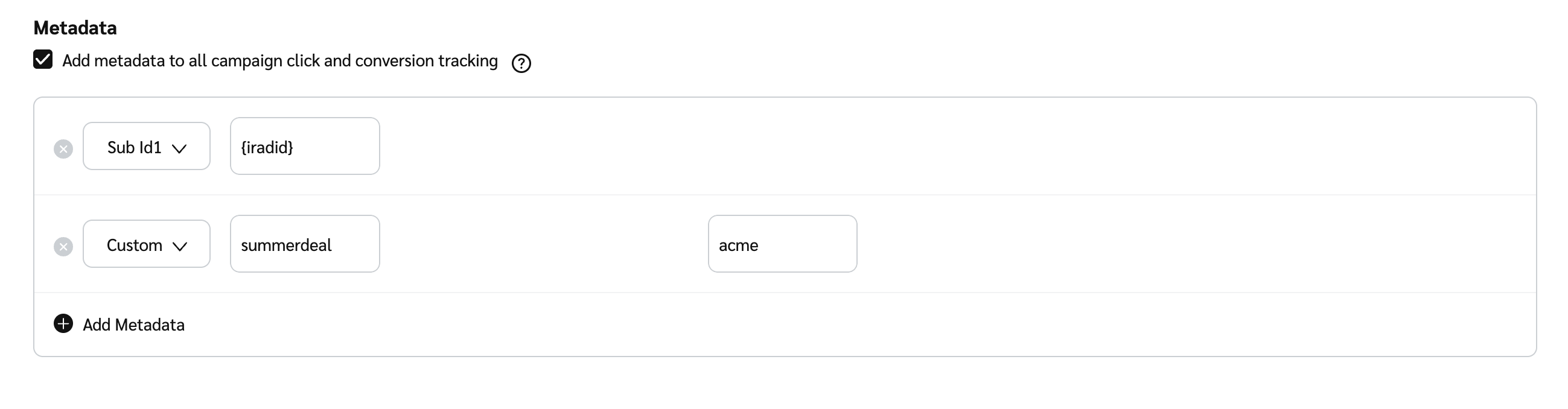
Optionally, select ![](https://4048883401-files.gitbook.io/~/files/v0/b/gitbook-x-prod.appspot.com/o/spaces%2FwMLlMoFBtKJa8ptd3zaw%2Fuploads%2Fgit-blob-d2954616dc486c3e12c9211e20ff376bda0ab1af%2F7586e04e82e7c7203e5c82320dd417f8ac564cae5035024fdf0eb2ed017e6376.svg?alt=media) **\[Checkbox]** **Add metadata to all campaign click and conversion tracking** to add additional metadata parameters and follow these steps:

* Select ![](https://4048883401-files.gitbook.io/~/files/v0/b/gitbook-x-prod.appspot.com/o/spaces%2FwMLlMoFBtKJa8ptd3zaw%2Fuploads%2Fgit-blob-d2954616dc486c3e12c9211e20ff376bda0ab1af%2F7586e04e82e7c7203e5c82320dd417f8ac564cae5035024fdf0eb2ed017e6376.svg?alt=media) **\[Checkbox]**, then select ![](https://4048883401-files.gitbook.io/~/files/v0/b/gitbook-x-prod.appspot.com/o/spaces%2FwMLlMoFBtKJa8ptd3zaw%2Fuploads%2Fgit-blob-6282f271b7521383385339243690b303086736d9%2F3b5a585dd2895bdf1c30d1236c72ba590dddd18717863b27074c8d313d05ae20.svg?alt=media) **\[Add] Add Metadata**.
* From the ![](https://4048883401-files.gitbook.io/~/files/v0/b/gitbook-x-prod.appspot.com/o/spaces%2FwMLlMoFBtKJa8ptd3zaw%2Fuploads%2Fgit-blob-c2cb550b55c51ea1eeff0acbd6f437a03b621a2c%2F60d033ae8a04c14498d5229c3c0160ac05feea7f605dbd770741793c900469f0.svg?alt=media) **\[Drop-down menu]**, select the query parameter you want to pass and enter the value

  * You can add more parameters by selecting ![](https://4048883401-files.gitbook.io/~/files/v0/b/gitbook-x-prod.appspot.com/o/spaces%2FwMLlMoFBtKJa8ptd3zaw%2Fuploads%2Fgit-blob-6282f271b7521383385339243690b303086736d9%2F3b5a585dd2895bdf1c30d1236c72ba590dddd18717863b27074c8d313d05ae20.svg?alt=media) **\[Add] Add Metadata.**
  * Metadata added to your campaign tracking link will be appended to the end of the link but won't be visible to creators when they generate vanity links.
  * If you select the *Custom* parameter you can set both the parameter name and value.

  <div data-gb-custom-block data-tag="hint" data-style="success" class="hint hint-success"><p><strong>Note:</strong> You can use the <a href="../../platform-features/ads/create-ads/create-an-article-asset">dynamic tokens</a> <code>{iradid}</code> and <code>{irpid}</code> as values for any of the metadata query parameters available, include <em>Custom</em>.</p></div>

<figure><img src="https://4048883401-files.gitbook.io/~/files/v0/b/gitbook-x-prod.appspot.com/o/spaces%2FwMLlMoFBtKJa8ptd3zaw%2Fuploads%2Fgit-blob-46368fdf2ac5b70e93359d2f15d1f8b9daac4e82%2F5cafb5ad92694cee1045a3cc2951c1116ecc540d1f1518b0507601bb376c1e8a.png?alt=media" alt=""><figcaption></figcaption></figure>

</details>

<details>

<summary>Review</summary>

Review the campaign details specified in the previous sections to see if you're happy with the outcome.

</details>

#### Save a campaign

1. Once you're done setting up the campaign, you can **Publish** or **Save as draft**.
   * **Publish:** The campaign is live, and creators can apply immediately.
   * **Save as draft:** The campaign is not live; you can edit and publish the campaign at a later stage.
2. Now you're ready to [invite new partners](https://help.impact.com/brand/what-would-you-like-to-learn-about/creator-program/recruit-creators/invite-creators-to-your-campaign) and [oversee your campaign applicants](https://help.impact.com/brand/what-would-you-like-to-learn-about/creator-program/recruit-creators/manage-creator-campaign-applicants).