> For the complete documentation index, see [llms.txt](https://help.impact.com/llms.txt). Markdown versions of documentation pages are available by appending `.md` to page URLs; this page is available as [Markdown](https://help.impact.com/partner/zh/nin-xiang-liao-jie-shen-me/platform-features/working-with-brands/contracts/get-a-sku-list-for-boosted-payouts.md).
# 获取提升佣金的 SKU 列表
如果你合作的品牌创建了一个包含 [提高的收益](/partner/zh/nin-xiang-liao-jie-shen-me/platform-features/working-with-brands/contracts/boosted-product-payouts-explained.md) 针对特定产品 SKU 的 Product Boost 活动,你可以按照以下步骤列出这些商品,并确定在推广中应优先推广哪些产品。
#### 步骤 1:检索合同的活动条款
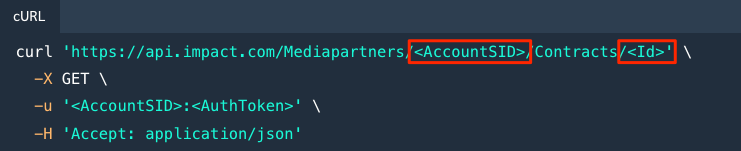
使用 [contracts API](https://integrations.impact.com/partner-api-reference/reference/contracts) 以检索你与创建该 Product Boost 活动的品牌签订的合同。
* 请按照以下示例请求中的内容执行: [检索合同](https://integrations.impact.com/partner-api-reference/reference/contracts/contracts) 参考。
* 请确保包含正确的凭证和相关合同 `Id`.
#### 步骤 2:查找 SKU 例外列表
在你的 API 响应中检查 SKU 例外列表。
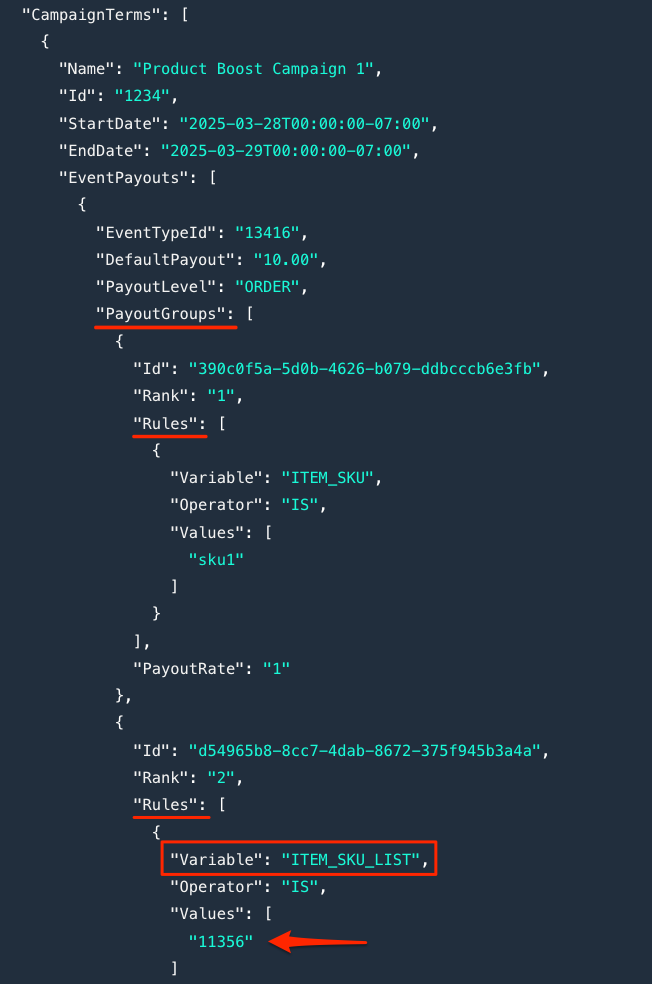
1. 在你的 API 响应中,导航到 `CampaignTerms` 属性以查看其 `PayoutGroups`.
2. 识别任何收益组 `规则` 与 `变量` 值 `“ITEM_SKU_LIST”`.
3. 请记下该 SKU 列表的标识符,因为你将在下一步中使用它。
* 例如,如果 `ITEM_SKU_LIST` `是` `11356` → “**11356**” 是该标识符。
#### 步骤 3:列出例外列表中的商品
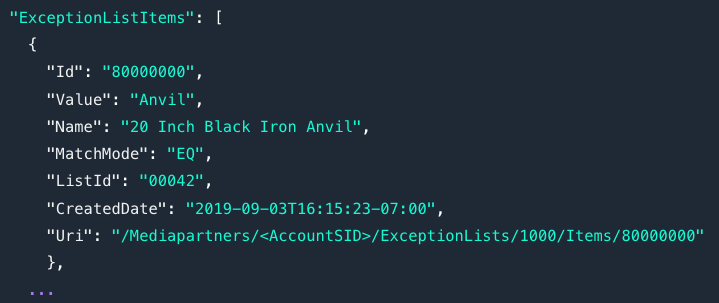
使用 [例外列表 API](https://integrations.impact.com/partner-api-reference/reference/exception-lists) 以列出具有提高收益的特定商品。
1. 请按照以下示例请求中的内容执行: [列出某个例外列表的所有商品](https://integrations.impact.com/partner-api-reference/reference/exception-lists/exception-lists) 参考。
* 请确保输入正确的凭证和相关的 `ExceptionListId` (使用前面 SKU 列表的标识符)。
2. 你的 API 响应将返回 SKU 例外列表中的每个商品以及以下详细信息:
{% hint style="info" %}
**提示:** 可以考虑让你的技术团队自动化此流程,例如,设置逻辑以自动识别何时 Product Boost 活动条款包含 `ITEM_SKU_LIST`.
{% endhint %}
---
# Agent Instructions
This documentation is published with GitBook. GitBook is the documentation platform designed so that both humans and AI agents can read, navigate, and reason over technical content effectively. Learn more at gitbook.com.
## Querying This Documentation
If you need additional information that is not directly available in this page, you can query the documentation dynamically by asking a question.
Perform an HTTP GET request on the current page URL with the `ask` query parameter, and the optional `goal` query parameter:
```
GET https://help.impact.com/partner/zh/nin-xiang-liao-jie-shen-me/platform-features/working-with-brands/contracts/get-a-sku-list-for-boosted-payouts.md?ask=&goal=
```
`ask` is the immediate question: it should be specific, self-contained, and written in natural language.
`goal` is optional and describes the broader end goal you are ultimately trying to accomplish on behalf of the user. GitBook uses it to tailor the answer towards what is most useful for that goal.
The response will contain a direct answer to the question and relevant excerpts and sources from the documentation.
Use this mechanism when the answer is not explicitly present in the current page, you need clarification or additional context, or you want to retrieve related documentation sections.