# 查找品牌联系信息

与你的品牌建立直接沟通渠道，是建立稳固合作关系的好方法。无论你是想向已合作的品牌提案一个活动创意，还是对你想申请合作的品牌有疑问，impact.com 都能让你轻松开启对话。&#x20;

#### 联系你正在合作的品牌

要快速列出所有合作品牌的联系信息，请按以下步骤操作：&#x20;

1. 从顶部导航栏中选择 **报告** → **更多报告**.
2. 从 *类别* 筛选器（位于搜索栏旁边）中，选择 **广告主**.
3. 打开 [**广告主联系列表**](https://app.impact.com/secure/mediapartner/report/viewReport.report?handle=mp_adv_contacts) 报告。
   * 使用报告筛选器和列选择器来向报告中添加或移除字段。更多详情请参阅下方参考。
   * 设置好所需的筛选器和列后，你还可以 ![](https://1152657667-files.gitbook.io/~/files/v0/b/gitbook-x-prod.appspot.com/o/spaces%2Fb2rE79d9UhOKZQLgzSqx%2Fuploads%2Fl76Cm4Sm6K1YmsvVmWh4%2FSchedule.svg?alt=media\&token=83896db1-b6fb-48a6-9df2-c0316f232c10) **\[安排]**, ![](https://1152657667-files.gitbook.io/~/files/v0/b/gitbook-x-prod.appspot.com/o/spaces%2Fb2rE79d9UhOKZQLgzSqx%2Fuploads%2FBpPZfX04wzybg8RdvlJ9%2FDownload.svg?alt=media\&token=f12ad686-782d-4860-8b1a-b0fe189b1c77) **\[下载]**，或 ![](https://1152657667-files.gitbook.io/~/files/v0/b/gitbook-x-prod.appspot.com/o/spaces%2Fb2rE79d9UhOKZQLgzSqx%2Fuploads%2FyxY2hdErjaHBF1VAheTI%2FExport.svg?alt=media\&token=d11da699-ae22-4b4e-a3d0-c0f69c244e83) **\[导出]** 该报告 via API。

<div data-with-frame="true"><figure><img src="https://1152657667-files.gitbook.io/~/files/v0/b/gitbook-x-prod.appspot.com/o/spaces%2Fb2rE79d9UhOKZQLgzSqx%2Fuploads%2Fpg5V39jkaf2QMA7bXTjm%2FScreenshot%202026-02-25%20at%2015.36.13.png?alt=media&#x26;token=b22d29f4-02c1-49fb-902b-b3135f98c889" alt=""><figcaption></figcaption></figure></div>

<details>

<summary>筛选器参考</summary>

| 筛选器 | 说明                                                                 |
| --- | ------------------------------------------------------------------ |
| 品牌  | 通过在菜单中选择项目名称来筛选特定品牌。                                               |
| 显示  | 选择 **显示** → **联系详情** 和 **应用** 更改，以确保表格中所有包含联系信息的列都可见。部分较敏感的列默认会隐藏。 |

</details>

<details>

<summary>表格参考</summary>

| 列      | 说明                             |
| ------ | ------------------------------ |
| 活动 ID  | 你所加入的特定品牌项目的唯一识别编号。            |
| 品牌     | 你所加入的品牌项目名称。                   |
| 品牌 ID  | 分配给该品牌在 impact.com 上账户的唯一识别编号。 |
| 广告主    | 你所合作品牌的公开名称。                   |
| 公司电话 # | 品牌列出的主要商务电话号码。                 |
| 地址     | 品牌的实际办公地址或总部地址。                |
| 城市     | 品牌业务所在地的城市。                    |
| 州/省    | 品牌业务所在地的州或省。                   |
| 国家     | 品牌主要注册所在的国家或地区。                |
| 邮政编码   | 品牌商务地址的邮政编码。                   |
| 增值税登记号 | 品牌的增值税登记号码（适用于国际税务和开票）。        |
| 联系人姓名  | 在联系该品牌时，指定为你的主要联系人的姓名。         |
| 电子邮件   | 品牌用于沟通和合作咨询的主要电子邮件地址。          |
| 工作电话   | 你的主要联系人的工作电话号码。                |
| 手机     | 你的主要联系人的手机号码。                  |

</details>

{% hint style="info" %}
你知道吗？你还可以在不离开平台的情况下与合作品牌聊天。请参阅 [向你的品牌发送消息](https://help.impact.com/partner/zh/nin-xiang-liao-jie-shen-me/platform-features/working-with-brands/contacting-a-brand/message-your-brands) 了解更多信息。
{% endhint %}

#### 联系市场中的品牌

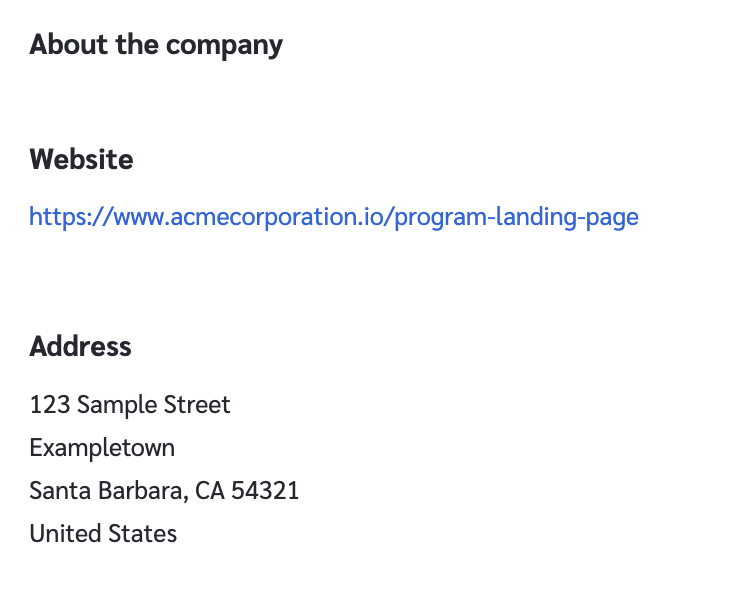
如果你想查找一个你尚未合作的特定品牌的联系信息，可以查看其市场资料：

1. 从顶部导航栏中选择 **发现** → [**我的品牌**](https://app.impact.com/secure/mediapartner/marketplace/new-campaign-marketplace-flow.ihtml?state=joined#joinState=joined).
2. 选择你想联系的品牌。
3. 在弹出侧栏的右上角，选择 **详情**.
4. 在 *关于公司* 部分，你会找到品牌添加到其资料中的任何联系信息。

<div data-with-frame="true"><figure><img src="https://1152657667-files.gitbook.io/~/files/v0/b/gitbook-x-prod.appspot.com/o/spaces%2Fb2rE79d9UhOKZQLgzSqx%2Fuploads%2FvdmhKb8N8zuxuGDnVJa1%2FScreenshot%202026-02-25%20at%2015.36.32.png?alt=media&#x26;token=bdfc6683-831e-478a-87b0-9ff78d8e7dea" alt="" width="375"><figcaption></figcaption></figure></div>


---

# Agent Instructions: Querying This Documentation

If you need additional information that is not directly available in this page, you can query the documentation dynamically by asking a question.

Perform an HTTP GET request on the current page URL with the `ask` query parameter:

```
GET https://help.impact.com/partner/zh/nin-xiang-liao-jie-shen-me/platform-features/working-with-brands/contacting-a-brand/access-brand-contact-information.md?ask=<question>
```

The question should be specific, self-contained, and written in natural language.
The response will contain a direct answer to the question and relevant excerpts and sources from the documentation.

Use this mechanism when the answer is not explicitly present in the current page, you need clarification or additional context, or you want to retrieve related documentation sections.