> For the complete documentation index, see [llms.txt](https://help.impact.com/llms.txt). Markdown versions of documentation pages are available by appending `.md` to page URLs; this page is available as [Markdown](https://help.impact.com/partner/zh/nin-xiang-liao-jie-shen-me/impactcom-mobile-app/working-with-brands-on-the-mobile-app/message-your-brands-on-the-mobile-app.md).
# 在移动应用中向您的品牌发送消息
使用 *消息* 可让您快速、轻松地与您潜在的品牌以及已合作的品牌进行沟通的功能。此功能用途广泛,例如简化您与品牌的入驻流程、就特殊安排联系品牌、解决问题等。
{% hint style="warning" %}
**重要:** 请参阅 impact.com 的 [消息使用条款](https://impact.com/terms-of-use-messaging/?_gl=1*j1tga9*_ga*MTI3MTM3MzE1Ni4xNjUyNjkzMjk1*_ga_MDF55NMH0F*MTY2MjAyMTAzMC4zODAuMS4xNjYyMDIxMjk1LjAuMC4w*_ga_MHKLSZ6DR4*MTY2MjAyMTAzMC4zNzcuMS4xNjYyMDIxMjk1LjAuMC4w) 以确保您始终遵守消息指南。
{% endhint %}
#### 查找消息
您可以在两个位置找到消息:
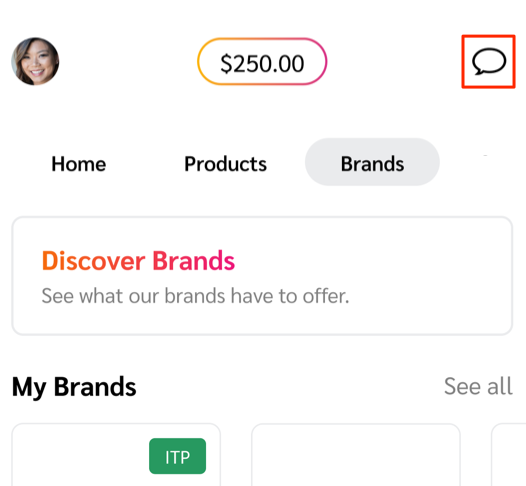
* 您可以在您的 *收件箱* 页面中,通过选择  **\[聊天]** 右上角的组件:
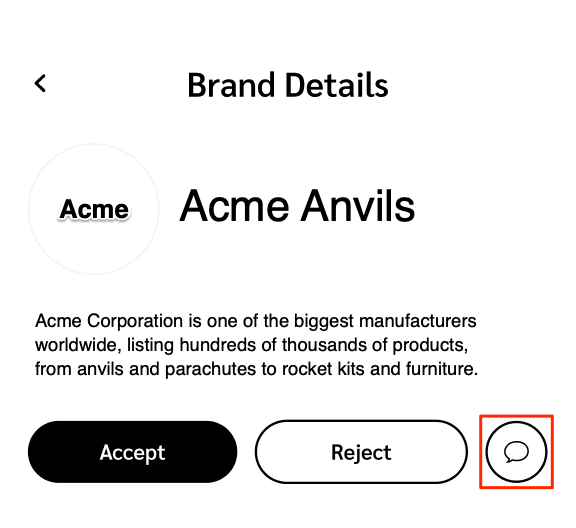
* 或者,您也可以在某个品牌的 *品牌详情*:
#### 创建新消息
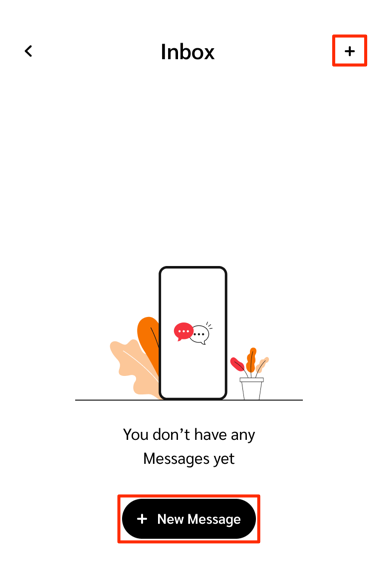
您可以从 *收件箱* 页面,或某个品牌的 *品牌详情*:
{% hint style="info" %}
**注意:** 只有当品牌已允许您这样做时,您才能主动发起对话。
{% endhint %}
* 在 *收件箱* 在……页面右上角,选择  **\[添加]** 或  **新消息**.
* 在 *新消息* 页面,使用  **\[搜索]** 来查找您想开始聊天的品牌。
* 要附加文件,请选择  **\[附加]**。请参见 *支持的附件* 下方参考,了解接受哪些文件类型。
* 在 *品牌详情* 在……页面中,在说明下方,选择  **\[聊天]**.
* 要附加文件,请选择  **\[附加]**。请参见 *支持的附件* 下方参考,了解接受哪些文件类型。
#### 支持的附件
您可以将以下文件类型附加到消息线程中:
* CSV
* PDF
* JPEG
* PNG
* GIF
---
# Agent Instructions
This documentation is published with GitBook. GitBook is the documentation platform designed so that both humans and AI agents can read, navigate, and reason over technical content effectively. Learn more at gitbook.com.
## Querying This Documentation
If you need additional information that is not directly available in this page, you can query the documentation dynamically by asking a question.
Perform an HTTP GET request on the current page URL with the `ask` query parameter, and the optional `goal` query parameter:
```
GET https://help.impact.com/partner/zh/nin-xiang-liao-jie-shen-me/impactcom-mobile-app/working-with-brands-on-the-mobile-app/message-your-brands-on-the-mobile-app.md?ask=&goal=
```
`ask` is the immediate question: it should be specific, self-contained, and written in natural language.
`goal` is optional and describes the broader end goal you are ultimately trying to accomplish on behalf of the user. GitBook uses it to tailor the answer towards what is most useful for that goal.
The response will contain a direct answer to the question and relevant excerpts and sources from the documentation.
Use this mechanism when the answer is not explicitly present in the current page, you need clarification or additional context, or you want to retrieve related documentation sections.