> For the complete documentation index, see [llms.txt](https://help.impact.com/llms.txt). Markdown versions of documentation pages are available by appending `.md` to page URLs; this page is available as [Markdown](https://help.impact.com/partner/zh/ni-xiang-liao-jie-shen-me/platform-features/working-with-brands/contacting-a-brand/access-brand-contact-information.md).

# 查找品牌方的联系信息

创建与您的品牌直接沟通的渠道，是建立牢固合作关系的绝佳方式。无论您是想向已合作的品牌推介一个活动创意，还是想向您希望申请合作的品牌提出问题，impact.com 都能让您轻松开启对话。

#### 联系您正在合作的品牌

要快速列出您所有合作品牌的联系信息，请执行以下操作：

1. 在顶部导航栏中，选择 **报告** → **更多报告**.
2. 从 *类别* 在搜索栏旁边的筛选器中，选择 **广告主**.
3. 打开 [**广告主联系人列表**](https://app.impact.com/secure/mediapartner/report/viewReport.report?handle=mp_adv_contacts) 报告。
   * 使用报告筛选器和列选择器，可在报告中添加或移除字段。更多详情请参见下方参考内容。
   * 设置好所需的筛选器和列后，您还可以 ![](/files/7300b577d66b344ab391cdeb63f5c2b853f6a8a7) **\[计划]**, ![](/files/d7a4af02dc036c19ba620799bcac509e1f43ddf7) **\[下载]**，或 ![](/files/b08cdaccbe89d4576f59787595e798d9fc5a6bb7) **\[导出]** 通过 API 获取报告。

<div data-with-frame="true"><figure><img src="/files/31787947e5b6ee452d75ec1949a444ac9170dd99" alt=""><figcaption></figcaption></figure></div>

<details>

<summary>筛选参考</summary>

| 筛选 | 说明                                                                      |
| -- | ----------------------------------------------------------------------- |
| 品牌 | 通过从菜单中选择项目名称来筛选特定品牌。                                                    |
| 显示 | 选择 **显示** → **联系详情** 和 **应用** 进行更改，以确保表格中所有包含联系信息的列都可见。部分较敏感的列默认处于隐藏状态。 |

</details>

<details>

<summary>表格参考</summary>

| 列          | 说明                             |
| ---------- | ------------------------------ |
| 活动 ID      | 您所加入的特定品牌项目的唯一识别编号。            |
| 品牌         | 您所加入的品牌项目名称。                   |
| 品牌 ID      | 分配给该品牌在 impact.com 上账户的唯一识别编号。 |
| 广告主        | 您所合作品牌对外展示的名称。                 |
| 公司电话       | 品牌列出的主要商务电话号码。                 |
| 地址         | 品牌的实际办公地址或总部地址。                |
| 城市         | 品牌业务所在地城市。                     |
| 州/省        | 品牌业务所在地的州或省。                   |
| 国家/地区      | 品牌主要注册所在的国家或地区。                |
| 邮政编码       | 品牌办公地址的邮编或邮政编码。                |
| VAT Reg No | 品牌的增值税注册号（适用于国际税务和开票）。         |
| 联系人姓名      | 当您联系品牌时，被指定为您的主要联系人之人的姓名。      |
| 电子邮件       | 品牌用于沟通和合作咨询的主要电子邮件地址。          |
| 工作         | 您的主要联系人的工作电话。                  |
| 手机         | 您的主要联系人的手机号码。                  |

</details>

{% hint style="info" %}
你知道吗？您也可以在不离开平台的情况下与您合作的品牌聊天。请参见 [向您的品牌发送消息](/partner/zh/ni-xiang-liao-jie-shen-me/platform-features/working-with-brands/contacting-a-brand/message-your-brands.md) 以了解更多信息。
{% endhint %}

#### 联系市场中的某个品牌

要查找您未合作的某个品牌的联系信息，您可以查看其市场资料：

1. 在顶部导航栏中，选择 **发现** → [**我的品牌**](https://app.impact.com/secure/mediapartner/marketplace/new-campaign-marketplace-flow.ihtml?state=joined#joinState=joined).
2. 选择你想联系的品牌。
3. 在弹出侧栏的右上角，选择 **详情**.
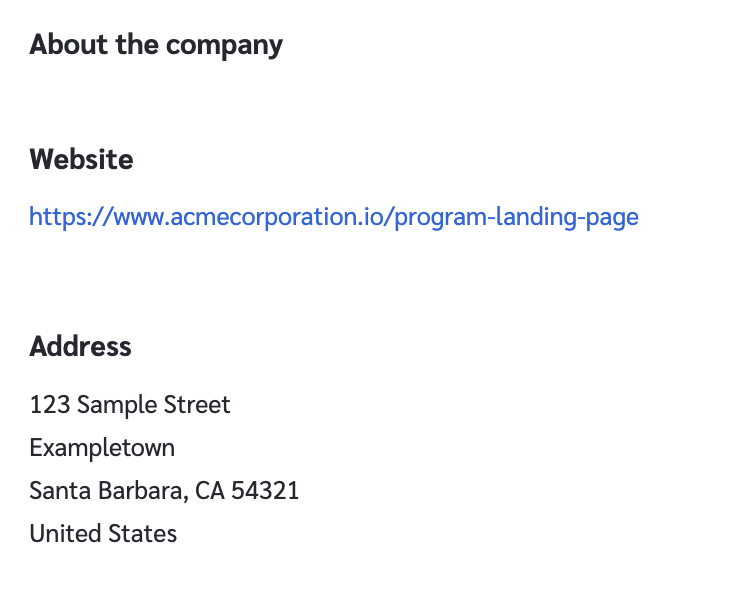
4. 在 *关于公司* 部分，您将找到品牌添加到其资料中的任何联系详情。

<div data-with-frame="true"><figure><img src="/files/dbec946c37108d5cca35eb7594b34759655ae31c" alt="" width="375"><figcaption></figcaption></figure></div>


---

# Agent Instructions
This documentation is published with GitBook. GitBook is the documentation platform designed so that both humans and AI agents can read, navigate, and reason over technical content effectively. Learn more at gitbook.com.

## Querying This Documentation
If you need additional information that is not directly available in this page, you can query the documentation dynamically by asking a question.

Perform an HTTP GET request on the current page URL with the `ask` query parameter, and the optional `goal` query parameter:

```
GET https://help.impact.com/partner/zh/ni-xiang-liao-jie-shen-me/platform-features/working-with-brands/contacting-a-brand/access-brand-contact-information.md?ask=<question>&goal=<endgoal>
```

`ask` is the immediate question: it should be specific, self-contained, and written in natural language.
`goal` is optional and describes the broader end goal you are ultimately trying to accomplish on behalf of the user. GitBook uses it to tailor the answer towards what is most useful for that goal.

The response will contain a direct answer to the question and relevant excerpts and sources from the documentation.

Use this mechanism when the answer is not explicitly present in the current page, you need clarification or additional context, or you want to retrieve related documentation sections.