> For the complete documentation index, see [llms.txt](https://help.impact.com/llms.txt). Markdown versions of documentation pages are available by appending `.md` to page URLs; this page is available as [Markdown](https://help.impact.com/partner/zh/ni-xiang-liao-jie-shen-me/platform-features/working-with-brands/applying-to-brands/profile-management/update-and-manage-your-public-profile.md).

# 更新和管理你的公开资料

你的 *公开资料* 是品牌与你建立联系的第一触点。它会向品牌介绍你是谁、你提供什么，以及你希望如何与他们合作。请花些时间润色它——一个引人注目且专业的个人资料对于吸引匹配度高的品牌至关重要！你也可以 [预览](/partner/zh/ni-xiang-liao-jie-shen-me/platform-features/working-with-brands/applying-to-brands/profile-management/preview-your-partner-profile.md) 你的个人资料，了解品牌如何看待它。

{% hint style="success" %}
**注意：** 你的公开个人资料与会员个人资料不同。要了解更多关于你的会员个人资料的信息，请访问 [管理您的合作伙伴用户资料](/partner/zh/ni-xiang-liao-jie-shen-me/platform-features/dashboard/manage-your-partner-user-profile.md).
{% endhint %}

#### 编辑公开个人资料详情

1. 在顶部导航栏中，选择 ![](/files/d599d976891a5c0517520cf3405bba1bb9d7163f) **\[用户资料] → 设置**.
2. 在 *资料* 部分中，选择 [**公开资料**](https://app.impact.com/secure/mediapartner/accountSettings/view-directorysettings-overview-flow.ihtml).
3. 编辑你的公开个人资料，然后选择 **保存**.
   * 请参阅 *公开个人资料组成部分* 下方部分了解每个设置的详细信息。
4. 确保你的媒体资产已 [已连接并验证](/partner/zh/ni-xiang-liao-jie-shen-me/account-management/account-settings/connect-media-properties/connect-and-manage-media-properties.md)——品牌也会将它们视为你公开个人资料的一部分。
   * 以下是你的个人资料在品牌眼中的显示示例：

<div data-with-frame="true"><figure><img src="/files/cbbf74427469c78c81bb46b3bffb09b4cc3f2d05" alt="" width="563"><figcaption></figcaption></figure></div>

#### 公开个人资料最佳实践

* 确保你的个人资料完整、准确、最新，并能清楚描述你是谁以及你的细分领域。详尽的描述和全面的关键词有助于品牌发现你。
* 确保你的 [身份](/partner/zh/ni-xiang-liao-jie-shen-me/account-management/account-settings/user-management/verify-your-identity-as-a-partner.md) 和 [媒体资源](/partner/zh/ni-xiang-liao-jie-shen-me/account-management/account-settings/connect-media-properties/connect-and-manage-media-properties.md) 已验证，以增强品牌信任。
* 通过订阅来自 impact.com 的商品邮件，及时了解最新动态，其中包含即将举行的网络研讨会、活动和行业报告更新。

<details>

<summary>订阅商品邮件</summary>

1. 在顶部导航栏中，选择 ![](/files/d599d976891a5c0517520cf3405bba1bb9d7163f) **\[用户资料] → 编辑资料**.
2. 在 *公开资料* 部分， ![](/files/5dbf21c4329d43c5852327d551195b0d5508a882) **\[开启] 邮件订阅** 以接收来自 impact.com 的有价值更新。

</details>

#### 公开个人资料组成部分

你的公开个人资料分为多个部分，你可以在其中介绍自己、提供媒体资料包，并帮助品牌更深入了解你。

<details>

<summary>资料</summary>

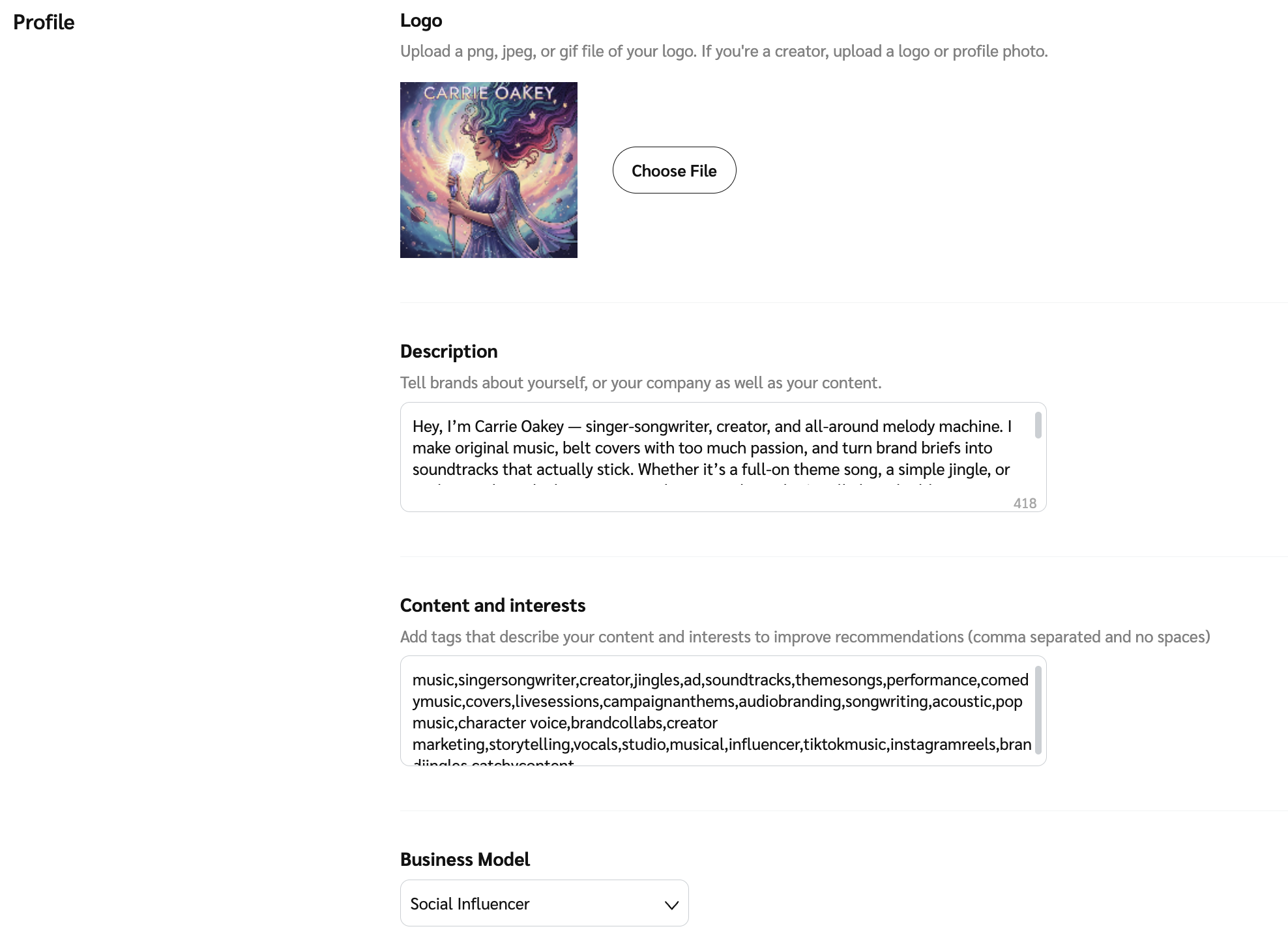
该 *资料* 该部分用于向品牌介绍你自己，并添加关键词以帮助他们找到你。请说明你希望合作的品牌类型，以及你偏好的合作方式。

<table data-header-hidden><thead><tr><th width="250.015625"></th><th></th></tr></thead><tbody><tr><td><strong>Logo</strong></td><td>选择一张专业图片或易识别的徽标，以显示在市场和你的公开个人资料中。推荐尺寸为 150 x 150 像素。</td></tr><tr><td><strong>说明</strong></td><td><p>你的个人资料中最关键的部分是 <strong>说明</strong>。你最多可使用 1,000 个字符，具体说明你做什么、你的专业领域、目标受众，以及品牌为什么应该与你合作。请务必分享你的独特价值主张——向品牌展示你为何与众不同！</p><p><strong>合作伙伴示例</strong></p><blockquote><p>Noah Lott Media 将品牌与顶尖内容创作者连接起来，以触达千禧一代和 Z 世代消费者。我们的数据驱动型网络专注于优质内容，并推动可衡量的成果。今天就与我们合作吧！</p></blockquote><p><strong>创作者示例</strong></p><blockquote><p>我为千禧一代和 Z 世代创作有吸引力的生活方式、科技、美妆和家居内容。通过真实测评、赞助帖文和社交活动，我与创新品牌合作，实现切实成果。让我们一起合作吧！</p></blockquote></td></tr><tr><td><strong>内容与兴趣</strong></td><td><p>为你的个人资料输入关键词。当品牌使用这些词搜索合作伙伴时，你的个人资料可能会显示。至少必须包含 1 个关键词。<br></p><p><strong>提示：</strong></p><ul><li>列表必须用逗号分隔，关键词之间不能有空格。</li><li>确保使用在你所在垂直领域中常见的关键词。</li><li>将任何额外的、非主要业务模式也作为关键词加入。</li></ul><pre><code>示例：lifestyleblogger,techreview,beautyblogger,homeessentials,millennialmarketing,genzshopping,shopthestyle,sustainablebrands,trendingtech,wellnessproducts
</code></pre></td></tr><tr><td><strong>商业模式</strong></td><td>从下拉列表中选择最符合你自身情况的商业模式。如果你属于多种商业模式，可在你的描述中加入其他模式，或作为关键词添加到你的 <strong>内容与兴趣</strong>.</td></tr></tbody></table>

<div data-with-frame="true"><figure><img src="/files/a857488bc4964e9c40e9d9f178846a5e243c6824" alt="" width="563"><figcaption></figcaption></figure></div>

</details>

<details>

<summary>个人信息</summary>

{% hint style="success" %}
**注意：** 此部分仅适用于创作者和社交影响者。
{% endhint %}

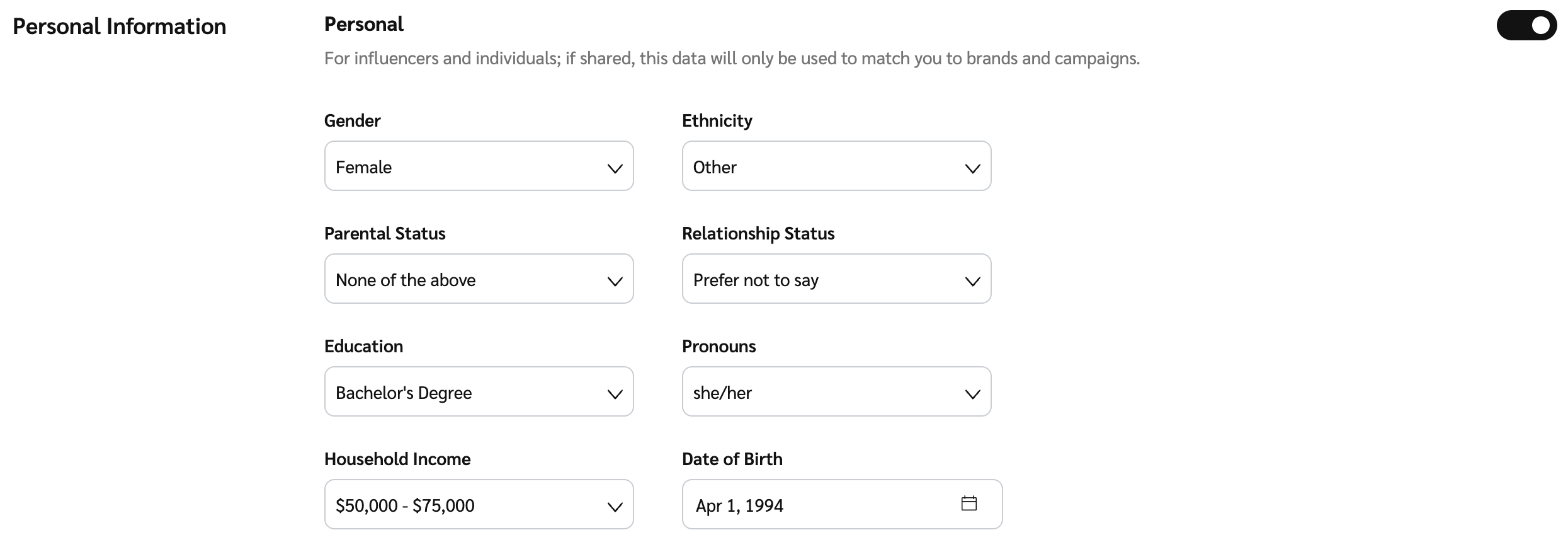
与 impact.com 分享你的个人信息，以便平台更好地推荐适合合作的品牌或项目。所有个人信息字段均为可选，且不会在你的个人资料中公开。

<div data-with-frame="true"><figure><img src="/files/1ce5ea9baa5c6e184fb1d9ca871a5cb91438255b" alt="" width="563"><figcaption></figcaption></figure></div>

</details>

<details>

<summary>配送信息</summary>

{% hint style="success" %}
**注意：** 此部分仅适用于创作者和社交影响者。
{% endhint %}

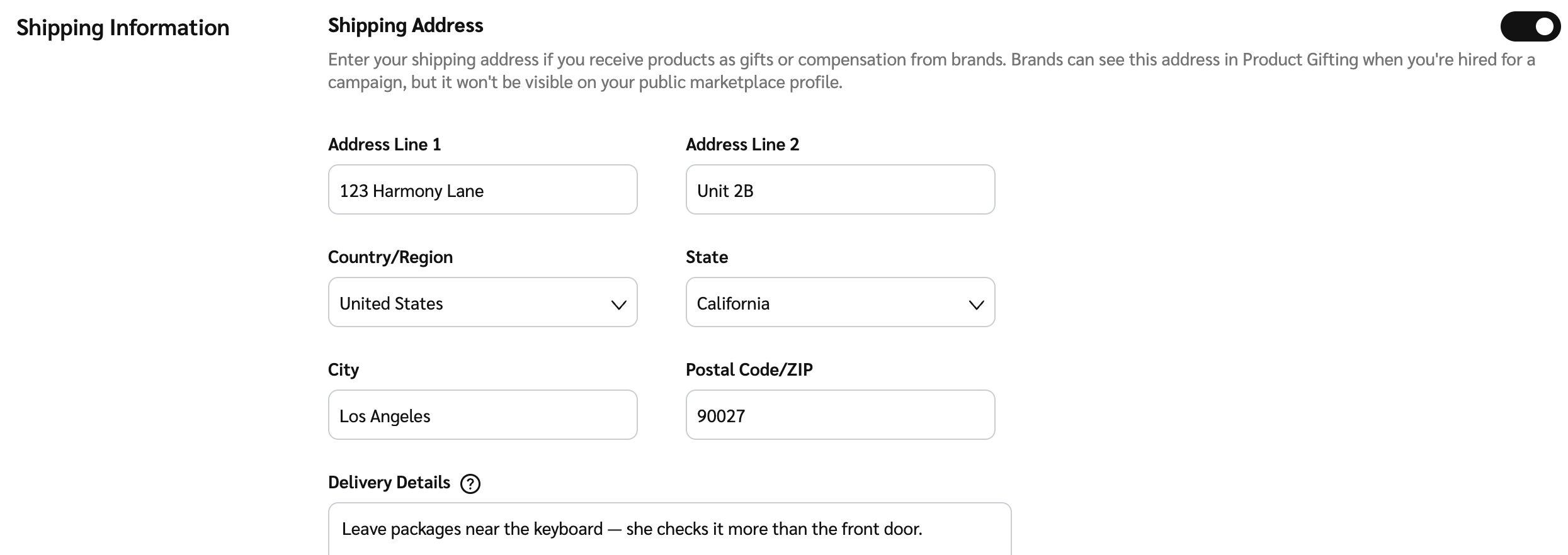
填写你的收货地址信息，品牌可在其项目中用此地址寄送产品或礼品。此信息不会添加到你的公开个人资料中。

<div data-with-frame="true"><figure><img src="/files/34086391baffb59d3740582016b542e757d6fc72" alt="" width="563"><figcaption></figcaption></figure></div>

</details>

<details>

<summary>附加信息</summary>

为品牌补充更多关于你自己的信息。如果你想添加你的网站、社交媒体主页和其他媒体资产，请参阅 [连接和管理媒体资产](/partner/zh/ni-xiang-liao-jie-shen-me/account-management/account-settings/connect-media-properties/connect-and-manage-media-properties.md).

{% hint style="success" %}
**注意：** 如果你的媒体资料包或作品集是数字版，建议你在此部分添加其链接。请确保你的媒体资料包或作品集会定期审核和更新。
{% endhint %}

<table data-header-hidden><thead><tr><th width="250.05078125"></th><th></th></tr></thead><tbody><tr><td><strong>链接</strong></td><td>选择 <img src="/files/5dbf21c4329d43c5852327d551195b0d5508a882" alt=""> <strong>[切换]</strong> 以在你的个人资料中添加你希望与潜在品牌分享的其他链接。</td></tr></tbody></table>

<div data-with-frame="true"><figure><img src="/files/7a4f8b66f114a7f21b028666bc2657a145923504" alt="" width="563"><figcaption></figcaption></figure></div>

</details>

<details>

<summary>联系人</summary>

为你的市场列表至少选择一个主要联系人。

<table data-header-hidden><thead><tr><th width="249.5859375"></th><th></th></tr></thead><tbody><tr><td><strong>市场联系人</strong></td><td><p>这将是会显示给与你合作的品牌以及在 Marketplace 中找到你的品牌的联系信息。</p><p>使用下拉菜单查看并选择 <img src="/files/961896379dec15908d56234d0fdc1ba0aa67e8a3" alt=""> <strong>[已勾选框]</strong> 在你希望在公开个人资料中显示为联系人的用户旁边。如有需要，你可以选择多个。选项来自 <a href="https://app.impact.com/secure/mediapartner/accountSettings/view-account-users-flow.ihtml"><em>账户用户</em></a> 页面上创建和管理。</p></td></tr></tbody></table>

<div data-with-frame="true"><figure><img src="/files/01e4c6b3577427e9ceb0a24418feba5bc505240a" alt="" width="563"><figcaption></figcaption></figure></div>

</details>

<details>

<summary>媒体资料包</summary>

如果你有媒体资料包，请将其上传到 impact.com，供品牌在你的公开个人资料中查看和下载。一份详细的媒体资料包，展示你的数据、报价和成功案例，将大大帮助品牌更有信心与你合作。

如果你的媒体资料包是数字版，你可以在 *其他链接* 部分。

<table data-header-hidden><thead><tr><th width="250.35546875"></th><th></th></tr></thead><tbody><tr><td><strong>媒体资料包 PDF</strong></td><td>选择 <strong>选择文件</strong> 查找并上传你的媒体资料包 PDF 文档。你可以上传多个文件。每个文件必须小于 200 MB。</td></tr></tbody></table>

<div data-with-frame="true"><figure><img src="/files/d68881fc7225274d6a3279303e3f10a96557c311" alt="" width="563"><figcaption></figcaption></figure></div>

</details>

{% hint style="success" %}
**注意：** 如果你想暂时向新品牌隐藏你的公开个人资料，你可以选择 ![](/files/961896379dec15908d56234d0fdc1ba0aa67e8a3) **\[复选框]** 下方 *暂停资料*。你已经合作过的任何品牌仍然可以查看你的个人资料。
{% endhint %}


---

# Agent Instructions
This documentation is published with GitBook. GitBook is the documentation platform designed so that both humans and AI agents can read, navigate, and reason over technical content effectively. Learn more at gitbook.com.

## Querying This Documentation
If you need additional information that is not directly available in this page, you can query the documentation dynamically by asking a question.

Perform an HTTP GET request on the current page URL with the `ask` query parameter, and the optional `goal` query parameter:

```
GET https://help.impact.com/partner/zh/ni-xiang-liao-jie-shen-me/platform-features/working-with-brands/applying-to-brands/profile-management/update-and-manage-your-public-profile.md?ask=<question>&goal=<endgoal>
```

`ask` is the immediate question: it should be specific, self-contained, and written in natural language.
`goal` is optional and describes the broader end goal you are ultimately trying to accomplish on behalf of the user. GitBook uses it to tailor the answer towards what is most useful for that goal.

The response will contain a direct answer to the question and relevant excerpts and sources from the documentation.

Use this mechanism when the answer is not explicitly present in the current page, you need clarification or additional context, or you want to retrieve related documentation sections.