> For the complete documentation index, see [llms.txt](https://help.impact.com/llms.txt). Markdown versions of documentation pages are available by appending `.md` to page URLs; this page is available as [Markdown](https://help.impact.com/partner/zh/ni-xiang-liao-jie-shen-me/platform-features/trackonomics/trackonomics-reports/overview-by-media-property-report.md).

# 按媒体属性概览报表

**升级**: 此功能可通过 Trackonomics Essentials 免费使用。要访问它，以及一整套可帮助您的项目增长的额外工具， [激活 Trackonomics Essentials](https://impact.com/trackonomics-essentials/) 立即。

使用此报告查看哪些平台表现最佳，以及您的收入和转化来自何处，从而可以在表现最好的渠道上投入更多。

1. 在顶部导航菜单中，选择 **Trackonomics**.
2. 从 ![](/files/ea861215fc8b001a1707acadbd9f6800d5d95c1e) **\[下拉菜单]**，选择 **按媒体属性概览**.

如果您的项目使用多种货币，您可以在右上角设置货币。您还可以选择 ![](/files/ebce0b87e5f8acea155a9bff008708c0afd194fd) **\[下载]** 以 PDF 或 CSV 格式下载您的报告，或者 ![](/files/96e2f628f8a57f07500c8f446f955663676d5373) **\[电子邮件]** 通过电子邮件发送报告。按日期范围筛选以查看特定时间段内的数据。

#### 报告数据分段

![](/files/a8768eacf4b6bb161a32c79ded33c8cf8baedd49) 此功能仅适用于 Trackonomics 附加组件。请联系 [支持](mailto:trackonomics.support@impact.com) 了解更多信息。

此报告中的数据分为以下部分：

{% tabs %}
{% tab title="交互式绩效图表" %}
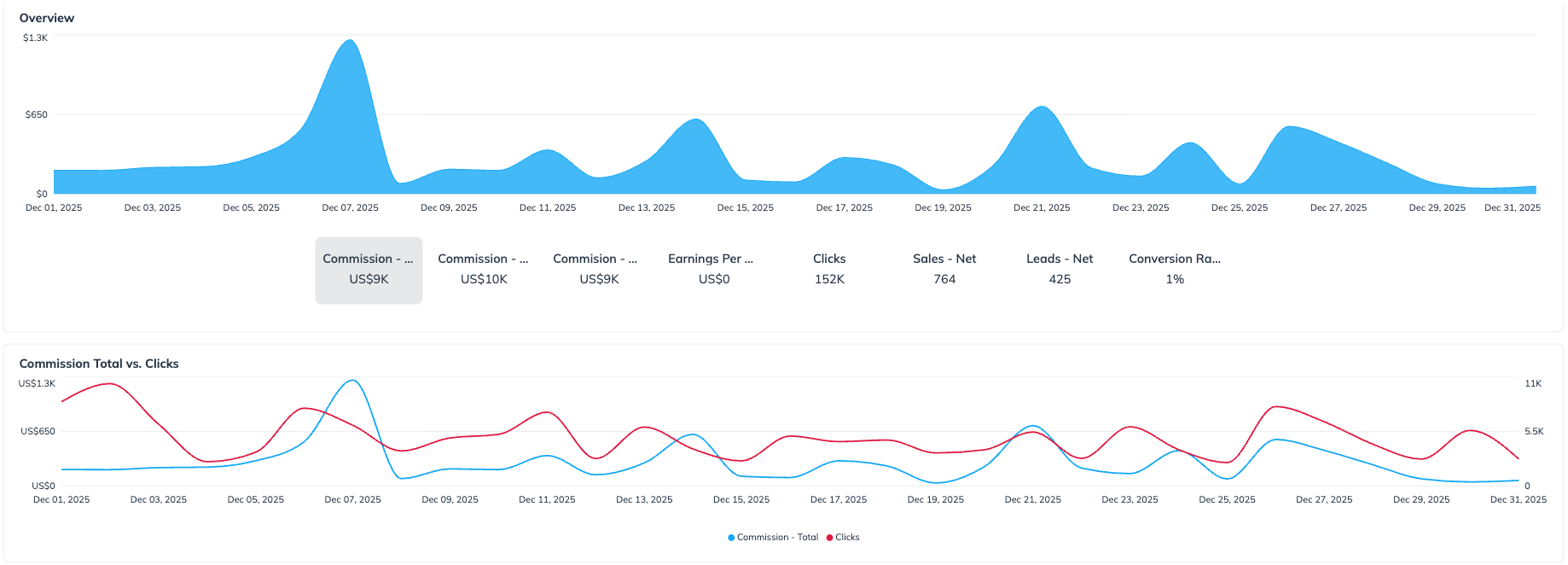
此部分包含两张不同的图表和一个交互式指标显示。

1. **主要趋势图：** 此面积图显示所选日期范围内单一指标的趋势。显示的指标由以下内容控制： *指标选择按钮* 位于图表下方。
2. **指标选择按钮：** 这些按钮（例如， *佣金 - 净额*, *点击*, *销售 - 净额*）可让您快速更改以下内容中显示的数据： *主要趋势图* 上方，便于立即概览该指标的表现。
3. **总佣金与点击图：** 这张辅助折线图用于对比分析两个关键绩效指标的趋势： *佣金 - 总额* 和 *点击*。此图表是静态的，不受以下内容影响： *指标选择按钮*.

<div data-with-frame="true"><figure><img src="/files/b6af9ff21840aa1f265adb9a2e79db835b82cf24" alt=""><figcaption></figcaption></figure></div>

要下载此图表数据，请选择 ![](/files/ebce0b87e5f8acea155a9bff008708c0afd194fd) **\[下载]** 右上角的。
{% endtab %}

{% tab title="数据表" %}
这组数据以表格形式呈现。它显示哪些社交渠道带来了最多的收入或转化。可通过选择以下内容下载此数据表： ![](/files/ebce0b87e5f8acea155a9bff008708c0afd194fd) **\[下载]** 右上角的。以下数据点包括：

<div data-with-frame="true"><figure><img src="/files/8cd136aaffbe54613875d203617ec0a6ac0b1957" alt=""><figcaption></figcaption></figure></div>
{% endtab %}
{% endtabs %}

<details>

<summary>数据点参考表</summary>

| 数据点         | 描述                                                                           |
| ----------- | ---------------------------------------------------------------------------- |
| 媒体属性        | 此列显示用于推广广告主品牌的具体平台、渠道或数字资产。它用于标明流量、点击和转化的来源。                                 |
| 佣金 - 总额     | 在任何扣除或验证之前，归属于您的所有操作（销售、潜在客户、安装等）的总佣金金额。该总额包括所有转化，不论其审批状态如何（例如，待处理、已批准、已撤销）。 |
| 佣金 - 毛额     | 所有有效操作（仅已批准的转化）的总佣金金额，在任何调整或合作伙伴费用等扣除之前。该金额反映了如果没有撤销或追回，您将获得的收入。             |
| 佣金 - 净额     | 在操作验证（例如已取消订单）、撤销（例如退货或欺诈）、调整以及合作伙伴或平台费用之后，您应得的最终佣金。该金额即实际支付给您的金额。           |
| 销售 - 净额     | 经验证的销售数量（例如产品购买），这些销售已获批准且未被取消或退款。使用此指标衡量绩效质量和转化情况。                          |
| 潜在客户 - 净额   | 在移除重复、垃圾信息或无效条目后生成的有效潜在客户数量（例如表单填写、试用注册）。此指标反映实际的合格潜在客户量。                    |
| 点击          | 通过您经由 impact.com 跟踪的联盟链接产生的点击次数（推荐访问）。点击可包括唯一点击和重复点击，有助于衡量流量规模和链接互动情况。       |
| 展示次数        | 总浏览次数，有助于衡量您针对特定广告主的推广活动覆盖面和可见度。                                             |
| 每次点击收益（EPC） | EPC 显示通过您的跟踪链接带来的每次点击可获得多少收益。随着时间推移进行衡量，这有助于比较不同活动或内容的表现。                    |
| 转化率（CR）     | 导致成功且有效转化（销售或潜在客户）的点击百分比。用于衡量流量转化为行动效果的关键指标。                                 |

</details>


---

# Agent Instructions
This documentation is published with GitBook. GitBook is the documentation platform designed so that both humans and AI agents can read, navigate, and reason over technical content effectively. Learn more at gitbook.com.

## Querying This Documentation
If you need additional information that is not directly available in this page, you can query the documentation dynamically by asking a question.

Perform an HTTP GET request on the current page URL with the `ask` query parameter, and the optional `goal` query parameter:

```
GET https://help.impact.com/partner/zh/ni-xiang-liao-jie-shen-me/platform-features/trackonomics/trackonomics-reports/overview-by-media-property-report.md?ask=<question>&goal=<endgoal>
```

`ask` is the immediate question: it should be specific, self-contained, and written in natural language.
`goal` is optional and describes the broader end goal you are ultimately trying to accomplish on behalf of the user. GitBook uses it to tailor the answer towards what is most useful for that goal.

The response will contain a direct answer to the question and relevant excerpts and sources from the documentation.

Use this mechanism when the answer is not explicitly present in the current page, you need clarification or additional context, or you want to retrieve related documentation sections.