> For the complete documentation index, see [llms.txt](https://help.impact.com/llms.txt). Markdown versions of documentation pages are available by appending `.md` to page URLs; this page is available as [Markdown](https://help.impact.com/partner/zh/ni-xiang-liao-jie-shen-me/platform-features/tracking/tracking-links/create-and-manage-links/add-reporting-information-to-your-tracking-links.md).

# 向你的跟踪链接添加报告信息

impact.com 允许你增强 [跟踪链接](/partner/zh/ni-xiang-liao-jie-shen-me/platform-features/tracking/tracking-links/create-and-manage-links/create-tracking-links.md) 你创建的链接，只需添加特殊参数即可推广你合作的品牌。这些查询字符串参数会添加到跟踪链接 URL 的末尾，以帮助整理信息，便于有效分析。这样一来，你就可以在报告中提取有价值的洞察，例如识别带来最多流量的推广渠道。请参阅 [按 Vanity Link 绩效](https://app.impact.com/secure/mediapartner/report/viewReport.report?handle=partner_perf_by_vlink) 报告，了解链接表现的详细洞察。

{% hint style="danger" %}
**警告：** impact.com 强烈建议你在 impact.com 平台上添加参数，而不是手动追加。手动更改跟踪链接容易出错，这可能会妨碍你有效利用报告信息。在从 impact.com 获取跟踪链接时，你可能会看到品牌已经添加到跟踪链接中的某些元标签。这些元标签 **绝不能删除** ，否则会导致跟踪不准确。
{% endhint %}

#### 通过仪表板小组件添加静态参数

如果你想为特定品牌项目生成的跟踪链接添加参数，可以使用此方法。通过这种方法，你可以使用 *创建链接* 仪表板小组件，快速将跟踪链接的 Sub ID 和 Shared ID 字段填充为不会变化的静态值。

{% tabs %}
{% tab title="仪表板小组件" %}

1. 按照步骤 [通过仪表板小组件为特定品牌项目创建跟踪链接](/partner/zh/ni-xiang-liao-jie-shen-me/platform-features/tracking/tracking-links/create-and-manage-links/create-tracking-links.md#create-a-tracking-link-for-a-specific-brand-program) 。
2. 在选择 *创建* 以创建跟踪链接之前，先选择 **高级**.
3. 添加可选 *子 ID*、一个 *共享 ID*，或一个 *推广属性* 到链接中。
   * *Sub ID*和 *Shared ID*可添加到跟踪链接中，使 impact.com 能够跟踪并报告你认为有用的信息。请参阅 *参数参考与示例* 以下以获取更多信息。
   * *推广属性* 可添加到跟踪链接中的包括网站、社交媒体应用或移动应用，这些已在你的 [Marketplace Profile](/partner/zh/ni-xiang-liao-jie-shen-me/platform-features/working-with-brands/applying-to-brands/profile-management/update-and-manage-your-public-profile.md).
4. 选择 **创建**.

   * 中启用并添加。

   <div data-with-frame="true"><figure><img src="/files/41c9ec7db08976893c5e116bd95727ce5c064109" alt="" width="375"><figcaption></figcaption></figure></div>

{% endtab %}

{% tab title="仪表板小组件 V2" %}

1. 按照步骤 [通过仪表板小组件为特定品牌项目创建跟踪链接](/partner/zh/ni-xiang-liao-jie-shen-me/platform-features/tracking/tracking-links/create-and-manage-links/create-tracking-links.md#create-a-tracking-link-for-a-specific-brand-program) 通过仪表板小组件 V2。
2. 在滑出面板中，你可以选择性地添加一个 *落地页* URL。
3. 选择 **高级** ![](/files/ea861215fc8b001a1707acadbd9f6800d5d95c1e) **\[下拉菜单]**.
4. 添加可选 *子 ID*、一个 *Shared ID*，或一个 *媒体属性*.
   * *子 ID* 和 *Shared IDs* 可添加到跟踪链接中，使 impact.com 能够跟踪并报告你认为有用的信息。请参阅 [*参数参考与示例*](#parameters-reference-and-examples) 以下以获取更多信息。
   * *媒体资料* 可添加到跟踪链接中的包括网站、社交媒体应用或移动应用，这些已在你的 [Marketplace Profile](/partner/zh/ni-xiang-liao-jie-shen-me/platform-features/working-with-brands/applying-to-brands/profile-management/update-and-manage-your-public-profile.md).

{% hint style="success" icon="memo-circle-info" %}
**Trackonomics Essentials 用户注意事项**：如果你已在账户中设置模板，也可以使用自定义 Sub ID 模板。请参阅 [Sub ID 模板说明](/partner/zh/ni-xiang-liao-jie-shen-me/platform-features/trackonomics/sub-id-templates-explained.md) 了解更多。
{% endhint %}

5. 选择 **更新并复制链接**.
   * 如果你已将链接偏好设置为默认生成短链接，则任何添加的参数都会附加到跟踪链接末尾，但不会显示在可分享链接字段中。如果你已将链接偏好设置为生成常规链接，则你会看到这些参数。
     {% endtab %}
     {% endtabs %}

#### 通过网页扩展添加静态参数

如果你想为特定品牌项目的跟踪链接添加参数，请使用此方法。通过这种方法，你可以将跟踪链接的 Sub ID 和 Shared ID 字段填充为不会变化的静态值。

1. 按照步骤 [通过仪表板小组件为特定品牌项目创建跟踪链接](/partner/zh/ni-xiang-liao-jie-shen-me/platform-features/tracking/tracking-links/create-and-manage-links/create-tracking-links.md) 通过网页扩展。
2. 在复制跟踪链接之前，选择 **显示高级设置**.
3. 添加可选 *子 ID* 或一个 *共享 ID* 到链接中。
   * *Sub ID*和 *Shared ID*可附加到跟踪链接中，使 impact.com 能够跟踪并报告你认为有用的信息。请参阅 *参数参考与示例* 以下以获取更多信息。
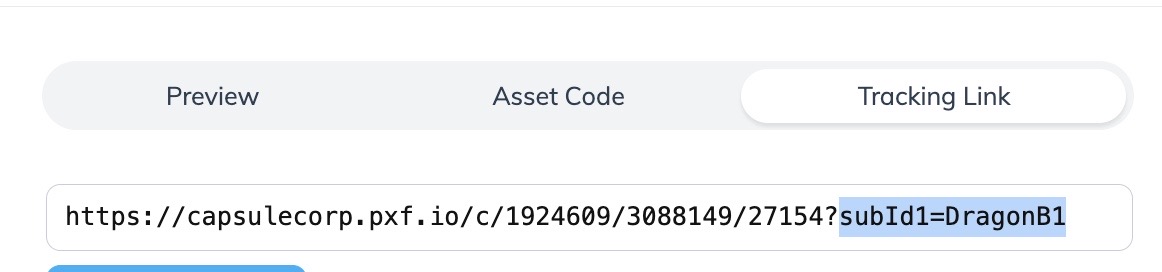
   * 你添加的参数会附加到跟踪链接末尾。

     <div data-with-frame="true"><figure><img src="/files/2c7b7345fa87021b8b26df58bc8345b5980ff0d7" alt="" width="563"><figcaption></figcaption></figure></div>

#### 通过资源滑出面板添加静态和动态参数

如果你想为从特定品牌素材或交易中获取的跟踪链接添加参数，请使用此方法。通过这种方法，你可以将跟踪链接的 Sub ID 和 Shared ID 字段填充为不会变化的静态值，或动态填充的值（例如， `{{MemberID}}`).

1. 按照步骤 [获取特定广告的跟踪链接](/partner/zh/ni-xiang-liao-jie-shen-me/platform-features/tracking/tracking-links/create-and-manage-links/create-tracking-links.md) 或 [交易](/partner/zh/ni-xiang-liao-jie-shen-me/platform-features/marketing-content/deals/view-and-manage-deals-as-a-partner.md).
2. 在复制跟踪链接之前，选择 ![](/files/5dbf21c4329d43c5852327d551195b0d5508a882) **\[开启] 跟踪参数**.
3. 添加可选 *子 ID*、一个 *共享 ID*，或一个 *推广属性* 到链接中。
   * *Sub ID*和 *Shared ID*可添加到跟踪链接中，使 impact.com 能够跟踪并报告你认为有用的信息。请参阅 *参数参考与示例* 部分了解更多信息。
   * *推广属性* 可添加到跟踪链接中的包括网站、社交媒体应用或移动应用，这些已在你的 [Marketplace Profile](/partner/zh/ni-xiang-liao-jie-shen-me/platform-features/working-with-brands/applying-to-brands/profile-management/update-and-manage-your-public-profile.md).
4. 在 *Sub ID* 字段中添加可选动态参数。
   * 请参见 *动态参数示例* 下方参考了解更多信息。
5. 选择 **保存**.
   * 你添加的参数会附加到跟踪链接末尾。
6. 选择 **复制跟踪链接**.

<details>

<summary>动态参数示例</summary>

{% hint style="success" icon="memo-circle-info" %}
**注意：** 下面的示例仅用于说明。设置你自己的动态跟踪时，请使用适合你的跟踪设置的语法和参数值。
{% endhint %}

动态参数对于某些合作伙伴类型尤其有用，例如 Cashback 和 Loyalty 网站，因为它们可以帮助你确保成员因点击和操作而获得正确归因。

为跟踪链接添加动态参数的一种使用场景是跟踪你网站中的哪个成员点击了链接并购买了商品。要跟踪此动态值：

1. 添加文本 **{{MemberID}}** 到你的某个 *Sub ID* 字段中添加可选动态参数。
2. 选择 **保存**.

   * 这将生成如下所示的跟踪链接： `https://acmecorp.sjv.io/c/111111/222222/33344?subId1=%257B%257BMemberID%257D%257D`
   * 当你网站中的成员点击此链接时，你的网站会将 *Sub ID* 字段填充为该成员的实际 ID（例如“12345678”），并且此动态填充值会反映在 impact.com 报告中。

   <div data-gb-custom-block data-tag="hint" data-style="danger" class="hint hint-danger"><p><strong>警告：</strong> 你只能在广告卡上的链接中添加动态参数——其他链接创建方法不适用。确保你的系统已配置为接受动态变量。请与你的技术团队合作，或参阅你的网站提供商的文档，了解你的网站如何处理这类变量的更多信息。</p></div>

</details>

#### 参数参考与示例

<details>

<summary>SubId1、SubId2 和 SubId3</summary>

该 *SubId* 参数接受自定义值，该值仅出现在合作伙伴报告（Advanced Action Listing、按 Sub ID 绩效）中。 [进一步了解 Sub ID 值。](/partner/zh/ni-xiang-liao-jie-shen-me/platform-features/tracking/tracking-links/link-parameters/sub-id-and-shared-id-parameters-explained-for-partners.md)

{% hint style="info" %}
**示例：**

`https://le.pxf.io/c/1416144/674249/8882?subId1=blog`

`https://le.pxf.io/c/1416144/674249/8882?subId2=blogarticle123`

`https://le.pxf.io/c/1416144/674249/8882?subId3=instagrambio`
{% endhint %}

</details>

<details>

<summary>SharedId</summary>

该 *SharedId* 参数接受自定义值，该值会同时出现在合作伙伴报告（Advanced Action Listing、按 Sub ID 绩效）和品牌报告中。 [进一步了解 Shared ID 值。](/partner/zh/ni-xiang-liao-jie-shen-me/platform-features/tracking/tracking-links/link-parameters/sub-id-and-shared-id-parameters-explained-for-partners.md)

仅使用字母和数字。不要使用空格或特殊字符。将值保持在 255 个字符以内。

{% hint style="info" %}
**示例：**

`https://le.pxf.io/c/1416144/674249/8882?SharedId=partnerblog`
{% endhint %}

</details>

<details>

<summary>u</summary>

该 *u* 参数用于深度链接到特定 URL。与你合作的品牌还必须 [允许深度链接](/partner/zh/ni-xiang-liao-jie-shen-me/platform-features/tracking/tracking-links/create-and-manage-links/tracking-links-overview.md#before-you-begin-0-0)，并且深度链接的 URL 必须是品牌允许的域名和路径。

请注意，所用 URL 必须进行百分比编码（即使用有效的 [ASCII 字符](https://www.w3schools.com/charsets/ref_html_ascii.asp)) ![](/files/be3fd489c8b7e9b3cf48defe579bdef8fdfeb70d)）。如果你不熟悉手动对 URL 编码，我们建议使用上述方法之一添加此参数。

{% hint style="info" %}
**示例：**

`https://le.pxf.io/c/1416144/674249/8882?u=https%3A%2F%2Fexample.com%2Fstore%2Fproduct.html`
{% endhint %}

</details>

<details>

<summary>TrafCat</summary>

该 *流量类别* 参数是手动添加的自定义值，主要用于标记来自跟踪链接的流量类别。

通常，这个值由品牌指定给你使用，并根据链接放置的上下文来使用（例如，来自网页工具栏的流量使用“Toolbar”）。品牌可以根据他们向你提出的条款，基于此参数配置付款规则。

{% hint style="info" %}
**示例：**

`https://le.pxf.io/c/1416144/674249/8882?trafcat=toolbar`
{% endhint %}

</details>

<details>

<summary>TrafSrc</summary>

该 *流量来源* 参数是手动添加的自定义值，主要用于标识流量来自哪个来源。

通常，这个值由品牌指定给你使用，并用于确定流量来自哪里（例如，“Paid Search”）。品牌可以根据他们向你提出的条款，基于此参数配置付款规则。

{% hint style="info" %}
**示例：**

`https://le.pxf.io/c/1416144/674249/8882?trafsrc=paidsearch`
{% endhint %}

</details>

<details>

<summary>ProdSku</summary>

该 *产品 SKU* 参数是手动追加的自定义值，用于标识将流量发送到特定产品的跟踪链接中的品牌特定产品 SKU。 *产品目录* 跟踪链接会自动添加此值，但如果品牌要求，你也可以手动添加此值。

{% hint style="info" %}
**示例：**

`https://le.pxf.io/c/1416144/674249/8882?prodsku=KS944RUR`
{% endhint %}

</details>

<details>

<summary>Param1、Param2、Param3 和 Param4</summary>

该 *Param* 参数是手动添加的自定义值，几乎与 *SharedId* 参数完全相同。品牌可能会要求你在这些查询字符串中传递值，因为它们会出现在品牌的特定报告中，但不会出现在合作伙伴报告中。

{% hint style="info" %}
**示例：**

`https://le.pxf.io/c/1416144/674249/8882?param1=ZveVDzsLSNLf`

`https://le.pxf.io/c/1416144/674249/8882?param2=product100`

`https://le.pxf.io/c/1416144/674249/8882?param3=desktop`

`https://le.pxf.io/c/1416144/674249/8882?param4=somevalue`
{% endhint %}

</details>

<details>

<summary>PartnerCustId</summary>

该 *合作伙伴客户 ID* 参数表示跟踪链接中你系统内访客的客户 ID。此参数可以帮助 impact.com 跨设备跟踪用户，以实现更准确的归因。

{% hint style="info" %}
**示例：**

`https://le.pxf.io/c/1416144/674249/8882?partnercustid={partner_customer_id}`

其中 `{partner_customer_id}` 是你在网站上分配给客户的唯一值。
{% endhint %}

</details>

<details>

<summary>impacttest</summary>

你可以在测试时将 *impacttest* 参数附加到跟踪链接中（以将该点击标识为测试点击）。

{% hint style="info" %}
**示例：**

`https://le.pxf.io/c/1416144/674249/8882?impacttest=1`
{% endhint %}

</details>

{% hint style="success" icon="memo-circle-info" %}
**注意：** 当从 impact.com 获取跟踪链接时，你可能会看到品牌已经添加到跟踪链接中的某些元标签。这些元标签 **绝不能删除**——这样做会导致跟踪不准确。
{% endhint %}


---

# Agent Instructions
This documentation is published with GitBook. GitBook is the documentation platform designed so that both humans and AI agents can read, navigate, and reason over technical content effectively. Learn more at gitbook.com.

## Querying This Documentation
If you need additional information that is not directly available in this page, you can query the documentation dynamically by asking a question.

Perform an HTTP GET request on the current page URL with the `ask` query parameter, and the optional `goal` query parameter:

```
GET https://help.impact.com/partner/zh/ni-xiang-liao-jie-shen-me/platform-features/tracking/tracking-links/create-and-manage-links/add-reporting-information-to-your-tracking-links.md?ask=<question>&goal=<endgoal>
```

`ask` is the immediate question: it should be specific, self-contained, and written in natural language.
`goal` is optional and describes the broader end goal you are ultimately trying to accomplish on behalf of the user. GitBook uses it to tailor the answer towards what is most useful for that goal.

The response will contain a direct answer to the question and relevant excerpts and sources from the documentation.

Use this mechanism when the answer is not explicitly present in the current page, you need clarification or additional context, or you want to retrieve related documentation sections.