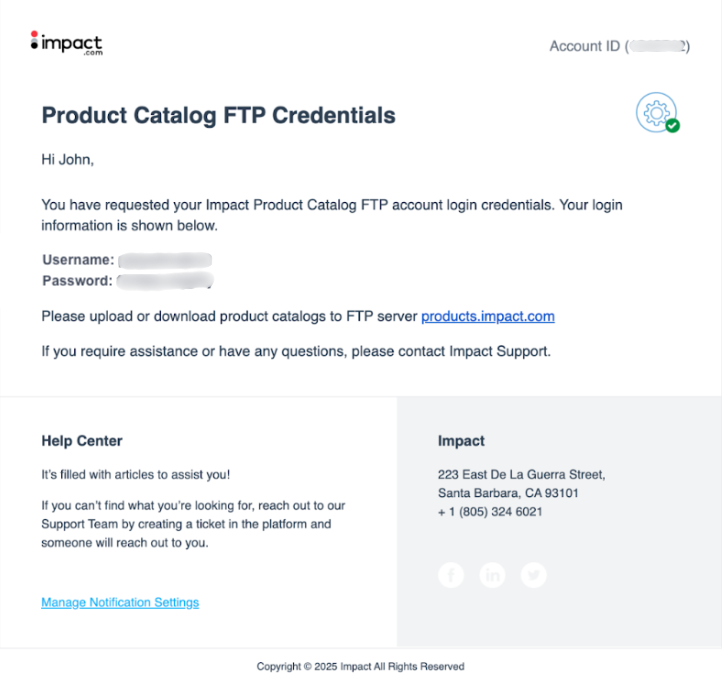
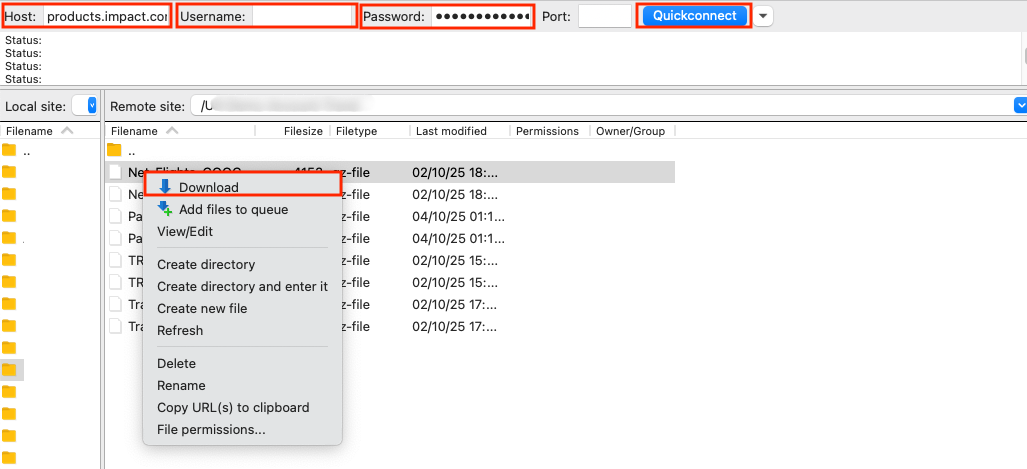
## 选项 3:通过 API 访问产品目录
通过 API 访问产品目录是一项高级功能,需要 [启用 API 访问](/partner/zh/ni-xiang-liao-jie-shen-me/account-management/account-settings/api-tokens/manage-api-access-tokens-as-a-partner.md)。请参阅我们的 [目录概览](https://integrations.impact.com/partner-api-reference/reference/catalogs) ,了解如何使用 API 获取产品目录的详细信息。
## 了解目录字段
下载目录后,您可能需要帮助理解每一列的含义。您看到的字段取决于您下载的格式:
* *广告主格式* 会按品牌上传时的原样返回目录,因此字段可能因品牌而异。
* *Impact 格式* 是 impact.com 的标准化版本,因此无论您下载哪个品牌的目录,字段都相同。下面的参考说明了解释了 Impact 格式文件中的每个字段。
目录字段参考
| 字段 | 描述 |
| -------------- | ---------------------------- |
| `唯一商家 SKU` | 商家在目录中为该商品指定的唯一标识符。 |
| `产品名称` | 产品名称。 |
| `产品 URL` | 您指向品牌网站上该产品页面的跟踪链接。 |
| `移动端 URL` | 您指向移动端优化产品页面的跟踪链接。 |
| `当前价格` | 客户当前支付的售价——商品促销时的折后价。 |
| `原价` | 任何折扣前的标准价格。等于 `当前价格` 商品未促销时。 |
| `单价` | 按计量单位计算的价格(例如每 100 毫升),如适用。 |
| `货币` | 该商品价格的 3 位 ISO 4217 货币代码。 |
| `产品出价` | 因推动该产品转化而支付给您的金额。 |
| `库存情况` | 该商品当前是否有库存。 |
| `库存说明` | 有关商品库存状态的自由文本详情。 |
| `预计发货日期` | 预计发货日期,尤其适用于该商品当前无库存时。 |
| `产品上市日期` | 产品已上架或将上架的日期。 |
| `EAN` | 该商品的欧洲商品编号条形码。 |
| `UPC` | 该商品的通用产品代码条形码。 |
| `ISBN` | 适用产品的图书标识符。 |
| `MPN` | 该商品的制造商零件编号。 |
| `产品描述` | 产品描述。 |
| `制造商` | 产品的品牌或制造商。 |
| `成色` | 商品状态,例如全新、二手或翻新。 |
| `产品要点 1–5` | 描述产品特点的简短陈述,每列一个。 |
| `产品类型` | 品牌对该商品的自定义产品类型分类。 |
| `类别` | 该商品的类别路径。 |
| `类别 ID` | 该商品类别的标识符。 |
| `标签` | 与该商品相关的搜索和分类术语。 |
| `畅销排名` | 该商品的受欢迎程度排名,如品牌提供。 |
| `陈列类型` | 该商品的陈列分类。 |
| `父级 SKU` | 父级商品的 SKU,如果该产品是另一个产品的变体。 |
| `父级名称` | 父级产品系列的名称。 |
| `相关产品` | 与该商品相关的产品引用。 |
| `组合包` | 指示该商品是否以组合包形式销售。 |
| `性别` | 该商品的目标性别,如适用。 |
| `颜色` | 该商品的主要颜色。 |
| `材质` | 该商品的材质构成。 |
| `尺寸` | 该商品的尺寸。 |
| `尺寸计量单位` | 用于 `尺寸` 该值的单位。 |
| `年龄范围` | 该商品的目标年龄范围。 |
| `手机套餐类型` | 电信产品的套餐类型。 |
| `手机服务提供商` | 电信产品的运营商。 |
| `软件平台` | 软件或游戏产品的平台。 |
| `手表显示类型` | 手表产品的显示类型。 |
| `格式` | 媒体或产品格式,如适用。 |
| `图片 URL` | 该商品主图的 URL。 |
| `备用图片 URL 1–5` | 其他产品图片的 URL,每列一个。 |
| `运费` | 运送该商品的费用。 |
| `运输重量` | 运输包裹的重量。 |
| `重量计量单位` | 用于重量值的单位。 |
| `产品重量` | 商品本身的重量。 |
| `配送地区` | 该商品配送到的地区。 |
| `邮政编码` | 与该商品配送相关的邮政编码。 |
| `优惠码` | 适用于该商品的优惠码(如有)。 |
| `优惠码说明` | 优惠信息的详情。 |
| `促销` | 与该商品相关的促销活动(如有)。 |
| `文本 1–3` | 品牌定义的自定义文本字段。 |
| `数字 1–3` | 品牌定义的自定义数值字段。 |
| `金额 1–3` | 品牌定义的自定义货币字段。 |
## 其他资源
* [在产品市场中查找产品](/partner/zh/ni-xiang-liao-jie-shen-me/platform-features/marketing-content/product-marketplace-and-catalogs/find-products-on-the-product-marketplace.md) — 了解如何查找并推广品牌目录中列出的产品。
* [从产品市场下载产品](/partner/zh/ni-xiang-liao-jie-shen-me/platform-features/marketing-content/product-marketplace-and-catalogs/download-products-from-the-product-marketplace.md) — 直接从产品市场下载所选产品的文件。
* [作为合作伙伴设置产品目录馈送偏好 ](/partner/zh/ni-xiang-liao-jie-shen-me/platform-features/marketing-content/product-marketplace-and-catalogs/set-product-catalog-feed-preferences-as-a-partner.md)— 为您的目录下载选择文件格式和传递选项。
---
# Agent Instructions
This documentation is published with GitBook. GitBook is the documentation platform designed so that both humans and AI agents can read, navigate, and reason over technical content effectively. Learn more at gitbook.com.
## Querying This Documentation
If you need additional information that is not directly available in this page, you can query the documentation by asking a question.
Perform an HTTP GET request on the following URL with the `ask` and `goal` query parameters:
```
GET https://help.impact.com/partner/zh/ni-xiang-liao-jie-shen-me/platform-features/marketing-content/product-marketplace-and-catalogs/download-product-catalogs-as-a-partner.md?ask=&goal=
```
`ask` is the immediate question: it should be specific, self-contained, and written in natural language.
`goal` is what the user is ultimately trying to achieve, the reason they need the answer. Sharing it helps GitBook give you a better, more relevant answer. A goal is most helpful when it describes the outcome the user wants rather than restating the question. For example, with `ask=how do I create an API token`, a goal like `automate deployments from our CI pipeline` lets GitBook tailor the answer to that use case.
The response will contain a direct answer to the question and relevant excerpts and sources from the documentation.
Use this mechanism when the answer is not explicitly present in the current page, you need clarification or additional context, or you want to retrieve related documentation sections.