> For the complete documentation index, see [llms.txt](https://help.impact.com/llms.txt). Markdown versions of documentation pages are available by appending `.md` to page URLs; this page is available as [Markdown](https://help.impact.com/partner/zh/ni-xiang-liao-jie-shen-me/platform-features/marketing-content/newsletters/unsubscribe-from-a-brand-newsletter.md).
# 管理品牌新闻简报订阅
取消订阅品牌新闻通讯是一个简单的手动流程,您可以在以合作伙伴身份登录时,从您的个人或工作邮箱帐户完成。您可以随时使用电子邮件中提供的链接取消订阅。如果您之后希望再次接收这些通讯,可以在您的合作伙伴帐户中使用自助流程重新订阅。
## 在您取消订阅之前需要了解的事项
* 务必警惕声称提供取消订阅选项的可疑电子邮件。为避免网络钓鱼诈骗,请仅通过受信任的链接取消订阅。
* 您的取消订阅可能需要几天时间才能完全处理完毕,因此在此期间您可能仍会收到一些电子邮件。
* 如果您在电子邮件中看不到取消订阅链接,您可以将该邮件标记为垃圾邮件,或在您的电子邮件客户端中设置过滤器或规则,自动删除或归档来自该发件人的未来邮件。
{% hint style="warning" %}
**警告:** 如果您以品牌用户身份登录,请不要在合作伙伴平台内取消订阅。如果您在使用合作伙伴帐户时取消订阅电子邮件,您也将停止接收重要的测试邮件。如果您需要帮助管理电子邮件偏好, [联系支持](https://app.impact.com/secure/mediapartner/support/customer-support-portal-flow.ihtml).
{% endhint %}
## 取消订阅品牌的新闻通讯
1. 访问您首选的电子邮件提供商并打开收件箱。
* 热门电子邮件提供商的例子包括 Gmail、Outlook(Hotmail)、ProtonMail、Yahoo! Mail 和 Mail.com 等。
2. 在搜索栏中输入您想取消订阅其新闻通讯的品牌的电子邮件地址或域名(例如, `@acmecorp.com`).
3. 打开您收到的其中一封来自他们的电子邮件。
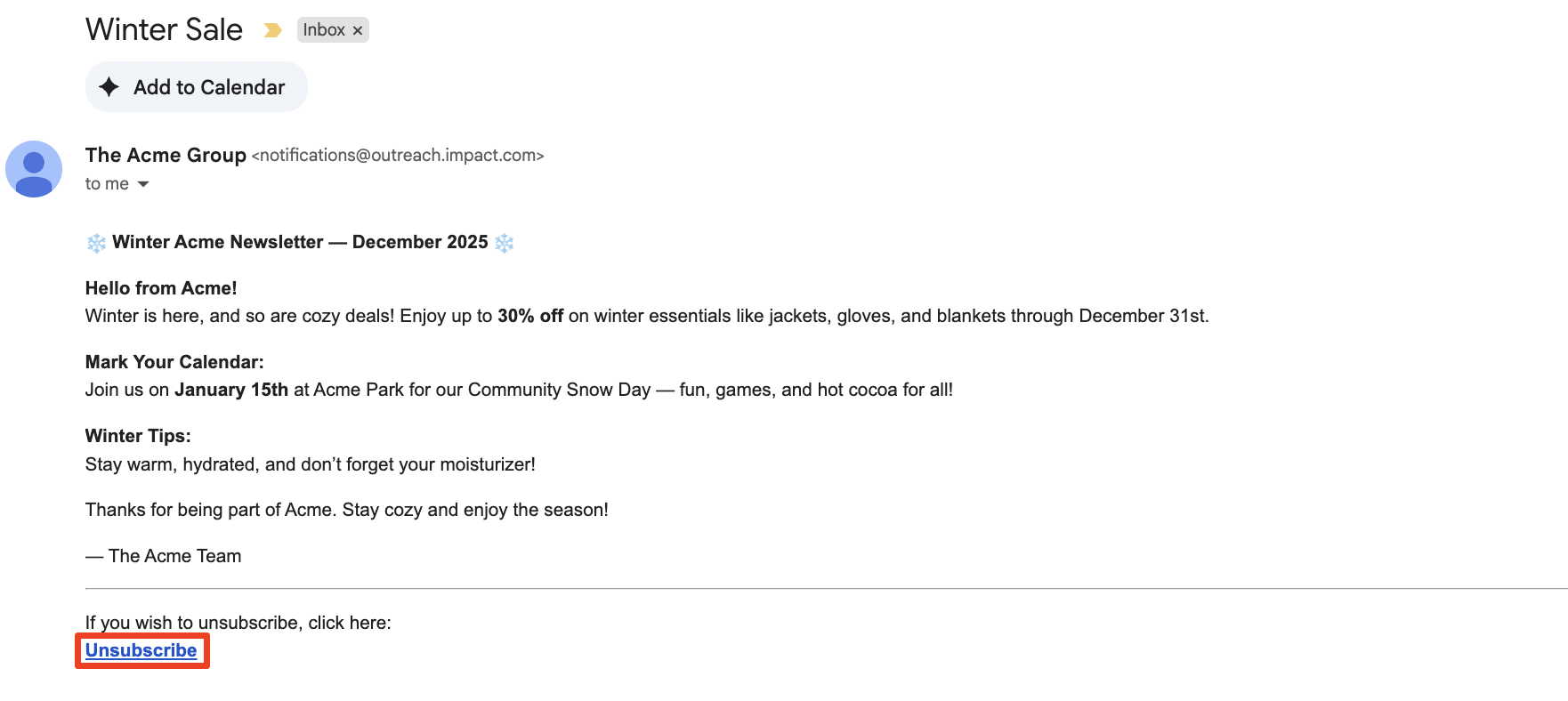
4. 选择 **取消订阅** (通常位于发件人姓名旁边或电子邮件底部)。
* 选择 *取消订阅*之后,您应该会看到一条确认消息(例如,您已成功退订此邮件列表)。
## 重新订阅品牌新闻通讯
您现在可以随时从您的合作伙伴帐户重新订阅新闻通讯。
1. 在顶部导航栏中,选择  **\[用户资料] → 设置**.
2. 在 *技术*下,选择 [**已取消订阅的外联邮件**](https://app.impact.com/secure/mediapartner/fr/outreach-unsubscribe-settings-ui.ihtml).
3. 找到您想重新开始接收的新闻通讯。
* 使用搜索栏按名称查找特定品牌。
4. 将鼠标悬停在您想重新开始接收的新闻通讯上,并选择 **订阅。**
5. **确认** 您重新订阅的决定。
---
# Agent Instructions
This documentation is published with GitBook. GitBook is the documentation platform designed so that both humans and AI agents can read, navigate, and reason over technical content effectively. Learn more at gitbook.com.
## Querying This Documentation
If you need additional information that is not directly available in this page, you can query the documentation by asking a question.
Perform an HTTP GET request on the following URL with the `ask` and `goal` query parameters:
```
GET https://help.impact.com/partner/zh/ni-xiang-liao-jie-shen-me/platform-features/marketing-content/newsletters/unsubscribe-from-a-brand-newsletter.md?ask=&goal=
```
`ask` is the immediate question: it should be specific, self-contained, and written in natural language.
`goal` is what the user is ultimately trying to achieve, the reason they need the answer. Sharing it helps GitBook give you a better, more relevant answer. A goal is most helpful when it describes the outcome the user wants rather than restating the question. For example, with `ask=how do I create an API token`, a goal like `automate deployments from our CI pipeline` lets GitBook tailor the answer to that use case.
The response will contain a direct answer to the question and relevant excerpts and sources from the documentation.
Use this mechanism when the answer is not explicitly present in the current page, you need clarification or additional context, or you want to retrieve related documentation sections.