> For the complete documentation index, see [llms.txt](https://help.impact.com/llms.txt). Markdown versions of documentation pages are available by appending `.md` to page URLs; this page is available as [Markdown](https://help.impact.com/partner/zh/ni-xiang-liao-jie-shen-me/platform-features/finance/payments-withdrawals-and-balance/payout-setup/canadian-routing-numbers-explained-for-partners.md).
# 合作伙伴加拿大银行路由号码说明
作为使用加拿大银行系统的合作伙伴,了解路由号码很重要,这样你就可以 [通过 EFT 提取你的余额](/partner/zh/ni-xiang-liao-jie-shen-me/platform-features/finance/payments-withdrawals-and-balance/payout-setup/withdraw-funds-to-your-bank-account.md#set-up-your-payment-method-0-1) 来自 impact.com 平台。
## 什么是路由号码?
加拿大的银行使用 *路由号码* 在处理交易时,用于识别与账户相关联的银行和分行。该号码可根据所进行的交易类型以两种方式格式化。对于 EFT 交易,你的路由号码始终遵循以下格式:
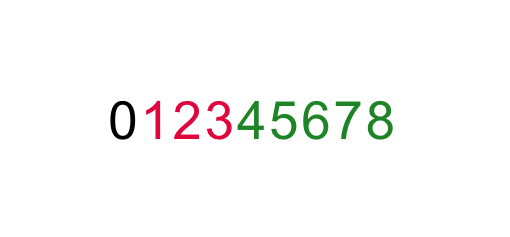
* 该号码为 9 位数字
* **0** 是一个标准数字,始终位于其他 8 位数字之前
* **123** 表示 *银行* 与你的账户相关联
* **45678** 表示 *银行分行* 与你的账户相关联
{% hint style="success" %}
**注意:** 填写以下内容时,请务必使用上述格式 *路由号码* 字段在你的 impact.com *银行账户* 设置中。请参见 [作为合作伙伴完成你的银行账户设置](/partner/zh/ni-xiang-liao-jie-shen-me/platform-features/finance/payments-withdrawals-and-balance/payout-setup/withdraw-funds-to-your-bank-account.md#set-up-your-payment-method-0-1) 以了解有关如何设置或修改你的付款方式的更多信息。
{% endhint %}
## 查找你的路由号码
如果你不知道你的账户的路由号码,有许多在线资源可供你查找。下面的步骤将向你
1. 访问任何一个可帮助你查找路由号码的网站。我们将使用 wise.com 的 [网页](https://wise.com/ca/bank-codes/transit-number/routing-number#routing-banks) 作为这个教程示例(impact.com 与 wise.com 没有任何关联)。
2. 选择 **查找你的路由号码**.
3. 选择你开立账户时所使用的银行。
4. 选择 **查找(你的银行的)过境号码**.
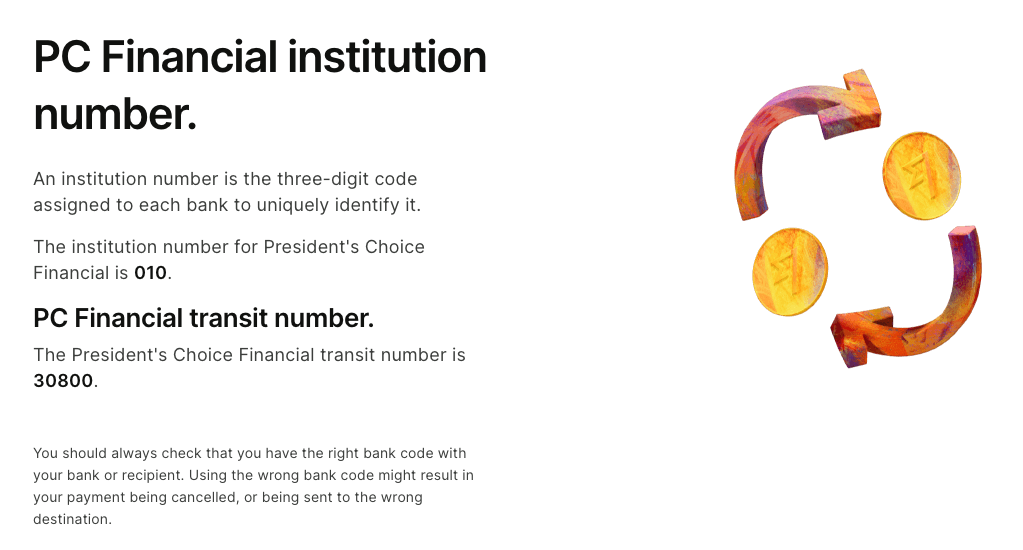
* 你将获得一个 *机构号码* 和一个 *过境号码* (即, *银行号码* 以及 *分行号码*).
5. 按照上方所示的 9 位格式将这些数字组合起来。记得先加上前导 0。
* 对于所提供截图中的示例,路由号码将是: **0****010****30800**
{% hint style="success" %}
**注意:** 如果你无法按照上述步骤查找路由号码,请尝试其他在线资源,或直接咨询你的银行。
{% endhint %}
---
# Agent Instructions
This documentation is published with GitBook. GitBook is the documentation platform designed so that both humans and AI agents can read, navigate, and reason over technical content effectively. Learn more at gitbook.com.
## Querying This Documentation
If you need additional information that is not directly available in this page, you can query the documentation by asking a question.
Perform an HTTP GET request on the following URL with the `ask` and `goal` query parameters:
```
GET https://help.impact.com/partner/zh/ni-xiang-liao-jie-shen-me/platform-features/finance/payments-withdrawals-and-balance/payout-setup/canadian-routing-numbers-explained-for-partners.md?ask=&goal=
```
`ask` is the immediate question: it should be specific, self-contained, and written in natural language.
`goal` is what the user is ultimately trying to achieve, the reason they need the answer. Sharing it helps GitBook give you a better, more relevant answer. A goal is most helpful when it describes the outcome the user wants rather than restating the question. For example, with `ask=how do I create an API token`, a goal like `automate deployments from our CI pipeline` lets GitBook tailor the answer to that use case.
The response will contain a direct answer to the question and relevant excerpts and sources from the documentation.
Use this mechanism when the answer is not explicitly present in the current page, you need clarification or additional context, or you want to retrieve related documentation sections.