> For the complete documentation index, see [llms.txt](https://help.impact.com/llms.txt). Markdown versions of documentation pages are available by appending `.md` to page URLs; this page is available as [Markdown](https://help.impact.com/partner/zh/ni-xiang-liao-jie-shen-me/platform-features/finance/payments-withdrawals-and-balance/partner-payments-explained-from-action-to-payout.md).

# 合作伙伴付款说明：从操作到付款

<a href="https://pxa.impact.com/student/activity/2767753?sid=0c0e3e5c-54c9-4435-9bee-ebcdccb7f292&#x26;sid_i=0?utm_source=app.impact.com&#x26;utm_medium=owned-platform&#x26;utm_content=&#x26;utm_campaign=help-center" class="button primary">参加 PXA 课程</a>

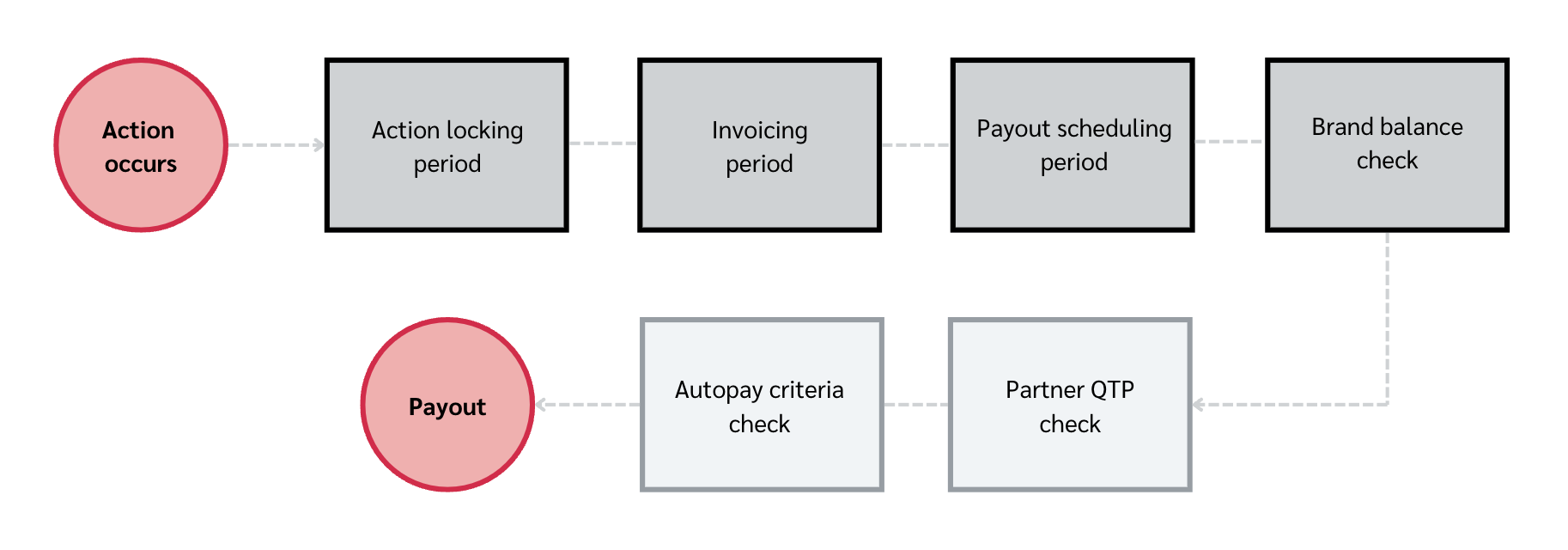
你所推动的任何行为（或转化）在你从 impact.com 平台提取佣金之前，都必须经过一系列步骤和检查。这些步骤和检查主要用于保护你与合作品牌之间所签订的合同。你的合同包含关于佣金何时应付给你的更详细信息，不过，即使佣金已到期，之后仍会进行进一步检查，这在某些情况下可能会延迟支付。

<div data-with-frame="true"><figure><img src="/files/022c5f14f05f1f80ec67b3b2366c850483b012cd" alt=""><figcaption></figcaption></figure></div>

#### 了解行为状态

某个行为在任何时点都会处于 5 种状态中的 1 种，具体取决于它在 [行为生命周期](/brand/zh/what-would-you-like-to-learn-about/platform-features/actions-and-payouts/understand-the-action-life-cycle-and-finance.md).

<table><thead><tr><th width="329.82421875">行为状态</th><th>描述</th></tr></thead><tbody><tr><td>待处理</td><td>当某个行为处于待处理状态时，它仍在等待最终确认。待处理的行为会进入 <em>已锁定</em> 在锁定日期后进入该状态。</td></tr><tr><td>已锁定</td><td>当某个行为被锁定时，行为成本金额即已到期。你将因促成该行为而获得佣金。</td></tr><tr><td>清算</td><td>当该行为 <em>已锁定</em>时，如果品牌资金充足，付款将在清算日执行。</td></tr><tr><td>逾期</td><td>当某个行为逾期时，品牌在清算日没有足够资金支付。</td></tr><tr><td>已撤销</td><td>当某个行为被撤销时，行为成本将作废，且不应支付佣金。</td></tr></tbody></table>

#### 第一部分：品牌端步骤

<details>

<summary>行为锁定期</summary>

你为某品牌促成的行为最初会在你的账户中显示为 [待处理行为](/partner/zh/ni-xiang-liao-jie-shen-me/platform-features/action-management/where-can-i-see-my-pending-actions-as-a-partner.md) ，直到一个称为 [*行为锁定期*](/partner/zh/ni-xiang-liao-jie-shen-me/platform-features/working-with-brands/contracts/contracts-explained-for-partners.md#scheduling-0-2) 的缓冲期结束。行为锁定期允许你的合作品牌在某个行为被认定超出你合同约定范围时，对其进行修改或撤销。

例如，如果客户退回产品或取消其购买的服务，行为可能会被撤销。要查找合作品牌关于行为锁定期的政策：

1. 在顶部导航菜单中，选择 **Discover → 我的品牌**.
2. 选择你要查看其行为锁定期政策的品牌。
3. 选择 ![](/files/bc9aa794eb347d6f55e668dbe0e98eae7d1cd905) **\[更多] → 查看并管理合同**.
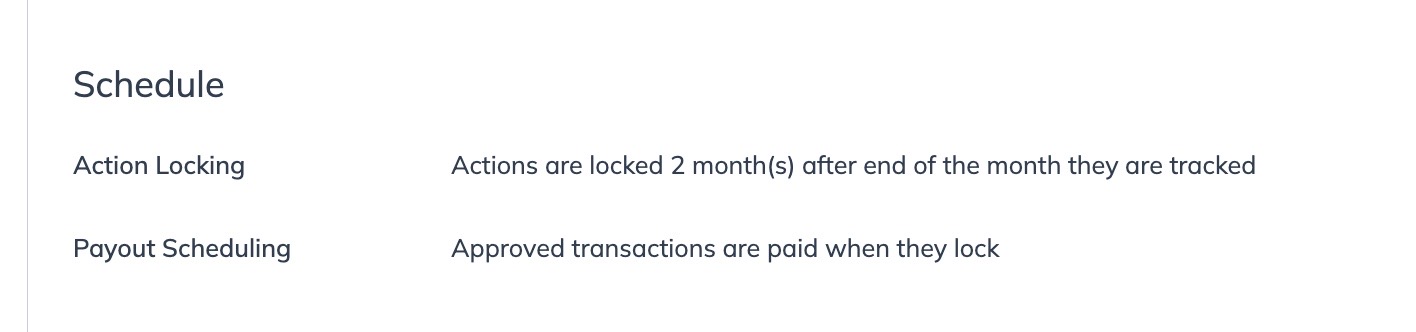
4. 在 *日程*下，找到 *行为锁定* 期政策。它可能如下所示：

   <div data-with-frame="true"><figure><img src="/files/17aba7b6af2a32e7624cb3e276793e214b257692" alt=""><figcaption></figcaption></figure></div>

</details>

<details>

<summary>开票期</summary>

一旦行为锁定期结束，品牌将不能再修改或撤销该行为。随后进入开票期。

这为 impact.com 向品牌发送其所欠全部款项的发票提供时间，随后品牌财务团队将处理这些发票并发起付款。你可以预期该期间会持续 2-3 周。

</details>

<details>

<summary>付款安排期</summary>

此后进入 [*付款安排期*](/partner/zh/ni-xiang-liao-jie-shen-me/platform-features/working-with-brands/contracts/contracts-explained-for-partners.md#scheduling-0-2) 。此期间主要是为了满足品牌对于在行为锁定后多久向合作伙伴发放付款的偏好。要查找合作品牌关于付款安排期的政策：

1. 在顶部导航菜单中，选择 **Discover → 我的品牌**.
2. 选择你要查看其付款安排期政策的品牌。
3. 选择 ![](/files/bc9aa794eb347d6f55e668dbe0e98eae7d1cd905) **\[更多]** ![](/files/ea861215fc8b001a1707acadbd9f6800d5d95c1e) → **查看并管理合同**.
4. 在 *日程*下，找到 *付款安排* 期政策。它可能如下所示：

   <div data-with-frame="true"><figure><img src="/files/17aba7b6af2a32e7624cb3e276793e214b257692" alt=""><figcaption></figcaption></figure></div>

</details>

<details>

<summary>品牌余额检查</summary>

接下来，impact.com 会检查品牌是否已在其 impact.com 账户中存入足够资金，以覆盖所有到期付款。如果其账户资金充足，付款将自动触发并转入你的 [可用余额](/partner/zh/ni-xiang-liao-jie-shen-me/platform-features/finance/payments-withdrawals-and-balance/balance-screen-overview-for-partners.md).

如果品牌资金不足，付款将不会发放，并将被标记为 *逾期*。请参阅我们关于检查 [逾期付款](/partner/zh/ni-xiang-liao-jie-shen-me/platform-features/finance/payments-withdrawals-and-balance/view-your-overdue-payouts.md) 的文章以了解更多信息，或 [直接联系品牌](https://help.impact.com/partner/what-would-you-like-to-learn-about/platform-features/working-with-brands/contacting-a-brand/access-brand-contact-information) ，询问你何时会收到付款。

</details>

#### 第二部分：合作伙伴端步骤

<details>

<summary>合作伙伴收款要求检查</summary>

收款要求用于确定你的账户是否已正确设置以接收付款。遵守 impact.com 的 [收款要求标准](/partner/zh/ni-xiang-liao-jie-shen-me/platform-features/finance/payment-requirements-explained-for-partners.md) 包括正确填写银行账户信息、提交正确的税务文件，以及让你提供的银行信息通过 impact.com 合规团队的审核。

有关如何查看和管理你在 impact.com 中列出的银行详细信息、税号和账单地址的指导，请参阅 [这篇文章](/partner/zh/ni-xiang-liao-jie-shen-me/platform-features/finance/payments-withdrawals-and-balance/withdraw-funds-to-your-bank-account.md).

</details>

<details>

<summary>自动付款条件检查</summary>

此时，付款已发放至你的 impact.com 账户。在你的款项被提取到银行账户或 PayPal 之前的最后一步，是检查你的 [自动设置](/partner/zh/ni-xiang-liao-jie-shen-me/platform-features/finance/payments-withdrawals-and-balance/select-how-often-you-get-paid-as-a-partner.md).

这些设置决定你的余额何时自动提现，你可以将其设定为基于某个特定的 *余额门槛* 达到，或基于某个 *固定日期* 的到来。要设置你账户的自动付款条件：

1. 首先，确保你已为账户设置 [双因素身份验证](/partner/zh/ni-xiang-liao-jie-shen-me/account-management/account-settings/manage-2fa-for-partner-accounts.md) 。
   * 这一步是为了你的安全，除非启用 2FA，否则你将无法访问以下设置。
2. 在顶部导航栏中，选择 ![](/files/d599d976891a5c0517520cf3405bba1bb9d7163f) **\[用户资料] → 设置**.
3. 在 *财务* 部分下，选择 **银行账户**.
4. 在 *自动付款*，选择你希望收款的时间。

   <div data-gb-custom-block data-tag="hint" data-style="success" class="hint hint-success"><p><strong>注意</strong>：如果你使用 <strong>余额门槛</strong> 计划，则该计划下所有发给合作伙伴的付款将于随后 <strong>星期二</strong> 或 <strong>星期四</strong> 处理，距付款日期 <a href="/spaces/0tT01uiqUHWshP3pQVHs/pages/074627c9661a8fd5afb10293be1ca8aecb11a7a0">付款处理时间表</a> 。使用 <strong>固定日期</strong> 计划的合作伙伴，其资金将按照我们的</p></div>

   * 如果你选择 *余额门槛* 选项，请使用 ![](/files/ea861215fc8b001a1707acadbd9f6800d5d95c1e) **\[下拉菜单]** 选择你希望设为必须达到的最低金额。该门槛可低至 *10 美元* 或高至 *250 万美元*.
     * 请注意，该门槛会因货币而异。
   * 如果你选择 *固定日期* 选项，请使用 ![](/files/ea861215fc8b001a1707acadbd9f6800d5d95c1e) **\[下拉菜单]** ，请选择 *1 日* 或 *15 日* 中的任意一个作为你的收款日期。
     * 请注意，即使使用此选项，仍需先满足最低门槛， *10 美元* 资金才会被提取。

   <div data-with-frame="true"><figure><img src="/files/b883df53c2caba4bfbe2a476e9e6703357d07aa9" alt=""><figcaption></figcaption></figure></div>
5. 选择 **保存**.

{% hint style="success" %}
**注意：** impact.com 会在每周二和周四检查你的账户是否具备付款资格，以及你的自动付款条件是否已满足。
{% endhint %}

</details>


---

# Agent Instructions
This documentation is published with GitBook. GitBook is the documentation platform designed so that both humans and AI agents can read, navigate, and reason over technical content effectively. Learn more at gitbook.com.

## Querying This Documentation
If you need additional information that is not directly available in this page, you can query the documentation dynamically by asking a question.

Perform an HTTP GET request on the current page URL with the `ask` query parameter, and the optional `goal` query parameter:

```
GET https://help.impact.com/partner/zh/ni-xiang-liao-jie-shen-me/platform-features/finance/payments-withdrawals-and-balance/partner-payments-explained-from-action-to-payout.md?ask=<question>&goal=<endgoal>
```

`ask` is the immediate question: it should be specific, self-contained, and written in natural language.
`goal` is optional and describes the broader end goal you are ultimately trying to accomplish on behalf of the user. GitBook uses it to tailor the answer towards what is most useful for that goal.

The response will contain a direct answer to the question and relevant excerpts and sources from the documentation.

Use this mechanism when the answer is not explicitly present in the current page, you need clarification or additional context, or you want to retrieve related documentation sections.