> For the complete documentation index, see [llms.txt](https://help.impact.com/llms.txt). Markdown versions of documentation pages are available by appending `.md` to page URLs; this page is available as [Markdown](https://help.impact.com/partner/zh/ni-xiang-liao-jie-shen-me/platform-features/action-management/event-notifications-and-postbacks/test-and-troubleshoot-a-postback-url.md).

# 测试并排查回传 URL

你可以在生产环境依赖它之前先测试一个回传 URL。这有助于你确认端点是否接受请求，并更快地定位投递问题。

## 测试你的回传 URL

{% hint style="success" %}
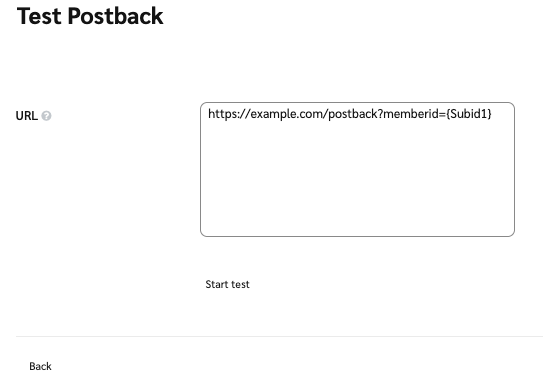
**注意：** 测试时，我们建议暂时修改你的回传 URL，传入一个硬编码的测试值（例如，用“12345678”代替 `{SubId1}`），以避免错误。如果你的服务器接受该提交，你可以安全地把回传 URL 改回使用该变量。
{% endhint %}

1. 在顶部导航栏中，选择 **发现** → [**品牌**](https://app.impact.com/secure/mediapartner/marketplace/new-campaign-marketplace-flow.ihtml).
2. 根据你的视图继续：
   * 对于 ![](https://1152657667-files.gitbook.io/~/files/v0/b/gitbook-x-prod.appspot.com/o/spaces%2Fb2rE79d9UhOKZQLgzSqx%2Fuploads%2Fgit-blob-1ed93f8f13c8544365c2e0766182519259e358d1%2F32cae165a86a348b171c1152a3c352a24ed3471cf88e03ca183b9015ee8f970b.svg?alt=media) **\[网格视图]**，选择你想测试回传的品牌，然后选择 ![](https://1152657667-files.gitbook.io/~/files/v0/b/gitbook-x-prod.appspot.com/o/spaces%2Fb2rE79d9UhOKZQLgzSqx%2Fuploads%2Fgit-blob-8ec3e877b1397045c61d394485e72ac4d93120ee%2Fc6ddb46c637059f06e86c790a911217a9428f5c47b5efef046f90555e85b03cd.svg?alt=media) **\[更多] → 跟踪集成**.
   * 对于 ![](https://1152657667-files.gitbook.io/~/files/v0/b/gitbook-x-prod.appspot.com/o/spaces%2Fb2rE79d9UhOKZQLgzSqx%2Fuploads%2Fgit-blob-b3ee5769241ce1575e4aff7d716b98c9937267eb%2F845c18aa59443d6b239132358fa67d4ae4df3cf4399ec037b8348bfa2e88c1bc.svg?alt=media) **\[列表视图]**，将鼠标悬停在你想测试回传的品牌上，然后选择 ![](https://1152657667-files.gitbook.io/~/files/v0/b/gitbook-x-prod.appspot.com/o/spaces%2Fb2rE79d9UhOKZQLgzSqx%2Fuploads%2Fgit-blob-8ec3e877b1397045c61d394485e72ac4d93120ee%2Fc6ddb46c637059f06e86c790a911217a9428f5c47b5efef046f90555e85b03cd.svg?alt=media) **\[更多]** → **跟踪集成**.
3. 在 *回传* 部分中，找到你想测试的回传 URL，然后选择 ![](https://1152657667-files.gitbook.io/~/files/v0/b/gitbook-x-prod.appspot.com/o/spaces%2Fb2rE79d9UhOKZQLgzSqx%2Fuploads%2Fgit-blob-df93ac0f80fc5cece7983980a5ce3fbcf19aabce%2F3ef9d737089bc07dbb7e4fd41a97edfbaec261e4f55ab3a1666f3daf957f69c3.svg?alt=media) **\[操作] → 测试**.
4. 填写你想测试的 URL，然后选择 **开始测试**.

   <div data-with-frame="true"><figure><img src="https://1152657667-files.gitbook.io/~/files/v0/b/gitbook-x-prod.appspot.com/o/spaces%2Fb2rE79d9UhOKZQLgzSqx%2Fuploads%2Fgit-blob-0c6431bd94b91ecd69409fb490bbd3d8f0937a74%2F70383df0310e63a8b1b9b8167325edc6c15af33a82fb5dd31b81f76b37afbfa3.png?alt=media" alt=""><figcaption></figcaption></figure></div>

## 了解重试行为

如果在 impact.com 将回传发送到你的目标 URL 时失败，impact.com 会自动重试投递。这有助于应对临时性的网络问题或服务器短暂不可用的情况。

impact.com 最多会对失败的回传总共重试 15 次。

在以下情况下，impact.com 不会重试回传：

* 目标 URL 格式错误或无效。
* 目标 URL 或其主机无法解析，例如在 DNS 查询失败时。

impact.com 会跳过来自 `400` 到 `500`.

| 重试次数  | 重试前延迟  |
| ----- | ------ |
| 重试 1  | +15 秒  |
| 重试 2  | +15 秒  |
| 重试 3  | +15 秒  |
| 重试 4  | +3 分钟  |
| 重试 5  | +3 分钟  |
| 重试 6  | +15 分钟 |
| 重试 7  | +15 分钟 |
| 重试 8  | +15 分钟 |
| 重试 9  | +2 小时  |
| 重试 10 | +2 小时  |
| 重试 11 | +2 小时  |
| 重试 12 | +6 小时  |
| 重试 13 | +6 小时  |
| 重试 14 | +6 小时  |
| 重试 15 | +6 小时  |

### 排查错误

<table><thead><tr><th width="199.5703125">错误</th><th>描述</th></tr></thead><tbody><tr><td>缺少必需参数</td><td>你的服务器很可能期望传入一个值而不是变量。修改你的回传 URL，传入一个测试值（例如，用“12345678”代替 <code>{SubId1}</code>），看看它是否接受这个硬编码值。</td></tr><tr><td>区分大小写的变量</td><td>动态变量区分大小写，必须完全一致，也就是说 <code>{SubId1}</code> 与 <code>{subid1}</code>并不相同。请仔细检查你的变量是否体现了正确的大小写。</td></tr><tr><td>拒绝访问</td><td>大多数回传服务器都需要随动态变量一起传递安全令牌或值。请与你网站的技术团队合作（或查阅你网站提供商的文档），了解访问该服务器所需的令牌或安全值。</td></tr></tbody></table>


---

# Agent Instructions
This documentation is published with GitBook. GitBook is the documentation platform designed so that both humans and AI agents can read, navigate, and reason over technical content effectively. Learn more at gitbook.com.

## Querying This Documentation
If you need additional information that is not directly available in this page, you can query the documentation by asking a question.

Perform an HTTP GET request on the following URL with the `ask` and `goal` query parameters:

```
GET https://help.impact.com/partner/zh/ni-xiang-liao-jie-shen-me/platform-features/action-management/event-notifications-and-postbacks/test-and-troubleshoot-a-postback-url.md?ask=<question>&goal=<user_goal>
```

`ask` is the immediate question: it should be specific, self-contained, and written in natural language.
`goal` is what the user is ultimately trying to achieve, the reason they need the answer. Sharing it helps GitBook give you a better, more relevant answer. A goal is most helpful when it describes the outcome the user wants rather than restating the question. For example, with `ask=how do I create an API token`, a goal like `automate deployments from our CI pipeline` lets GitBook tailor the answer to that use case.

The response will contain a direct answer to the question and relevant excerpts and sources from the documentation.

Use this mechanism when the answer is not explicitly present in the current page, you need clarification or additional context, or you want to retrieve related documentation sections.
