> For the complete documentation index, see [llms.txt](https://help.impact.com/llms.txt). Markdown versions of documentation pages are available by appending `.md` to page URLs; this page is available as [Markdown](https://help.impact.com/partner/zh/ni-xiang-liao-jie-shen-me/impactcom-mobile-app/working-with-brands-on-the-mobile-app/message-your-brands-on-the-mobile-app.md).

# 在移动应用中给您的品牌发送消息

使用 *消息* 用于与您潜在的品牌以及您已合作的品牌进行沟通的功能。该功能为您提供一系列用途，例如简化您与品牌的入驻流程、就特殊安排联系品牌、解决问题等。

{% hint style="warning" %}
**重要：** 请遵循 impact.com 的 [消息使用条款](https://impact.com/terms-of-use-messaging/) 当您向品牌发送消息时。
{% endhint %}

## 查找消息

您可以在两个位置找到消息：

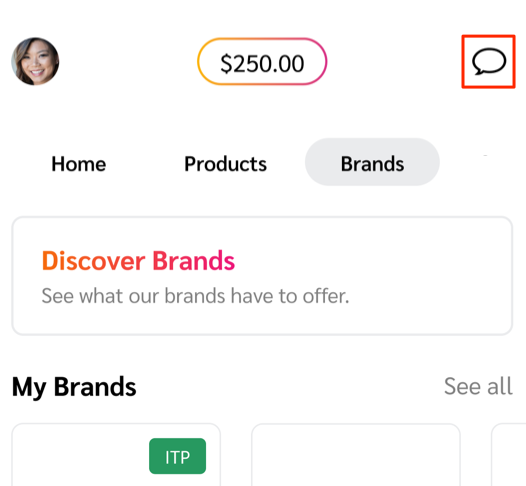
* 选择 ![Chat](https://1152657667-files.gitbook.io/~/files/v0/b/gitbook-x-prod.appspot.com/o/spaces%2Fb2rE79d9UhOKZQLgzSqx%2Fuploads%2Fgit-blob-7ecf5df45e06e6b7c09769b367898e68ee4a5e7c%2F51f34bf8e6da338f17712db1b36aeebf2443b795ad441d16b8d60aaca6c3bc39.svg?alt=media) **\[聊天]** 在右上角，打开您的 *收件箱* 界面中移除之前还剩多少天。

  <div data-with-frame="true"><figure><img src="https://1152657667-files.gitbook.io/~/files/v0/b/gitbook-x-prod.appspot.com/o/spaces%2Fb2rE79d9UhOKZQLgzSqx%2Fuploads%2Fgit-blob-84c0eddfbf5deeecaa0fa609fefe1ba0488743ae%2F3a15f0a1531c57f6917940a49c5c7bd01c049ba72876f2d3cb0ef9838ed710ec.png?alt=media" alt="Chat icon in the upper-right corner of the app" width="263"><figcaption></figcaption></figure></div>
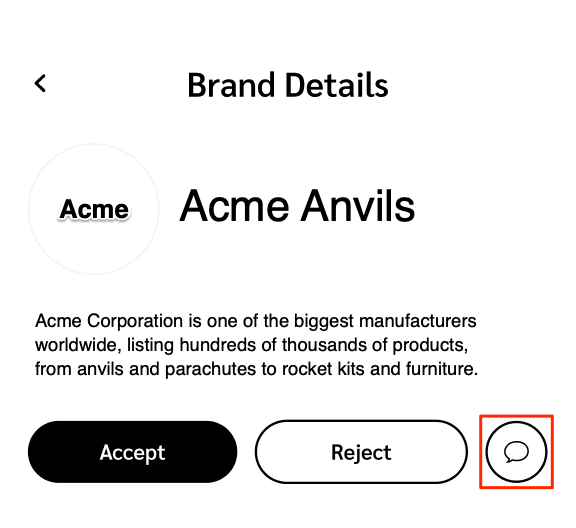
* 从品牌的 *品牌详情* 界面中移除之前还剩多少天。

  <div data-with-frame="true"><figure><img src="https://1152657667-files.gitbook.io/~/files/v0/b/gitbook-x-prod.appspot.com/o/spaces%2Fb2rE79d9UhOKZQLgzSqx%2Fuploads%2Fgit-blob-d67fdb44e2b724715317beb51c98ea9a0347d46a%2Fb5b2eaebee9a315aabdc11bb160104f19f3a536b20f61c28585ee2a2a2b1f8f6.png?alt=media" alt="Brand Details screen with the Chat option" width="288"><figcaption></figcaption></figure></div>

## 创建新消息

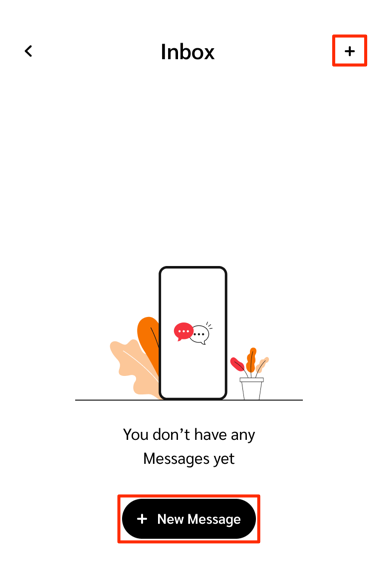
您可以从以下位置创建新的消息线程：从 *收件箱* 屏幕或品牌的 *品牌详情*:

{% hint style="success" icon="circle-info" %}
**注意：** 只有在品牌允许的情况下，您才能与该品牌开始对话。
{% endhint %}

* 在 *收件箱* 在屏幕右上角，选择 ![Add](https://1152657667-files.gitbook.io/~/files/v0/b/gitbook-x-prod.appspot.com/o/spaces%2Fb2rE79d9UhOKZQLgzSqx%2Fuploads%2Fgit-blob-3ca70a1ff22f0720bfb8c9e284c7d8178e3a547b%2Fb6a126b0775291b814c5a97f83039ef72ba42d6d02b0fe20f4790213ea01961e.svg?alt=media) **\[添加]** 或 ![Add](https://1152657667-files.gitbook.io/~/files/v0/b/gitbook-x-prod.appspot.com/o/spaces%2Fb2rE79d9UhOKZQLgzSqx%2Fuploads%2Fgit-blob-3ca70a1ff22f0720bfb8c9e284c7d8178e3a547b%2Fb6a126b0775291b814c5a97f83039ef72ba42d6d02b0fe20f4790213ea01961e.svg?alt=media) **新消息**.

  * 在 *新消息* 在屏幕上，使用 ![Search](https://1152657667-files.gitbook.io/~/files/v0/b/gitbook-x-prod.appspot.com/o/spaces%2Fb2rE79d9UhOKZQLgzSqx%2Fuploads%2Fgit-blob-3c5971fb7b03a98375488e97a4317afd60621298%2Fd0fbb4c2c189cdc83bc0eb8e906fa3cb66818d0a9daa1491ea48042160714ed2.svg?alt=media) **\[搜索]** 查找您想开始聊天的品牌。
  * 要附加文件，请选择 ![Attach](https://1152657667-files.gitbook.io/~/files/v0/b/gitbook-x-prod.appspot.com/o/spaces%2Fb2rE79d9UhOKZQLgzSqx%2Fuploads%2Fgit-blob-3ca70a1ff22f0720bfb8c9e284c7d8178e3a547b%2Fb6a126b0775291b814c5a97f83039ef72ba42d6d02b0fe20f4790213ea01961e.svg?alt=media) **\[附加]**。请参阅 *支持的附件* 下面的参考信息，了解接受哪些文件类型。

  <div data-with-frame="true"><figure><img src="https://1152657667-files.gitbook.io/~/files/v0/b/gitbook-x-prod.appspot.com/o/spaces%2Fb2rE79d9UhOKZQLgzSqx%2Fuploads%2Fgit-blob-d7a0eeeb8acdbec924ac59e7b050b5d5a71473ce%2F7653d139c5dd676ece4d60d6da43713d31d8bc05063a5d1ccbc1ae978f678b24.png?alt=media" alt="New message screen with brand search" width="281"><figcaption></figcaption></figure></div>
* 在 *品牌详情* 在屏幕上，在说明下方，选择 ![Chat](https://1152657667-files.gitbook.io/~/files/v0/b/gitbook-x-prod.appspot.com/o/spaces%2Fb2rE79d9UhOKZQLgzSqx%2Fuploads%2Fgit-blob-7ecf5df45e06e6b7c09769b367898e68ee4a5e7c%2F51f34bf8e6da338f17712db1b36aeebf2443b795ad441d16b8d60aaca6c3bc39.svg?alt=media) **\[聊天]**.
  * 要附加文件，请选择 ![Attach](https://1152657667-files.gitbook.io/~/files/v0/b/gitbook-x-prod.appspot.com/o/spaces%2Fb2rE79d9UhOKZQLgzSqx%2Fuploads%2Fgit-blob-3ca70a1ff22f0720bfb8c9e284c7d8178e3a547b%2Fb6a126b0775291b814c5a97f83039ef72ba42d6d02b0fe20f4790213ea01961e.svg?alt=media) **\[附加]**。请参阅 *支持的附件* 下面的参考信息，了解接受哪些文件类型。

## 支持的附件

您可以将以下文件类型附加到消息线程：

* CSV
* PDF
* JPEG
* PNG
* GIF


---

# Agent Instructions
This documentation is published with GitBook. GitBook is the documentation platform designed so that both humans and AI agents can read, navigate, and reason over technical content effectively. Learn more at gitbook.com.

## Querying This Documentation
If you need additional information that is not directly available in this page, you can query the documentation by asking a question.

Perform an HTTP GET request on the following URL with the `ask` and `goal` query parameters:

```
GET https://help.impact.com/partner/zh/ni-xiang-liao-jie-shen-me/impactcom-mobile-app/working-with-brands-on-the-mobile-app/message-your-brands-on-the-mobile-app.md?ask=<question>&goal=<user_goal>
```

`ask` is the immediate question: it should be specific, self-contained, and written in natural language.
`goal` is what the user is ultimately trying to achieve, the reason they need the answer. Sharing it helps GitBook give you a better, more relevant answer. A goal is most helpful when it describes the outcome the user wants rather than restating the question. For example, with `ask=how do I create an API token`, a goal like `automate deployments from our CI pipeline` lets GitBook tailor the answer to that use case.

The response will contain a direct answer to the question and relevant excerpts and sources from the documentation.

Use this mechanism when the answer is not explicitly present in the current page, you need clarification or additional context, or you want to retrieve related documentation sections.