> For the complete documentation index, see [llms.txt](https://help.impact.com/llms.txt). Markdown versions of documentation pages are available by appending `.md` to page URLs; this page is available as [Markdown](https://help.impact.com/partner/zh/ni-xiang-liao-jie-shen-me/impactcom-mobile-app/mobile-app-product-marketplace/explore-the-mobile-app-product-marketplace.md).

# 探索移动应用商品市场

Product Marketplace 是一个品牌发现工具，可让符合条件的合作伙伴 [已加入 impact.com Marketplace 的](/partner/zh/ni-xiang-liao-jie-shen-me/platform-features/working-with-brands/applying-to-brands/join-the-brands-marketplace.md) 通过品牌提供的商品发现并申请新的品牌。作为合作伙伴，您可以：

* 浏览由 impact.com 策划的不同商品合集（例如：服装与配饰、电子产品、家居与装饰等）。
* 浏览 impact.com 平台上的所有商品——无论您与提供这些商品的品牌是否有合作关系。
* 通过商品市场申请与品牌合作。

#### 搜索并筛选特定商品

在商品市场中，您可以进行关键词搜索，并使用一系列筛选条件来帮助您查找特定类型的商品。

1. 从屏幕底部的导航栏中，选择 ![](/files/66efcfa8c93378e0ff635fa7bdd27b96ae0d7b0c) **发现**.
2. 从顶部的选项卡中 *发现* 屏幕，选择 **商品**.
3. 选择一个商品合集。
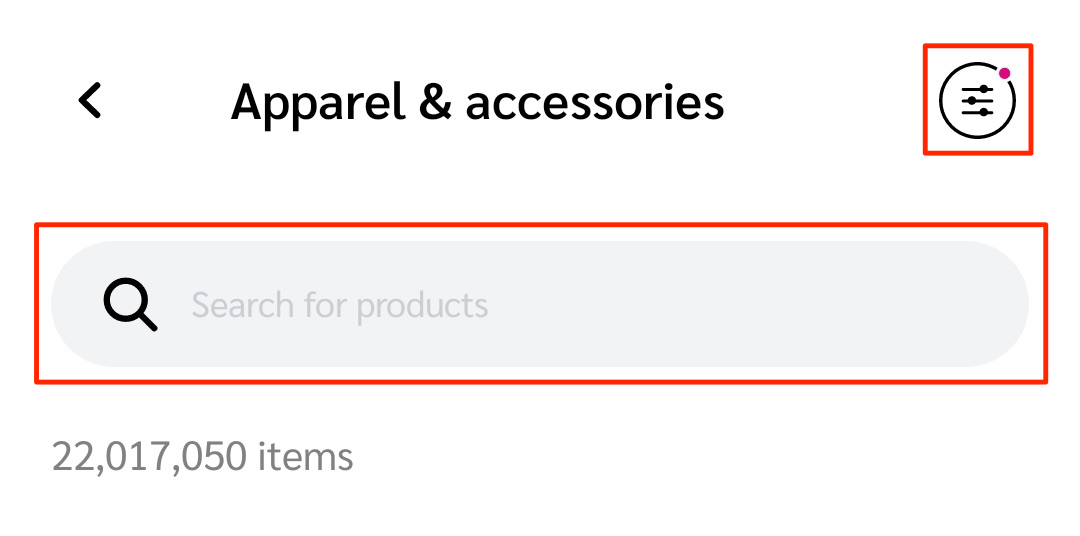
4. 使用 ![](/files/b3b8d4a571ed0a0b5d2fbc19523e97ad882b4a69) **\[搜索]** 用于按关键词搜索商品的字段，并使用 ![](/files/cd014655c4c89f8f2f61ce9532c6f031ca249694) **\[筛选]** 来优化显示的商品列表。

   * 搜索和筛选功能位于屏幕顶部。
   * 请参见 *筛选参考* 下面，了解更多可用的筛选选项。

   <div data-with-frame="true"><figure><img src="/files/14f3f7aa20fba9c6b2f610b822c3eed9758692b7" alt="" width="375"><figcaption></figcaption></figure></div>

<details>

<summary>筛选参考</summary>

| 筛选    | 说明                                                                                                                                                                                                                                                                                                                                                                                                                                                                                                                                                                                                                                                                      |
| ----- | ----------------------------------------------------------------------------------------------------------------------------------------------------------------------------------------------------------------------------------------------------------------------------------------------------------------------------------------------------------------------------------------------------------------------------------------------------------------------------------------------------------------------------------------------------------------------------------------------------------------------------------------------------------------------- |
| 排序依据  | <p>• <strong>相关性</strong> — 按商品与您的搜索词或筛选条件的相似程度排序（从最相似到最不相似）。</p><p>• <strong>价格升序</strong> — 按商品价格从低到高排序。</p><p>• <strong>价格降序</strong> — 按商品价格从高到低排序。</p><p>• <strong>折扣百分比</strong> — 按相较于原售价的折扣百分比从高到低排序商品列表。</p><p>• <strong>总佣金</strong> — 这是某商品已支付佣金的总金额（美元）。选择此选项将按已支付佣金最高的商品对商品列表进行降序排列。佣金按滚动的 28 天周期计算。</p><p>• <strong>总销售额</strong> — 这是 impact.com 记录的某商品销售总金额（美元）。选择此选项将按销售金额最高的商品对商品列表进行降序排列。销售额按滚动的 28 天周期计算。</p><p>• <strong>销售量</strong> — 这是 impact.com 记录的某商品销售总量。选择此选项将按订单量最高的商品对商品列表进行降序排列。销售量按滚动的 28 天周期计算。</p><p>• <strong>每次点击收益</strong> — 如果品牌按点击付费，那么您在推广此商品时将获得每次点击收益（EPC）。</p><p>• <strong>佣金百分比</strong> — 此选项会按提供最高佣金比例的项目中的商品进行排序。</p> |
| 项目关系  | <p>有三种选项：</p><p>• <strong>我的品牌</strong> — 仅显示来自您已合作品牌的商品。</p><p>• <strong>其他品牌</strong> — 仅显示来自您尚未合作品牌的商品。</p><p>• <strong>预先符合资格</strong> — 显示来自您已预先符合合作条件的品牌的所有商品。</p>                                                                                                                                                                                                                                                                                                                                                                                                                                                                                                |
| 类别    | <p>该商品所属的商品市场分类，例如： <em>服装与配饰</em>.</p><p>这与商品详情中提供的分类相对应。请参阅 <a href="#section-idm23435526839894"><em>了解更多商品信息</em></a> 部分以了解更多。</p>                                                                                                                                                                                                                                                                                                                                                                                                                                                                                                                                   |
| 主要制造商 | <p>商品制造商名称，例如： <em>ACME Inc</em>.</p><p>选择分类或项目后，此筛选条件会显示。</p>                                                                                                                                                                                                                                                                                                                                                                                                                                                                                                                                                                                                          |
| 价格范围  | 通过设置 *最低* 和 *最高* 价格来筛选商品。                                                                                                                                                                                                                                                                                                                                                                                                                                                                                                                                                                                                                                               |

</details>

#### 了解更多商品信息

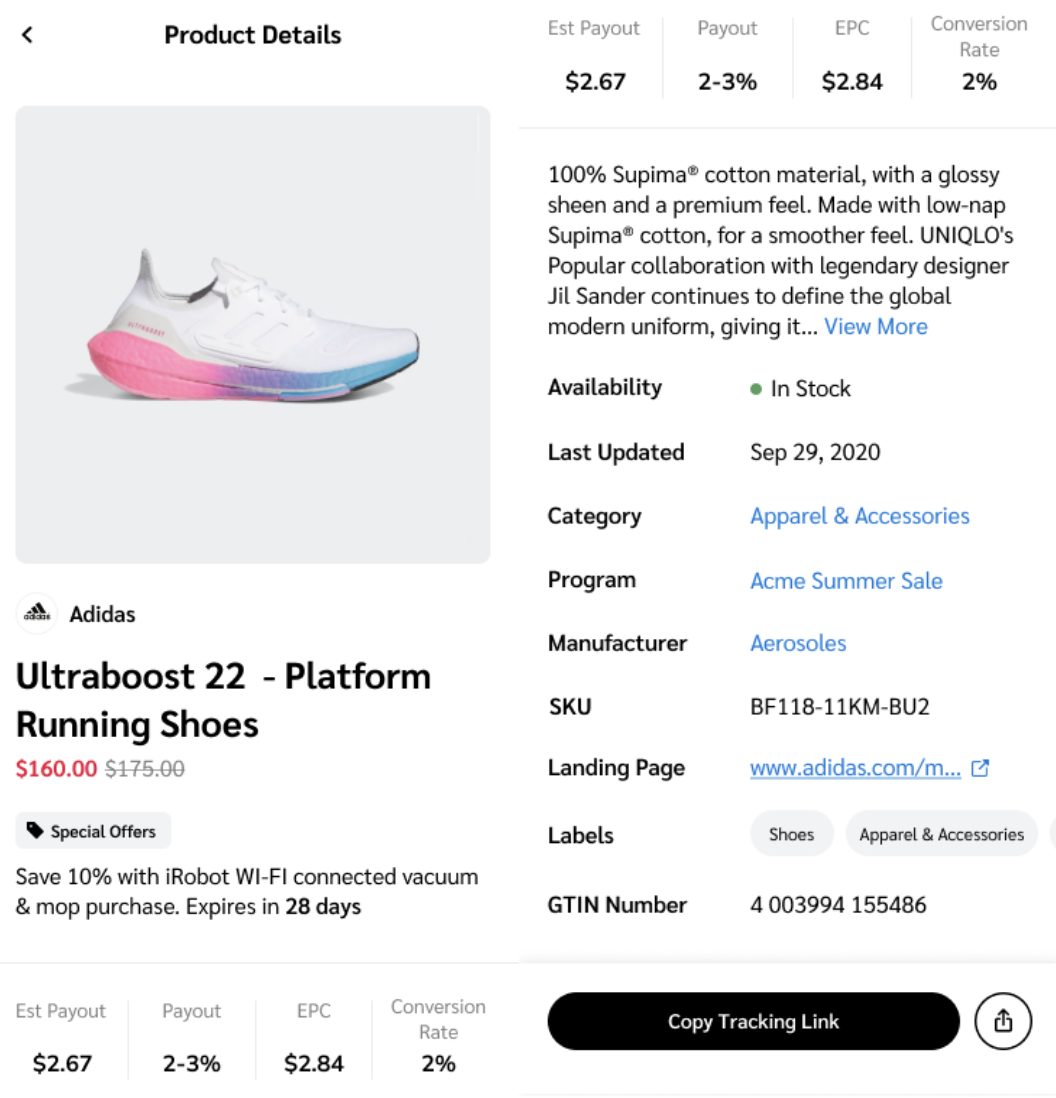
找到想要推广或进一步了解的商品后，您可以选择商品图标查看更多商品信息。下表提供了您可在此处找到的信息的更多详情。

<div data-with-frame="true"><figure><img src="/files/97e24befe69e37028db948f031cfc7582824d305" alt="" width="375"><figcaption></figcaption></figure></div>

<details>

<summary>商品详情参考</summary>

| 商品详情    | 说明                                                                        |
| ------- | ------------------------------------------------------------------------- |
| 商品基本信息  | 商品的名称、价格和描述。                                                              |
| 预估收益    | 通过促成该商品销售您可以获得的收益。                                                        |
| 收益      | 通过促成该商品销售您可获得的销售额百分比。                                                     |
| 每次点击收益  | 如果品牌按点击付费，查看您在推广该商品时将获得的每次点击收益（EPC）。                                      |
| 转化率     | 这是该商品的点击转化率百分比。                                                           |
| 可用性     | 该商品当前是否有库存。                                                               |
| 最后更新    | 商品详情上次编辑的日期。                                                              |
| 类别      | 该商品所属的商品市场分类。这与用于 [搜索并筛选特定商品](#section-idm234355267560014).               |
| 项目      | 该商品所属项目的名称和链接。                                                            |
| 制造商     | 该商品制造商的名称。如果此字段是链接，您可以选择它来查看更多该制造商的商品。                                    |
| SKU     | 该商品的库存单位（SKU）。这是一个唯一 ID，可帮助您识别特定商品。                                       |
| 落地页     | 商品网页的链接。                                                                  |
| 标签      | 与该商品相关联的标签。                                                               |
| GTIN 编号 | 该商品的 [全球贸易项目编号](https://en.wikipedia.org/wiki/Global_Trade_Item_Number) . |

</details>


---

# Agent Instructions
This documentation is published with GitBook. GitBook is the documentation platform designed so that both humans and AI agents can read, navigate, and reason over technical content effectively. Learn more at gitbook.com.

## Querying This Documentation
If you need additional information that is not directly available in this page, you can query the documentation dynamically by asking a question.

Perform an HTTP GET request on the current page URL with the `ask` query parameter, and the optional `goal` query parameter:

```
GET https://help.impact.com/partner/zh/ni-xiang-liao-jie-shen-me/impactcom-mobile-app/mobile-app-product-marketplace/explore-the-mobile-app-product-marketplace.md?ask=<question>&goal=<endgoal>
```

`ask` is the immediate question: it should be specific, self-contained, and written in natural language.
`goal` is optional and describes the broader end goal you are ultimately trying to accomplish on behalf of the user. GitBook uses it to tailor the answer towards what is most useful for that goal.

The response will contain a direct answer to the question and relevant excerpts and sources from the documentation.

Use this mechanism when the answer is not explicitly present in the current page, you need clarification or additional context, or you want to retrieve related documentation sections.