> For the complete documentation index, see [llms.txt](https://help.impact.com/llms.txt). Markdown versions of documentation pages are available by appending `.md` to page URLs; this page is available as [Markdown](https://help.impact.com/partner/zh/ni-xiang-liao-jie-shen-me/impactcom-mobile-app/mobile-app-creator-campaigns/generate-campaign-tracking-links-on-the-mobile-app.md).

# 在移动应用中生成活动跟踪链接

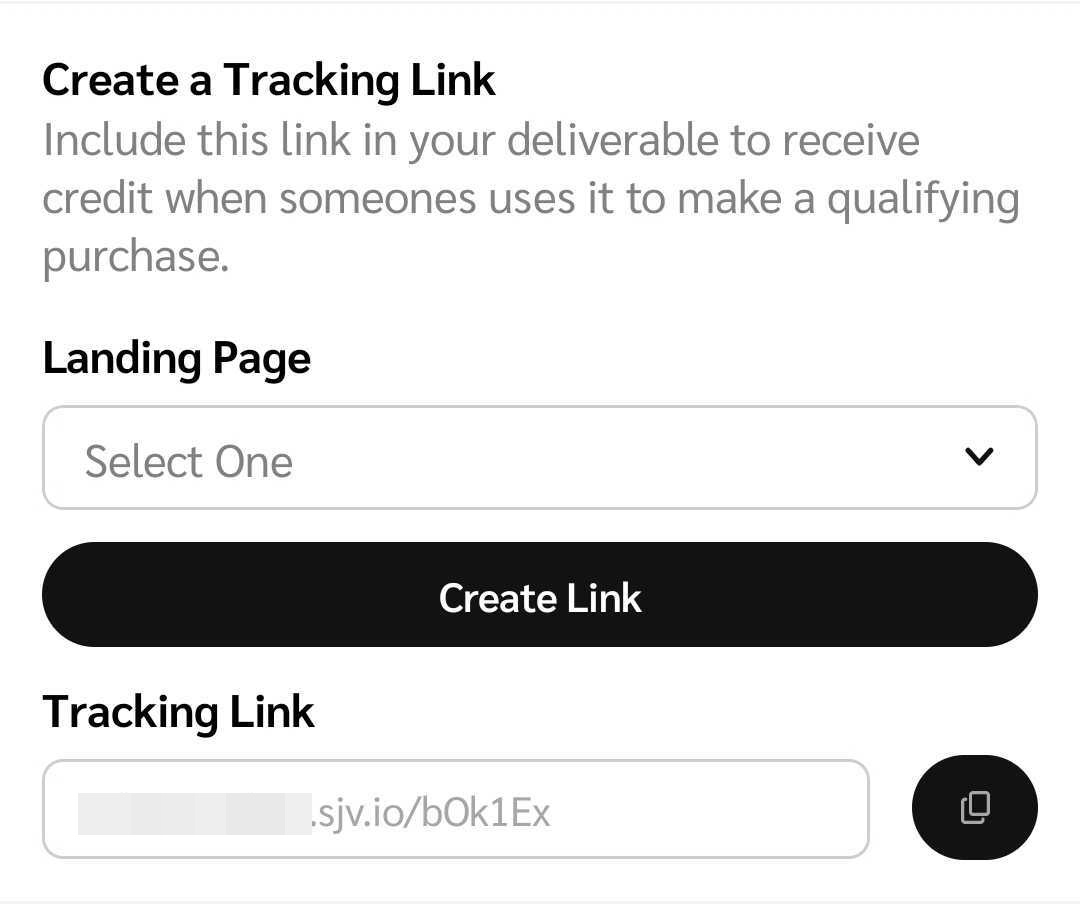
如果您正在参与创作者活动，您可以为与特定任务相关的素材获取跟踪链接。

1. 从屏幕底部的导航栏中，选择 ![](/files/73b2320e30be608cb6dc2bbd87dae5e3cdffd45e) **\[任务]**.
2. 在 *活动任务* 界面中，找到并选择您要为其生成跟踪链接的任务。
   * 选择 ![](/files/cd014655c4c89f8f2f61ce9532c6f031ca249694) **\[筛选]** 在右上角按特定类别筛选任务。请参阅 *筛选参考* 以下以获取更多信息。
3. 根据品牌在设置活动时选择的跟踪链接设置，您的跟踪链接将因以下 3 种设置中的 1 种而有所不同：
   * **您将流量引导至您选择的落地页：** 手动输入落地页。
   * **您将流量引导至品牌选择的特定落地页：** 从下拉菜单中选择您保存的落地页。
   * **您将流量引导至品牌项目的默认落地页：** 您的默认落地页将自动填充，并且跟踪链接将自动生成。
4. 根据跟踪链接配置，选择 **创建链接** 和 ![](/files/7683a0c21fc2317d3e28a9fbcf990236f0db367e) **\[复制]** 该链接并将其分享给您的受众。

   <div data-with-frame="true"><figure><img src="/files/629cb909be922e75259d885d88e8cf536337c54f" alt="" width="375"><figcaption></figcaption></figure></div>

<details>

<summary>筛选参考</summary>

| 筛选   | 说明                                                                                                                                                                    |
| ---- | --------------------------------------------------------------------------------------------------------------------------------------------------------------------- |
| 排序方式 | 将任务按 *升序* 或 *降序* 按发布日期排序。                                                                                                                                             |
| 状态   | <p>按以下任一进度状态筛选任务：</p><p>• <em>已完成</em> — 品牌已批准的交付物。</p><p>• <em>进行中</em> — 草稿或交付物等待品牌审核。</p><p>• <em>等待提交交付物</em> — 等待你提交交付物的任务。</p><p>• <em>未开始</em> — 你尚未开始的任务。</p> |
| 品牌   | 通过搜索品牌并选择相关的 ![](/files/ec3071b8d8e071cd82dbd77e267195afa7d6e423) **\[复选框]**.                                                                                         |
| 活动   | 通过搜索活动并选择相关的，筛选与特定创作者活动相关的任务 ![](/files/ec3071b8d8e071cd82dbd77e267195afa7d6e423) **\[复选框]**.                                                                         |
| 任务类型 | 通过选择相关的内容，筛选特定类型的任务帖子 ![](/files/ec3071b8d8e071cd82dbd77e267195afa7d6e423) **\[复选框]**.                                                                                |

</details>


---

# Agent Instructions
This documentation is published with GitBook. GitBook is the documentation platform designed so that both humans and AI agents can read, navigate, and reason over technical content effectively. Learn more at gitbook.com.

## Querying This Documentation
If you need additional information that is not directly available in this page, you can query the documentation dynamically by asking a question.

Perform an HTTP GET request on the current page URL with the `ask` query parameter, and the optional `goal` query parameter:

```
GET https://help.impact.com/partner/zh/ni-xiang-liao-jie-shen-me/impactcom-mobile-app/mobile-app-creator-campaigns/generate-campaign-tracking-links-on-the-mobile-app.md?ask=<question>&goal=<endgoal>
```

`ask` is the immediate question: it should be specific, self-contained, and written in natural language.
`goal` is optional and describes the broader end goal you are ultimately trying to accomplish on behalf of the user. GitBook uses it to tailor the answer towards what is most useful for that goal.

The response will contain a direct answer to the question and relevant excerpts and sources from the documentation.

Use this mechanism when the answer is not explicitly present in the current page, you need clarification or additional context, or you want to retrieve related documentation sections.