> For the complete documentation index, see [llms.txt](https://help.impact.com/llms.txt). Markdown versions of documentation pages are available by appending `.md` to page URLs; this page is available as [Markdown](https://help.impact.com/partner/zh/ni-xiang-liao-jie-shen-me/impactcom-mobile-app/getting-started-on-the-mobile-app/explore-impactcoms-mobile-app.md).
# 探索 impact.com 移动应用
参加 PXA 课程
欢迎使用 impact.com 的移动应用!四处看看,了解各项功能的位置。
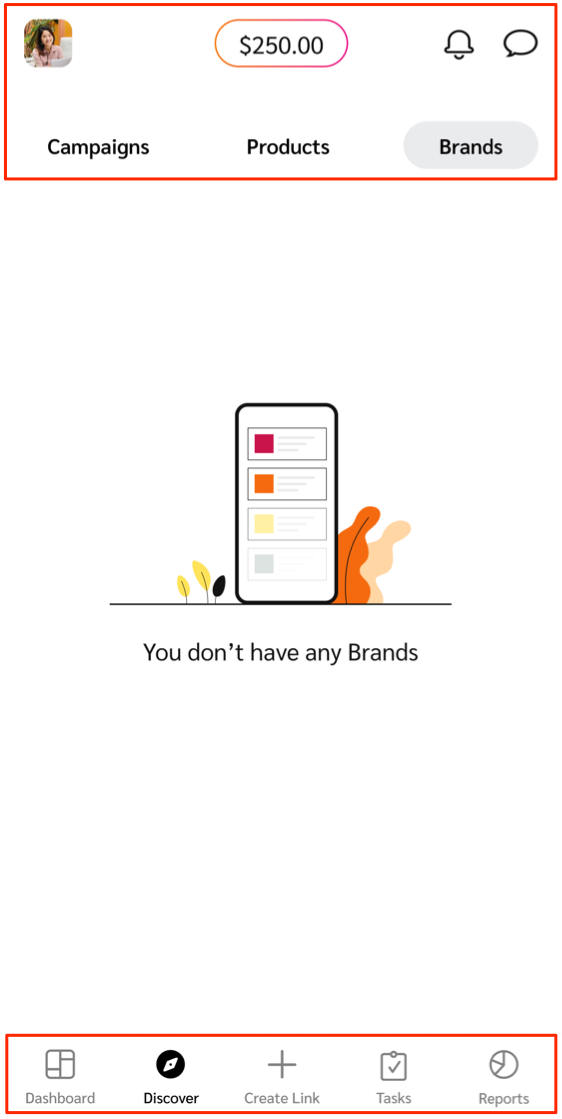
#### 顶部栏
顶部栏中可找到您的个人资料设置、账户余额、账户通知,以及与品牌的消息线程。
| 顶部栏选项 | 说明 |
| --------------------------------------------------------------------------------------------------------------------------------------------------------------------------------------------------------------------------------------------------------------------------- | --------------------------------------------------------------------------------------------------------------------------------------------------------------------------------- |
|  **\[个人资料]** | 你的 [用户资料](/partner/zh/ni-xiang-liao-jie-shen-me/impactcom-mobile-app/mobile-app-account-administration/manage-your-user-profile-on-the-mobile-app.md) 包含联系方式、公司信息,以及语言和密码设置等常规设置。 |
| **可用余额** | 此功能会实时显示可供提取的资金。请访问 [*报告*](/partner/zh/ni-xiang-liao-jie-shen-me/impactcom-mobile-app/mobile-app-reporting/mobile-app-reports-overview.md) 页面,查看在自动提现吗之前您还需赚取多少。 |
|  **\[通知]** | 查看最近的账户通知列表,并按最新程度分组。每条通知都有时间戳和简短说明。 |
|  **\[消息]** | 打开收件箱,查看并向品牌发送消息。了解更多关于 [向品牌发送消息](/partner/zh/ni-xiang-liao-jie-shen-me/impactcom-mobile-app/working-with-brands-on-the-mobile-app/message-your-brands-on-the-mobile-app.md). |
#### 底部菜单栏
在底部菜单栏中,您可以找到发现品牌、产品和创作者活动、创建跟踪链接、跟踪项目表现等选项。
| 菜单选项 | 说明 |
| --------------------------------------------------------------------------------------------------------------------------------------------------------------------------------------------------------------------------------------------------------------------------- | ---------------------------------------------------------------------------------------------------------------------------------------------------------------------------------------------------------------------------------------------------------------------------------------------------------------------------------------------------------------------------------------------------------------------------------------------------------------------------------------------------------------------------------------------------------------------------------------------------------------------------------------------------------------------------------- |
|  **\[仪表板]** | 查看待办事项,例如未处理的 [项目邀请](/partner/zh/ni-xiang-liao-jie-shen-me/impactcom-mobile-app/working-with-brands-on-the-mobile-app/manage-brand-invites-and-applications-on-the-mobile-app.md) 和 [提案](/partner/zh/ni-xiang-liao-jie-shen-me/impactcom-mobile-app/working-with-brands-on-the-mobile-app/manage-brand-proposals-on-the-mobile-app.md) 需要您审核的,或 [活动邀请](/partner/zh/ni-xiang-liao-jie-shen-me/impactcom-mobile-app/mobile-app-creator-campaigns/join-creator-campaigns-on-the-mobile-app.md) 和 [任务](/partner/zh/ni-xiang-liao-jie-shen-me/impactcom-mobile-app/mobile-app-creator-campaigns/submit-campaign-tasks-on-the-mobile-app.md) 如果您是创作者。如果您没有任何待办事项,您可以查看业绩概览,或快速进入您的品牌和产品。 |
|  **\[发现]** | 搜索已合作品牌、新 [可合作的品牌](/partner/zh/ni-xiang-liao-jie-shen-me/impactcom-mobile-app/working-with-brands-on-the-mobile-app/apply-to-brands-on-the-mobile-app.md)或要推广的产品。 |
|  **\[邀请]** | 管理 项目邀请 和 提案 您从品牌收到的邀请。
只有加入 impact.com marketplace 后,您才会看到此菜单选项。
|
|  **\[创建链接]** | 快速 [获取并自定义跟踪链接](/partner/zh/ni-xiang-liao-jie-shen-me/impactcom-mobile-app/working-with-brands-on-the-mobile-app/create-tracking-links-on-the-mobile-app.md) 适用于您已合作的品牌。 |
|  **\[活动任务]** | 查看和管理创作者 活动任务 在不同品牌和活动中。
只有您是创作者时,才会看到此菜单选项。
|
|  **\[报告]** | 使用以下方式跟踪并查看您的营销效果表现 [移动应用报告](/partner/zh/ni-xiang-liao-jie-shen-me/impactcom-mobile-app/mobile-app-reporting/mobile-app-reports-overview.md). |
---
# Agent Instructions
This documentation is published with GitBook. GitBook is the documentation platform designed so that both humans and AI agents can read, navigate, and reason over technical content effectively. Learn more at gitbook.com.
## Querying This Documentation
If you need additional information that is not directly available in this page, you can query the documentation dynamically by asking a question.
Perform an HTTP GET request on the current page URL with the `ask` query parameter, and the optional `goal` query parameter:
```
GET https://help.impact.com/partner/zh/ni-xiang-liao-jie-shen-me/impactcom-mobile-app/getting-started-on-the-mobile-app/explore-impactcoms-mobile-app.md?ask=&goal=
```
`ask` is the immediate question: it should be specific, self-contained, and written in natural language.
`goal` is optional and describes the broader end goal you are ultimately trying to accomplish on behalf of the user. GitBook uses it to tailor the answer towards what is most useful for that goal.
The response will contain a direct answer to the question and relevant excerpts and sources from the documentation.
Use this mechanism when the answer is not explicitly present in the current page, you need clarification or additional context, or you want to retrieve related documentation sections.