> For the complete documentation index, see [llms.txt](https://help.impact.com/llms.txt). Markdown versions of documentation pages are available by appending `.md` to page URLs; this page is available as [Markdown](https://help.impact.com/partner/zh/ni-xiang-liao-jie-shen-me/campaigns/creator-campaigns/social-property-campaign-linking/add-links-to-your-tiktok-videos.md).

# 为您的 TikTok 视频添加链接

如果你已经 [已连接并验证了你的 TikTok 账户](/partner/zh/ni-xiang-liao-jie-shen-me/account-management/account-settings/connect-media-properties/connect-a-social-media-profile.md) 在 impact.com 上，你可能有资格参与测试一项新的 TikTok 功能：将 impact.com 商品链接添加到你的自然 TikTok 视频中。

## 要求

* 你拥有一个 [已连接并已验证](/partner/zh/ni-xiang-liao-jie-shen-me/account-management/account-settings/connect-media-properties/connect-a-social-media-profile.md) 在 impact.com 上的 TikTok 个人（非商业）账户。
* 你的 TikTok 账户必须在 2024 年 11 月 17 日前添加并在 impact.com 上验证。
* 你在 impact.com 创作者账户下列出的国家 *公司地址* 以及你的 TikTok 账户的 *位置* 都必须是 `美国`.
* 你已被列入允许名单，可参与。
  * 被列入允许名单意味着 impact.com 已将你已连接的 TikTok 账户发送给 TikTok，并且他们已为你开启该功能。

如果你满足上述要求， [联系支持](https://app.impact.com/support/portal.ihtml?createTicket=true) 以申请访问权限。

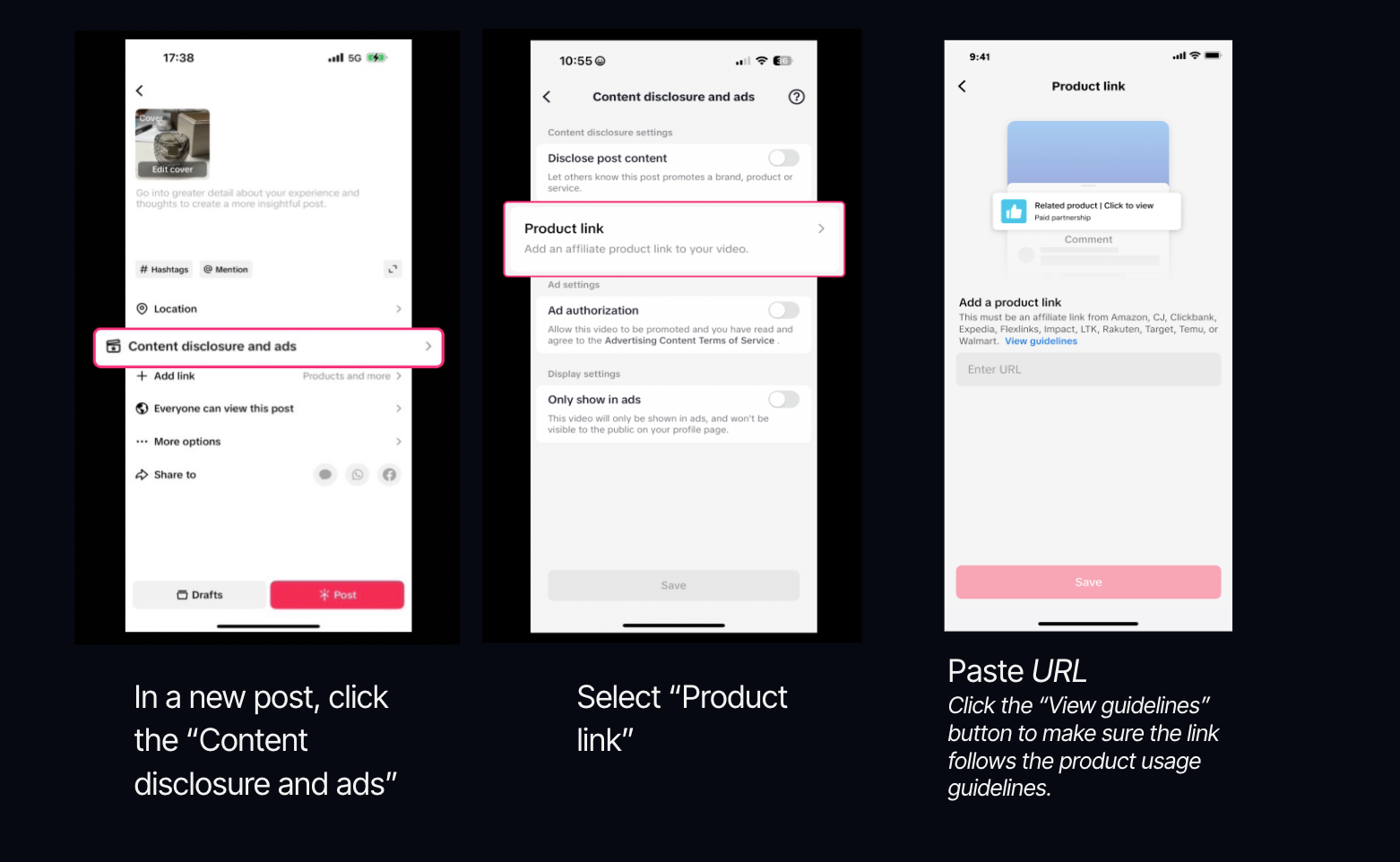
## 将商品链接添加到你的 TikTok 视频中

{% hint style="success" %}
此功能仅适用于特定的 impact.com 版本或附加组件。 [联系我们](https://app.impact.com/support/portal.ihtml?createTicket=true) 以升级你的账户并获得访问权限！
{% endhint %}

{% hint style="warning" %}
**重要：** 此测试版功能将于 2024 年 12 月 14 日结束。现有商品链接在此日期后仍将继续有效，但你将无法再向 TikTok 添加新链接。
{% endhint %}

1. 打开 *发布视频* 模块。
2. 选择 **内容披露和广告**.
3. 选择 **商品链接**.
4. **复制并粘贴** 你的 impact.com 商品链接到 *URL* 字段中输入该操作 ID。
   * 了解如何 [获取商品链接](/partner/zh/ni-xiang-liao-jie-shen-me/platform-features/tracking/tracking-links/create-and-manage-links/create-tracking-links.md#get-a-tracking-link-for-a-specific-product-0-2) 在 impact.com 上。

<details>

<summary>链接资格标准</summary>

* 仅 **单个商品详情页** 支持链接。聚合商品页面或链接树不被允许。 **我们强烈建议你选择“查看指南”链接，并了解哪些链接会被接受。**
* 你推广的商品必须 [遵守 TikTok 规定](https://ads.tiktok.com/help/article/tiktok-advertising-policies) .

</details>

5. 选择 **提交** → **保存**.
6. **发布** 你的视频。

   * 你每天最多可提交 7 个链接。
   * 链接在提交后将接受 12 小时审核。
   * 如果你的任何链接被标记，它们将从你的帖子中移除，但你的帖子仍会保留上线。
   * 你只能在以下视频中添加链接： *品牌内容* 是否 ![](https://1152657667-files.gitbook.io/~/files/v0/b/gitbook-x-prod.appspot.com/o/spaces%2Fb2rE79d9UhOKZQLgzSqx%2Fuploads%2FEv341AdIiPndQSb7uGMI%2FToggle%20on.svg?alt=media\&token=4ae8972d-c510-4ee2-adc5-e7170981650b) **\[已开启]**.
   * 商品将固定在你视频评论区顶部。

   <div data-with-frame="true"><figure><img src="https://1152657667-files.gitbook.io/~/files/v0/b/gitbook-x-prod.appspot.com/o/spaces%2Fb2rE79d9UhOKZQLgzSqx%2Fuploads%2Fgit-blob-3cd2c1880225b4af6e6d1dcac915c8f937412521%2F4dbd593bdfde39a4ed1ee7530aade37f122a730c1fb6cc49e87f175850b07407.png?alt=media" alt=""><figcaption></figcaption></figure></div>


---

# Agent Instructions
This documentation is published with GitBook. GitBook is the documentation platform designed so that both humans and AI agents can read, navigate, and reason over technical content effectively. Learn more at gitbook.com.

## Querying This Documentation
If you need additional information that is not directly available in this page, you can query the documentation by asking a question.

Perform an HTTP GET request on the following URL with the `ask` and `goal` query parameters:

```
GET https://help.impact.com/partner/zh/ni-xiang-liao-jie-shen-me/campaigns/creator-campaigns/social-property-campaign-linking/add-links-to-your-tiktok-videos.md?ask=<question>&goal=<user_goal>
```

`ask` is the immediate question: it should be specific, self-contained, and written in natural language.
`goal` is what the user is ultimately trying to achieve, the reason they need the answer. Sharing it helps GitBook give you a better, more relevant answer. A goal is most helpful when it describes the outcome the user wants rather than restating the question. For example, with `ask=how do I create an API token`, a goal like `automate deployments from our CI pipeline` lets GitBook tailor the answer to that use case.

The response will contain a direct answer to the question and relevant excerpts and sources from the documentation.

Use this mechanism when the answer is not explicitly present in the current page, you need clarification or additional context, or you want to retrieve related documentation sections.