# Contracts Explained for Partners

Contracts in impact.com allow brands to establish the terms of their partnerships with partners. When you receive a [contract proposal](https://help.impact.com/partner/what-would-you-like-to-learn-about/platform-features/working-with-brands/contracts/manage-your-brand-program-term-proposals) from a brand or are [applying to join a program](https://help.impact.com/partner/what-would-you-like-to-learn-about/platform-features/working-with-brands/applying-to-brands/find-and-apply-to-brands), you should understand what you are signing up for. Carefully review a contract proposal before accepting the terms.

{% hint style="info" %}
**Note:** All contracts within impact.com require you to agree to the [Impact Master Campaign Agreement](https://app.impact.com/content/MCA.ihtml), which defines your relationship with impact.com, and is legally binding document when agreed to.
{% endhint %}

#### View and manage your contracts

1. From the top navigation menu, select **Discover** → **My Brands**.
2. Find the relevant brand and select the brand's tile.
3. From the slideout, select ![](https://347878556-files.gitbook.io/~/files/v0/b/gitbook-x-prod.appspot.com/o/spaces%2Fb2rE79d9UhOKZQLgzSqx%2Fuploads%2Fgit-blob-8ec3e877b1397045c61d394485e72ac4d93120ee%2Fc6ddb46c637059f06e86c790a911217a9428f5c47b5efef046f90555e85b03cd.svg?alt=media) **\[More]** → **View And Manage Contract**.
   * Refer to the contract sections below to learn more about a contract's details.

#### Contract sections

<details>

<summary>Payout details</summary>

The *payout details* section of your contract can include information about the specified payout type, including payout amount, restrictions, and limits.

|                         |                                                                                                                                                                                                                                                                                                                                                                                                                               |
| ----------------------- | ----------------------------------------------------------------------------------------------------------------------------------------------------------------------------------------------------------------------------------------------------------------------------------------------------------------------------------------------------------------------------------------------------------------------------- |
| **Field**               | **Description**                                                                                                                                                                                                                                                                                                                                                                                                               |
| **Default Payout**      | The amount the brand will pay you per sale, sign-up, installation, impression, or other actions you drive. This amount can either be a fixed amount or a percentage of the sale.                                                                                                                                                                                                                                              |
| **Payout Groups**       | Payout groups change the default payout if an action characteristic matches a specific condition set.                                                                                                                                                                                                                                                                                                                         |
| **Payout Restrictions** | Payout restrictions will stop an action from generating a payout if an action characteristic matches a specific condition set.                                                                                                                                                                                                                                                                                                |
| **Limits**              | <p>Brands can set a limit to the number of actions that can generate a payout or just set a total payout limit for a given period.</p><p>• Any actions driven above this limit are considered <a href="../../action-management/where-can-i-see-my-pending-actions-as-a-partner">Outside of Terms</a>, will have a status of <code>Exceeded Action Cap</code> and will not be payable unless manually approved by a brand.</p> |

<div data-with-frame="true"><figure><img src="https://347878556-files.gitbook.io/~/files/v0/b/gitbook-x-prod.appspot.com/o/spaces%2Fb2rE79d9UhOKZQLgzSqx%2Fuploads%2Fgit-blob-0193798d991f0f8d421f26c4f62667c7b8eedade%2F554b1cfbccd74a43aa56ea84bf4013d4dff14ee52440f669c35b8d937b7fb0d8.png?alt=media" alt=""><figcaption></figcaption></figure></div>

</details>

<details>

<summary>Scheduling</summary>

This is the section of the contract that defines how long you have to query actions before they lock, when actions will be [invoiced](https://help.impact.com/partner/what-would-you-like-to-learn-about/platform-features/finance/finance-documents/invoices-explained-for-partners), and [when payouts will be paid](https://help.impact.com/partner/what-would-you-like-to-learn-about/platform-features/finance/payments-withdrawals-and-balance/why-havent-i-received-my-payouts-yet) for actions driven.

{% hint style="info" %}
**Note:** Regarding action inquiries: Only cashback or loyalty partners can [create action inquiries](https://help.impact.com/partner/what-would-you-like-to-learn-about/platform-features/action-management/action-inquiries/manage-submitted-action-inquiries-as-a-partner). If you're a cashback or loyalty partner and can't see this feature, [contact support](https://app.impact.com/support/portal.ihtml?createTicket=true\&accountType=PARTNER).
{% endhint %}

|                       |                                                                                                                                                                                                                                                                                                                             |
| --------------------- | --------------------------------------------------------------------------------------------------------------------------------------------------------------------------------------------------------------------------------------------------------------------------------------------------------------------------- |
| **Field**             | **Description**                                                                                                                                                                                                                                                                                                             |
| **Action Locking**    | This is the period (in days and months) after an action is tracked that you can [query the action](https://help.impact.com/partner/what-would-you-like-to-learn-about/platform-features/action-management/action-inquiries/manage-submitted-action-inquiries-as-a-partner), and the brand can modify or reverse the action. |
| **Invoicing**         | The date on which locked actions will be invoiced.                                                                                                                                                                                                                                                                          |
| **Payout Scheduling** | <p>Brands can choose to schedule payments for locked actions at a later time than when they became locked.</p><p>See the <em>Payout scheduling reference</em> section below for more information on how this works.</p>                                                                                                     |

<div data-with-frame="true"><figure><img src="https://347878556-files.gitbook.io/~/files/v0/b/gitbook-x-prod.appspot.com/o/spaces%2Fb2rE79d9UhOKZQLgzSqx%2Fuploads%2Fgit-blob-de4cd2e14702aa1f4c53c6af819aa86f165db8e3%2Fd9a124e7e3daa55087c126635355aba36e8aa6e4313098e6b5bb599834be392a.png?alt=media" alt=""><figcaption></figcaption></figure></div>

**Payout scheduling reference**

|                                                             |                                                                                                                                 |                                                                                                                   |
| ----------------------------------------------------------- | ------------------------------------------------------------------------------------------------------------------------------- | ----------------------------------------------------------------------------------------------------------------- |
| **Option**                                                  | **Description**                                                                                                                 | **Example**                                                                                                       |
| **Pay actions on the \[x] of the month after they locked**  | All actions that were locked in a given locking window will be paid out on a set date in the month after they were locked.      | Actions that are locked on February 15th will be paid out to you on a set date in March                           |
| **Pay actions \[x] day(s) after they locked**               | All actions that were locked in a given locking window will be paid out a set number of days after they were locked.            | Actions that are locked on February 15th will be paid out a chosen number of days after February 15th.            |
| **Pay actions \[x] month(s) and \[x] days after they lock** | All actions that were locked in a given locking window will be paid out a set number of months and days after they were locked. | Actions that are locked on February 15th will be paid out a chosen number of months and days after February 15th. |

</details>

<details>

<summary>Qualified referrals</summary>

This section of the contract defines what you need to do to receive credit for an action (**Credit Policy**) and how long after you drove traffic to the brand’s website that you can still be credited (**Referral Window**) for driving the action.

<div data-with-frame="true"><figure><img src="https://347878556-files.gitbook.io/~/files/v0/b/gitbook-x-prod.appspot.com/o/spaces%2Fb2rE79d9UhOKZQLgzSqx%2Fuploads%2Fgit-blob-16e7b3b4690cbbdc71f69b475d9b322ad43ac234%2Fc020f8e434cb68a8a478023f0ea3420377eeaa3897f9c44064c0469bb6e2a3be.png?alt=media" alt=""><figcaption></figcaption></figure></div>

</details>

<details>

<summary>General terms</summary>

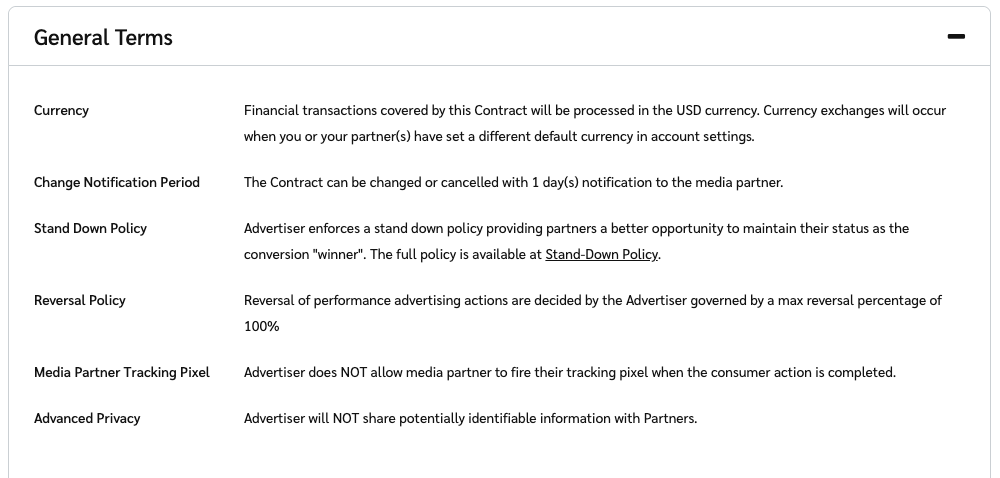
The general terms of a contract are custom terms set by brands that apply across the entire contract. Below are some of the more commonly used general terms.

|                                  |                                                                                                                                                                                                                                                                                                                                                                                                                                                                                                  |
| -------------------------------- | ------------------------------------------------------------------------------------------------------------------------------------------------------------------------------------------------------------------------------------------------------------------------------------------------------------------------------------------------------------------------------------------------------------------------------------------------------------------------------------------------ |
| **Term**                         | **Description**                                                                                                                                                                                                                                                                                                                                                                                                                                                                                  |
| **Currency**                     | The currency in which the brand will pay you. If you’ve set a different currency in your [company information](https://help.impact.com/partner/what-would-you-like-to-learn-about/account-management/account-settings/account-management/manage-your-company-information-as-a-partner), the currency may be exchanged.                                                                                                                                                                           |
| **Change Notice Period**         | The notice period that the brand must give you before changing or canceling the contract.                                                                                                                                                                                                                                                                                                                                                                                                        |
| **Stand Down Policy**            | <p>Indicates that the brand is enforcing a stand-down policy that prevents certain partners—particularly those using browser extensions, toolbars, or in-cart solutions—from interfering with clicks that you drove.</p><p>If this policy is not visible in your general terms, it means that the brand is not enforcing a stand-down policy.</p>                                                                                                                                                |
| **Reversal Policy**              | The policy by which the brand may [reverse actions](https://help.impact.com/partner/what-would-you-like-to-learn-about/platform-features/action-management/reversed-actions-explained-for-partners) driven by you.                                                                                                                                                                                                                                                                               |
| **Media Partner Tracking Pixel** | <p>Indicates whether the brand allows you to place a <a href="../../tracking/piggyback-pixels/partner-piggyback-pixels-overview">partner piggyback pixel</a> on their confirmation page or not.</p><p>To use pixels, these requirements must be met:</p><p>• The partnered brand must use pixel tracking (non-pixel tracking means no pixels exist to piggyback off of)</p><p>• You must have your own system, separate from impact.com, that can receive and ingest the pixel’s information</p> |
| **Advanced Privacy**             | When a brand has advanced privacy enabled, they'll limit the data shared with you by removing user identifiers and sensitive information from reports and postbacks.                                                                                                                                                                                                                                                                                                                             |

<div data-with-frame="true"><figure><img src="https://347878556-files.gitbook.io/~/files/v0/b/gitbook-x-prod.appspot.com/o/spaces%2Fb2rE79d9UhOKZQLgzSqx%2Fuploads%2Fgit-blob-68f75605eceb6a75c7de44c028e5b5c034f16681%2F4bc991789b7f8b38f557bbed8d925dabd6d3cb283c8606c13f8d8638aa29110e.png?alt=media" alt=""><figcaption></figcaption></figure></div>

</details>

#### Contract best practices

* Always read the entire contract to ensure that you don't miss any clauses and conditions.
* Pay attention to these terms in the *Payout Details* section:
  * **Payout Restrictions**: Restrictions prevent an action from generating a payout if a certain condition is met. Make sure you understand all restrictions to avoid promoting products or services that won't be payable.
  * **Limits**: Be aware of any limits on the number of actions or total payout for a given period. Actions that exceed these limits are marked as *Exceeded Action Cap* or [*Outside of Terms*](https://help.impact.com/partner/what-would-you-like-to-learn-about/platform-features/action-management/view-outside-of-terms-actions-as-a-partner) and are not payable unless manually approved.
* Pay attention to the *notice period*. A 0-day notice period is a risk. It means that a brand can change the terms of the contract at any time, without any advance notice. A longer notice period (e.g., 3 days) gives you time to adjust your strategy or negotiate if the new terms are not favorable.
* Identify contract terms that can enhance your earnings. These terms include:
  * **Cost-per-click (CPC) Payout**: In addition to the standard percentage or fixed payout, some brands offer a CPC payout. This is an added bonus for the traffic you drive, even if it doesn't immediately result in a sale.
  * **Minimum Effective Payout (min. EPC)**: This is a guarantee from a brand that your CPA earnings will provide you a minimum CPC rate, ensuring a certain level of CPC earnings when you are engaging with a brand on a CPA basis. It provides a safety net and shows the brand is confident in their conversion funnel and your traffic quality.
  * **Performance Bonus**: These are additional earnings you unlock when you reach specific volume tiers. They reward higher performance by increasing your overall payout.