> For the complete documentation index, see [llms.txt](https://help.impact.com/llms.txt). Markdown versions of documentation pages are available by appending `.md` to page URLs; this page is available as [Markdown](https://help.impact.com/partner/what-would-you-like-to-learn-about/platform-features/trackonomics/trackonomics-reports/overview-by-story-report.md).
# Overview by Story Report
**Upgrade**: This feature is available for free with Trackonomics Essentials. To access it, along with a suite of additional tools to grow your program, [activate Trackonomics Essentials](https://impact.com/trackonomics-essentials/) today.
This report helps you analyze how your stories or posts perform across key metrics. Use it to understand which content pieces drive engagement and revenue over specified time periods.
#### Access the report
 This feature is only available with the Trackonomics add-on. Contact [support](mailto:trackonomics.support@impact.com) for further information.
1. From the top navigation menu, select **Trackonomics**.
2. From the drop-down menu, select **Overview by Story**.
{% hint style="warning" %}
**Important:** To make full use of this report, you must have impact.com's [Publisher Tag](/partner/what-would-you-like-to-learn-about/platform-features/tracking/tracking-links/create-and-manage-links/publisher-tag-implementation-for-partners.md) installed on your website.
{% endhint %}
#### Report data segments
The data in this report is organized into the following sections:
{% tabs %}
{% tab title="Interactive performance chart" %}
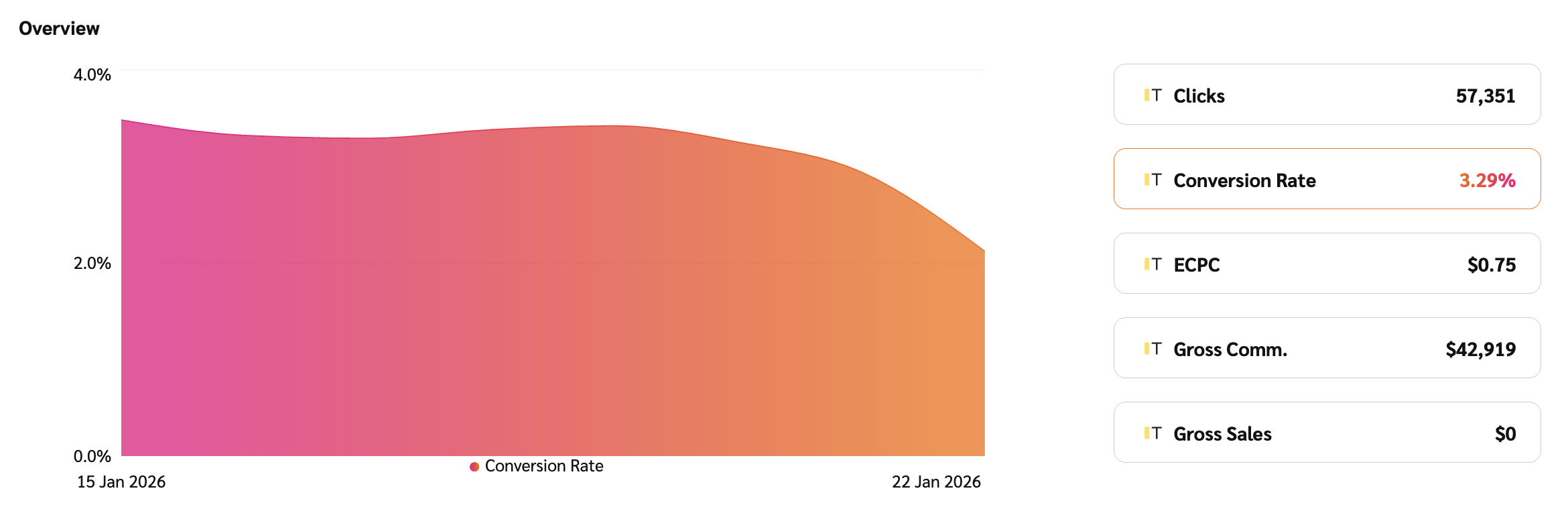
This section features a graph and an interactive metric display.
1. **Primary trend graph:** This area chart displays the trend of a single metric over your selected date range. The metric shown is controlled by the metric selector buttons located to the right of the graph.
2. **Metric selector buttons:** These buttons (e.g., *Gross Commission*, *Clicks*, *Gross Sales*) allow you to quickly change the data displayed in the primary trend graph, providing an immediate overview of that metric's performance.
{% endtab %}
{% tab title="Data table" %}
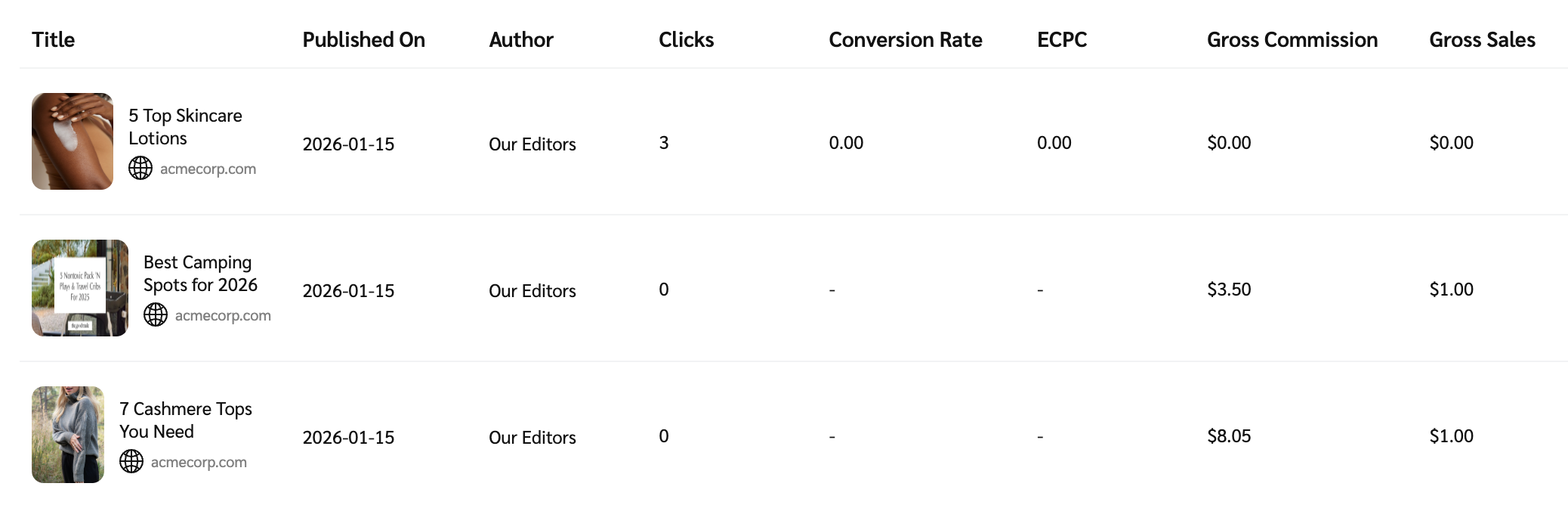
This set of data is presented in a table that covers data related to a specific post where a user performed the tracked action. Hover over a specific story to view a more detailed breakdown, then select **View Report**. For more information, see [Overview by Story Detail Report](/partner/what-would-you-like-to-learn-about/platform-features/trackonomics/trackonomics-reports/overview-by-story-detail-report.md). Refer to the *Data point reference table* for more information on these data points.
{% endtab %}
{% endtabs %}
Data point reference table
| Data point | Description |
| ------------------------------- | ----------------------------------------------------------------------------------------------------------------------------------------------------------------------------------------------- |
| Title | The title of the story or post where the tracked action (e.g., click or conversion) occurred. |
| Published On | The date the story or post was originally published. |
| Author | The author associated with the story or post. |
| Clicks | The number of times impact.com tracked users clicking your affiliate links. This includes both unique and repeat clicks and helps measure traffic and engagement. |
| Conversion Rate (CR) | The percentage of clicks that led to a successful, valid conversion (sale or lead). This metric helps gauge how well your traffic converts into actions. |
| Effective Cost Per Click (eCPC) | The average commission earned per click, calculated by dividing your total commission earnings by the total clicks you generate. |
| Gross Commission | The total commission for all valid actions (approved conversions only), before any deductions like adjustments. This amount reflects what you would earn if no reversals or clawbacks occurred. |
| Gross Sales | The total value of validated sales (e.g., product purchases) that were not canceled or refunded. This metric reflects revenue driven by the story. |
---
# Agent Instructions
This documentation is published with GitBook. GitBook is the documentation platform designed so that both humans and AI agents can read, navigate, and reason over technical content effectively. Learn more at gitbook.com.
## Querying This Documentation
If you need additional information that is not directly available in this page, you can query the documentation by asking a question.
Perform an HTTP GET request on the following URL with the `ask` and `goal` query parameters:
```
GET https://help.impact.com/partner/what-would-you-like-to-learn-about/platform-features/trackonomics/trackonomics-reports/overview-by-story-report.md?ask=&goal=
```
`ask` is the immediate question: it should be specific, self-contained, and written in natural language.
`goal` is what the user is ultimately trying to achieve, the reason they need the answer. Sharing it helps GitBook give you a better, more relevant answer. A goal is most helpful when it describes the outcome the user wants rather than restating the question. For example, with `ask=how do I create an API token`, a goal like `automate deployments from our CI pipeline` lets GitBook tailor the answer to that use case.
The response will contain a direct answer to the question and relevant excerpts and sources from the documentation.
Use this mechanism when the answer is not explicitly present in the current page, you need clarification or additional context, or you want to retrieve related documentation sections.