Share Tracking Links to Social Media
You can post tracking links to your socials or attach them to an image or text you've created. When a user follows the link, they will be directed to the brand's landing page, and credit for driving the click will be attributed to your impact.com account.
Depending on the brand in question, you may also be permitted to deep link a tracking link, i.e., use a tracking link to send customers directly to a specific page on the brand's website or app.
Share a tracking or vanity link for a specific brand program
Follow the steps to create a tracking link for a specific brand program or to create a vanity link.
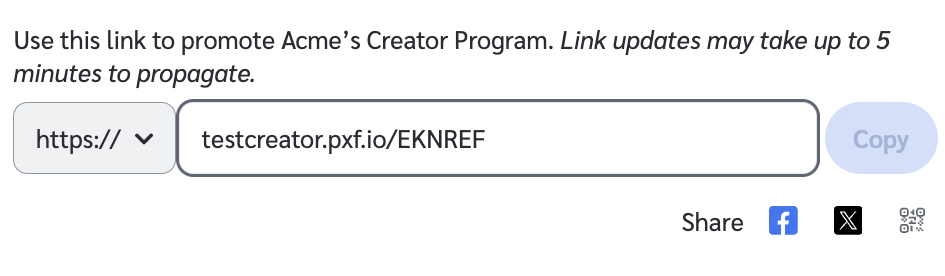
To share the link directly to Facebook, Twitter/X, or via QR code, select the appropriate social media icon next to Share.
If you haven't yet connected your social media properties, see Connect a Social Media Profile.
Alternatively, to share the link elsewhere, select anywhere in the tracking link field to copy the link to your clipboard.
See the Best practices section below for guidelines when posting tracking links.

Important: When creating QR codes, impact.com highly recommends that you select Download to download them as they are not saved on the platform.
Share a tracking link for a specific ad
Follow the steps to get a tracking link for a specific ad.
Select Copy Tracking Link.
See the Best practices section for guidelines when placing tracking links.
Share a tracking link for a specific product
Follow the steps to get a tracking link for a specific product.
Select Copy Tracking Link.
See the Best practices section for guidelines when placing tracking links.
Best practices
Social media character limits
Some social media platforms will truncate links longer than a certain number of characters. If your links end up being longer than these limits, consider creating a vanity link.
YouTube
40 characters
19 characters for the domain, 32 characters for the entire link
26 characters
Twitter / X
23 characters
Last updated
Was this helpful?


Social media guidelines
Some social media platforms have requirements and restrictions for adding promotional links. For example, YouTube requires you to include the URL protocol (
https://). Another example is Instagram, where you can't add links within a post.YouTube
Include the URL protocol (for example,
https://) when placing links.Facebook
Avoid using generalized short links (like bit.ly).
Instagram
Links can only be added to a profile's bio or to story posts.
Pinterest
Avoid using generalized short links (like bit.ly). Also avoid using tracking links on every Pin.
LinkedIn
Do not use white space in links (e.g.,
https://www.ACME Corp.com).TikTok
Links can only be added to business accounts with more than 1,000 followers. If you don't meet these requirements, consider linking your Instagram or YouTube account to TikTok and hosting links on those sites instead.
Twitter / X
No special requirements.
Twitch
No special requirements.
WeChat
No special requirements.
Weibo
No special requirements.