> For the complete documentation index, see [llms.txt](https://help.impact.com/llms.txt). Markdown versions of documentation pages are available by appending `.md` to page URLs; this page is available as [Markdown](https://help.impact.com/partner/what-would-you-like-to-learn-about/platform-features/marketing-content/product-marketplace-and-catalogs/download-product-catalogs-as-a-partner.md).
# Download Product Catalogs as a Partner
Many retail brands will upload and maintain *product catalogs*, which are data feed files that list their products and any metadata about those products. Brands on impact.com are advised to update their catalogs daily with the latest prices and stock availability. You can download your brands' catalogs in the following ways:
* **Platform download** — Log in to your impact.com partner account and download a compressed version of the file.
* **FTP download** — Receive login details to access the server storing the file, then save the file to your device.
* **API retrieval** — Get a list of catalogs or products available to you, then download the data if needed.
## Option 1: Download a product catalog in-platform
Use this method to easily download catalogs directly from your impact.com account.
{% hint style="success" %}
**Note:** This download option will only work with files under 3 GB in size. For larger files, refer to [*Option 2: Download a product catalog via FTP*](#option-2-download-a-product-catalog-via-ftp) and [*Option 3: Access product catalogs via API*](#option-3-access-product-catalogs-via-api) below.
{% endhint %}
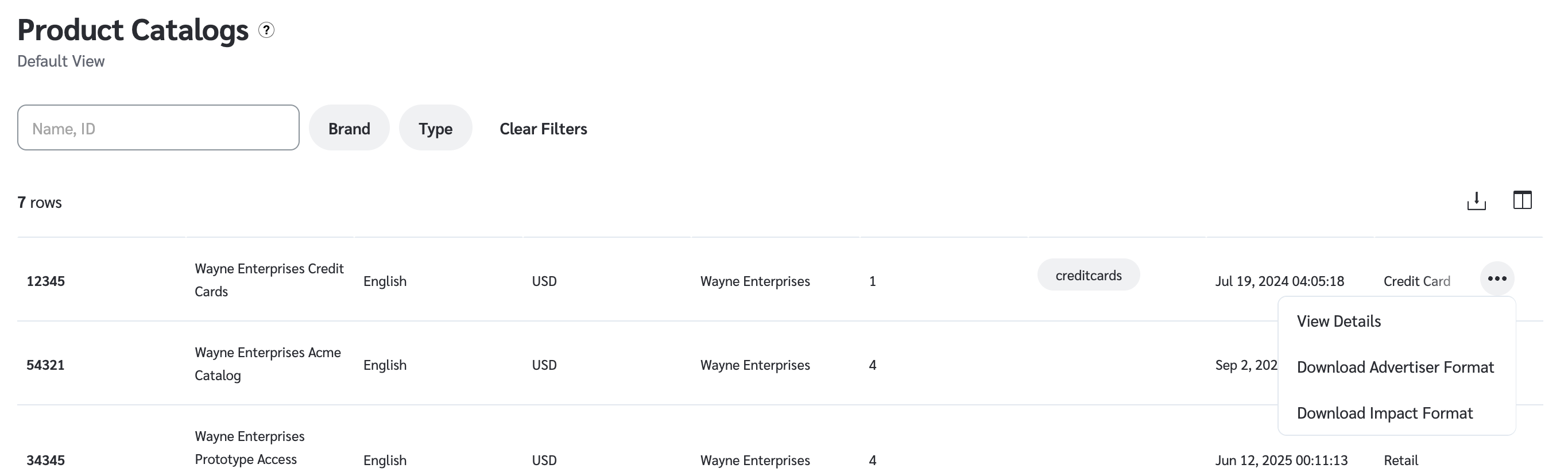
1. From the top navigation bar, select **Content →** [**Product Catalogs**](https://app.impact.com/secure/mediapartner/ads/view-product-catalogs-flow.ihtml).
* Alternatively, from the top navigation bar, select **Manage** **→ More →** [**My Products**](https://app.impact.com/secure/mediapartner/ads/view-product-catalogs-flow.ihtml).
2. Below the *Product Catalogs* heading, use the search bar to find product catalogs according to their name or ID, or use the filters.
* Refer to the [*Filter reference*](#filter-reference) below for details on each filter.
3. Hover over a table row, and from the  **\[More]** menu:
* Select **View Details** for more information about the catalog, like the number of products, file size, and when it was last updated.
* The *Last Updated* date reflects the latest changes to a catalog, including updates the brand makes through the API, which impact.com synchronizes once a day.
* You can also download product catalogs via FTP here. To learn more, refer to [*Download product catalogs via FTP*](#download-product-catalogs-via-ftp) below.
* Select **Download Advertiser Format** to download the product catalog as the brand uploaded it.
* Select **Download Impact Format** to download the impact.com standardized version of this product catalog.
* Downloaded catalogs will be compressed with a `.gz` file extension. To open the file, you will need to make use of decompression software such as [WinZip](https://www.winzip.com/en/) , [WinRAR](https://www.rarlab.com/) , or [7-Zip](https://www.7-zip.org/).
Filter reference
Filter
Description
Brand
Filter catalogs by the associated brand
Type
Filter catalogs by catalog type
Label
Filter catalogs by one or more labels assigned to them
## Option 2: Download a product catalog via FTP
Use this method to download files over 3 GB that are too large to download directly from the platform.
Ensure the following prerequisites:
* You'll need *Technical Settings* [account permissions](/partner/what-would-you-like-to-learn-about/account-management/account-settings/user-management/partner-account-user-roles-and-permissions.md) to receive the FTP credentials.
* You'll need an FTP client (like FileZilla or Cyberduck) to connect to impact.com's FTP server.
1. From the top navigation bar, select **Content →** [**Product Catalogs**](https://app.impact.com/secure/mediapartner/ads/view-product-catalogs-flow.ihtml).
* Alternatively, from the top navigation bar, select **Manage** **→ More →** [**My Products**](https://app.impact.com/secure/mediapartner/ads/view-product-catalogs-flow.ihtml).
2. Find a product catalog that you want to download, hover over the option, and select  **\[More]** → **View Details**.
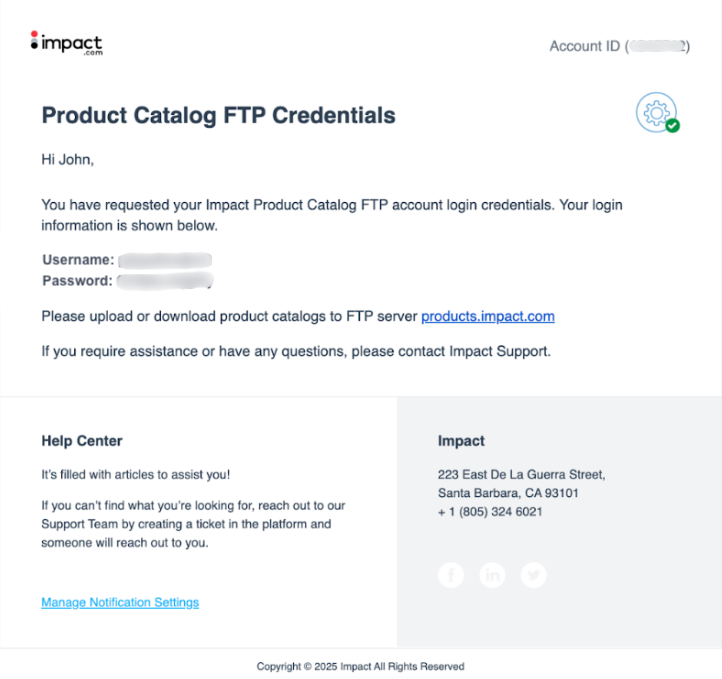
3. Select **Email Product Catalog FTP Username and Password** to receive login credentials for the FTP server via email.
4. Open the email to see the FTP server address and your login credentials.
* Here's an example of an email you'll receive from impact.com:
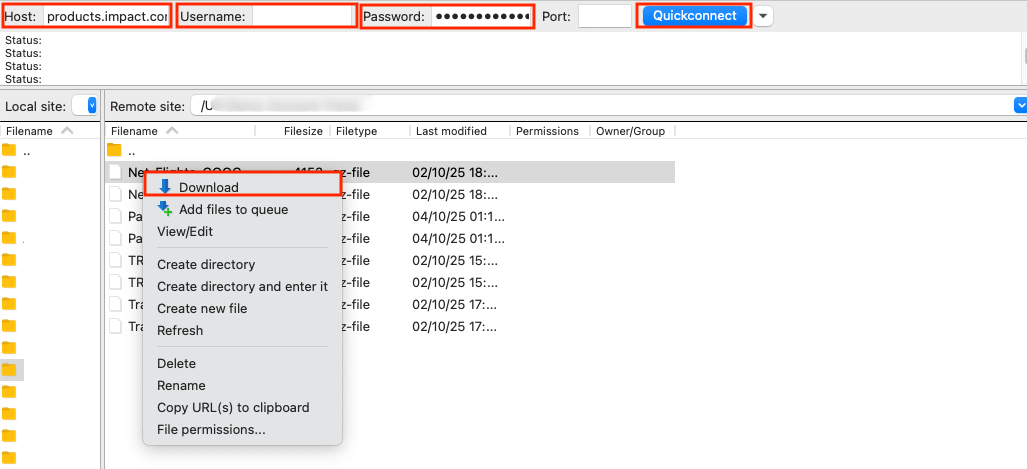
6. In your chosen FTP client, enter the *Username* and *Password* you received in the email. If you need to enter a *Host address*, this can be found in the *Download via FTP* section within the impact.com platform.
7. Once connected, you can browse the server and download the product catalog onto your system.
* Product catalogs downloaded via FTP will always be in [Impact Format](/partner/what-would-you-like-to-learn-about/platform-features/marketing-content/product-marketplace-and-catalogs/set-product-catalog-feed-preferences-as-a-partner.md).
* The image below shows how downloading a file will look using [FileZilla](https://www.hostinger.com/tutorials/filezilla-ftp-configuration/). Once you've entered your credentials, select **Quickconnect**.
## Option 3: Access product catalogs via API
Accessing product catalogs via API is an advanced feature that requires [enabling API access](/partner/what-would-you-like-to-learn-about/account-management/account-settings/api-tokens/manage-api-access-tokens-as-a-partner.md). Refer to our [catalogs overview](https://integrations.impact.com/partner-api-reference/reference/catalogs) for details on how to use the API to retrieve product catalogs.
## Understand catalog fields
Once you download a catalog, you may need help understanding what each column means. The fields you'll see depend on the format you downloaded:
* *Advertiser Format* returns the catalog as the brand uploaded it, so the fields may vary from brand to brand.
* *Impact Format* is impact.com's standardized version, so the fields are the same no matter which brand's catalog you download. The reference below explains each field in an Impact Format file.
Catalog field reference
| Field | Description |
| ----------------------------- | -------------------------------------------------------------------------------------------- |
| `Unique Merchant SKU` | The merchant's unique identifier for the item within the catalog. |
| `Product Name` | The name of the product. |
| `Product URL` | Your tracking link to the product's page on the brand's site. |
| `Mobile URL` | Your tracking link to the mobile-optimized product page. |
| `Current Price` | The current selling price the customer pays — the discounted price when the item is on sale. |
| `Original Price` | The standard price before any discount. Equals `Current Price` when the item isn't on sale. |
| `Unit Price` | The price per unit of measure (for example, per 100 ml), where applicable. |
| `Currency` | The 3-letter ISO 4217 currency code for the item's prices. |
| `ProductBid` | The amount you'll be paid for driving a conversion on this product. |
| `Stock Availability` | Whether the item is currently in stock. |
| `Stock Description` | Free-text detail about the item's stock status. |
| `Estimated Ship Date` | The expected ship date, especially relevant when the item isn't currently in stock. |
| `Product Launch Date` | The date the product became, or will become, available. |
| `EAN` | The European Article Number barcode for the item. |
| `UPC` | The Universal Product Code barcode for the item. |
| `ISBN` | The book identifier, for applicable products. |
| `MPN` | The Manufacturer Part Number for the item. |
| `Product Description` | A description of the product. |
| `Manufacturer` | The brand or manufacturer of the product. |
| `Condition` | The item's condition, such as New, Used, or Refurbished. |
| `Product Bullet Point 1–5` | Short statements describing the product's features, one per column. |
| `Product Type` | The brand's own product-type classification for the item. |
| `Category` | The item's category breadcrumb trail. |
| `Category ID` | The identifier for the item's category. |
| `Labels` | Search and categorization terms associated with the item. |
| `Top Seller Rank` | The item's popularity ranking, where provided by the brand. |
| `Merchandising Type` | The item's merchandising classification. |
| `Parent SKU` | The SKU of the parent item, if this product is a variant of another. |
| `Parent Name` | The name of the parent product family. |
| `Related Products` | References to products related to this item. |
| `Bundle` | Indicates whether the item is sold as a bundle. |
| `Gender` | The target gender for the item, where applicable. |
| `Color` | The primary color or colors of the item. |
| `Material` | The item's material composition. |
| `Size` | The item's size. |
| `Size Unit of Measure` | The unit used for the `Size` value. |
| `Age Range` | The intended age range for the item. |
| `Cell Phone Plan Type` | The plan type, for telecom products. |
| `Cell Phone Service Provider` | The carrier, for telecom products. |
| `Software Platform` | The platform, for software or game products. |
| `Watch Display Type` | The display type, for watch products. |
| `Format` | The media or product format, where applicable. |
| `Image URL` | The URL of the item's primary image. |
| `Alternative Image URL 1–5` | URLs of additional product images, one per column. |
| `Shipping Rate` | The cost to ship the item. |
| `Shipping Weight` | The weight of the shipping parcel. |
| `Weight Unit of Measure` | The unit used for the weight values. |
| `Product Weight` | The weight of the item itself. |
| `Shipping Region` | The region or regions the item ships to. |
| `Zip Code` | The postal code associated with the item's shipping. |
| `Coupon Code` | A coupon code applicable to the item, if any. |
| `Coupon Code Description` | Details of the coupon offer. |
| `Promotion` | A promotion associated with the item, if any. |
| `Text1–3` | Brand-defined custom text fields. |
| `Numeric1–3` | Brand-defined custom numeric fields. |
| `Money1–3` | Brand-defined custom monetary fields. |
## Additional resources
* [Find Products on the Product Marketplace](/partner/what-would-you-like-to-learn-about/platform-features/marketing-content/product-marketplace-and-catalogs/find-products-on-the-product-marketplace.md) — Learn how to find and promote the products listed in brand catalogs.
* [Download Products from the Product Marketplace](/partner/what-would-you-like-to-learn-about/platform-features/marketing-content/product-marketplace-and-catalogs/download-products-from-the-product-marketplace.md) — Download a file of selected products directly from the Product Marketplace.
* [Set Product Catalog Feed Preferences as a Partner ](/partner/what-would-you-like-to-learn-about/platform-features/marketing-content/product-marketplace-and-catalogs/set-product-catalog-feed-preferences-as-a-partner.md)— Choose the file format and delivery options for your catalog downloads.
---
# Agent Instructions
This documentation is published with GitBook. GitBook is the documentation platform designed so that both humans and AI agents can read, navigate, and reason over technical content effectively. Learn more at gitbook.com.
## Querying This Documentation
If you need additional information that is not directly available in this page, you can query the documentation by asking a question.
Perform an HTTP GET request on the following URL with the `ask` and `goal` query parameters:
```
GET https://help.impact.com/partner/what-would-you-like-to-learn-about/platform-features/marketing-content/product-marketplace-and-catalogs/download-product-catalogs-as-a-partner.md?ask=&goal=
```
`ask` is the immediate question: it should be specific, self-contained, and written in natural language.
`goal` is what the user is ultimately trying to achieve, the reason they need the answer. Sharing it helps GitBook give you a better, more relevant answer. A goal is most helpful when it describes the outcome the user wants rather than restating the question. For example, with `ask=how do I create an API token`, a goal like `automate deployments from our CI pipeline` lets GitBook tailor the answer to that use case.
The response will contain a direct answer to the question and relevant excerpts and sources from the documentation.
Use this mechanism when the answer is not explicitly present in the current page, you need clarification or additional context, or you want to retrieve related documentation sections.