# Test & Troubleshoot a Postback URL

You can test a postback URL before you rely on it in production. This helps you confirm that your endpoint accepts the request and isolate delivery issues faster.

#### Test your Postback URL

{% hint style="success" icon="circle-info" %}
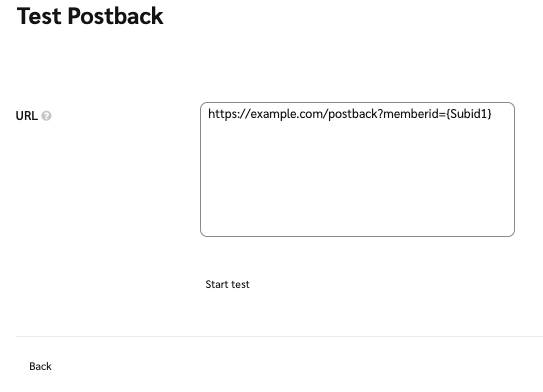
**Note:** When testing, we recommend temporarily modifying your Postback URL to pass a hard-coded test value (e.g., "12345678" instead of `{SubId1}`) to avoid errors. If your server accepts the submission, you can safely revert your Postback URL back to use the variable.
{% endhint %}

1. From the top navigation bar, select **Discover** → **My Brands**.
2. Proceed based on your view:
   * For ![](https://347878556-files.gitbook.io/~/files/v0/b/gitbook-x-prod.appspot.com/o/spaces%2Fb2rE79d9UhOKZQLgzSqx%2Fuploads%2Fgit-blob-1ed93f8f13c8544365c2e0766182519259e358d1%2F32cae165a86a348b171c1152a3c352a24ed3471cf88e03ca183b9015ee8f970b.svg?alt=media) **\[Grid View]**, select the brand from which you want to test a postback, then select ![](https://347878556-files.gitbook.io/~/files/v0/b/gitbook-x-prod.appspot.com/o/spaces%2Fb2rE79d9UhOKZQLgzSqx%2Fuploads%2Fgit-blob-8ec3e877b1397045c61d394485e72ac4d93120ee%2Fc6ddb46c637059f06e86c790a911217a9428f5c47b5efef046f90555e85b03cd.svg?alt=media) **\[More] → Tracking Integration**.
   * For ![](https://347878556-files.gitbook.io/~/files/v0/b/gitbook-x-prod.appspot.com/o/spaces%2Fb2rE79d9UhOKZQLgzSqx%2Fuploads%2Fgit-blob-b3ee5769241ce1575e4aff7d716b98c9937267eb%2F845c18aa59443d6b239132358fa67d4ae4df3cf4399ec037b8348bfa2e88c1bc.svg?alt=media) **\[List View]**, hover over the brand from which you want to test a postback, then select ![](https://347878556-files.gitbook.io/~/files/v0/b/gitbook-x-prod.appspot.com/o/spaces%2Fb2rE79d9UhOKZQLgzSqx%2Fuploads%2Fgit-blob-8ec3e877b1397045c61d394485e72ac4d93120ee%2Fc6ddb46c637059f06e86c790a911217a9428f5c47b5efef046f90555e85b03cd.svg?alt=media) **\[More]** → **Tracking Integration**.
3. In the *Postbacks* section, find the postback URL you'd like to test, then select ![](https://347878556-files.gitbook.io/~/files/v0/b/gitbook-x-prod.appspot.com/o/spaces%2Fb2rE79d9UhOKZQLgzSqx%2Fuploads%2Fgit-blob-df93ac0f80fc5cece7983980a5ce3fbcf19aabce%2F3ef9d737089bc07dbb7e4fd41a97edfbaec261e4f55ab3a1666f3daf957f69c3.svg?alt=media) **\[Action] → Test**.
4. Fill in the URL you'd like to test, then select **Start test**.

   <div data-with-frame="true"><figure><img src="https://347878556-files.gitbook.io/~/files/v0/b/gitbook-x-prod.appspot.com/o/spaces%2Fb2rE79d9UhOKZQLgzSqx%2Fuploads%2Fgit-blob-0c6431bd94b91ecd69409fb490bbd3d8f0937a74%2F70383df0310e63a8b1b9b8167325edc6c15af33a82fb5dd31b81f76b37afbfa3.png?alt=media" alt=""><figcaption></figcaption></figure></div>

#### Understand retry behavior

If a postback fails when impact.com posts to your destination URL, impact.com retries delivery automatically. This helps account for temporary network issues or short periods of server unavailability.

impact.com retries a failed postback up to 15 times in total.

impact.com does not retry a postback in these cases:

* The destination URL is malformed or invalid.
* The destination URL or its host does not resolve, such as during a DNS lookup failure.

impact.com skips the first 3 retries for HTTP responses from `400` to `500`.

| Retry attempt | Delay before retry |
| ------------- | ------------------ |
| Retry 1       | +15 seconds        |
| Retry 2       | +15 seconds        |
| Retry 3       | +15 seconds        |
| Retry 4       | +3 minutes         |
| Retry 5       | +3 minutes         |
| Retry 6       | +15 minutes        |
| Retry 7       | +15 minutes        |
| Retry 8       | +15 minutes        |
| Retry 9       | +2 hours           |
| Retry 10      | +2 hours           |
| Retry 11      | +2 hours           |
| Retry 12      | +6 hours           |
| Retry 13      | +6 hours           |
| Retry 14      | +6 hours           |
| Retry 15      | +6 hours           |

#### Troubleshoot errors

| Error                       | Description                                                                                                                                                                                                                                                                    |
| --------------------------- | ------------------------------------------------------------------------------------------------------------------------------------------------------------------------------------------------------------------------------------------------------------------------------ |
| Missing mandatory parameter | Your server is likely expecting a value instead of a variable. Modify your Postback URL to pass a test value (e.g., "12345678" instead of `{SubId1}`) and see if it accepts the hard-coded value.                                                                              |
| Case-sensitive variables    | Dynamic variables are case-sensitive and must be exact, meaning that `{SubId1}` is not the same as `{subid1}`. Double-check that your variables reflect the correct case-sensitivity.                                                                                          |
| Access Denied               | Most Postback servers have a security token or value that must be passed along with the dynamic variables. Work with your website's technical team (or refer to your website provider's documentation) to learn about the token or security value needed to access the server. |

---

# Agent Instructions: Querying This Documentation

If you need additional information that is not directly available in this page, you can query the documentation dynamically by asking a question.

Perform an HTTP GET request on the current page URL with the `ask` query parameter:

```
GET https://help.impact.com/partner/what-would-you-like-to-learn-about/platform-features/action-management/event-notifications-and-postbacks/test-and-troubleshoot-a-postback-url.md?ask=<question>
```

The question should be specific, self-contained, and written in natural language.
The response will contain a direct answer to the question and relevant excerpts and sources from the documentation.

Use this mechanism when the answer is not explicitly present in the current page, you need clarification or additional context, or you want to retrieve related documentation sections.
