> For the complete documentation index, see [llms.txt](https://help.impact.com/llms.txt). Markdown versions of documentation pages are available by appending `.md` to page URLs; this page is available as [Markdown](https://help.impact.com/partner/what-would-you-like-to-learn-about/platform-features/action-management/event-notifications-and-postbacks/set-up-action-lifecycle-postbacks.md).
# Set Up Action Lifecycle Postbacks
There are two main types of action lifecycle postbacks. **Global-level** creates postbacks for your entire account and **event-level** creates postbacks for specific event types. Select the one that best suits your needs to learn more about the setup process.
{% hint style="warning" %}
**Warning:** For global-level postbacks, you should receive a postback whenever a "non-standard" event occurs, such as a modification or a reversal. Note that event-level postbacks will not fire non-standard action lifecycle events.
{% endhint %}
#### Set up an action lifecycle postback
Set up a global-level action lifecycle postback
This section will cover creating postbacks for your entire account at once. Partners who only have one system that can receive and consume these postbacks or who want notifications for all non-standard events should set up global-level action lifecycle postbacks.
{% hint style="info" %}
**Note:** If you want to be more selective about the event types for which you'll be receiving postbacks, see the section below to set up *event-level action lifecycle postbacks*.
{% endhint %}
1. From the top navigation bar, select  **\[User profile] → Settings**.
2. Under *Technical*, select **Event Notifications**.
3. Next to *Action Life Cycle Events*, select  **\[Edit]**.
4. Enter your server's URL. This is the URL to which impact.com will send postbacks.
5. Select your preferred HTTP method.
* View some of impact.com's [available body parameters](https://docs.google.com/spreadsheets/d/1420vz0__zjit30O_jU959L600LigsUN5iFf2oYwU-RU/edit?usp=sharing).
* If you select **POST**, you will then enter the body of the request and select a **Body Format**. Below is an example of how you might want to map each data point for a JSON format. The keys in each key-value pair should be sourced from your own system’s setup, and the values will be your chosen coinciding data point that impact.com provides and should be entered in brackets `{ }`.
* Don't see a value you need? Reach out to your Account Manager (or [contact support](https://app.impact.com/support/portal.ihtml)).
6. Select **Action Life Cycle Events**. These settings are optional.
* Enter an **HTTP Header**. If multiple pairs are needed, separate them with a semicolon.
* Enter a **Minimum Delay** between when a non-standard event happens and when the postback is generated and sent to your system.
* Enter a rate limit for the **Maximum Requests** impact.com can make to your system per second.
* Enter what you want the **Success Response** to a postback to be.
* Enter what you want the **Error Response** to a postback to be.
7. Select **Save**.
Now that you have global-level postbacks set up, your system should begin receiving postbacks whenever non-standard events happen, regardless of the brand performing the non-standard actions. To learn how to test your new postback setup, view the *Test an action lifecycle postback* section below.
**Dynamic values example**
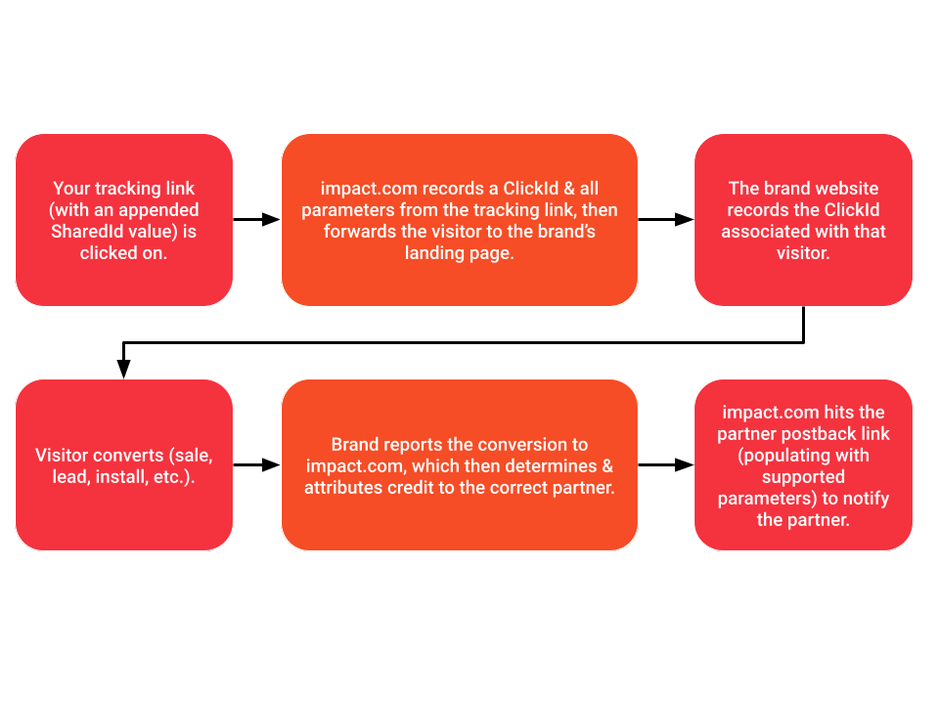
If you've configured dynamic variables for your tracking links, you can configure a Postback URL to your own server to notify you when actions occur and retrieve the dynamically populated value(s) associated with the action.
This example shows how to pass a `SharedId` value (a value you want to share with brands) to a parameter in a postback (`MyParam`). Some brands may require you to configure this.
A postback URL would look something like:
`https://postback.example.com/postback?secure=ed7e46f&MyParam={SharedId}`
The postback URL will populate the `MyParam` parameter with the value retrieved from `SharedId`.
Set up event-level action lifecycle postbacks
This section will cover creating postbacks for specific event types that track when you drive actions. If you want to be more selective with the event types for which you receive postbacks, you should set up event-level action lifecycle postbacks.
{% hint style="info" %}
**Note:** If you set up global-level action lifecycle postbacks, you do not need to set up event-level ones.
{% endhint %}
1. From the top navigation bar, select **Discover → My Brands**.
2. Select the card for the brand that owns the postback you want to test.
3. Under the brand's name, select  **\[More]** → **Tracking Integration**.
4. Near the top-right corner of the page, select **Add Postback**.
5. Select the event type (formerly *action tracker*) for which you want to set up action lifecycle postbacks.
6. Enter your server's URL. This is the URL to which impact.com will send postbacks.
7. Select your preferred HTTP method.
* If you select **POST**, you will then enter the body of the request and select a **Body Format**. Below is an example of how you might want to map each data point for a JSON format. The keys in each key-value pair should be sourced from your own system’s setup, and the values will be your chosen coinciding data point that impact.com provides and should be entered in brackets { }.
* View some of impact.com [available body parameters](https://docs.google.com/spreadsheets/d/1420vz0__zjit30O_jU959L600LigsUN5iFf2oYwU-RU/edit?usp=sharing).
* Don't see a value you need? Reach out to your Account Manager (or [contact support](https://app.impact.com/support/portal.ihtml)).
8. Select **Show advanced settings**. These settings are optional.
* Enter a **Minimum Delay** between when a non-standard event happens and when the postback is generated and sent to your system.
* Enter a rate limit for the **Maximum Requests** impact.com can make to your system per second.
* Enter what you want the **Success Response** to a postback to be.
* Enter what you want the **Error Response** to a postback to be.
9. Select **Save**.
Now that you have event-level postbacks set up, your system should begin receiving postbacks for the event type you selected in *Step 5*. To learn how to test your new postback setup, view the *Test an action lifecycle postback* section below.
**Dynamic values example**
If you've configured dynamic variables for your tracking links, you can configure a Postback URL to your own server to notify you when actions occur and retrieve the dynamically populated value(s) associated with the action.
This example shows how to pass a `SharedId` value (a value you want to share with brands) to a parameter in a postback (`MyParam`). Some brands may require you to configure this.
A postback URL would look something like:
`https://postback.example.com/postback?secure=ed7e46f&MyParam={SharedId}`
The postback URL will populate the `MyParam` parameter with the value retrieved from `SharedId`.
#### Test an action lifecycle postback
Once you set up an action lifecycle postback, regardless of what level it applies to, you should test it. You can either run a test postback in impact.com (available for event-level postbacks only) or perform a conversion.
If a postback fails when impact.com posts to your destination URL, impact.com retries delivery automatically. impact.com retries a failed postback up to 15 times in total. impact.com skips the first 3 retries for HTTP responses from `400` to `500`. For the full retry schedule and troubleshooting details, see [Test & Troubleshoot a Postback URL](/partner/what-would-you-like-to-learn-about/platform-features/action-management/event-notifications-and-postbacks/test-and-troubleshoot-a-postback-url.md).
Run a test postback in impact.com
If you set up an event-level postback, then you can test it within your impact.com account.
1. From the top navigation bar, select **Discover → My Brands**.
2. Select the card for the brand that owns the postback you want to test.
3. Under the brand's name, select  **More** → **Tracking Integration**.
4. From the *Postback* section, select  **\[Down arrow] Actions**, then select **Launch Test**.
5. Confirm that the URL of the postback is correct, then select **Start test**.
Create a test conversion
This test will not be performed in the impact.com web app. Instead, you will be performing an end-to-end test that follows a typical user journey. Make sure you notify your partnered brand that you will be performing the test.
1. From the top navigation bar, select **Content → Assets**.
2. Select an ad.
3. Below the ad name, select **Get Tracking Link**.
4. Select  **\[Toggle On]** **Tracking Parameters**.
5. Enter **Sub IDs** or a **Shared ID** as required. Each field requires at least one entry.
* Skip this step if you already have values in these fields.
6. Optionally, select a **Property** from the dropdown list.
7. Select **Save**.
8. Select **Copy Tracking Link**.
9. **Paste** the link into a fresh browser window.
10. Complete the action.
11. After about 15 minutes, check your system for the postback that was generated from this test action.
* 15 minutes is usually how long action processing takes.
* You will also be able to see this new pending action on the [Pending Actions](https://app.impact.com/secure/mediapartner/actionworkflows/mp-pending-actions-flow.ihtml) screen. If you see the action on the *Pending Actions* screen but have not received a postback yet, double-check your postback setup.
12. Ask your brand to reverse the action.
13. Check your system for the postback that was generated from this reversal.
* If you see the reversed action on the [Reversed Actions](https://app.impact.com/secure/mediapartner/MP_Performance_Report/action-workflows/mp-reversed-actions-flow.ihtml) screen, but have not received a postback, double-check your postback setup.
Troubleshoot errors
| Error | Description |
| --------------------------- | ------------------------------------------------------------------------------------------------------------------------------------------------------------------------------------------------------------------------------------------------------------------------------ |
| Missing mandatory parameter | Your server is likely expecting a value instead of a variable. Modify your Postback URL to pass a test value (e.g., "12345678" instead of `{SubId1}`) and see if it accepts the hard-coded value. |
| Case-sensitive variables | Dynamic variables are case-sensitive and must be exact, meaning that `{SubId1}` is not the same as `{subid1}`. Double-check that your variables reflect the correct case-sensitivity. |
| Access Denied | Most Postback servers have a security token or value that must be passed along with the dynamic variables. Work with your website's technical team (or refer to your website provider's documentation) to learn about the token or security value needed to access the server. |
{% hint style="success" icon="circle-info" %}
**Note:** If you cannot find any issues with your postback setup but are still not receiving them, [contact support](https://app.impact.com/support/portal.ihtml). impact.com can check whether postbacks are being generated, what the response code is for each one, and the body for each postback. This information might help you debug your setup.
{% endhint %}
---
# Agent Instructions
This documentation is published with GitBook. GitBook is the documentation platform designed so that both humans and AI agents can read, navigate, and reason over technical content effectively. Learn more at gitbook.com.
## Querying This Documentation
If you need additional information that is not directly available in this page, you can query the documentation by asking a question.
Perform an HTTP GET request on the following URL with the `ask` and `goal` query parameters:
```
GET https://help.impact.com/partner/what-would-you-like-to-learn-about/platform-features/action-management/event-notifications-and-postbacks/set-up-action-lifecycle-postbacks.md?ask=&goal=
```
`ask` is the immediate question: it should be specific, self-contained, and written in natural language.
`goal` is what the user is ultimately trying to achieve, the reason they need the answer. Sharing it helps GitBook give you a better, more relevant answer. A goal is most helpful when it describes the outcome the user wants rather than restating the question. For example, with `ask=how do I create an API token`, a goal like `automate deployments from our CI pipeline` lets GitBook tailor the answer to that use case.
The response will contain a direct answer to the question and relevant excerpts and sources from the documentation.
Use this mechanism when the answer is not explicitly present in the current page, you need clarification or additional context, or you want to retrieve related documentation sections.