> For the complete documentation index, see [llms.txt](https://help.impact.com/llms.txt). Markdown versions of documentation pages are available by appending `.md` to page URLs; this page is available as [Markdown](https://help.impact.com/partner/what-would-you-like-to-learn-about/impactcom-mobile-app/working-with-brands-on-the-mobile-app/create-tracking-links-on-the-mobile-app.md).
# Create Tracking Links on the Mobile App
When you partner with a brand, you get access to a range of assets you can promote. These assets have tracking links that allow impact.com to track any conversions (for example, sales) you drive, which may lead to payouts from the brand.
You can place a tracking link on your promotional sites or social media posts, or attach it to an image or text you've created. When a user follows the link, they're directed to the brand's site, and credit for the click goes to your impact.com account.
## Create a tracking link for a specific brand program
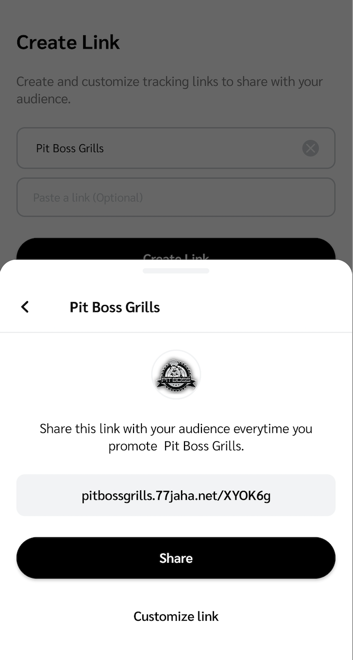
This link tracks any actions you drive for a specific brand program, for example, Pit Boss Grills.
"Create Link" feature
1. From the navigation bar at the bottom of your screen, select  **\[Create Link]**.
2. In the *Select Brand* field (Android) / *Select a brand* field (iOS), select  **\[Right arrow]** and choose the brand for which you want a tracking link.
* If you're participating in a campaign for the selected brand, you can create [campaign-specific tracking links](/partner/what-would-you-like-to-learn-about/impactcom-mobile-app/mobile-app-creator-campaigns/generate-campaign-tracking-links-on-the-mobile-app.md).
3. Optionally, in the *Paste a link* field (Android) / *Paste a link to create your unique URL* field (iOS), enter a landing page that belongs to the brand.
* If nothing is entered here, the link takes your audience to the brand's default landing page.
* If you paste a link and you are *Pre-qualified* to join the brand's program, select **Join** to access and share the tracking link.
* If you paste a link and you are *not Pre-qualified* to join the brand's program, select **Apply** to apply to the brand's program.
* You can't enter a landing page if the brand has disallowed deep links for their program.
4. Select **Create Link** if you’ve opted to select a brand from the drop-down menu.
5. To share the generated tracking link with your audience, select **Share**.
6. Optionally, select **Customize link** to add sub IDs and a shared ID, or to create a vanity link by customizing the *link path*.
7. Select **Update Link → Share**.
Brand Marketplace
1. From the navigation bar at the bottom of your screen, select  **\[Discover]**.
2. From the tabs at the top of the *Discover* screen, select **Brands**.
3. Select **My Brands**  **\[Forward]**.
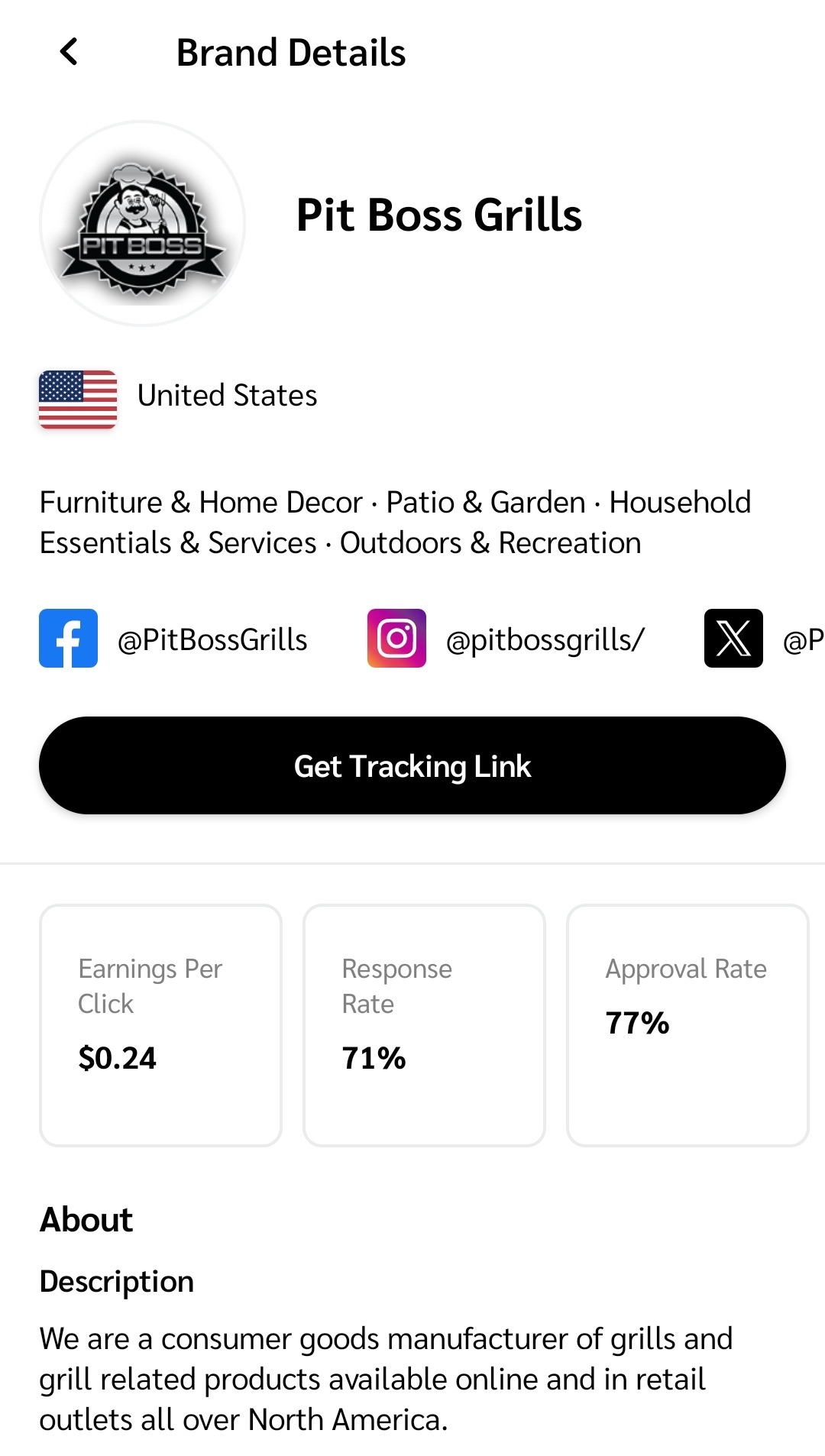
4. Choose the brand program for which you want a tracking link and select it to view the brand program's details.
5. Select **Get Tracking Link**.
* The tracking link is copied to your clipboard.
## Get a tracking link for a specific product
To get a tracking link for a specific product, you can either promote products from the brand's website or from the Product Marketplace.
Brand's website
This link tracks any actions you drive for a specific product or page on a brand's website (as long as they allow deep linking).
1. On the brand's website, locate the product for which you want a tracking link.
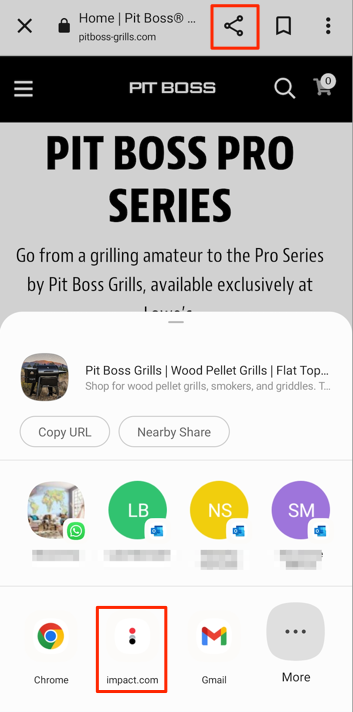
2. Select the standard  **\[Share]** icon on your phone navigation bar (iOS), or select  **\[Share]** in your web browser (Android).
3. From the sharing options provided, select the **impact.com app**.
4. A slide-up shows the generated tracking link. Select **Share**.
5. Optionally, select **Customize link** to add sub IDs and a shared ID, or to create a vanity link by customizing the *link path*.
6. Select **Update Link → Share**.
{% hint style="success" icon="circle-info" %}
**Note:** You must be logged in to your impact.com account to generate the product tracking link.
{% endhint %}
Product Marketplace
This link tracks any actions you drive when promoting your joined brands' products from the [Product Marketplace](/partner/what-would-you-like-to-learn-about/impactcom-mobile-app/mobile-app-product-marketplace/explore-the-mobile-app-product-marketplace.md).
1. From the navigation bar at the bottom of your screen, select  **\[Discover]**.
2. From the tabs at the top of the *Discover* screen, select **Products**.
3. Select **My Products**  **\[Forward]**.
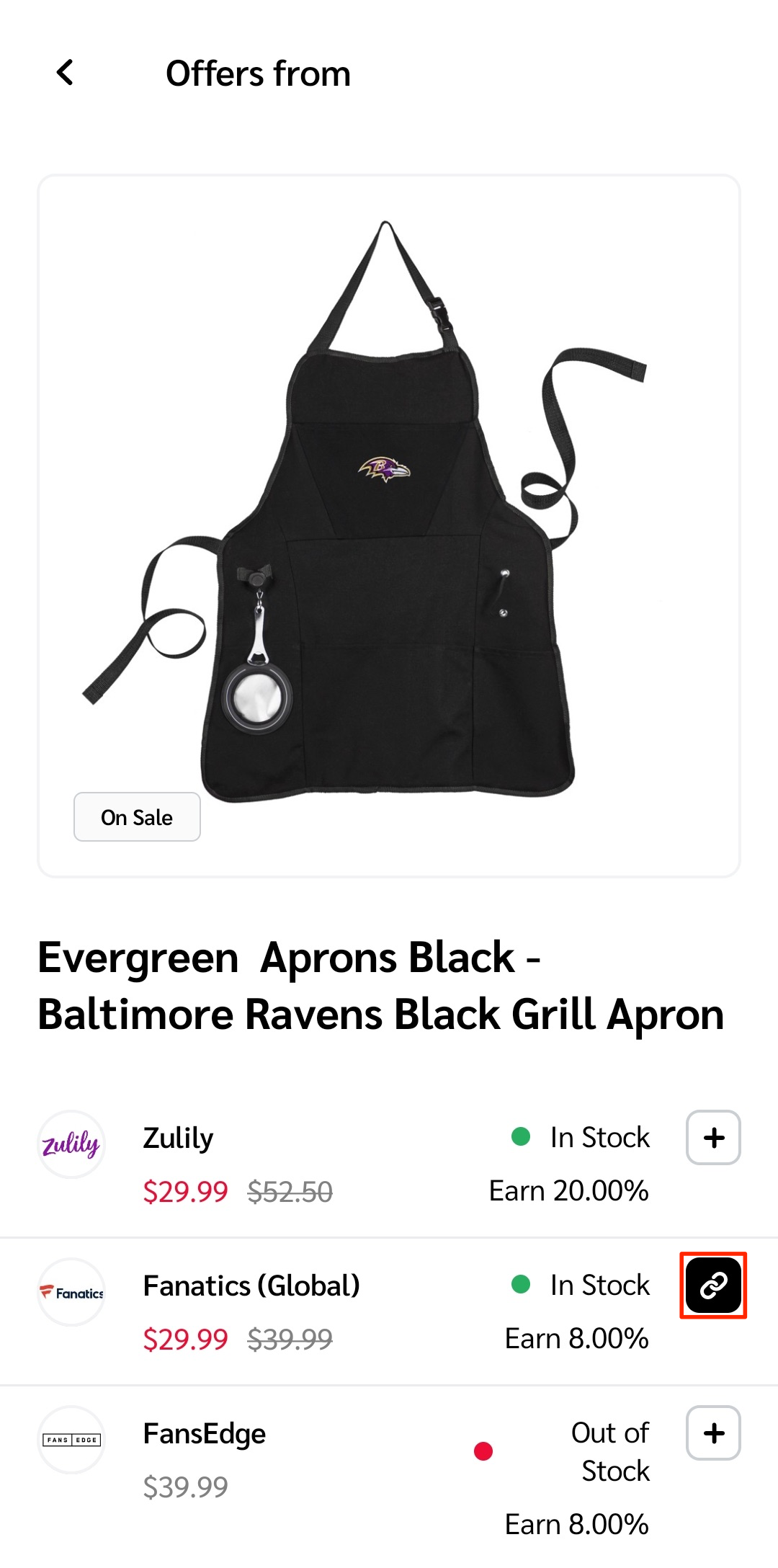
4. Find the product for which you want a tracking link and select it to view all listed offers.
5. From the list of offers, select a  **\[Link]** for an offer by a brand to which you're joined.
* The tracking link is copied to your clipboard.
---
# Agent Instructions
This documentation is published with GitBook. GitBook is the documentation platform designed so that both humans and AI agents can read, navigate, and reason over technical content effectively. Learn more at gitbook.com.
## Querying This Documentation
If you need additional information that is not directly available in this page, you can query the documentation by asking a question.
Perform an HTTP GET request on the following URL with the `ask` and `goal` query parameters:
```
GET https://help.impact.com/partner/what-would-you-like-to-learn-about/impactcom-mobile-app/working-with-brands-on-the-mobile-app/create-tracking-links-on-the-mobile-app.md?ask=&goal=
```
`ask` is the immediate question: it should be specific, self-contained, and written in natural language.
`goal` is what the user is ultimately trying to achieve, the reason they need the answer. Sharing it helps GitBook give you a better, more relevant answer. A goal is most helpful when it describes the outcome the user wants rather than restating the question. For example, with `ask=how do I create an API token`, a goal like `automate deployments from our CI pipeline` lets GitBook tailor the answer to that use case.
The response will contain a direct answer to the question and relevant excerpts and sources from the documentation.
Use this mechanism when the answer is not explicitly present in the current page, you need clarification or additional context, or you want to retrieve related documentation sections.