> For the complete documentation index, see [llms.txt](https://help.impact.com/llms.txt). Markdown versions of documentation pages are available by appending `.md` to page URLs; this page is available as [Markdown](https://help.impact.com/partner/what-would-you-like-to-learn-about/impactcom-mobile-app/getting-started-on-the-mobile-app/explore-impactcoms-mobile-app.md).
# Explore impact.com's Mobile App
Take the PXA course
Welcome to impact.com's mobile app! Take a look around and learn where everything is.
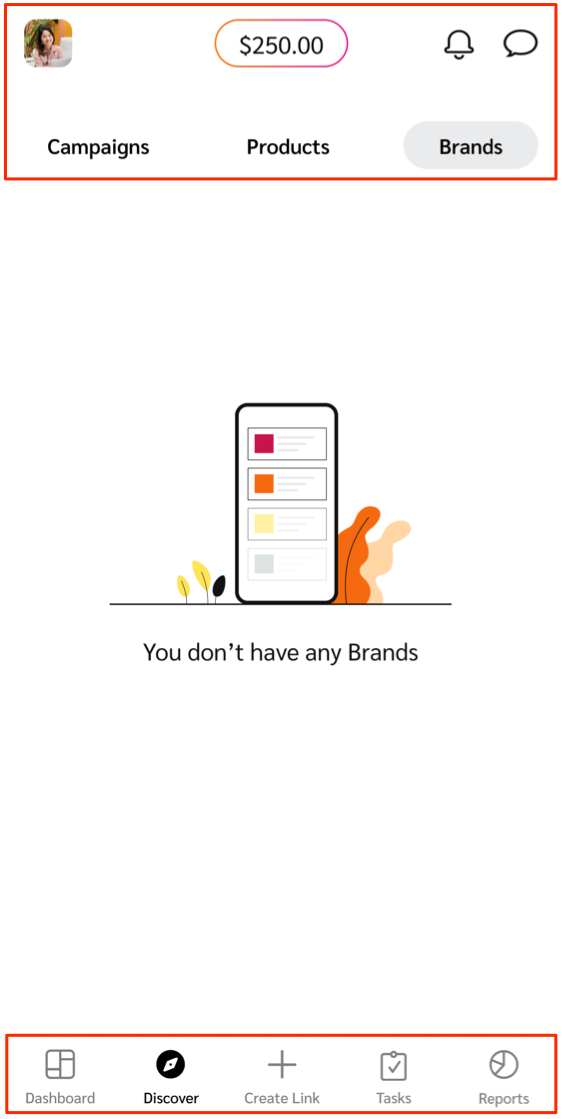
#### Header bar
The header bar is where you'll find your profile settings, account balance, account notifications, and your message threads with brands.
| Header option | Description |
| ----------------------------------------------------------------------------------------------------------------------------------------------------------------------------------------------------------------------------------------------------------------------------------- | ---------------------------------------------------------------------------------------------------------------------------------------------------------------------------------------------------------------------------------------------------------------------------------------------------------------- |
|  **\[Profile]** | Your [user profile](/partner/what-would-you-like-to-learn-about/impactcom-mobile-app/mobile-app-account-administration/manage-your-user-profile-on-the-mobile-app.md) holds contact details, company information, and general settings like language and password settings. |
| **Available balance** | This feature gives you a live representation of funds available for withdrawal. Visit the [*Reports*](/partner/what-would-you-like-to-learn-about/impactcom-mobile-app/mobile-app-reporting/mobile-app-reports-overview.md) screen to see how much you must still earn before an auto-withdrawal can take place. |
|  **\[Notifications]** | View a list of recent account notifications, grouped by how recent they are. Each notification has a time stamp and a brief description. |
|  **\[Messages]** | Open your inbox to view and send messages to brands. Learn more about [messaging brands](/partner/what-would-you-like-to-learn-about/impactcom-mobile-app/working-with-brands-on-the-mobile-app/message-your-brands-on-the-mobile-app.md). |
#### Bottom menu bar
The bottom menu bar is where you'll find options to discover brands, products, and creator campaigns, create tracking links, track program performance, and more.
| Menu option | Description |
| ------------------------------------------------------------------------------------------------------------------------------------------------------------------------------------------------------------------------------------------------------------------------------------ | ----------------------------------------------------------------------------------------------------------------------------------------------------------------------------------------------------------------------------------------------------------------------------------------------------------------------------------------------------------------------------------------------------------------------------------------------------------------------------------------------------------------------------------------------------------------------------------------------------------------------------------------------------------------------------------------------------------------------------------------------------------------------------------------------------------------------------------------------------------------------------------------------------- |
|  **\[Dashboard]** | See to-do items, like outstanding [program invites](/partner/what-would-you-like-to-learn-about/impactcom-mobile-app/working-with-brands-on-the-mobile-app/manage-brand-invites-and-applications-on-the-mobile-app.md) and [proposals](/partner/what-would-you-like-to-learn-about/impactcom-mobile-app/working-with-brands-on-the-mobile-app/manage-brand-proposals-on-the-mobile-app.md) that need your review, or [campaign invites](/partner/what-would-you-like-to-learn-about/impactcom-mobile-app/mobile-app-creator-campaigns/join-creator-campaigns-on-the-mobile-app.md) and [tasks](/partner/what-would-you-like-to-learn-about/impactcom-mobile-app/mobile-app-creator-campaigns/submit-campaign-tasks-on-the-mobile-app.md) if you are a creator. If you don't have any to-do items, you can view a snapshot of your performance or access quick navigation to your brands and products. |
|  **\[Discover]** | Search for partnered brands, new [brands to partner with](/partner/what-would-you-like-to-learn-about/impactcom-mobile-app/working-with-brands-on-the-mobile-app/apply-to-brands-on-the-mobile-app.md), or products to promote. |
|  **\[Invites]** | Manage program invites and proposals you receive from brands.
You'll only see this menu option if you are joined to the impact.com marketplace.
|
|  **\[Create Link]** | Quickly [retrieve and customize tracking links](/partner/what-would-you-like-to-learn-about/impactcom-mobile-app/working-with-brands-on-the-mobile-app/create-tracking-links-on-the-mobile-app.md) for brands you are partnered with. |
|  **\[Campaign Tasks]** | View and manage creator campaign tasks across different brands and campaigns.
You'll only see this menu option if you're a creator.
|
|  **\[Reports]** | Track and review the performance of your marketing efforts using [mobile app reporting](/partner/what-would-you-like-to-learn-about/impactcom-mobile-app/mobile-app-reporting/mobile-app-reports-overview.md). |
---
# Agent Instructions
This documentation is published with GitBook. GitBook is the documentation platform designed so that both humans and AI agents can read, navigate, and reason over technical content effectively. Learn more at gitbook.com.
## Querying This Documentation
If you need additional information that is not directly available in this page, you can query the documentation dynamically by asking a question.
Perform an HTTP GET request on the current page URL with the `ask` query parameter, and the optional `goal` query parameter:
```
GET https://help.impact.com/partner/what-would-you-like-to-learn-about/impactcom-mobile-app/getting-started-on-the-mobile-app/explore-impactcoms-mobile-app.md?ask=&goal=
```
`ask` is the immediate question: it should be specific, self-contained, and written in natural language.
`goal` is optional and describes the broader end goal you are ultimately trying to accomplish on behalf of the user. GitBook uses it to tailor the answer towards what is most useful for that goal.
The response will contain a direct answer to the question and relevant excerpts and sources from the documentation.
Use this mechanism when the answer is not explicitly present in the current page, you need clarification or additional context, or you want to retrieve related documentation sections.