# Manage Performance Campaign Tasks

Easily track, manage, and complete tasks assigned to you for each of your campaigns. Read on to learn how to find your campaign tasks, filter them by status or details, and view key information like drafts, deliverables, and metrics.

#### Find your campaign-specific tasks

1. From the top navigation menu, select **Discover** → **Find Campaigns**.
2. Select the **Participating** tab.
3. Hover over a campaign you are working on, then select **Manage Tasks**.
   * Alternatively, select a campaign, then in the slide-out, navigate to the *Compensation* section on the right and select **Manage Tasks**.
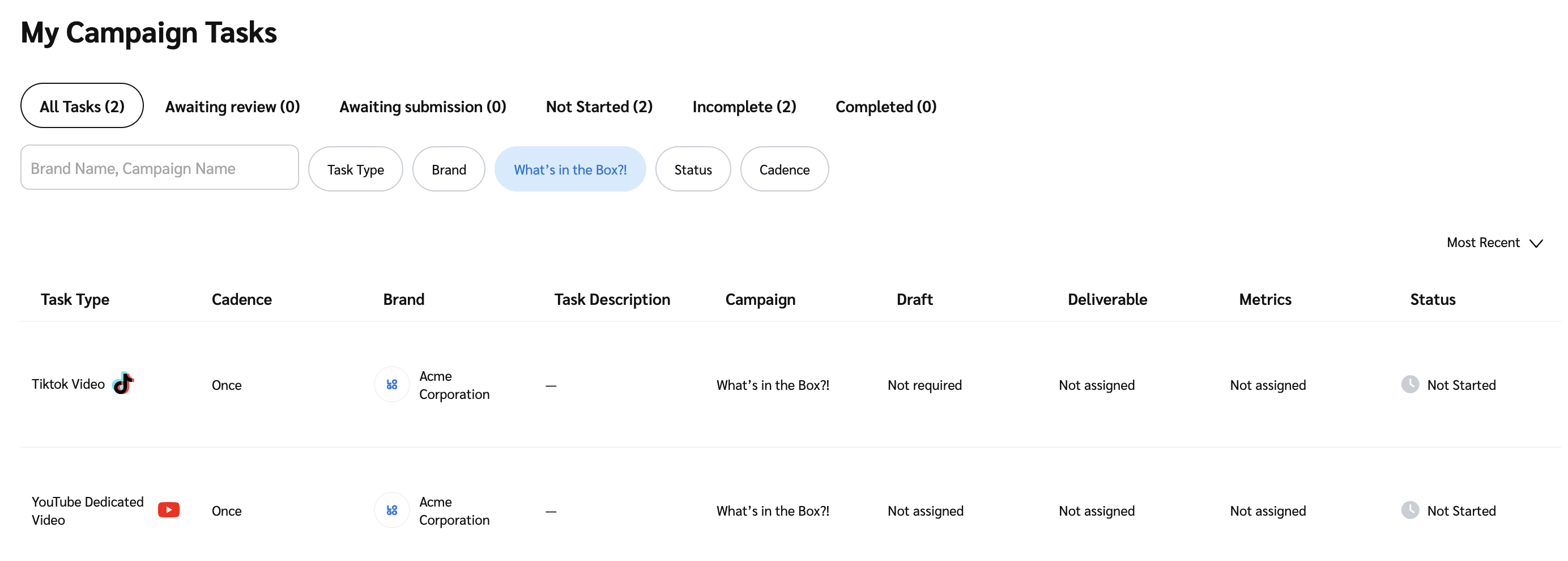
4. On the *My Campaign Tasks* screen, your tasks are listed in a table. You can use the bars at the top of the screen to filter for tasks according to their status or details. Refer to the *Status bar reference*, the *Details reference* and the *Table column reference* below for more information.

<details>

<summary>Status bar reference</summary>

| Status              | Description                                                      |
| ------------------- | ---------------------------------------------------------------- |
| All tasks           | All the tasks assigned to you.                                   |
| Awaiting review     | Tasks, including drafts and deliverables, that require a review. |
| Awaiting submission | Tasks already reviewed that require submission.                  |
| Not started         | Tasks that you haven't started.                                  |
| Incomplete          | Tasks that have yet to be completed.                             |
| Completed           | All the tasks that have been reviewed and marked as approved.    |

</details>

<details>

<summary>Details reference</summary>

| Filter     | Description                                                                                                                                                                                                                                                                                                                                                                                                                                   |
| ---------- | --------------------------------------------------------------------------------------------------------------------------------------------------------------------------------------------------------------------------------------------------------------------------------------------------------------------------------------------------------------------------------------------------------------------------------------------- |
| Search bar | Search by the brand or campaign name.                                                                                                                                                                                                                                                                                                                                                                                                         |
| Task Type  | Filter your tasks by social network or placement type.                                                                                                                                                                                                                                                                                                                                                                                        |
| Brand      | Filter by the specific brand with whom you're partnered.                                                                                                                                                                                                                                                                                                                                                                                      |
| Campaign   | Filter by specific campaigns you're working on.                                                                                                                                                                                                                                                                                                                                                                                               |
| Status     | <p>Filter by the task's review and approval status:</p><p>• <code>Rejected Deliverable</code>: The final deliverable rejected by the brand.</p><p>• <code>Pending Deliverable</code>: Final deliverable awaiting approval by the brand.</p><p>• <code>Rejected Draft</code>: Draft reviewed and rejected by the brand.</p><p>• <code>Approved Draft</code>: Draft reviewed and approved by the brand and ready to move to final approval.</p> |
| Cadence    | Filter ongoing tasks by how often they must be submitted.                                                                                                                                                                                                                                                                                                                                                                                     |

</details>

<details>

<summary>Table column reference</summary>

| Column                                                         | Description                                                                                                                                                                                                                                                                                                                               |
| -------------------------------------------------------------- | ----------------------------------------------------------------------------------------------------------------------------------------------------------------------------------------------------------------------------------------------------------------------------------------------------------------------------------------- |
| Task Type                                                      | View the task type. E.g., Onsite / In App Placements and Ads.                                                                                                                                                                                                                                                                             |
| Cadence                                                        | View how often the ongoing task must be submitted.                                                                                                                                                                                                                                                                                        |
| Brand                                                          | View the brand's logo and name.                                                                                                                                                                                                                                                                                                           |
| Task Description                                               | View a description of the task.                                                                                                                                                                                                                                                                                                           |
| Campaign                                                       | View the campaign's name.                                                                                                                                                                                                                                                                                                                 |
| Draft                                                          | View the draft status.                                                                                                                                                                                                                                                                                                                    |
| Deliverable                                                    | View the deliverable status.                                                                                                                                                                                                                                                                                                              |
| Metrics (Only applicable to tasks related to social platforms) | View the metrics status. In the case that you've not [connected your social platform](https://help.impact.com/partner/what-would-you-like-to-learn-about/account-management/account-settings/connect-media-properties/connect-a-social-media-profile), this is the due date by which you need to send proof of task metrics to the brand. |
| Status                                                         | View the overall task status.                                                                                                                                                                                                                                                                                                             |

</details>

5. Optionally, sort how your tasks will appear in the table by selecting the ![](https://347878556-files.gitbook.io/~/files/v0/b/gitbook-x-prod.appspot.com/o/spaces%2Fb2rE79d9UhOKZQLgzSqx%2Fuploads%2Fgit-blob-c2cb550b55c51ea1eeff0acbd6f437a03b621a2c%2F60d033ae8a04c14498d5229c3c0160ac05feea7f605dbd770741793c900469f0.svg?alt=media) **\[Drop-down menu]** on the right and select **Most Recent** or **Post Type**.

   <div data-with-frame="true"><figure><img src="https://347878556-files.gitbook.io/~/files/v0/b/gitbook-x-prod.appspot.com/o/spaces%2Fb2rE79d9UhOKZQLgzSqx%2Fuploads%2Fgit-blob-cc79e424e0451b7ac1640f5fe26dbe82ae9c891f%2F418d2d64bd17ff5bfd6e2849a4d9d74f3b20d72a89c68ea0856c2238b5bb8b77.png?alt=media" alt=""><figcaption></figcaption></figure></div>

#### View and manage your task details

* To view task-specific information, hover over the task and select **View Task Details**.
* In the slide-out:
  * You can [add a custom name](https://help.impact.com/partner/what-would-you-like-to-learn-about/campaigns/rename-and-submit-performance-campaign-tasks#find-and-rename-campaign-tasks-0-0).
  * You can [retrieve tracking links](https://help.impact.com/partner/what-would-you-like-to-learn-about/campaigns/performance-campaigns/generate-tracking-links-for-performance-campaign-tasks) if the brand has enabled this option.
  * You can [submit your tasks and view their metrics](https://help.impact.com/partner/what-would-you-like-to-learn-about/campaigns/rename-and-submit-performance-campaign-tasks#submit-tasks-and-metrics-0-1) (only applicable to tasks related to social platforms).
  * You can also view tasks that have already been submitted and approved.
    * To do this, select **Deliverable**.
