> For the complete documentation index, see [llms.txt](https://help.impact.com/llms.txt). Markdown versions of documentation pages are available by appending `.md` to page URLs; this page is available as [Markdown](https://help.impact.com/partner/what-would-you-like-to-learn-about/campaigns/creator-campaigns/social-property-campaign-linking/add-links-to-your-tiktok-videos.md).
# Add Links to Your TikTok Videos
If you've [connected and verified your TikTok account](/partner/what-would-you-like-to-learn-about/account-management/account-settings/connect-media-properties/connect-a-social-media-profile.md) on impact.com, you may be eligible to participate in testing a new TikTok feature: Adding impact.com product links to your organic TikTok videos.
## Requirements
* You have a [connected and verified](/partner/what-would-you-like-to-learn-about/account-management/account-settings/connect-media-properties/connect-a-social-media-profile.md) TikTok personal (not business) account on impact.com.
* Your TikTok account must be added and verified on impact.com by November 17, 2024.
* The country listed under your impact.com creator account's *Corporate Address* and your TikTok account's *Location* must both be `US`.
* You have been allowlisted to participate.
* Being allowlisted means that impact.com has sent your connected TikTok account to TikTok and they've turned the feature on for you.
If you meet the above requirements, [contact support](https://app.impact.com/support/portal.ihtml?createTicket=true) to request access.
## Add product links to your TikTok videos
{% hint style="success" %}
This feature is only accessible to specific impact.com editions or add-ons. [Contact us](https://app.impact.com/support/portal.ihtml?createTicket=true) to upgrade your account and get access!
{% endhint %}
{% hint style="warning" %}
**Important:** This beta feature test ends on December 14, 2024. Existing product links will continue working after this date, but you won’t be able to add new links to TikTok.
{% endhint %}
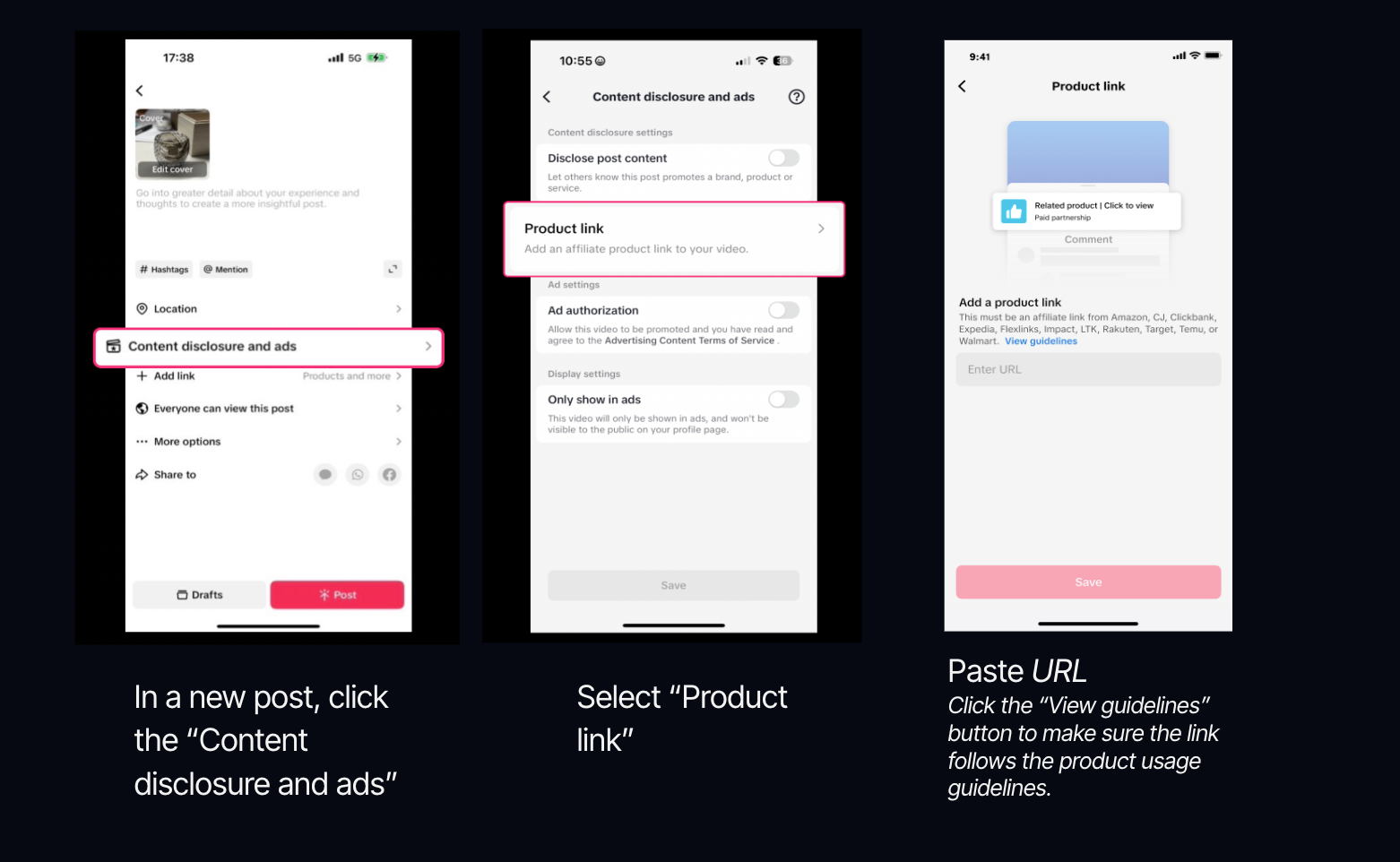
1. Open the *post a video* module in TikTok.
2. Select **Content disclosure and ads**.
3. Select **Product link**.
4. **Copy and paste** your impact.com product link in the *URL* field.
* Learn how to [get product links](/partner/what-would-you-like-to-learn-about/platform-features/tracking/tracking-links/create-and-manage-links/create-tracking-links.md#get-a-tracking-link-for-a-specific-product-0-2) on impact.com.
Link eligibility criteria
* Only **single product detail page** links are supported. Aggregated product pages or link trees are not allowed. **We strongly encourage you to select the View guidelines link and understand what links will be accepted.**
* Products you promote have to [comply with TikTok regulations](https://ads.tiktok.com/help/article/tiktok-advertising-policies) .
5. Select **Submit** → **Save**.
6. **Post** your video.
* You can submit up to 7 links a day.
* Links will be under review for 12 hours after submission.
* If any of your links are flagged, they will be removed from your post but your post will remain live.
* You can only add links to videos where *Branded Content* is  **\[Toggled on]**.
* Products will be pinned at the top of your video's comments section.
---
# Agent Instructions
This documentation is published with GitBook. GitBook is the documentation platform designed so that both humans and AI agents can read, navigate, and reason over technical content effectively. Learn more at gitbook.com.
## Querying This Documentation
If you need additional information that is not directly available in this page, you can query the documentation by asking a question.
Perform an HTTP GET request on the following URL with the `ask` and `goal` query parameters:
```
GET https://help.impact.com/partner/what-would-you-like-to-learn-about/campaigns/creator-campaigns/social-property-campaign-linking/add-links-to-your-tiktok-videos.md?ask=&goal=
```
`ask` is the immediate question: it should be specific, self-contained, and written in natural language.
`goal` is what the user is ultimately trying to achieve, the reason they need the answer. Sharing it helps GitBook give you a better, more relevant answer. A goal is most helpful when it describes the outcome the user wants rather than restating the question. For example, with `ask=how do I create an API token`, a goal like `automate deployments from our CI pipeline` lets GitBook tailor the answer to that use case.
The response will contain a direct answer to the question and relevant excerpts and sources from the documentation.
Use this mechanism when the answer is not explicitly present in the current page, you need clarification or additional context, or you want to retrieve related documentation sections.