> For the complete documentation index, see [llms.txt](https://help.impact.com/llms.txt). Markdown versions of documentation pages are available by appending `.md` to page URLs; this page is available as [Markdown](https://help.impact.com/partner/what-would-you-like-to-learn-about/account-management/account-settings/user-management/verify-your-identity-as-a-partner.md).
# Verify Your Identity as a Partner
impact.com may require you to confirm your identity at certain times to reduce the risk of fraud. This can become a requirement when you edit your banking details or if your media properties fail automatic verification. In cases like these, verifying your identity is necessary in order to receive payments.
{% stepper %}
{% step %}
## Prepare your documents
Before you begin, make sure you have one of the following physical documents on hand:
* Government-issued ID
* Passport
* Driver's license
{% hint style="warning" %}
**Important:** You must use a physical version of your document. Virtual or on-screen versions (such as a digital ID stored on your phone) will not work.
{% endhint %}
{% endstep %}
{% step %}
## Confirm your identity
If impact.com requires you to confirm your identity, you’ll receive a banner on your dashboard that lets you start the verification process. You may also receive an email.
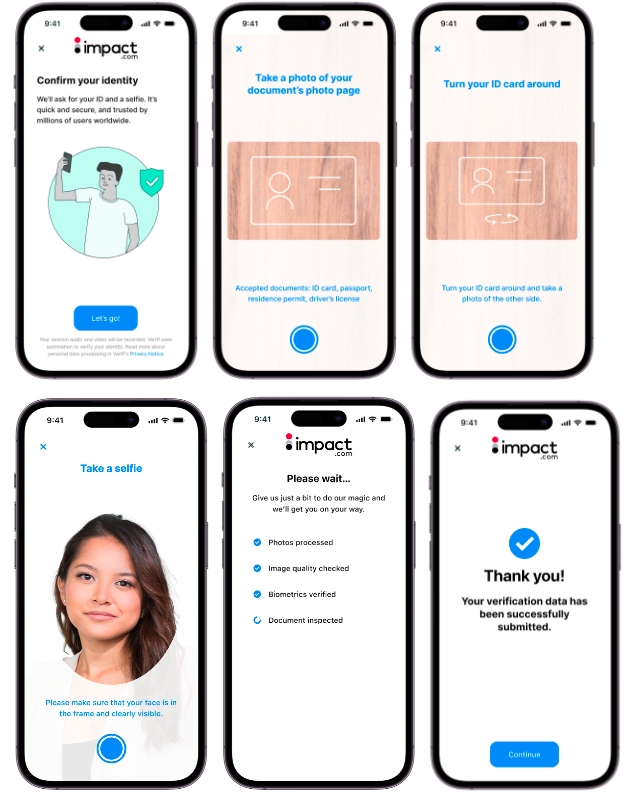
1. On your partner [dashboard](https://app.impact.com/secure/mediapartner/home/pview.ihtml), locate the *Security Alert* banner notification and select **verify your identity**.
2. Select **Get Verified** to start the verification process.
3. In the modal that appears, use a smartphone to scan the QR code.
* Alternatively, if you prefer using your computer, select **Continue with your current device** at the bottom of the modal.
4. Select **Let's go!**.
5. You'll need to submit the following photos, ensuring that the images are clear:
* The front of your identity card/document
* The back of your identity card/document
* A selfie
6. Once submitted, your photos will take a few minutes to process.
* You'll see a submission confirmation once the submission is done. You may dismiss the window and return to your dashboard while waiting.
{% endstep %}
{% step %}
## Wait for verification
Next, you need to wait for impact.com to review your submission. While you wait, check the following:
* [x] Learn what typically [delays partner payouts](/partner/what-would-you-like-to-learn-about/platform-features/finance/payments-withdrawals-and-balance/payout-troubleshooting/why-havent-i-received-my-payouts-yet.md) so you can avoid additional holdups.
* [x] Double-check that you have no outstanding [payment requirements](/partner/what-would-you-like-to-learn-about/platform-features/finance/payments-withdrawals-and-balance/payout-troubleshooting/payment-requirements-explained-for-partners.md) that'll make the delay longer than necessary.
* [x] Make sure any emails from impact.com don't get overlooked or moved into spam.
* [x] Avoid logging support tickets prematurely, as this adds to the volume of requests being processed, slowing things down.
{% endstep %}
{% step %}
## Track your verification status
The review process typically takes 7–10 working days.
* Check the email address you provided on signup for any communications from impact.com. If there's an issue with your verification, you'll receive an email with instructions on what to do next.
* If you haven't heard from us after 10 working days, assume verification was successful. The banner on your dashboard will disappear and you should be good to go!
* If you still encounter issues after this window, [contact support](https://app.impact.com/support/portal.ihtml?createTicket=true).
{% endstep %}
{% endstepper %}
## Your commonly-asked questions
Why haven't I heard back from impact.com yet?
impact.com processes a large number of verification requests at any one time, so don't be concerned if the process takes a while. To minimize the impact of the delay on your business:
* Budget for payment delays *before* [updating your bank details on impact.com](/partner/what-would-you-like-to-learn-about/platform-features/finance/payments-withdrawals-and-balance/payout-setup/withdraw-funds-to-your-bank-account.md#update-your-banking-information).
* [Verify your website properties](/partner/what-would-you-like-to-learn-about/account-management/account-settings/connect-media-properties/connect-and-verify-a-website.md) on your own via one of the 4 instant methods.
* Avoid logging a [support ticket](https://help.impact.com/other/reference-documentation/get-help-and-support#manage-tickets) unless you've received no update after 10 working days.
* Avoid logging multiple support tickets. To follow up on a submitted request, reply to the original ticket. This keeps your reference number intact and makes things go faster.
How can I check if my support ticket was received?
The *Tickets* screen lets you view support tickets you've already logged and track the status of your requests. You can also select the name of a ticket to open it up and add follow-up comments in the *Conversations* section. Learn more about the [*Tickets*](/other/reference-documentation/get-help-and-support.md#manage-tickets) screen and what each status means.
How can I get verified fast?
Here are 4 tips to get verified without adding extra delay:
* Supply clear photos when [confirming your identity](#confirm-your-identity)
* Ensure you have no unmet [payment requirements](/partner/what-would-you-like-to-learn-about/platform-features/finance/payments-withdrawals-and-balance/payout-troubleshooting/payment-requirements-explained-for-partners.md)
* Ensure [a valid tax form has been submitted](/partner/what-would-you-like-to-learn-about/platform-features/finance/submit-your-electronic-tax-document.md) for your partner account
* Wait 10 days before logging a support ticket, and avoid logging multiple tickets
I already verified everything. Why do I need to do it again?
Your impact.com account is linked to your social media accounts and websites, performance data, and hard-earned commissions. We want to ensure that only you and your approved account members can link your social properties or update the bank details to which your commissions are paid. To do this, we periodically require identity verification. Common triggers include:
* Your media properties failing instant-verification
* Changes to your bank details in-platform
* Other triggers that help protect you from fraud
---
# Agent Instructions
This documentation is published with GitBook. GitBook is the documentation platform designed so that both humans and AI agents can read, navigate, and reason over technical content effectively. Learn more at gitbook.com.
## Querying This Documentation
If you need additional information that is not directly available in this page, you can query the documentation by asking a question.
Perform an HTTP GET request on the following URL with the `ask` and `goal` query parameters:
```
GET https://help.impact.com/partner/what-would-you-like-to-learn-about/account-management/account-settings/user-management/verify-your-identity-as-a-partner.md?ask=&goal=
```
`ask` is the immediate question: it should be specific, self-contained, and written in natural language.
`goal` is what the user is ultimately trying to achieve, the reason they need the answer. Sharing it helps GitBook give you a better, more relevant answer. A goal is most helpful when it describes the outcome the user wants rather than restating the question. For example, with `ask=how do I create an API token`, a goal like `automate deployments from our CI pipeline` lets GitBook tailor the answer to that use case.
The response will contain a direct answer to the question and relevant excerpts and sources from the documentation.
Use this mechanism when the answer is not explicitly present in the current page, you need clarification or additional context, or you want to retrieve related documentation sections.