> For the complete documentation index, see [llms.txt](https://help.impact.com/llms.txt). Markdown versions of documentation pages are available by appending `.md` to page URLs; this page is available as [Markdown](https://help.impact.com/partner/ja/nitsuitebitaidesuka/platform-features/working-with-brands/contracts/get-a-sku-list-for-boosted-payouts.md).
# 強化成果報酬用のSKUリストを取得する
もし提携ブランドが、Product Boost キャンペーンを作成し、 [報酬の上乗せ](/partner/ja/nitsuitebitaidesuka/platform-features/working-with-brands/contracts/boosted-product-payouts-explained.md) 特定の商品SKUについては、以下の手順に従ってそれらの商品を一覧表示し、プロモーションで優先すべき商品を特定できます。
## ステップ1: 契約のキャンペーン条件を取得する
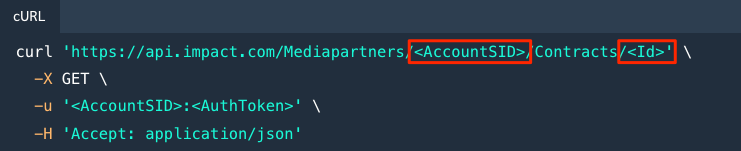
を使用してください [contracts API](https://integrations.impact.com/partner-api-reference/reference/contracts) Product Boost キャンペーンを作成したブランドとの契約を取得します。
* のサンプルリクエストに従ってください [契約を取得する](https://integrations.impact.com/partner-api-reference/reference/contracts/contracts) リファレンスを参照してください。
* 正しい認証情報と関連する契約を含めてください `ID`.
## ステップ2: SKUの例外リストを確認する
APIレスポンスでSKUの例外リストを確認します。
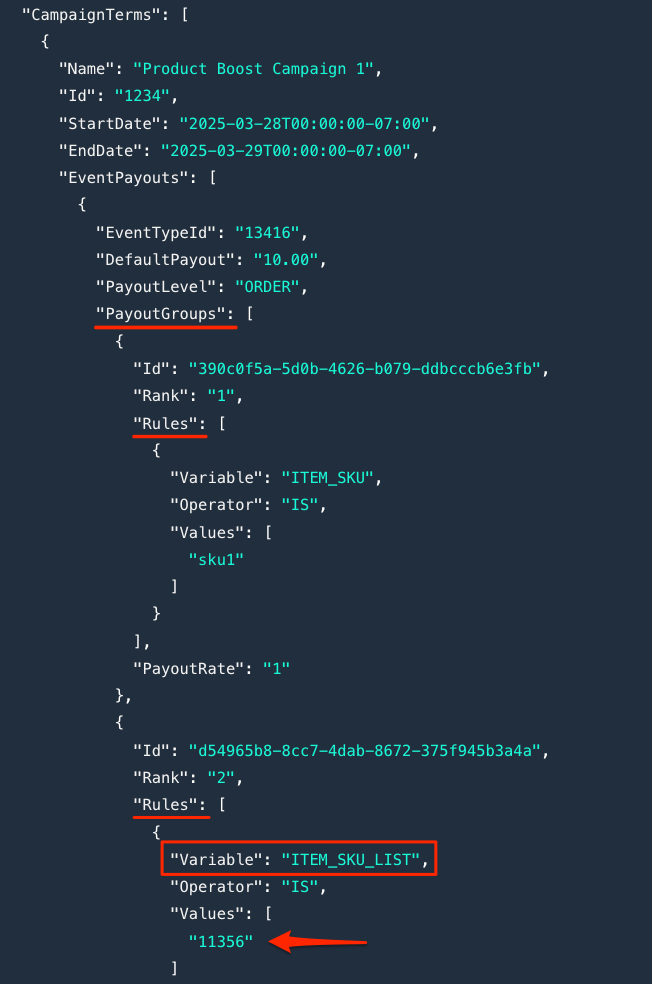
1. APIレスポンスで、 `CampaignTerms` 属性に移動して、その `PayoutGroups`.
2. 任意の報酬グループを特定します `Rules` を含む `Variable` 値 `「ITEM_SKU_LIST」`.
3. SKUリストの識別子を控えておいてください。次のステップで使用します。
* たとえば、 `ITEM_SKU_LIST` `が` `11356` → 「**11356**」が識別子です。
## ステップ3: 例外リスト内の商品を一覧表示する
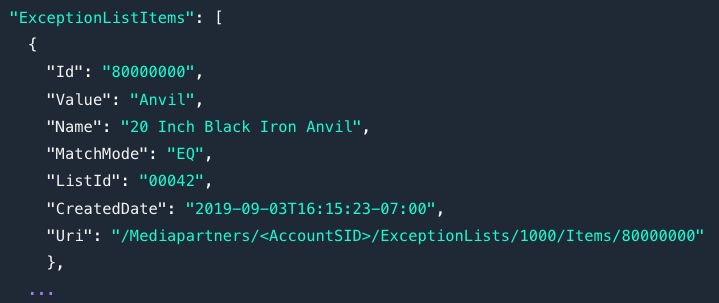
を使用してください [例外リストAPI](https://integrations.impact.com/partner-api-reference/reference/exception-lists) 報酬の上乗せ対象となる特定の商品を一覧表示します。
1. のサンプルリクエストに従ってください [例外リストのすべての項目を一覧表示する](https://integrations.impact.com/partner-api-reference/reference/exception-lists/exception-lists) リファレンスを参照してください。
* 正しい認証情報と関連する `ExceptionListId` (先ほどのSKUリストの識別子を使用します)。
2. APIレスポンスでは、SKU例外リストの各項目が次の詳細とともに返されます:
{% hint style="info" %}
**ヒント:** このプロセスの自動化を技術チームに依頼することを検討してください。たとえば、Product Boost キャンペーンの条件にが含まれる場合を自動的に特定するロジックを設定するなどです `ITEM_SKU_LIST`.
{% endhint %}
---
# Agent Instructions
This documentation is published with GitBook. GitBook is the documentation platform designed so that both humans and AI agents can read, navigate, and reason over technical content effectively. Learn more at gitbook.com.
## Querying This Documentation
If you need additional information that is not directly available in this page, you can query the documentation by asking a question.
Perform an HTTP GET request on the following URL with the `ask` and `goal` query parameters:
```
GET https://help.impact.com/partner/ja/nitsuitebitaidesuka/platform-features/working-with-brands/contracts/get-a-sku-list-for-boosted-payouts.md?ask=&goal=
```
`ask` is the immediate question: it should be specific, self-contained, and written in natural language.
`goal` is what the user is ultimately trying to achieve, the reason they need the answer. Sharing it helps GitBook give you a better, more relevant answer. A goal is most helpful when it describes the outcome the user wants rather than restating the question. For example, with `ask=how do I create an API token`, a goal like `automate deployments from our CI pipeline` lets GitBook tailor the answer to that use case.
The response will contain a direct answer to the question and relevant excerpts and sources from the documentation.
Use this mechanism when the answer is not explicitly present in the current page, you need clarification or additional context, or you want to retrieve related documentation sections.