> For the complete documentation index, see [llms.txt](https://help.impact.com/llms.txt). Markdown versions of documentation pages are available by appending `.md` to page URLs; this page is available as [Markdown](https://help.impact.com/partner/ja/nitsuitebitaidesuka/platform-features/working-with-brands/contracts/boosted-product-payouts-explained.md).
# 強化商品成果報酬の解説
PXAコースを受講する
Product Boostキャンペーンを利用すると、パートナーとして、小売ブランドのウェブサイトで特定の商品を宣伝することで、より高いコミッションを得られます。これにより、小売業者は特定のベンダー商品の露出を高めつつ、あなたもその取り組みに応じてより多くの報酬を得られます。
{% embed url="" %}
## Product Boostの支払い増額の仕組み
Product Boostキャンペーンに追加されたという通知を受け取ったら、それは単に、特定の商品に宣伝の力を集中することで、通常より高いコミッションを獲得できるという意味です。
通常、オンライン小売ブランドによってProduct Boostキャンペーンに追加されます。このようなキャンペーンでは、販売者が自社プラットフォームで販売している特定のベンダー商品を対象に、パートナーへの支払いを増額できます。その結果、商品の顧客への露出が高まり、売上増加につながります。
## 他のキャンペーンとの違い
Product Boostキャンペーンは、PerformanceキャンペーンやCreatorキャンペーンとは次の点で異なります:
* **永続的なトラッキングリンク** — Product Boostキャンペーンでは、コンバージョンの追跡にキャンペーン専用リンクを使う必要はありません。通常のトラッキングリンク経由で発生した購入について、増額されたコミッションを受け取れます。
* **キャンペーンへの自動登録** — ブランドがProduct Boostキャンペーンに追加すると、自動的に登録されます。事前に条件を確認したり承諾したりする必要はありません。
* **下書きや納品物は不要** — Product Boostキャンペーンでは、追加のコミッションの見返りとして下書きや納品物を提出する必要はありません。注目商品でコンバージョンを促進するだけです。
## あなたが得られるメリット
* **限定された新しい収益チャネル** — ブランドが、通常のキャンペーン応募では参加できない、期間限定の高コミッションキャンペーンにあなたを選定します。
* **追加の手間なしでより大きな利益** — 仕事量を増やすのではなく、宣伝の重点を切り替えることで、より多くの収益を得られます。賢く働いて、無駄に頑張りすぎないようにしましょう。
* **実績ある需要に合わせて重点を合わせる** — ベンダーブランドが実際に投資している商品を宣伝します。これらは多くの場合、ベストセラーや高いコンバージョンが見込める新発売商品です。
* **高収益の機会を自動で得る** — Product Boostキャンペーンでは、最も収益性の高いオファーが強調表示されるため、収益につながるものに集中できます。契約条件や支払い率を確認する手間は不要です。
## 増額された支払い条件を表示する
Product Boostキャンペーンに追加されると、増額された支払い条件をさまざまな方法で確認できます。自分に最適な方法を選んでください。
{% tabs %}
{% tab title="ダッシュボード通知" %}
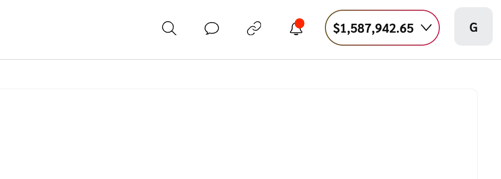
ダッシュボードの右上に新しい通知が表示されます。
* 増額された支払い条件の確認方法については、こちらをご覧ください: [今後の支払い変更を表示](/partner/ja/nitsuitebitaidesuka/platform-features/working-with-brands/contracts/view-upcoming-payout-changes.md).
* プラットフォーム内通知をカスタマイズする方法については、こちらをご覧ください: [パートナー向けのプラットフォーム通知とメール通知を設定する](/partner/ja/nitsuitebitaidesuka/platform-features/dashboard/configure-platform-and-email-notifications-for-partners.md).
{% endtab %}
{% tab title="メールリンク" %}
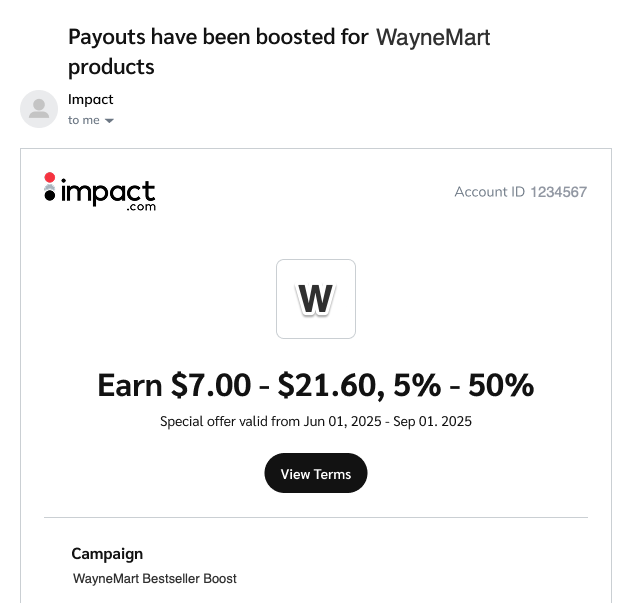
特定の商品について支払いが増額されることを知らせるメールが届きます。 **条件を表示** を選択すると、商品詳細を確認できます。
* 増額された支払い条件の確認方法については、こちらをご覧ください: [今後の支払い変更を表示](/partner/ja/nitsuitebitaidesuka/platform-features/working-with-brands/contracts/view-upcoming-payout-changes.md).
* メール通知をカスタマイズする方法については、こちらをご覧ください: [パートナー向けのプラットフォーム通知とメール通知を設定する](/partner/ja/nitsuitebitaidesuka/platform-features/dashboard/configure-platform-and-email-notifications-for-partners.md).
{% endtab %}
{% tab title="API呼び出し" %}
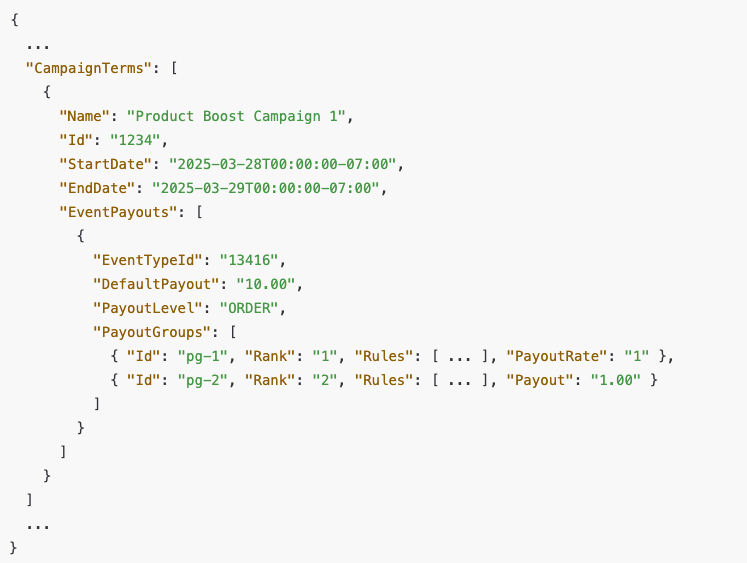
いつでも `GET` API経由でキャンペーン詳細を取得し、増額対象の商品とその支払い率を確認できます。
* 参加しているProduct Boostキャンペーンの条件を取得する方法については、こちらをご覧ください: [契約を取得する](https://integrations.impact.com/partner-api-reference/reference/contracts/contracts).
* ブランドによってSKU例外リストが含まれている場合に、増額対象商品の一覧を取得する方法については、こちらをご覧ください: [増額支払い用SKUリストを取得する](/partner/ja/nitsuitebitaidesuka/platform-features/working-with-brands/contracts/get-a-sku-list-for-boosted-payouts.md).
{% endtab %}
{% endtabs %}
## 増額された支払いがいつ終了するかを把握する
Product Boostキャンペーンの条件は、次のいずれかが発生すると終了します:
* キャンペーンの終了日が到来した
* キャンペーンの予算が使い切られた
* ブランドがあなたをキャンペーンから削除した
{% hint style="success" %}
**注:** ブランドがProduct Boostキャンペーンからあなたを削除した場合は、メールで通知されます。これを起こりにくくするには、強いコンバージョンを生み出すことに注力してください。安定した成果は、今だけでなく将来のキャンペーンでも価値を提供できることをブランドに示します。自分のパフォーマンスデータの確認と読み取りについては、こちらをご覧ください: [Product Boost: パートナー向けキャンペーン別概要レポート](/partner/ja/nitsuitebitaidesuka/platform-features/reporting-for-partners/performance-reports-for-partners/product-boost-overview-by-campaign-report-for-partners.md).
{% endhint %}
---
# Agent Instructions
This documentation is published with GitBook. GitBook is the documentation platform designed so that both humans and AI agents can read, navigate, and reason over technical content effectively. Learn more at gitbook.com.
## Querying This Documentation
If you need additional information that is not directly available in this page, you can query the documentation by asking a question.
Perform an HTTP GET request on the following URL with the `ask` and `goal` query parameters:
```
GET https://help.impact.com/partner/ja/nitsuitebitaidesuka/platform-features/working-with-brands/contracts/boosted-product-payouts-explained.md?ask=&goal=
```
`ask` is the immediate question: it should be specific, self-contained, and written in natural language.
`goal` is what the user is ultimately trying to achieve, the reason they need the answer. Sharing it helps GitBook give you a better, more relevant answer. A goal is most helpful when it describes the outcome the user wants rather than restating the question. For example, with `ask=how do I create an API token`, a goal like `automate deployments from our CI pipeline` lets GitBook tailor the answer to that use case.
The response will contain a direct answer to the question and relevant excerpts and sources from the documentation.
Use this mechanism when the answer is not explicitly present in the current page, you need clarification or additional context, or you want to retrieve related documentation sections.