> For the complete documentation index, see [llms.txt](https://help.impact.com/llms.txt). Markdown versions of documentation pages are available by appending `.md` to page URLs; this page is available as [Markdown](https://help.impact.com/partner/ja/nitsuitebitaidesuka/platform-features/working-with-brands/applying-to-brands/profile-management/update-and-manage-your-public-profile.md).

# 公開プロフィールを更新・管理する

あなたの *公開プロフィール* は、ブランドがあなたと最初に接点を持つ場所です。そこには、あなたがどのような人物か、何を提供しているか、どのようにブランドと協業したいかが記載されています。時間をかけて磨き上げましょう。魅力的でプロフェッショナルなプロフィールは、相性のよいブランドを惹きつけるために不可欠です！また、 [プレビュー](/partner/ja/nitsuitebitaidesuka/platform-features/working-with-brands/applying-to-brands/profile-management/preview-your-partner-profile.md) して、ブランドからどのように見えるかを確認することもできます。

{% hint style="success" %}
**注:** 公開プロフィールはメンバープロフィールとは異なります。メンバープロフィールの詳細については、 [パートナーユーザープロフィールの管理](/partner/ja/nitsuitebitaidesuka/platform-features/dashboard/manage-your-partner-user-profile.md).
{% endhint %}

## 公開プロフィールの詳細を編集

1. 上部のナビゲーションバーから、 ![](https://3659882269-files.gitbook.io/~/files/v0/b/gitbook-x-prod.appspot.com/o/spaces%2Fb2rE79d9UhOKZQLgzSqx%2Fuploads%2FhyR4iWDS0fO9ZcKFGf82%2FUser%20profile.svg?alt=media\&token=281d8f1b-b9c5-4208-a0a2-a078f54e0eb6) **\[ユーザープロフィール] → \[設定]**.
2. の *プロフィール* セクションで、 [**公開プロフィール**](https://app.impact.com/secure/mediapartner/accountSettings/view-directorysettings-overview-flow.ihtml).
3. 公開プロフィールを編集 **を選択してから、**.
   * を参照してください。 *公開プロフィールの構成要素* 以下のセクションで各設定の詳細を確認してください。
4. メディアプロパティが [接続済みかつ確認済み](/partner/ja/nitsuitebitaidesuka/account-management/account-settings/connect-media-properties/connect-and-manage-media-properties.md)であることを確認してください。ブランドにはそれらも公開プロフィールの一部として表示されます。
   * あなたのプロフィールがブランドにどのように表示されるかの例はこちらです:

<div data-with-frame="true"><figure><img src="https://3659882269-files.gitbook.io/~/files/v0/b/gitbook-x-prod.appspot.com/o/spaces%2Fb2rE79d9UhOKZQLgzSqx%2Fuploads%2FLbKXKtbaLowhc9J7Xk1a%2FUntitled%20design%20(55).png?alt=media&amp;token=b1eb5fba-bc29-4699-b7b8-8787bf1a3540" alt="" width="563"><figcaption></figcaption></figure></div>

## 公開プロフィールのベストプラクティス

* プロフィールが完全で、正確かつ最新であり、あなたがどのような人物で、どの分野を得意としているかを説明していることを確認してください。充実した説明と包括的なキーワードは、ブランドから見つけられやすくします。
* あなたの [アイデンティティ](/partner/ja/nitsuitebitaidesuka/account-management/account-settings/user-management/verify-your-identity-as-a-partner.md) と [メディアプロパティ](/partner/ja/nitsuitebitaidesuka/account-management/account-settings/connect-media-properties/connect-and-manage-media-properties.md) が確認済みであることを確認し、ブランドからの信頼を築きましょう。
* impact.comからの商品メールを受け取るように登録すると、今後予定されているウェビナー、イベント、業界レポートの更新情報を含む最新情報を受け取れます。

<details>

<summary>商品メールの受信を登録する</summary>

1. 上部のナビゲーションバーから、 ![](https://3659882269-files.gitbook.io/~/files/v0/b/gitbook-x-prod.appspot.com/o/spaces%2Fb2rE79d9UhOKZQLgzSqx%2Fuploads%2FhyR4iWDS0fO9ZcKFGf82%2FUser%20profile.svg?alt=media\&token=281d8f1b-b9c5-4208-a0a2-a078f54e0eb6) **\[ユーザープロフィール] → \[プロフィールを編集]**.
2. の *公開プロフィール* セクションで、 ![](https://3659882269-files.gitbook.io/~/files/v0/b/gitbook-x-prod.appspot.com/o/spaces%2Fb2rE79d9UhOKZQLgzSqx%2Fuploads%2FEv341AdIiPndQSb7uGMI%2FToggle%20on.svg?alt=media\&token=4ae8972d-c510-4ee2-adc5-e7170981650b) **\[トグルをオン] メール受信登録** を有効にして、impact.comからの有益な更新情報を受け取りましょう。

</details>

## 公開プロフィールの構成要素

公開プロフィールはいくつかのセクションに分かれており、自分自身について記述したり、メディアキットを提供したり、ブランドがあなたについて詳しく知るのに役立てたりできます。

<details>

<summary>プロフィール</summary>

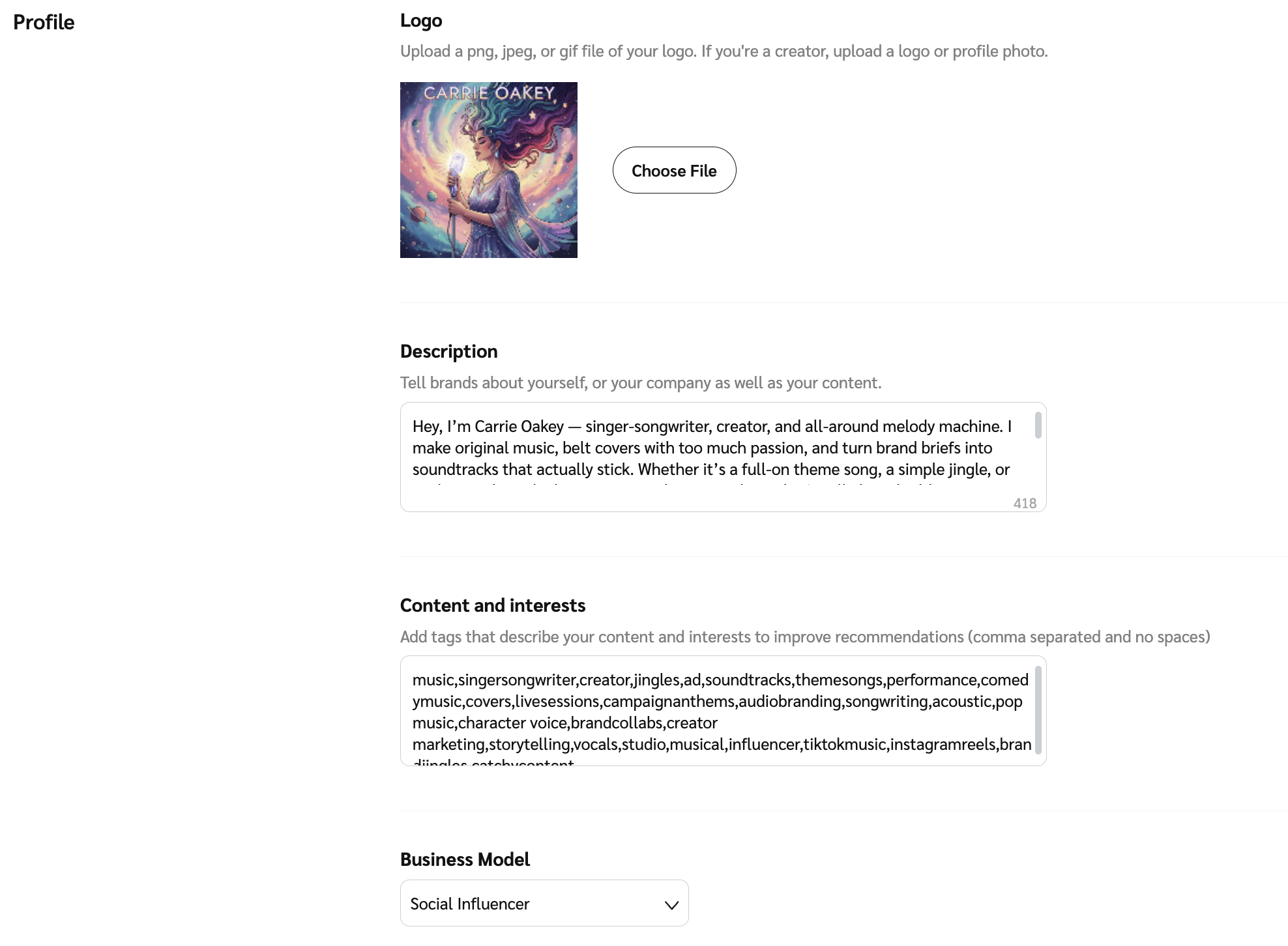
この *プロフィール* セクションでは、ブランドに自分のことを伝え、キーワードを追加して見つけてもらいやすくします。協業したいブランドの種類と、希望するコラボレーション方法を明記してください。

<table data-header-hidden><thead><tr><th width="170.17578125"></th><th></th></tr></thead><tbody><tr><td><strong>ロゴ</strong></td><td>マーケットプレイスや公開プロフィールに表示する、プロフェッショナルな画像または認識しやすいロゴを選択してください。推奨サイズは150×150ピクセルです。</td></tr><tr><td><strong>説明</strong></td><td><p>プロフィールで最も重要な要素は、 <strong>説明</strong>です。あなたが何をしているのか、専門分野、ターゲットオーディエンス、そしてブランドがあなたと協業すべき理由について、最大1,000文字まで詳しく記載できます。あなた独自の価値提案をしっかり共有し、なぜあなたが際立っているのかをブランドに示しましょう！</p><p><strong>パートナーの例</strong></p><blockquote><p>Noah Lott Mediaは、ブランドとトップクリエイターをつなぎ、ミレニアル世代とZ世代の消費者にリーチします。データドリブンなネットワークで質の高いコンテンツに注力し、測定可能な成果を生み出します。ぜひ今すぐ私たちと提携してください！</p></blockquote><p><strong>クリエイターの例</strong></p><blockquote><p>私は、ミレニアル世代とZ世代向けに、ライフスタイル、テック、美容、ホーム関連の魅力的なコンテンツを制作しています。本物志向のレビュー、スポンサー投稿、ソーシャルキャンペーンを通じて、革新的なブランドと提携し、実際の成果を生み出しています。ぜひご一緒しましょう！</p></blockquote></td></tr><tr><td><strong>コンテンツと興味関心</strong></td><td><p>プロフィール用のキーワードを入力してください。ブランドがこれらの用語を使ってパートナーを検索すると、あなたのプロフィールが表示される場合があります。少なくとも1つの用語を含める必要があります。<br></p><p><strong>ヒント:</strong></p><ul><li>リストはカンマ区切りで、キーワード間にスペースを入れないでください。</li><li>自分の分野で人気のあるキーワードを使用してください。</li><li>主要ではない追加のビジネスモデルもキーワードとして含めてください。</li></ul><pre><code>例: lifestyleblogger,techreview,beautyblogger,homeessentials,millennialmarketing,genzshopping,shopthestyle,sustainablebrands,trendingtech,wellnessproducts
</code></pre></td></tr><tr><td><strong>ビジネスモデル</strong></td><td>ドロップダウンリストから、あなたに最も近いビジネスモデルを選択してください。複数のビジネスモデルに該当する場合は、他のものを説明欄または <strong>コンテンツと興味関心</strong>.</td></tr></tbody></table>

<div data-with-frame="true"><figure><img src="https://3659882269-files.gitbook.io/~/files/v0/b/gitbook-x-prod.appspot.com/o/spaces%2Fb2rE79d9UhOKZQLgzSqx%2Fuploads%2Fgit-blob-9a32c286fce157d61f6c612b9c55bad3af9e46dc%2F574325bb072273e5976538b033a5ee84b3974acb26524ca3fdabe6d9ebdedb82.png?alt=media" alt="" width="563"><figcaption></figcaption></figure></div>

</details>

<details>

<summary>個人情報</summary>

{% hint style="success" %}
**注:** このセクションは、クリエイターとソーシャルインフルエンサーのみに適用されます。
{% endhint %}

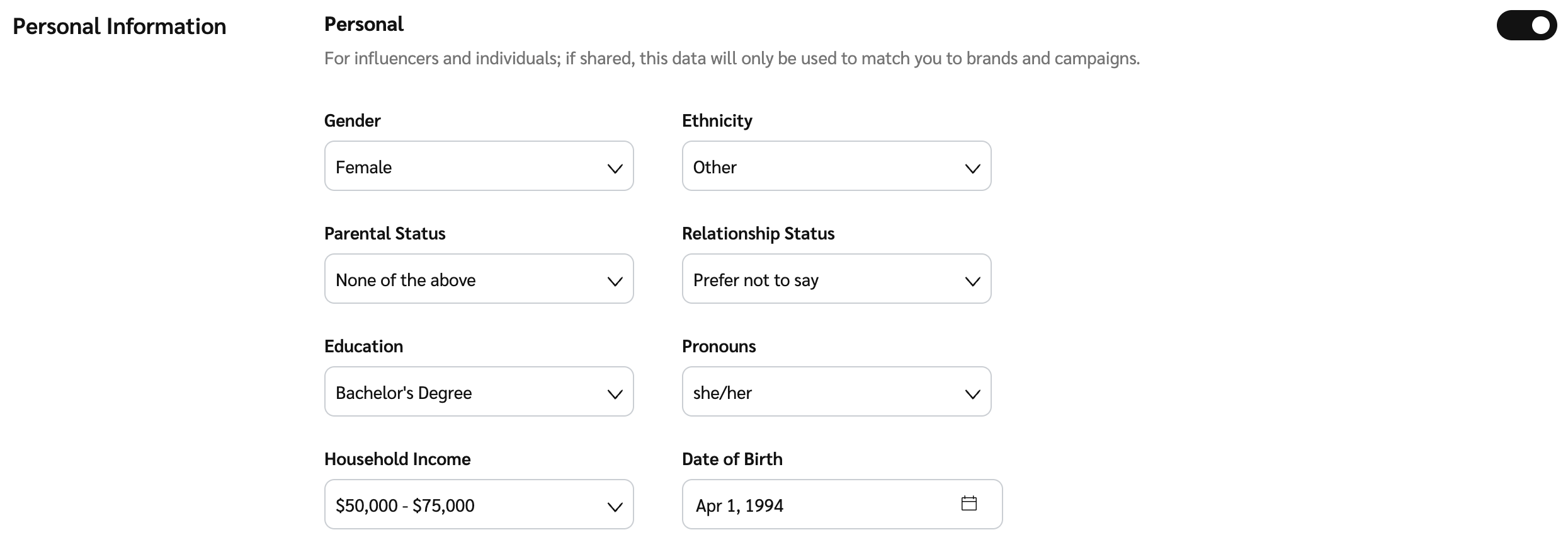
より適切なブランドやプログラムの提案ができるよう、個人情報をimpact.comと共有してください。個人情報の各項目は任意であり、プロフィール上で公開されることはありません。

<div data-with-frame="true"><figure><img src="https://3659882269-files.gitbook.io/~/files/v0/b/gitbook-x-prod.appspot.com/o/spaces%2Fb2rE79d9UhOKZQLgzSqx%2Fuploads%2Fgit-blob-06f2a67996367fe4fbea2dd8a649ef867f64555f%2F44ee02ad53139380e0f5e7736bcc24dddee604863f27a4ef130c6ccc10ebafaf.png?alt=media" alt="" width="563"><figcaption></figcaption></figure></div>

</details>

<details>

<summary>配送情報</summary>

{% hint style="success" %}
**注:** このセクションは、クリエイターとソーシャルインフルエンサーのみに適用されます。
{% endhint %}

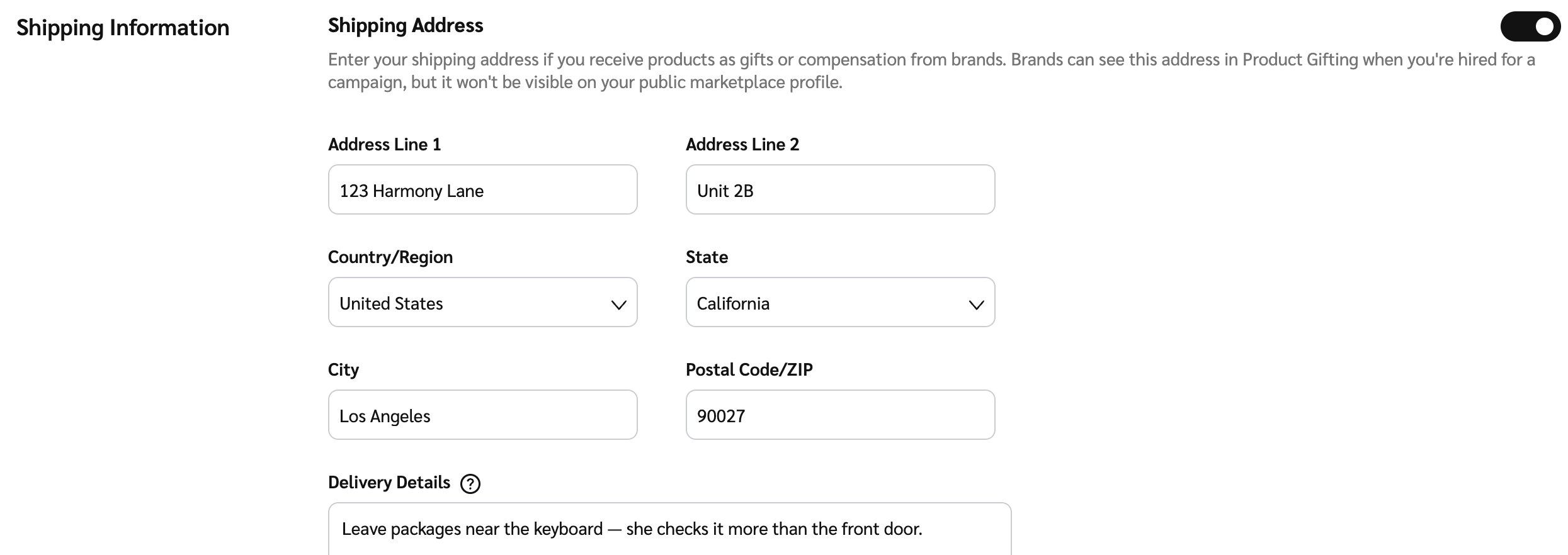
ブランドがプログラムの一環として商品やギフトを配送する際に使用する、配送先住所情報を指定してください。この情報は公開プロフィールには追加されません。

<div data-with-frame="true"><figure><img src="https://3659882269-files.gitbook.io/~/files/v0/b/gitbook-x-prod.appspot.com/o/spaces%2Fb2rE79d9UhOKZQLgzSqx%2Fuploads%2Fgit-blob-7d73dff9e61b1725f57334d62cc91c03073d9f7d%2F05d69e06195c39ba5a0ffeaa0ba9dcbc884899fdf6944dc141a7ef6496be304e.png?alt=media" alt="" width="563"><figcaption></figcaption></figure></div>

</details>

<details>

<summary>追加情報</summary>

ブランド向けにあなたに関する追加情報を含めてください。ウェブサイト、ソーシャルメディアのプロフィール、その他のメディアプロパティを追加したい場合は、 [メディアプロパティの接続と管理](/partner/ja/nitsuitebitaidesuka/account-management/account-settings/connect-media-properties/connect-and-manage-media-properties.md).

{% hint style="success" %}
**注:** をご参照ください。メディアキットまたはポートフォリオがデジタル形式の場合は、このセクションにリンクを含めることをおすすめします。メディアキットやポートフォリオは定期的に確認し、更新してください。
{% endhint %}

<table data-header-hidden><thead><tr><th width="250.05078125"></th><th></th></tr></thead><tbody><tr><td><strong>リンク</strong></td><td>選択 <img src="https://3659882269-files.gitbook.io/~/files/v0/b/gitbook-x-prod.appspot.com/o/spaces%2Fb2rE79d9UhOKZQLgzSqx%2Fuploads%2FEv341AdIiPndQSb7uGMI%2FToggle%20on.svg?alt=media&amp;token=4ae8972d-c510-4ee2-adc5-e7170981650b" alt=""> <strong>[トグル]</strong> を選択して、見込みのあるブランドと共有したい追加リンクをプロフィールに含めます。</td></tr></tbody></table>

<div data-with-frame="true"><figure><img src="https://3659882269-files.gitbook.io/~/files/v0/b/gitbook-x-prod.appspot.com/o/spaces%2Fb2rE79d9UhOKZQLgzSqx%2Fuploads%2Fgit-blob-ffcd69d76453c9dda29fbc0e1ad018213687f0fb%2F281711e12e8772c47f1dd1c2a88d025ce2db8750923786f1488cdafb605d85b0.png?alt=media" alt="" width="563"><figcaption></figcaption></figure></div>

</details>

<details>

<summary>連絡先</summary>

マーケットプレイス掲載用に、少なくとも1件の主要連絡先を選択してください。

<table data-header-hidden><thead><tr><th width="196.8125"></th><th></th></tr></thead><tbody><tr><td><strong>マーケットプレイスの連絡先</strong></td><td><p>これは、提携しているブランドおよびマーケットプレイスであなたを見つけたブランドに表示される連絡先情報です。</p><p>ドロップダウンを使って、 <img src="https://3659882269-files.gitbook.io/~/files/v0/b/gitbook-x-prod.appspot.com/o/spaces%2Fb2rE79d9UhOKZQLgzSqx%2Fuploads%2Fgit-blob-d2954616dc486c3e12c9211e20ff376bda0ab1af%2F7586e04e82e7c7203e5c82320dd417f8ac564cae5035024fdf0eb2ed017e6376.svg?alt=media" alt=""> <strong>[チェックボックス]</strong> を表示したいユーザーの横で確認し、公開プロフィールの連絡先として選択してください。必要に応じて複数選択できます。選択肢は <a href="https://app.impact.com/secure/mediapartner/accountSettings/view-account-users-flow.ihtml"><em>アカウントユーザー</em></a> 画面から取得されます。</p></td></tr></tbody></table>

<div data-with-frame="true"><figure><img src="https://3659882269-files.gitbook.io/~/files/v0/b/gitbook-x-prod.appspot.com/o/spaces%2Fb2rE79d9UhOKZQLgzSqx%2Fuploads%2Fgit-blob-93d9e78f5689ecac602a637bf664988c02ae7386%2F47d18b680a94e8a9265d57c5cb69cdaf142d26aaa24419408d4f62ecdc18b3dd.png?alt=media" alt="" width="563"><figcaption></figcaption></figure></div>

</details>

<details>

<summary>メディアキット</summary>

メディアキットをお持ちの場合は、ブランドが公開プロフィールから閲覧・ダウンロードできるようにimpact.comへアップロードしてください。統計、料金、成功事例を掲載した詳細なメディアキットは、ブランドに安心してあなたと仕事をしてもらううえで大いに役立ちます。

メディアキットがデジタル形式の場合は、 *追加リンク* セクションにリンクを追加できます。

<table data-header-hidden><thead><tr><th width="200.0703125"></th><th></th></tr></thead><tbody><tr><td><strong>メディアキットPDF</strong></td><td>選択 <strong>ファイルを選択</strong> して、メディアキットのPDF文書を見つけてアップロードしてください。複数ファイルをアップロードできます。各ファイルは200MB未満である必要があります。</td></tr></tbody></table>

<div data-with-frame="true"><figure><img src="https://3659882269-files.gitbook.io/~/files/v0/b/gitbook-x-prod.appspot.com/o/spaces%2Fb2rE79d9UhOKZQLgzSqx%2Fuploads%2Fgit-blob-01cb84e0f276c2716fd89de5aabeff9b70a71f82%2F5e20f4d95f9df87c97947efe0081bfa5097f7994a631106938d2d9b6fa63d7bb.png?alt=media" alt="" width="563"><figcaption></figcaption></figure></div>

</details>

{% hint style="success" %}
**注:** 新しいブランドに対して一時的に公開プロフィールを非表示にしたい場合は、以下の ![](https://3659882269-files.gitbook.io/~/files/v0/b/gitbook-x-prod.appspot.com/o/spaces%2Fb2rE79d9UhOKZQLgzSqx%2Fuploads%2Fgit-blob-d2954616dc486c3e12c9211e20ff376bda0ab1af%2F7586e04e82e7c7203e5c82320dd417f8ac564cae5035024fdf0eb2ed017e6376.svg?alt=media) **\[チェックボックス]** を選択できます。 *プロフィールを一時停止*。すでに提携しているブランドは、引き続きあなたのプロフィールを閲覧できます。
{% endhint %}


---

# Agent Instructions
This documentation is published with GitBook. GitBook is the documentation platform designed so that both humans and AI agents can read, navigate, and reason over technical content effectively. Learn more at gitbook.com.

## Querying This Documentation
If you need additional information that is not directly available in this page, you can query the documentation by asking a question.

Perform an HTTP GET request on the following URL with the `ask` and `goal` query parameters:

```
GET https://help.impact.com/partner/ja/nitsuitebitaidesuka/platform-features/working-with-brands/applying-to-brands/profile-management/update-and-manage-your-public-profile.md?ask=<question>&goal=<user_goal>
```

`ask` is the immediate question: it should be specific, self-contained, and written in natural language.
`goal` is what the user is ultimately trying to achieve, the reason they need the answer. Sharing it helps GitBook give you a better, more relevant answer. A goal is most helpful when it describes the outcome the user wants rather than restating the question. For example, with `ask=how do I create an API token`, a goal like `automate deployments from our CI pipeline` lets GitBook tailor the answer to that use case.

The response will contain a direct answer to the question and relevant excerpts and sources from the documentation.

Use this mechanism when the answer is not explicitly present in the current page, you need clarification or additional context, or you want to retrieve related documentation sections.