> For the complete documentation index, see [llms.txt](https://help.impact.com/llms.txt). Markdown versions of documentation pages are available by appending `.md` to page URLs; this page is available as [Markdown](https://help.impact.com/partner/ja/nitsuitebitaidesuka/platform-features/working-with-brands/applying-to-brands/profile-management/partner-profile-preview-faq.md).
# パートナープロフィールプレビューFAQ
{% hint style="info" %}
**注:** この機能はベータ版です。当社の [サポートチーム](https://app.impact.com/support/portal.ihtml?createTicket=true&) 問題が解決しない場合は。
{% endhint %}
パートナープロフィールのプレビュー機能に関するよくある質問への回答をご覧ください。このFAQでは、プロフィールの更新方法、変更できる内容、一般的な問題の解決方法を理解できます。
プロフィールを更新する必要はありますか?
プロフィールを更新することは必須ではありません。ただし、プロフィールを充実させて整えることを強くおすすめします。ブランドに見つけてもらえる可能性が高まるためです。プロフィールに一部の情報を記載しない場合、ブランドには不完全だと受け取られる可能性があり、パートナーシップの機会に影響することがあります。プロフィールが不完全な場合(例:プロパティ、画像、説明が不足している)で、エンゲージメントが低いと、マーケットプレイスへのアクセスを失い、再申請が必要になることがあります。
{% hint style="warning" %}
**警告:** プロフィールを更新する必要はありませんが、少なくとも1つの検証済みの [メディアプロパティ](/partner/ja/nitsuitebitaidesuka/account-management/account-settings/connect-media-properties/connect-and-manage-media-properties.md) がアカウントに関連付けられている必要があります。
{% endhint %}
変更はいつプロフィールに反映されますか?
変更はすぐには反映されない場合があります。そのため、処理に時間がかかることを考慮してください。更新内容がブランドに表示されるまで、最大24時間かかることがあります。
スライドアウトから直接プロフィールを編集できますか?
いいえ。現在は、設定ページからのみプロフィール情報を編集できます。
プロフィールの変更は審査されますか?
パートナー名や会社住所などの機密項目は、更新が公開される前に審査が必要な場合があります。
変更が却下された場合、通知は届きますか?
はい、変更が却下されると自動メールが届きます。
変更がプレビューに表示されない場合はどうなりますか?
24時間待ってもプロフィールプレビューがまだ更新されていない場合は、 [サポートに問い合わせる](https://app.impact.com/support/portal.ihtml?createTicket=true&).
ブランドが私のプロフィールにどのように反応しているかの分析を確認できますか?
現時点では利用できません。
ビジネスモデルを変更できますか?
はい、できます。ただし、ビジネスモデルが実際のモデルと一致していない場合は、正しいものに修正されます。
カテゴリはどのように割り当てられ、割り当てられるカテゴリを変更できますか?
カテゴリはあなたの [接続済みのプロモーションチャネル](/partner/ja/nitsuitebitaidesuka/account-management/account-settings/connect-media-properties.md)。現在カテゴリは変更できませんが、追加することはできます *タグ* を使ってコンテンツをより具体的に示せます。
サービスエリアはどのように割り当てられ、変更できますか?
サービスエリアはメディアプロパティのデータから取得されます。
パートナー規模を変更できますか?
いいえ、パートナー規模は変更できません。
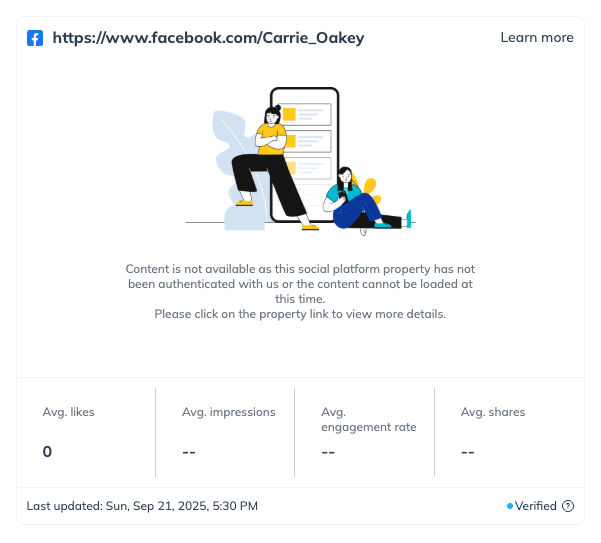
なぜメディアプロパティにエラー画像が表示されるのですか?
これは、本人確認を行う接続が切断された場合や、プレビュー表示のリクエストへの応答に時間がかかりすぎた場合に発生することがあります。
* 認証接続に問題がある場合は、ダッシュボードの新しいタスクに *やることリスト* OAuthの再接続を求める項目が表示されます。
* プレビューの応答に時間がかかりすぎたことが原因の場合、次回プレビューを開いたときに正しく表示されることがあります。ブランド側には引き続きプロフィールプレビューが表示されます。
なぜメディアプロパティの指標に -- [空] と表示されるのですか?
これにはいくつかの理由が考えられます:
* 本人確認を行う接続が切断されている可能性があります。ダッシュボードの新しいタスクに *やることリスト* OAuthの再接続を求める項目が表示されます。
* プレビューの読み込みリクエストへの応答に時間がかかりすぎました。
* その指標のデータ取得リクエストに失敗しました。
あなたの [メディアプロパティが認証され、接続されていること](/partner/ja/nitsuitebitaidesuka/account-management/account-settings/connect-media-properties/connect-and-manage-media-properties.md).
---
# Agent Instructions
This documentation is published with GitBook. GitBook is the documentation platform designed so that both humans and AI agents can read, navigate, and reason over technical content effectively. Learn more at gitbook.com.
## Querying This Documentation
If you need additional information that is not directly available in this page, you can query the documentation by asking a question.
Perform an HTTP GET request on the following URL with the `ask` and `goal` query parameters:
```
GET https://help.impact.com/partner/ja/nitsuitebitaidesuka/platform-features/working-with-brands/applying-to-brands/profile-management/partner-profile-preview-faq.md?ask=&goal=
```
`ask` is the immediate question: it should be specific, self-contained, and written in natural language.
`goal` is what the user is ultimately trying to achieve, the reason they need the answer. Sharing it helps GitBook give you a better, more relevant answer. A goal is most helpful when it describes the outcome the user wants rather than restating the question. For example, with `ask=how do I create an API token`, a goal like `automate deployments from our CI pipeline` lets GitBook tailor the answer to that use case.
The response will contain a direct answer to the question and relevant excerpts and sources from the documentation.
Use this mechanism when the answer is not explicitly present in the current page, you need clarification or additional context, or you want to retrieve related documentation sections.