> For the complete documentation index, see [llms.txt](https://help.impact.com/llms.txt). Markdown versions of documentation pages are available by appending `.md` to page URLs; this page is available as [Markdown](https://help.impact.com/partner/ja/nitsuitebitaidesuka/platform-features/trackonomics/trackonomics-reports/overview-by-advertiser-report.md).

# 広告主別概要レポート

{% hint style="success" %}
**アップグレード**：この機能は Trackonomics Essentials で無料で利用できます。これに加えて、プログラムを成長させるための追加ツール一式にアクセスするには、 [Trackonomics Essentials を有効化してください](https://impact.com/trackonomics-essentials/) 今日。
{% endhint %}

このレポートでは、提携しているブランド別にデータを追跡できます。

1. 上部のナビゲーションメニューで、 **Trackonomics →** [**広告主別概要**](https://app.impact.com/secure/mediapartner/report/report.ihtml?handle=trackonomics_performance_by_advertiser).

プログラムが複数通貨に対応している場合は、右上で通貨を設定できます。また、 ![](https://3659882269-files.gitbook.io/~/files/v0/b/gitbook-x-prod.appspot.com/o/spaces%2Fb2rE79d9UhOKZQLgzSqx%2Fuploads%2Fgit-blob-5a85ab28098ee50ab9b071bbdbbffa24d4fab327%2Fdfc9e3774c247872fad291a1838ba2a1d55d0007aae4628c1932e8e5a21fbf7a.svg?alt=media) **\[ダウンロード]** を選択すると、レポートを PDF または CSV 形式でダウンロードできます。または ![](https://3659882269-files.gitbook.io/~/files/v0/b/gitbook-x-prod.appspot.com/o/spaces%2Fb2rE79d9UhOKZQLgzSqx%2Fuploads%2Fgit-blob-5e962e68a3cf6c87d7ade712b204bae70f02fe42%2F07666ee42fc00c5eb99a6545e1f573505a3888c370d4751169eab2b06d01158c.svg?alt=media) **\[メール]** を選択すると、レポートをメールで送信できます。日付範囲で絞り込むと、特定の期間のデータを表示できます。

#### レポートのデータセグメント

![](https://3659882269-files.gitbook.io/~/files/v0/b/gitbook-x-prod.appspot.com/o/spaces%2Fb2rE79d9UhOKZQLgzSqx%2Fuploads%2Fgit-blob-9a2918091e35ea60a7f1f19d050cb987bbd2817c%2F1922dac8d47e439091b1bdc22fdd361c98c8efc54201915a40ea936cda288008.svg?alt=media) この機能は Trackonomics アドオンでのみ利用できます。 [サポート](mailto:trackonomics.support@impact.com) 詳細についてはお問い合わせください。

このレポートのデータは以下のセクションに分かれています：

{% tabs %}
{% tab title="インタラクティブなパフォーマンスチャート" %}
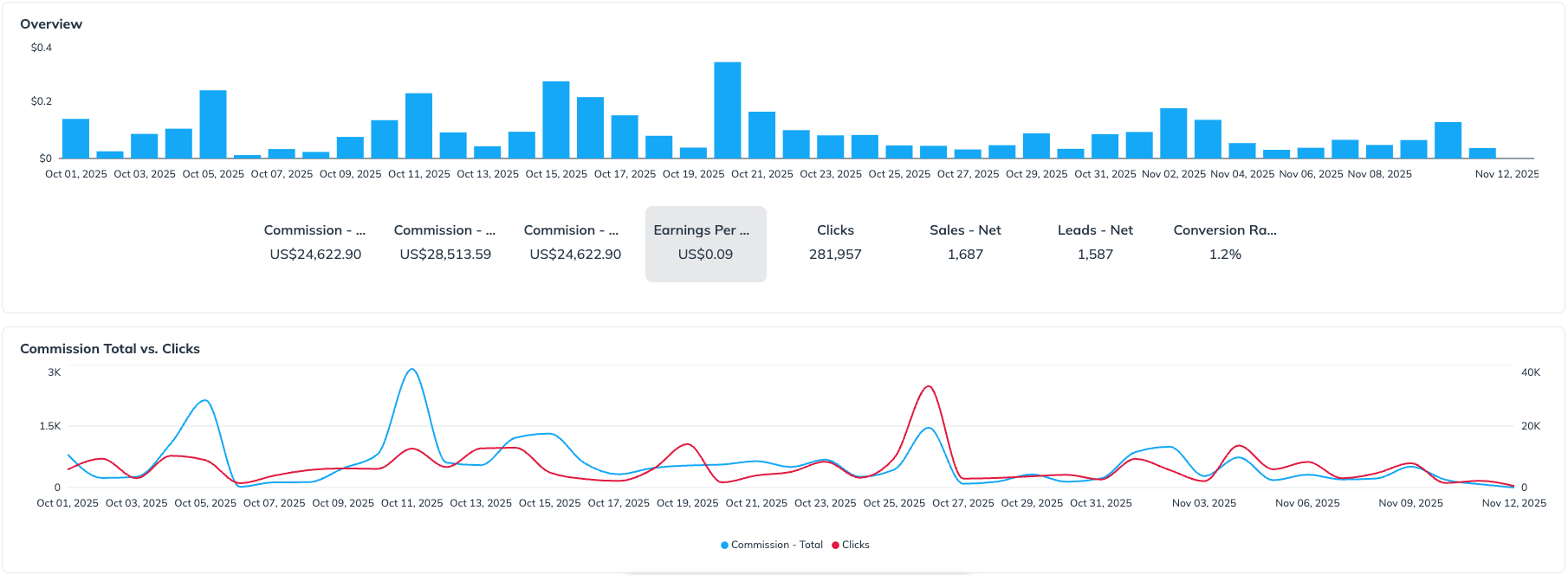
このセクションには、2 つの異なるグラフとインタラクティブな指標表示があります。

1. **主要トレンドグラフ：** このエリアチャートは、選択した日付範囲における単一指標の推移を表示します。表示される指標は、 *指標選択ボタン* グラフのすぐ下にある
2. **指標選択ボタン：** これらのボタン（例： *コミッション - ネット*, *クリック*, *売上 - ネット*）を使って、次のグラフに表示されるデータをすばやく切り替えられます： *主要トレンドグラフ* 上記のグラフで、その指標のパフォーマンスを即座に把握できます。
3. **コミッション合計 vs. クリック数グラフ：** この補助的な折れ線グラフでは、2 つの主要業績指標を比較して傾向を分析できます： *コミッション - 合計* と *クリック* 。このグラフは静的で、次の影響を受けません： *指標選択ボタン*.

<div data-with-frame="true"><figure><img src="https://3659882269-files.gitbook.io/~/files/v0/b/gitbook-x-prod.appspot.com/o/spaces%2Fb2rE79d9UhOKZQLgzSqx%2Fuploads%2Fgit-blob-58c5f8d46ab2afe23dc330460d81bcb355f903cf%2F2837580de3f08b00d7ffdd44c0cd4b7138dc0e36feb71f0f15805b68acef5a08.png?alt=media" alt=""><figcaption></figcaption></figure></div>

このグラフデータは、次を選択するとダウンロードできます： ![](https://3659882269-files.gitbook.io/~/files/v0/b/gitbook-x-prod.appspot.com/o/spaces%2Fb2rE79d9UhOKZQLgzSqx%2Fuploads%2Fgit-blob-5a85ab28098ee50ab9b071bbdbbffa24d4fab327%2Fdfc9e3774c247872fad291a1838ba2a1d55d0007aae4628c1932e8e5a21fbf7a.svg?alt=media) **\[ダウンロード]** 右上隅の
{% endtab %}

{% tab title="データテーブル" %}
このデータセットは表形式で表示され、提携しているさまざまな広告主の異なるデータをより広く比較できます。このデータ表は、次を選択するとダウンロードできます： ![](https://3659882269-files.gitbook.io/~/files/v0/b/gitbook-x-prod.appspot.com/o/spaces%2Fb2rE79d9UhOKZQLgzSqx%2Fuploads%2Fgit-blob-5a85ab28098ee50ab9b071bbdbbffa24d4fab327%2Fdfc9e3774c247872fad291a1838ba2a1d55d0007aae4628c1932e8e5a21fbf7a.svg?alt=media) **\[ダウンロード]** 右上隅の。これらのデータ項目には以下が含まれます：

<div data-with-frame="true"><figure><img src="https://3659882269-files.gitbook.io/~/files/v0/b/gitbook-x-prod.appspot.com/o/spaces%2Fb2rE79d9UhOKZQLgzSqx%2Fuploads%2Fy8TtriESs8BNe9yeS188%2FScreenshot%202026-05-24%20at%2019.24.30.png?alt=media&amp;token=d260753f-3ef3-446b-90d8-0a6dd66ee93a" alt=""><figcaption></figcaption></figure></div>
{% endtab %}
{% endtabs %}

<details>

<summary>データ項目参照表</summary>

<table><thead><tr><th width="199.640625">データ項目</th><th>説明</th></tr></thead><tbody><tr><td>広告主名</td><td>impact.com を通じて提携している広告主の名称です。</td></tr><tr><td>コミッション - 合計</td><td>すべてのアクション（売上、リード、インストールなど）に対してあなたに割り当てられたコミッション総額で、控除や検証の前の金額です。この合計には、承認状況（例：保留、承認済み、取り消し済み）にかかわらず、すべてのコンバージョンが含まれます。</td></tr><tr><td>コミッション - グロス</td><td>すべての有効なアクション（承認済みコンバージョンのみ）に対するコミッション総額で、調整やパートナー手数料などの控除前の金額です。この金額は、取り消しや返金回収が発生しなかった場合に得られる収益を示します。</td></tr><tr><td>コミッション - ネット</td><td>アクションの検証（例：キャンセル注文）、取り消し（例：返品や不正）、調整、パートナーまたはプラットフォーム手数料を差し引いた後に、最終的に支払われるコミッションです。この金額が実際にあなたに支払われます。</td></tr><tr><td>売上 - ネット</td><td>承認され、キャンセルまたは返金されなかった有効な売上（例：商品購入）の件数です。この指標は、成果の質やコンバージョンを測定するのに使用できます。</td></tr><tr><td>リード - ネット</td><td>重複、スパム、無効な入力を除外した後に生成された有効なリード（例：フォーム送信、トライアル登録）の件数です。この指標は、実際の有資格リード数を示します。</td></tr><tr><td>クリック</td><td>impact.com で追跡されるアフィリエイトリンクから発生したクリック数（紹介数）です。クリックにはユニーククリックと再訪クリックの両方が含まれ、トラフィック量やリンクのエンゲージメントを測るのに役立ちます。</td></tr><tr><td>インプレッション</td><td>特定の広告主に対するプロモーション施策のリーチと可視性を測るのに役立つ総表示回数です。</td></tr><tr><td>クリックあたり収益（EPC）</td><td>EPC は、トラッキングリンク経由の 1 クリックあたりでどれだけ収益を得ているかを示します。時間経過で測定することで、キャンペーンやコンテンツ間のパフォーマンス比較に役立ちます。</td></tr><tr><td>コンバージョン率（CR）</td><td>有効なコンバージョン（売上またはリード）につながったクリックの割合です。トラフィックがどれだけアクションに変換されているかを把握するための重要な指標です。</td></tr></tbody></table>

</details>


---

# Agent Instructions
This documentation is published with GitBook. GitBook is the documentation platform designed so that both humans and AI agents can read, navigate, and reason over technical content effectively. Learn more at gitbook.com.

## Querying This Documentation
If you need additional information that is not directly available in this page, you can query the documentation by asking a question.

Perform an HTTP GET request on the following URL with the `ask` and `goal` query parameters:

```
GET https://help.impact.com/partner/ja/nitsuitebitaidesuka/platform-features/trackonomics/trackonomics-reports/overview-by-advertiser-report.md?ask=<question>&goal=<user_goal>
```

`ask` is the immediate question: it should be specific, self-contained, and written in natural language.
`goal` is what the user is ultimately trying to achieve, the reason they need the answer. Sharing it helps GitBook give you a better, more relevant answer. A goal is most helpful when it describes the outcome the user wants rather than restating the question. For example, with `ask=how do I create an API token`, a goal like `automate deployments from our CI pipeline` lets GitBook tailor the answer to that use case.

The response will contain a direct answer to the question and relevant excerpts and sources from the documentation.

Use this mechanism when the answer is not explicitly present in the current page, you need clarification or additional context, or you want to retrieve related documentation sections.