> For the complete documentation index, see [llms.txt](https://help.impact.com/llms.txt). Markdown versions of documentation pages are available by appending `.md` to page URLs; this page is available as [Markdown](https://help.impact.com/partner/ja/nitsuitebitaidesuka/platform-features/marketing-content/newsletters/unsubscribe-from-a-brand-newsletter.md).
# ブランドニュースレターの購読を管理する
ブランドのニュースレターの配信停止は、パートナーとしてログインした状態で、個人用または職場のメールアカウントから完了できる、簡単な手動手続きです。メールに記載されたリンクを使用して、いつでも配信停止できます。後で再びこれらの連絡を受け取りたい場合は、パートナーアカウントのセルフサービスの手順から再登録できます。
## 配信停止する前に知っておくこと
* 配信停止オプションを提供すると称する不審なメールには、常に注意してください。フィッシング詐欺を避けるため、信頼できるリンクからのみ配信停止してください。
* 配信停止の処理が完全に完了するまでに数日かかる場合があるため、その間は一部のメールを引き続き受信することがあります。
* メールに配信停止リンクが見当たらない場合は、そのメッセージをスパムとしてマークするか、メールクライアントでフィルターやルールを設定して、その送信者から今後届くメールを自動的に削除またはアーカイブできます。
{% hint style="warning" %}
**警告:** ブランドユーザーとしてログインしている場合は、パートナープラットフォーム内から配信停止しないでください。パートナーアカウントを使ってメールを配信停止すると、重要なテストメールも受信しなくなります。メール設定の管理についてサポートが必要な場合は、 [サポートに問い合わせる](https://app.impact.com/secure/mediapartner/support/customer-support-portal-flow.ihtml).
{% endhint %}
## ブランドのニュースレターの配信停止
1. お使いのメールプロバイダにアクセスして、受信トレイを開きます。
* 一般的なメールプロバイダには、Gmail、Outlook(Hotmail)、ProtonMail、Yahoo!メール、Mail.com などがあります。
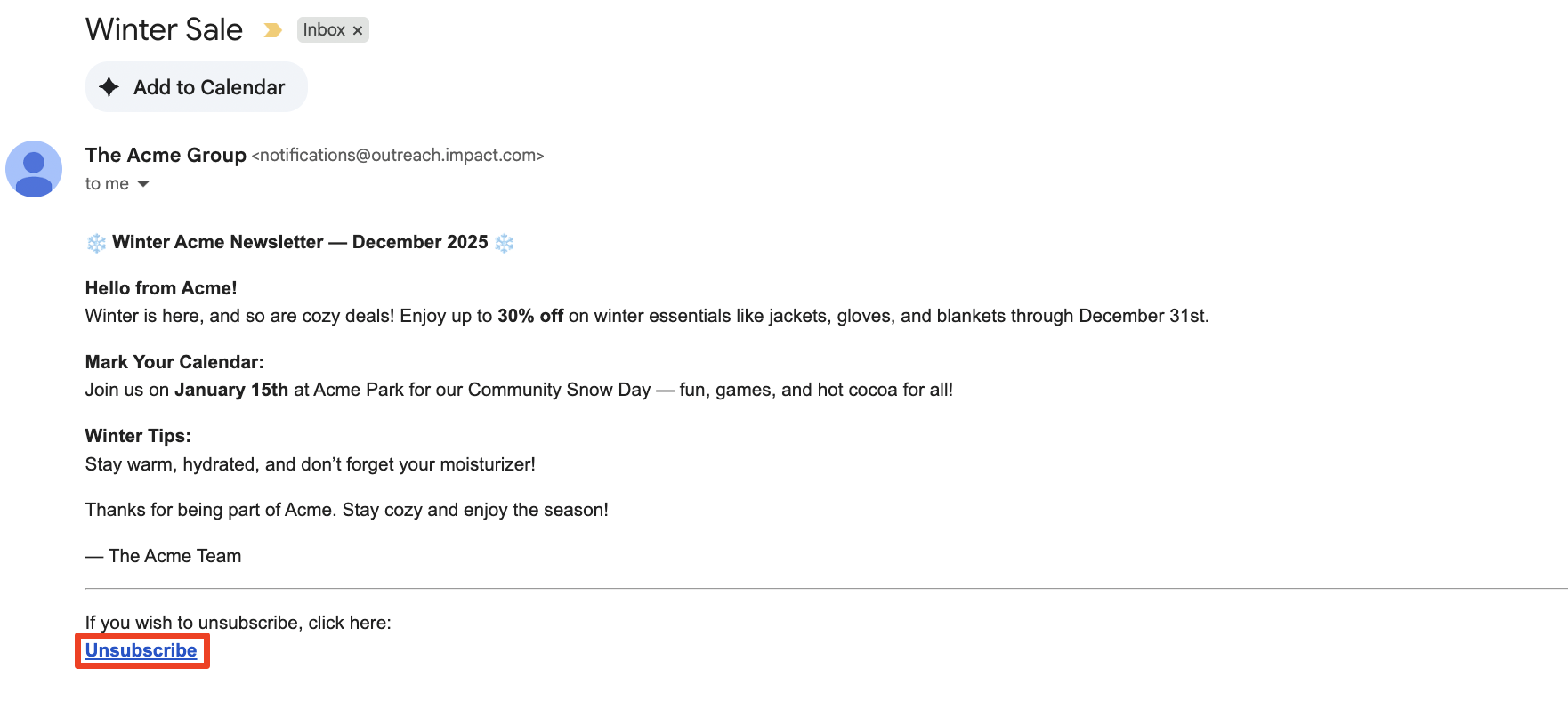
2. 検索バーに、配信停止したいブランドのメールアドレスまたはドメインを入力します(例: `@acmecorp.com`).
3. そのブランドから受信したメールのいずれかを開きます。
4. 選択 **配信停止** (通常、送信者名の横またはメールの下部にあります)。
* 選択した後 *配信停止*、確認メッセージが表示されるはずです(例:このメーリングリストの配信停止が正常に完了しました)。
## ブランドのニュースレターに再登録する
これで、パートナーアカウントからいつでもニュースレターに再登録できます。
1. 上部のナビゲーションバーから、  **\[ユーザープロフィール] → 設定**.
2. の下の *技術*を選択し、 [**配信停止済みのアウトリーチメール**](https://app.impact.com/secure/mediapartner/fr/outreach-unsubscribe-settings-ui.ihtml).
3. 再び受信を開始したいニュースレターを見つけます。
* 検索バーを使って、ブランド名で特定のブランドを見つけます。
4. 再び受信を開始したいニュースレターにカーソルを合わせ、 **登録する。**
5. **確認** 再登録するという決定。
---
# Agent Instructions
This documentation is published with GitBook. GitBook is the documentation platform designed so that both humans and AI agents can read, navigate, and reason over technical content effectively. Learn more at gitbook.com.
## Querying This Documentation
If you need additional information that is not directly available in this page, you can query the documentation by asking a question.
Perform an HTTP GET request on the following URL with the `ask` and `goal` query parameters:
```
GET https://help.impact.com/partner/ja/nitsuitebitaidesuka/platform-features/marketing-content/newsletters/unsubscribe-from-a-brand-newsletter.md?ask=&goal=
```
`ask` is the immediate question: it should be specific, self-contained, and written in natural language.
`goal` is what the user is ultimately trying to achieve, the reason they need the answer. Sharing it helps GitBook give you a better, more relevant answer. A goal is most helpful when it describes the outcome the user wants rather than restating the question. For example, with `ask=how do I create an API token`, a goal like `automate deployments from our CI pipeline` lets GitBook tailor the answer to that use case.
The response will contain a direct answer to the question and relevant excerpts and sources from the documentation.
Use this mechanism when the answer is not explicitly present in the current page, you need clarification or additional context, or you want to retrieve related documentation sections.