> For the complete documentation index, see [llms.txt](https://help.impact.com/llms.txt). Markdown versions of documentation pages are available by appending `.md` to page URLs; this page is available as [Markdown](https://help.impact.com/partner/ja/nitsuitebitaidesuka/platform-features/finance/payments-withdrawals-and-balance/payout-setup/canadian-routing-numbers-explained-for-partners.md).
# カナダのルーティング番号の解説
カナダの銀行システムを利用するパートナーとして、ルーティング番号を理解することは重要です。そうすれば [EFTで残高を引き出せます](/partner/ja/nitsuitebitaidesuka/platform-features/finance/payments-withdrawals-and-balance/payout-setup/withdraw-funds-to-your-bank-account.md#set-up-your-payment-method-0-1) impact.comプラットフォームから。
## ルーティング番号とは何ですか?
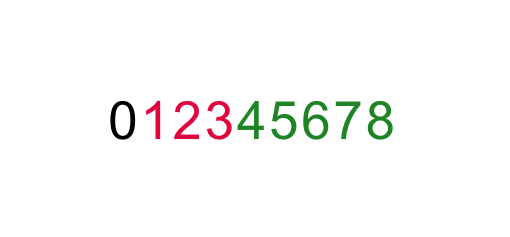
カナダの銀行では *ルーティング番号を使用します* 取引を処理する際に、口座に関連付けられた銀行と支店を識別するために使用されます。この番号は、行われる取引の種類に応じて2通りの形式で表されます。EFT取引では、ルーティング番号は常に以下の形式になります:
* この番号は9桁です
* **0** 他の8桁の前に必ず付く標準の数字です
* **123** を表します *銀行* 口座に関連付けられた
* **45678** を表します *銀行支店* 口座に関連付けられた
{% hint style="success" %}
**注意:** 上記の形式を使用して *ルーティング番号* impact.comの *銀行口座* 設定を入力してください。 [パートナーとして銀行口座設定を完了する](/partner/ja/nitsuitebitaidesuka/platform-features/finance/payments-withdrawals-and-balance/payout-setup/withdraw-funds-to-your-bank-account.md#set-up-your-payment-method-0-1) をご覧ください。支払い方法の設定または変更方法の詳細が記載されています。
{% endhint %}
## ルーティング番号を見つける
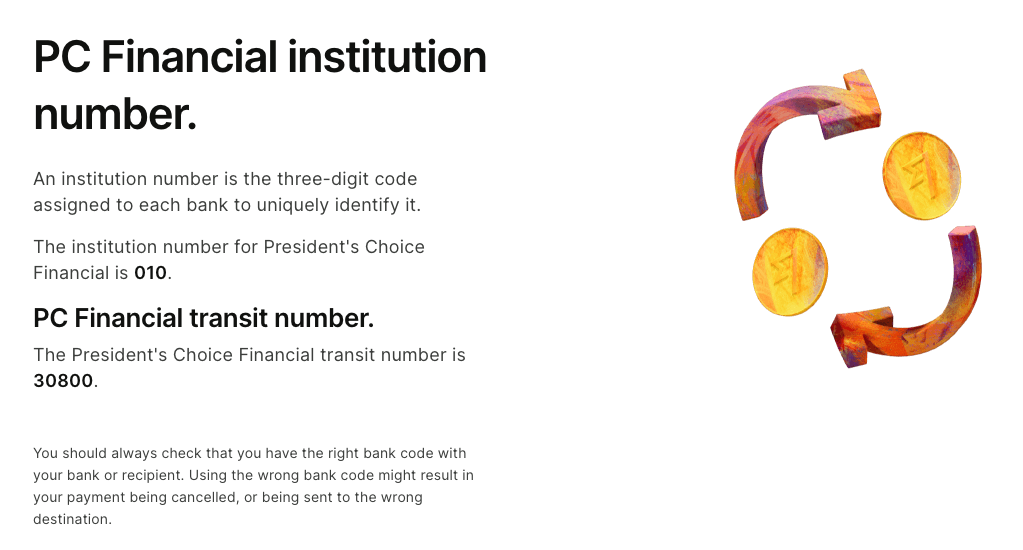
口座のルーティング番号がわからない場合は、番号を調べられるオンラインリソースが多数あります。以下の手順では、そのようなサイトの1つを使ってルーティング番号を見つける方法を示します。
1. ルーティング番号を調べるのに役立つ任意のウェブサイトに移動します。ここでは wise.com の [Webページ](https://wise.com/ca/bank-codes/transit-number/routing-number#routing-banks) をこの説明例として使用します(impact.comはwise.comと一切提携していません)。
2. 選択 **ルーティング番号を見つける**.
3. 口座を開設した銀行を選択します。
4. 選択 **(銀行の)トランジット番号を見つける**.
* 次の情報が表示されます *金融機関番号* と *トランジット番号* (別名、 *銀行番号* および *支店番号*).
5. 上記に示した9桁の形式に従って番号を組み合わせます。最初に先頭のゼロを追加するのを忘れないでください。
* 表示されているスクリーンショットの例では、ルーティング番号は次のようになります: **0****010****30800**
{% hint style="success" %}
**注意:** 上記の手順でルーティング番号を見つけられない場合は、別のオンラインリソースを試すか、銀行に直接お問い合わせください。
{% endhint %}
---
# Agent Instructions
This documentation is published with GitBook. GitBook is the documentation platform designed so that both humans and AI agents can read, navigate, and reason over technical content effectively. Learn more at gitbook.com.
## Querying This Documentation
If you need additional information that is not directly available in this page, you can query the documentation by asking a question.
Perform an HTTP GET request on the following URL with the `ask` and `goal` query parameters:
```
GET https://help.impact.com/partner/ja/nitsuitebitaidesuka/platform-features/finance/payments-withdrawals-and-balance/payout-setup/canadian-routing-numbers-explained-for-partners.md?ask=&goal=
```
`ask` is the immediate question: it should be specific, self-contained, and written in natural language.
`goal` is what the user is ultimately trying to achieve, the reason they need the answer. Sharing it helps GitBook give you a better, more relevant answer. A goal is most helpful when it describes the outcome the user wants rather than restating the question. For example, with `ask=how do I create an API token`, a goal like `automate deployments from our CI pipeline` lets GitBook tailor the answer to that use case.
The response will contain a direct answer to the question and relevant excerpts and sources from the documentation.
Use this mechanism when the answer is not explicitly present in the current page, you need clarification or additional context, or you want to retrieve related documentation sections.