> For the complete documentation index, see [llms.txt](https://help.impact.com/llms.txt). Markdown versions of documentation pages are available by appending `.md` to page URLs; this page is available as [Markdown](https://help.impact.com/partner/ja/nitsuitebitaidesuka/platform-features/finance/payments-withdrawals-and-balance/canadian-routing-numbers-explained-for-partners.md).
# カナダのルーティング番号の解説(パートナー向け)
カナダの銀行システムを利用するパートナーとして、ルーティング番号を理解しておくことは重要です。そうすれば、 [EFTで残高を引き出すことができます](/partner/ja/nitsuitebitaidesuka/platform-features/finance/payments-withdrawals-and-balance/withdraw-funds-to-your-bank-account.md#set-up-your-payment-method-0-1) impact.comプラットフォームから。
#### ルーティング番号とは何ですか?
カナダの銀行では *ルーティング番号を* 取引処理時に、口座に関連付けられた銀行と支店を識別するために使用します。この番号は、行われる取引の種類に応じて2通りの形式で表されます。EFT取引では、ルーティング番号は常に以下の形式になります:
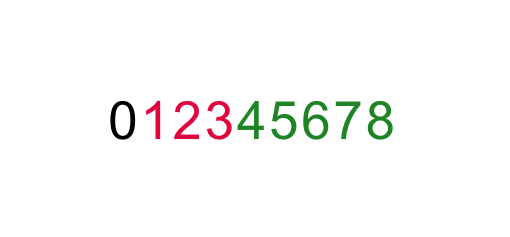
* 番号は9桁です
* **0** は、常に他の8桁の前に置かれる標準の数字です
* **123** を表します *銀行* あなたの口座に関連する
* **45678** を表します *銀行支店* あなたの口座に関連する
{% hint style="info" %}
**注:** 次の項目を入力する際は、必ず上記の形式を使用してください: *ルーティング番号* impact.comの *銀行口座* 設定のフィールド。参照: [パートナーとして銀行口座設定を完了する](/partner/ja/nitsuitebitaidesuka/platform-features/finance/payments-withdrawals-and-balance/withdraw-funds-to-your-bank-account.md#set-up-your-payment-method-0-1) 支払い方法の設定または変更方法の詳細については、こちらをご覧ください。
{% endhint %}
#### ルーティング番号を見つける
口座のルーティング番号がわからない場合は、見つけるために使えるオンラインリソースが多数あります。以下の手順では、そのようなサイトの1つを使ってルーティング番号を見つける方法を示します。
1. ルーティング番号を見つけるのに役立つ任意のウェブサイトにアクセスしてください。ここではwise.comの [ウェブページを](https://wise.com/ca/bank-codes/transit-number/routing-number#routing-banks) この説明例に使用します(impact.comはwise.comと一切提携していません)。
2. 選択 **ルーティング番号を見つける**.
3. 口座を開設した銀行を選択します。
4. 選択 **(あなたの銀行の)トランジット番号を見つける**.
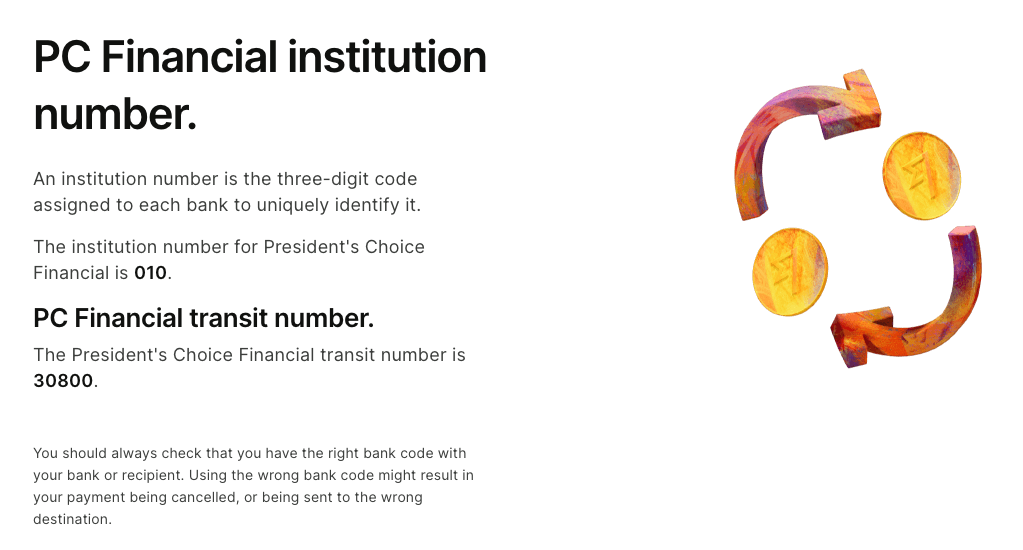
* 提供されるのは *金融機関番号* と *トランジット番号* (別名、 *銀行番号* および *支店番号*).
5. 上記の9桁の形式に従って番号を組み合わせます。先頭の0を最初に追加するのを忘れないでください。
* 提示されたスクリーンショットの例では、ルーティング番号は次のようになります: **0****010****30800**
{% hint style="info" %}
**注:** 上記の手順でルーティング番号を見つけられない場合は、別のオンラインリソースを試すか、直接銀行にお問い合わせください。
{% endhint %}
---
# Agent Instructions
This documentation is published with GitBook. GitBook is the documentation platform designed so that both humans and AI agents can read, navigate, and reason over technical content effectively. Learn more at gitbook.com.
## Querying This Documentation
If you need additional information that is not directly available in this page, you can query the documentation dynamically by asking a question.
Perform an HTTP GET request on the current page URL with the `ask` query parameter, and the optional `goal` query parameter:
```
GET https://help.impact.com/partner/ja/nitsuitebitaidesuka/platform-features/finance/payments-withdrawals-and-balance/canadian-routing-numbers-explained-for-partners.md?ask=&goal=
```
`ask` is the immediate question: it should be specific, self-contained, and written in natural language.
`goal` is optional and describes the broader end goal you are ultimately trying to accomplish on behalf of the user. GitBook uses it to tailor the answer towards what is most useful for that goal.
The response will contain a direct answer to the question and relevant excerpts and sources from the documentation.
Use this mechanism when the answer is not explicitly present in the current page, you need clarification or additional context, or you want to retrieve related documentation sections.