> For the complete documentation index, see [llms.txt](https://help.impact.com/llms.txt). Markdown versions of documentation pages are available by appending `.md` to page URLs; this page is available as [Markdown](https://help.impact.com/partner/ja/nitsuitebitaidesuka/platform-features/action-management/event-notifications-and-postbacks/test-and-troubleshoot-a-postback-url.md).

# ポストバック URL をテストしてトラブルシューティングする

本番環境で頼る前に、postback URL をテストできます。これにより、エンドポイントがリクエストを受け付けることを確認し、配信の問題をより早く切り分けられます。

#### Postback URL をテストする

{% hint style="success" icon="circle-info" %}
**注：** テスト時には、一時的に Postback URL を変更して、ハードコードされたテスト値（例: 「12345678」の代わりに `{SubId1}`）を使用してエラーを避けることをおすすめします。サーバーが送信を受け付ける場合は、Postback URL を変数を使用する設定に安全に戻せます。
{% endhint %}

1. 上部のナビゲーションバーから、 **ディスカバー** → **マイブランド**.
2. 表示に応じて進めてください:
   * に関しては ![](/files/15f81cb99c714ba32058e2306b005a2902a89de3) **\[グリッド表示]**、postback をテストしたいブランドを選択し、次に ![](/files/4927eb1e5c4fa3b3dc6c7e11a5ab7eb37b71050d) **\[詳細] → トラッキング連携**.
   * に関しては ![](/files/062faf4cfcd56cd113992985d1fa181e71b3dbd6) **\[リスト表示]**、postback をテストしたいブランドにカーソルを合わせ、次に ![](/files/4927eb1e5c4fa3b3dc6c7e11a5ab7eb37b71050d) **\[その他]** → **トラッキング統合**.
3. の *ポストバック* セクションで、テストしたい postback URL を見つけ、次に ![](/files/abddecb8ce63e889572eca17db0d705cd899c19f) **\[アクション] → テスト**.
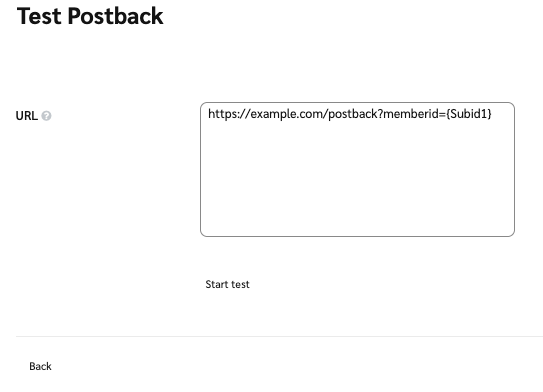
4. テストしたい URL を入力し、次に **テストを開始**.

   <div data-with-frame="true"><figure><img src="/files/9ce0952486b3321e040a52f3a6eae55f5184eb82" alt=""><figcaption></figcaption></figure></div>

#### 再試行の動作を理解する

impact.com が宛先 URL に postback を送信した際に失敗した場合、impact.com は配信を自動的に再試行します。これは、一時的なネットワークの問題や、短時間のサーバー停止に対応するのに役立ちます。

impact.com は失敗した postback を合計で最大 15 回再試行します。

impact.com は次の場合、postback を再試行しません:

* 宛先 URL が不正な形式であるか、無効です。
* 宛先 URL またはそのホストが解決できない場合。たとえば DNS ルックアップの失敗時など。

impact.comは、〜からのHTTPレスポンスに対する最初の3回の再試行をスキップします `400` 〜へ `500`.

| 再試行回数  | 再試行までの遅延 |
| ------ | -------- |
| 再試行 1  | +15 秒    |
| 再試行 2  | +15 秒    |
| 再試行 3  | +15 秒    |
| 再試行 4  | +3 分     |
| 再試行 5  | +3 分     |
| 再試行 6  | +15 分    |
| 再試行 7  | +15 分    |
| 再試行 8  | +15 分    |
| 再試行 9  | +2 時間    |
| 再試行 10 | +2 時間    |
| 再試行 11 | +2 時間    |
| 再試行 12 | +6 時間    |
| 再試行 13 | +6 時間    |
| 再試行 14 | +6 時間    |
| 再試行 15 | +6 時間    |

#### エラーをトラブルシューティングする

| エラー            | 説明                                                                                                                                        |
| -------------- | ----------------------------------------------------------------------------------------------------------------------------------------- |
| 必須パラメータがありません  | サーバーは変数ではなく値を想定している可能性があります。Postback URLを変更してテスト値（例： `{SubId1}`ではなく「12345678」）を渡し、ハードコードされた値を受け入れるか確認してください。                              |
| 大文字と小文字を区別する変数 | 動的変数は大文字と小文字を区別し、完全に一致する必要があります。つまり、 `{SubId1}` は、次と同じではありません： `{subid1}`。変数で大文字と小文字が正しく区別されていることを再確認してください。                              |
| アクセス拒否         | ほとんどのPostbackサーバーには、動的変数とともに渡す必要があるセキュリティトークンまたは値があります。サーバーへのアクセスに必要なトークンまたはセキュリティ値については、ウェブサイトの技術チームと連携するか、ウェブサイトプロバイダーのドキュメントを参照してください。 |


---

# Agent Instructions
This documentation is published with GitBook. GitBook is the documentation platform designed so that both humans and AI agents can read, navigate, and reason over technical content effectively. Learn more at gitbook.com.

## Querying This Documentation
If you need additional information that is not directly available in this page, you can query the documentation dynamically by asking a question.

Perform an HTTP GET request on the current page URL with the `ask` query parameter, and the optional `goal` query parameter:

```
GET https://help.impact.com/partner/ja/nitsuitebitaidesuka/platform-features/action-management/event-notifications-and-postbacks/test-and-troubleshoot-a-postback-url.md?ask=<question>&goal=<endgoal>
```

`ask` is the immediate question: it should be specific, self-contained, and written in natural language.
`goal` is optional and describes the broader end goal you are ultimately trying to accomplish on behalf of the user. GitBook uses it to tailor the answer towards what is most useful for that goal.

The response will contain a direct answer to the question and relevant excerpts and sources from the documentation.

Use this mechanism when the answer is not explicitly present in the current page, you need clarification or additional context, or you want to retrieve related documentation sections.
