> For the complete documentation index, see [llms.txt](https://help.impact.com/llms.txt). Markdown versions of documentation pages are available by appending `.md` to page URLs; this page is available as [Markdown](https://help.impact.com/partner/ja/nitsuitebitaidesuka/impactcom-mobile-app/working-with-brands-on-the-mobile-app/message-your-brands-on-the-mobile-app.md).
# モバイルアプリでブランドにメッセージを送る
を使用して、 *メッセージ* ブランド候補とすでに提携しているブランドの両方とコミュニケーションを取るための機能です。この機能には、ブランドとの導入を効率化したり、特別な取り決めについてブランドに連絡したり、問題を解決したりするなど、さまざまな用途があります。
{% hint style="warning" %}
**重要:** impact.com の [メッセージ利用規約](https://impact.com/terms-of-use-messaging/) ブランドにメッセージを送る際は。
{% endhint %}
## メッセージを検索
メッセージは2か所で見つけられます:
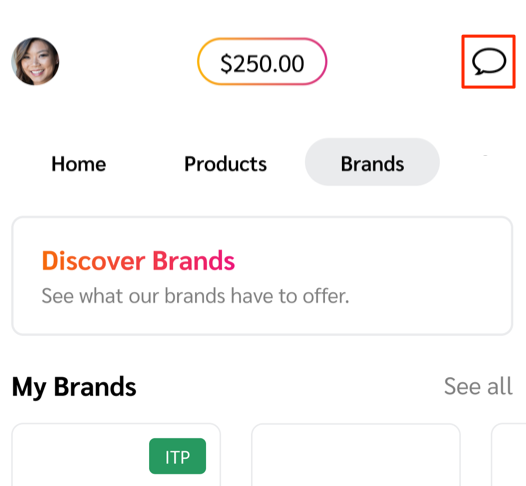
* 選択する  **\[チャット]** 右上隅で、あなたの *受信トレイ* 画面から削除されるまであと何日残っているかを示します。
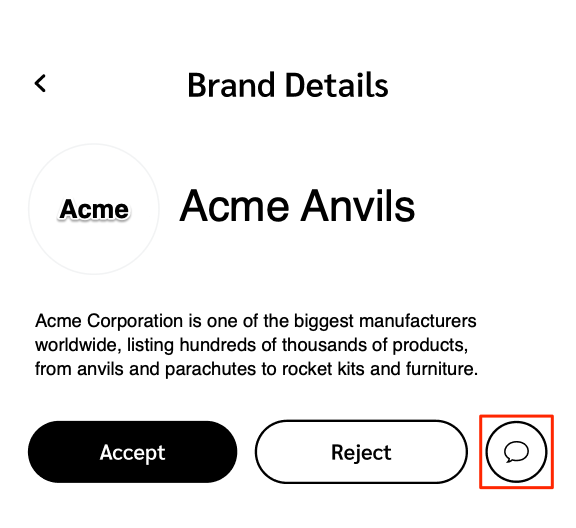
* ブランドの からメッセージスレッドを開きます *ブランド詳細* 画面から削除されるまであと何日残っているかを示します。
## 新しいメッセージを作成
から新しいメッセージスレッドを作成できます *受信トレイ* 画面またはブランドの *ブランド詳細*:
{% hint style="success" icon="circle-info" %}
**注:** ブランドが許可している場合にのみ、ブランドとの会話を開始できます。
{% endhint %}
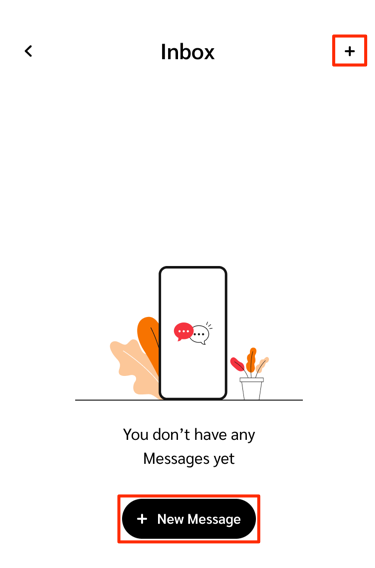
* の *受信トレイ* 画面の右上隅で、 を選択します  **\[Add]** または  **新規メッセージ**.
* の *新しいメッセージ* 画面で、 を使用して  **\[Search]** チャットを始めたいブランドを見つけます。
* ファイルを添付するには、 を選択します  **\[添付]**。以下の *対応している添付ファイル* を参照して、受け付けられるファイル形式を確認してください。
* の *ブランド詳細* 画面の説明の下で、 を選択します  **\[チャット]**.
* ファイルを添付するには、 を選択します  **\[添付]**。以下の *対応している添付ファイル* を参照して、受け付けられるファイル形式を確認してください。
## 対応している添付ファイル
メッセージスレッドには次のファイル形式を添付できます:
* CSV
* PDF
* JPEG
* PNG
* GIF
---
# Agent Instructions
This documentation is published with GitBook. GitBook is the documentation platform designed so that both humans and AI agents can read, navigate, and reason over technical content effectively. Learn more at gitbook.com.
## Querying This Documentation
If you need additional information that is not directly available in this page, you can query the documentation by asking a question.
Perform an HTTP GET request on the following URL with the `ask` and `goal` query parameters:
```
GET https://help.impact.com/partner/ja/nitsuitebitaidesuka/impactcom-mobile-app/working-with-brands-on-the-mobile-app/message-your-brands-on-the-mobile-app.md?ask=&goal=
```
`ask` is the immediate question: it should be specific, self-contained, and written in natural language.
`goal` is what the user is ultimately trying to achieve, the reason they need the answer. Sharing it helps GitBook give you a better, more relevant answer. A goal is most helpful when it describes the outcome the user wants rather than restating the question. For example, with `ask=how do I create an API token`, a goal like `automate deployments from our CI pipeline` lets GitBook tailor the answer to that use case.
The response will contain a direct answer to the question and relevant excerpts and sources from the documentation.
Use this mechanism when the answer is not explicitly present in the current page, you need clarification or additional context, or you want to retrieve related documentation sections.