> For the complete documentation index, see [llms.txt](https://help.impact.com/llms.txt). Markdown versions of documentation pages are available by appending `.md` to page URLs; this page is available as [Markdown](https://help.impact.com/partner/ja/nitsuitebitaidesuka/impactcom-mobile-app/working-with-brands-on-the-mobile-app/apply-to-brands-on-the-mobile-app.md).

# モバイルアプリでブランドに応募する

この *ブランドマーケットプレイス* では、ブランドを見つけて提携申請できます。複数の提携を結ぶことで、あなたの宣伝チャネルやオーディエンスに合うブランドへのトラフィックをより多く促進できます。これらの提携は、あなたと提携先ブランドの収益を増やします。

{% hint style="success" icon="circle-info" %}
**注：** 必ず [ブランドマーケットプレイスに参加してから](/partner/ja/nitsuitebitaidesuka/platform-features/working-with-brands/applying-to-brands/join-the-brands-marketplace.md) でないと、ブランドに申請できません。
{% endhint %}

## ブランドを探す

1. 画面下部のナビゲーションバーから、 ![Discover](https://3659882269-files.gitbook.io/~/files/v0/b/gitbook-x-prod.appspot.com/o/spaces%2Fb2rE79d9UhOKZQLgzSqx%2Fuploads%2Fgit-blob-35961b52dbef3eb40a6bf6105fe09c31da9cf8d5%2Fbc8ad019d1124bda96c027b8aa307415958044436ec6fbb88ee11e06cc87cf09.svg?alt=media) **\[Discover]**.
2. を選択します。 *Discover* 画面上部のタブから、 **ブランド**.
3. 〜の下で *ブランドマーケットプレイス*、 **ブランドを探す**.

<details>

<summary>マーケットプレイスを操作する</summary>

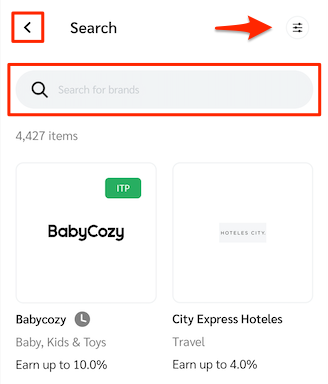
の機能を理解する *ブランドマーケットプレイス* 画面：

<div data-with-frame="true"><figure><img src="https://3659882269-files.gitbook.io/~/files/v0/b/gitbook-x-prod.appspot.com/o/spaces%2Fb2rE79d9UhOKZQLgzSqx%2Fuploads%2Fgit-blob-fd110d73f4a032be4a0f78e755c454140ee8c27a%2F2831af720ed6dc2eff16f78f2514bb2ad832fcf4683df81b79c5b316b3a7f8f4.png?alt=media" alt="Brand Marketplace screen with Back, Filter, and Search" width="246"><figcaption></figcaption></figure></div>

| 機能                                                                                                                                                                                                                                                                                  | 説明                                                                                                                                                                                                                                                                                                                                                             |
| ----------------------------------------------------------------------------------------------------------------------------------------------------------------------------------------------------------------------------------------------------------------------------------- | -------------------------------------------------------------------------------------------------------------------------------------------------------------------------------------------------------------------------------------------------------------------------------------------------------------------------------------------------------------- |
| ![Back](https://3659882269-files.gitbook.io/~/files/v0/b/gitbook-x-prod.appspot.com/o/spaces%2Fb2rE79d9UhOKZQLgzSqx%2Fuploads%2Fgit-blob-3364b389815e6386c73528dda541e583d2fe0c16%2F0eceeaaa32f185a9932075cd699744ed6b755396902ea2e4cabff73869cb9f6f.svg?alt=media) **\[Back]**     | に戻ります。 *ブランド* ページ。                                                                                                                                                                                                                                                                                                                                             |
| ![Filter](https://3659882269-files.gitbook.io/~/files/v0/b/gitbook-x-prod.appspot.com/o/spaces%2Fb2rE79d9UhOKZQLgzSqx%2Fuploads%2Fgit-blob-7cfd25b971c29a0610f2e298c20fbd9fd30ae9e6%2Fb9fc56922a355ba3112ddf49588fbe3cb2030c765ff244dd14a06eda4c9bf555.svg?alt=media) **\[Filter]** | を開きます。 *フィルター* を上にスライドして、特定の条件に基づいてブランドを絞り込みます。詳細については、 *特定のブランドでフィルタリングする* を参照してください。                                                                                                                                                                                                                                                                         |
| ![Search](https://3659882269-files.gitbook.io/~/files/v0/b/gitbook-x-prod.appspot.com/o/spaces%2Fb2rE79d9UhOKZQLgzSqx%2Fuploads%2Fgit-blob-3c5971fb7b03a98375488e97a4317afd60621298%2Fd0fbb4c2c189cdc83bc0eb8e906fa3cb66818d0a9daa1491ea48042160714ed2.svg?alt=media) **\[Search]** | ブランドマーケットプレイスで特定のカテゴリのブランドを検索するか、ブランド名で検索します。 ![Exit](https://3659882269-files.gitbook.io/~/files/v0/b/gitbook-x-prod.appspot.com/o/spaces%2Fb2rE79d9UhOKZQLgzSqx%2Fuploads%2Fgit-blob-d05e21635c52fff94d35ca4c6b05c1deecc699ef%2F768d04f4d7e1b5b745577812f7d67db99d988bfc34749b6e575a04438d6cee36.svg?alt=media) **\[Exit]** または **キャンセル** を選択して、検索条件をクリアします。 |

</details>

<details>

<summary>特定のブランドでフィルタリングする</summary>

この *フィルター* を上にスライドすると、あなたに合うブランドを見つけるためのフィルターが表示されます。 ![Checked box](https://3659882269-files.gitbook.io/~/files/v0/b/gitbook-x-prod.appspot.com/o/spaces%2Fb2rE79d9UhOKZQLgzSqx%2Fuploads%2Fgit-blob-d2954616dc486c3e12c9211e20ff376bda0ab1af%2F7586e04e82e7c7203e5c82320dd417f8ac564cae5035024fdf0eb2ed017e6376.svg?alt=media) **\[Checked box]** を選択してフィルターを適用するか、 ![Plus](https://3659882269-files.gitbook.io/~/files/v0/b/gitbook-x-prod.appspot.com/o/spaces%2Fb2rE79d9UhOKZQLgzSqx%2Fuploads%2Fgit-blob-3ca70a1ff22f0720bfb8c9e284c7d8178e3a547b%2Fb6a126b0775291b814c5a97f83039ef72ba42d6d02b0fe20f4790213ea01961e.svg?alt=media) **\[Plus]** を選択してフィルターカテゴリを展開し、さらに多くのオプションを表示します。

| フィルター  | 説明                                                                                                                  |
| ------ | ------------------------------------------------------------------------------------------------------------------- |
| 並べ替え   | ブランドをどの順序で表示するかを選択します。ブランドは次のように並べ替えられます。 *最新順*, *名前：A-Z*、または *名前：Z-A*.                                             |
| カテゴリ   | ブランドを業界で絞り込めます。ほかのサブカテゴリで検索をさらに絞り込む前に、業界を選択してください。                                                                  |
| 関係     | まだ申請していないブランド（以前に却下されたブランドを利用可能な対象から除外）や、事前に提携資格のあるブランド（プログラムに即時参加）で絞り込めます。また、あなたを却下したブランドや、事前に提携資格のあるブランドでも絞り込めます。 |
| 支払いモデル | オンライン販売/CPA、リード、アプリインストールなど、ブランドが何に対して支払うかで絞り込めます。詳しくはブランドの条件をご覧ください。                                               |
| 提供地域   | ブランドが顧客に商品やサービスを提供している国で絞り込めます。                                                                                     |

</details>

## ブランドについて知る

提携に興味のあるブランドを見つけたら、そのアイコンを選択して、次のような詳細を確認できます。 *概要* 情報、希望するビジネスモデル、その他の統計情報。

<details>

<summary>ブランド詳細</summary>

| 詳細          | 説明                                                   |
| ----------- | ---------------------------------------------------- |
| クリックごとの収益   | ブランドの現在の提携先が各クリックから平均でどれだけ稼いでいるかを表示します。              |
| 応答率         | このブランドが過去7日間に返信した申請の割合を表示します。                        |
| 承認率         | このブランドが過去7日間に承認した申請の割合を表示します。                        |
| 資金状況        | 合意された時点で、ブランドが提携先に獲得額の全額を支払えるよう十分に口座へ入金していた頻度を表示します。 |
| 説明          | ブランドの概要説明です。                                         |
| 希望するビジネスモデル | ブランドが好む提携先の宣伝方法。たとえば、 *ロイヤルティ/特典*.                   |

</details>

<details>

<summary>プロモーションタブ</summary>

アクセスするには **Promote** タブを選択して、プログラムのプロモーション情報を表示します。

| 詳細    | 説明                   |
| ----- | -------------------- |
| 支払い詳細 | ブランドが提供する宣伝情報を表示します。 |

</details>

<details>

<summary>詳細タブ</summary>

アクセスするには **詳細** タブを選択して、追加のブランド詳細にアクセスします。

| 詳細          | 説明                                                                                                                                                                                                                                                                                                                                                                                                                                                                                                                                                                                                                      |
| ----------- | ----------------------------------------------------------------------------------------------------------------------------------------------------------------------------------------------------------------------------------------------------------------------------------------------------------------------------------------------------------------------------------------------------------------------------------------------------------------------------------------------------------------------------------------------------------------------------------------------------------------------- |
| 提供地域        | ブランドが商品やサービスを販売できる地理的地域。                                                                                                                                                                                                                                                                                                                                                                                                                                                                                                                                                                                                |
| トラッキング方法    | <p>プログラムで利用可能なトラッキング方法：</p><p><strong>ユニークなプロモコードトラッキング</strong>: ブランドがプロモコードトラッキングを設定しているか確認できます。これは、チェックアウト時にプロモコードが使用されるたびに記録されます。</p><p><strong>モバイルサイト</strong>: ブランドがモバイルサイトを設定しているか確認できます。通常、これはモバイルサイト対応の広告があることを意味します。</p><p><strong>モバイルアプリ</strong>: ブランドがモバイルアプリを持っているか確認できます。通常、これはアプリのインストールを促進する広告があることを意味します。</p><p><strong>ピクセルのピギーバック</strong>: ブランドはあなたが <a href="/partner/ja/nitsuitebitaidesuka/platform-features/tracking/piggyback-pixels/partner-piggyback-pixels-overview.md">ピギーバックピクセル</a> をサイトに設置することを許可します。</p><p><strong>ディープリンク</strong>: 彼らのウェブサイト上の別ページへのトラッキングリンクを作成します。</p>          |
| その他のプログラム詳細 | <p>ブランドを宣伝するために必要となる追加情報。</p><p><strong>商品カタログ</strong>: ブランドが商品を <a href="/partner/ja/nitsuitebitaidesuka/impactcom-mobile-app/mobile-app-product-marketplace/explore-the-mobile-app-product-marketplace.md">impact.comの商品マーケットプレイス</a>.</p><p><strong>商標使用可</strong>: ブランドが商標登録している用語について、他の提携先と入札できます。SEOキーワードに役立ちます。</p><p><strong>ギフトカードでの支払い</strong>: 消費者がチェックアウト時にギフトカードを使用すると、ブランドが支払いを行います。</p><p><strong>掲載枠に対応</strong>: ブランドは広告掲載の料金支払いを受け入れる意思があり、交渉にも応じます。 <em>掲載料</em> 広告掲載のための。</p><p><strong>Amazonで販売</strong>: ブランドの商品がAmazonで利用できます。</p><p><strong>クリエイター対応</strong>: ブランドはインフルエンサーとの提携に前向きです。</p> |
| 会社について      | 会社の所在地や、ウェブサイトのアドレスなどの関連情報。                                                                                                                                                                                                                                                                                                                                                                                                                                                                                                                                                                                             |

</details>

## ブランドマーケットプレイスから申請する

1. 画面下部のナビゲーションバーから、 ![Discover](https://3659882269-files.gitbook.io/~/files/v0/b/gitbook-x-prod.appspot.com/o/spaces%2Fb2rE79d9UhOKZQLgzSqx%2Fuploads%2Fgit-blob-35961b52dbef3eb40a6bf6105fe09c31da9cf8d5%2Fbc8ad019d1124bda96c027b8aa307415958044436ec6fbb88ee11e06cc87cf09.svg?alt=media) **\[Discover]**.
2. を選択します。 *Discover* 画面上部のタブから、 **ブランド**.
3. 〜の下で *ブランドマーケットプレイス*、 **ブランドを探す**.
4. アクセスするには **プロフィールアイコン** のブランドのうち申請したいものを選び、次に **申請する**.
   1. 選択します ![Checked box](https://3659882269-files.gitbook.io/~/files/v0/b/gitbook-x-prod.appspot.com/o/spaces%2Fb2rE79d9UhOKZQLgzSqx%2Fuploads%2Fgit-blob-d2954616dc486c3e12c9211e20ff376bda0ab1af%2F7586e04e82e7c7203e5c82320dd417f8ac564cae5035024fdf0eb2ed017e6376.svg?alt=media) **\[Checked box] 私は（ブランド）の利用規約を読み、理解し、確認し、承諾しました。**
5. 選択します **送信**.
6. 条件付きで、ブランドが申請にアンケートを含めている場合は、 **続行**を選択し、アンケートに回答してから、 **申請する。**

## 商品マーケットプレイスから申請する

1. 画面下部のナビゲーションバーから、 ![Discover](https://3659882269-files.gitbook.io/~/files/v0/b/gitbook-x-prod.appspot.com/o/spaces%2Fb2rE79d9UhOKZQLgzSqx%2Fuploads%2Fgit-blob-35961b52dbef3eb40a6bf6105fe09c31da9cf8d5%2Fbc8ad019d1124bda96c027b8aa307415958044436ec6fbb88ee11e06cc87cf09.svg?alt=media) **\[Discover]**.
2. を選択します。 *Discover* 画面上部のタブから、 **商品**.
3. 〜の下で *商品マーケットプレイス*、 **商品マーケットプレイスを見る**.
4. 興味のある商品のアイコンを選択し、次に **ブランドに申請**.
   * または、 ![Add](https://3659882269-files.gitbook.io/~/files/v0/b/gitbook-x-prod.appspot.com/o/spaces%2Fb2rE79d9UhOKZQLgzSqx%2Fuploads%2Fgit-blob-3ca70a1ff22f0720bfb8c9e284c7d8178e3a547b%2Fb6a126b0775291b814c5a97f83039ef72ba42d6d02b0fe20f4790213ea01961e.svg?alt=media) **\[Add]** を商品の名前の横で選択します。
5. 次に *支払い条件*、 ![Checked box](https://3659882269-files.gitbook.io/~/files/v0/b/gitbook-x-prod.appspot.com/o/spaces%2Fb2rE79d9UhOKZQLgzSqx%2Fuploads%2Fgit-blob-d2954616dc486c3e12c9211e20ff376bda0ab1af%2F7586e04e82e7c7203e5c82320dd417f8ac564cae5035024fdf0eb2ed017e6376.svg?alt=media) **\[Checked box] 私は（ブランド）の利用規約を読み、理解し、確認し、承諾しました**.
   * 必要に応じて、そのブランドと一緒に働きたい理由を説明するメモを追加します。
6. 選択します **申請する**.
   * ブランドのプログラムへの参加申請が承認されると、そのブランドの商品への固有のトラッキングリンクを取得できます。


---

# Agent Instructions
This documentation is published with GitBook. GitBook is the documentation platform designed so that both humans and AI agents can read, navigate, and reason over technical content effectively. Learn more at gitbook.com.

## Querying This Documentation
If you need additional information that is not directly available in this page, you can query the documentation by asking a question.

Perform an HTTP GET request on the following URL with the `ask` and `goal` query parameters:

```
GET https://help.impact.com/partner/ja/nitsuitebitaidesuka/impactcom-mobile-app/working-with-brands-on-the-mobile-app/apply-to-brands-on-the-mobile-app.md?ask=<question>&goal=<user_goal>
```

`ask` is the immediate question: it should be specific, self-contained, and written in natural language.
`goal` is what the user is ultimately trying to achieve, the reason they need the answer. Sharing it helps GitBook give you a better, more relevant answer. A goal is most helpful when it describes the outcome the user wants rather than restating the question. For example, with `ask=how do I create an API token`, a goal like `automate deployments from our CI pipeline` lets GitBook tailor the answer to that use case.

The response will contain a direct answer to the question and relevant excerpts and sources from the documentation.

Use this mechanism when the answer is not explicitly present in the current page, you need clarification or additional context, or you want to retrieve related documentation sections.
