> For the complete documentation index, see [llms.txt](https://help.impact.com/llms.txt). Markdown versions of documentation pages are available by appending `.md` to page URLs; this page is available as [Markdown](https://help.impact.com/partner/ja/nitsuitebitaidesuka/impactcom-mobile-app/mobile-app-product-marketplace/explore-the-mobile-app-product-marketplace.md).

# モバイルアプリの商品マーケットプレイスを利用する

Product Marketplace は、〜であるパートナー向けのブランド発見ツールです。 [impact.com Marketplace に参加している](/partner/ja/nitsuitebitaidesuka/platform-features/working-with-brands/applying-to-brands/join-the-brands-marketplace.md) パートナーが、ブランドが提供している商品を通じて新しいブランドを見つけて申し込むことができます。パートナーとして、次のことができます：

* impact.com により厳選された、さまざまな商品のコレクション（たとえば、アパレル＆アクセサリー、電子機器、ホームデコール）を閲覧する。
* impact.com プラットフォーム上のすべての商品を閲覧する — それらの商品を提供しているブランドとの関係に関係なく。
* 商品マーケットプレイスを通じてブランドに申し込む。

## 特定の商品を検索・絞り込みする

Product Marketplace では、キーワード検索を実行し、特定の種類の商品を探すのに役立つさまざまなフィルターを利用できます。

1. 画面下部のナビゲーションバーから、 ![Discover](https://3659882269-files.gitbook.io/~/files/v0/b/gitbook-x-prod.appspot.com/o/spaces%2Fb2rE79d9UhOKZQLgzSqx%2Fuploads%2Fgit-blob-35961b52dbef3eb40a6bf6105fe09c31da9cf8d5%2Fbc8ad019d1124bda96c027b8aa307415958044436ec6fbb88ee11e06cc87cf09.svg?alt=media) **\[Discover] を選択**.
2. 上部のタブから *Discover* 画面で、 **Products**.
3. いずれかの商品コレクションを選択します。
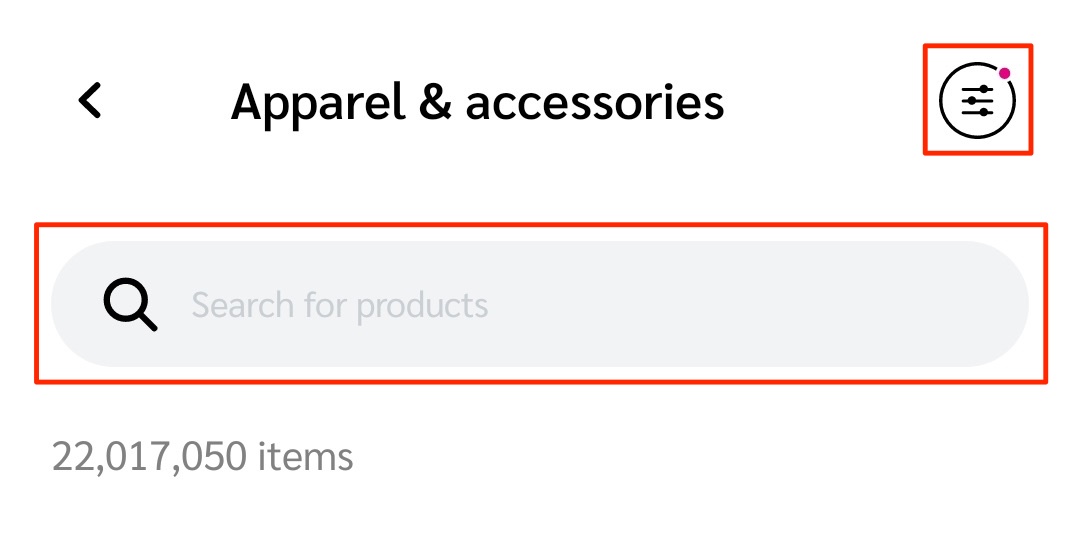
4. を使用して、 ![Search](https://3659882269-files.gitbook.io/~/files/v0/b/gitbook-x-prod.appspot.com/o/spaces%2Fb2rE79d9UhOKZQLgzSqx%2Fuploads%2Fgit-blob-3c5971fb7b03a98375488e97a4317afd60621298%2Fd0fbb4c2c189cdc83bc0eb8e906fa3cb66818d0a9daa1491ea48042160714ed2.svg?alt=media) **\[Search]** フィールドでキーワード検索を行い、 ![Filter](https://3659882269-files.gitbook.io/~/files/v0/b/gitbook-x-prod.appspot.com/o/spaces%2Fb2rE79d9UhOKZQLgzSqx%2Fuploads%2Fgit-blob-7cfd25b971c29a0610f2e298c20fbd9fd30ae9e6%2Fb9fc56922a355ba3112ddf49588fbe3cb2030c765ff244dd14a06eda4c9bf555.svg?alt=media) **\[Filter]** を使用して表示される商品の一覧を絞り込みます。

   * 検索とフィルター機能は画面上部にあります。
   * 詳細は以下の *フィルターリファレンス* を参照してください。

   <div data-with-frame="true"><figure><img src="https://3659882269-files.gitbook.io/~/files/v0/b/gitbook-x-prod.appspot.com/o/spaces%2Fb2rE79d9UhOKZQLgzSqx%2Fuploads%2Fgit-blob-5576a66fbe5bca787d26eb631c134af6ff26951e%2F0717e81ac4dd87efe714e099dafc5aa97b91f785fe35804c2a9200fcca6c7dfd.png?alt=media" alt="Product collection with search and filter options" width="375"><figcaption></figcaption></figure></div>

<details>

<summary>フィルターリファレンス</summary>

| フィルター   | 説明                                                                                                                                                                                                                                                                                                                                                                                                                                                                                                                                                                                                                                                                                                                                                                                            |
| ------- | --------------------------------------------------------------------------------------------------------------------------------------------------------------------------------------------------------------------------------------------------------------------------------------------------------------------------------------------------------------------------------------------------------------------------------------------------------------------------------------------------------------------------------------------------------------------------------------------------------------------------------------------------------------------------------------------------------------------------------------------------------------------------------------------- |
| 並べ替え基準  | <p>• <strong>関連度</strong> — 商品を検索語句やフィルターにどれだけ近いかで並べ替えます（最も近いものから最も近くないものへ）。</p><p>• <strong>価格の昇順</strong> — 商品を安い順から高い順に並べ替えます。</p><p>• <strong>価格の降順</strong> — 商品を高い順から安い順に並べ替えます。</p><p>• <strong>割引率</strong> — 元の販売価格と比較して、割引率が高いものから低いものへ商品一覧を並べ替えます。</p><p>• <strong>総コミッション</strong> — 商品に対して支払われたコミッションの合計額（$）。支払われたコミッション額が最も高い商品から降順に一覧を並べ替えます。コミッションは直近28日間のローリング期間で測定されます。</p><p>• <strong>総売上</strong> — impact.com が商品に対して記録した売上総額（$）。売上額が最も高い商品から降順に一覧を並べ替えます。売上は直近28日間のローリング期間で測定されます。</p><p>• <strong>売上数量</strong> — impact.com が商品に対して記録した売上数量の合計。注文数が最も多い商品から降順に一覧を並べ替えます。売上は直近28日間のローリング期間で測定されます。</p><p>• <strong>クリック単価収益</strong> — ブランドがクリックごとに支払う場合、この商品を宣伝して得られるクリック単価収益（EPC）です。</p><p>• <strong>コミッション率</strong> — 最も高いコミッション率の支払いを提供するプログラムに属する商品を並べ替えます。</p> |
| プログラム関係 | <p>選択肢は 3 つあります：</p><p>• <strong>My Brands</strong> — あなたが提携しているブランドの商品だけを表示します。</p><p>• <strong>Other Brands</strong> — まだ提携していないブランドの商品だけを表示します。</p><p>• <strong>Pre-Qualified</strong> — 事前に取引対象として認定されているブランドの商品すべてを表示します。</p>                                                                                                                                                                                                                                                                                                                                                                                                                                                                                                                                                            |
| カテゴリー   | <p>商品が属する商品マーケットプレイスのカテゴリー。たとえば、 <em>アパレル＆アクセサリー</em>.</p><p>これは商品詳細に記載されているカテゴリーに対応します。詳細は <a href="#learn-more-about-a-product"><em>商品の詳細を確認する</em></a> セクションをご覧ください。</p>                                                                                                                                                                                                                                                                                                                                                                                                                                                                                                                                                                                                                   |
| 主要メーカー  | <p>商品のメーカー名。たとえば、 <em>ACME Inc</em>.</p><p>このフィルターは、カテゴリーまたはプログラムを選択した後に表示されます。</p>                                                                                                                                                                                                                                                                                                                                                                                                                                                                                                                                                                                                                                                                                                           |
| 価格帯     | 次の値を設定して商品を絞り込みます： *最小* と *最大* 価格。                                                                                                                                                                                                                                                                                                                                                                                                                                                                                                                                                                                                                                                                                                                                                            |

</details>

## 商品の詳細を確認する

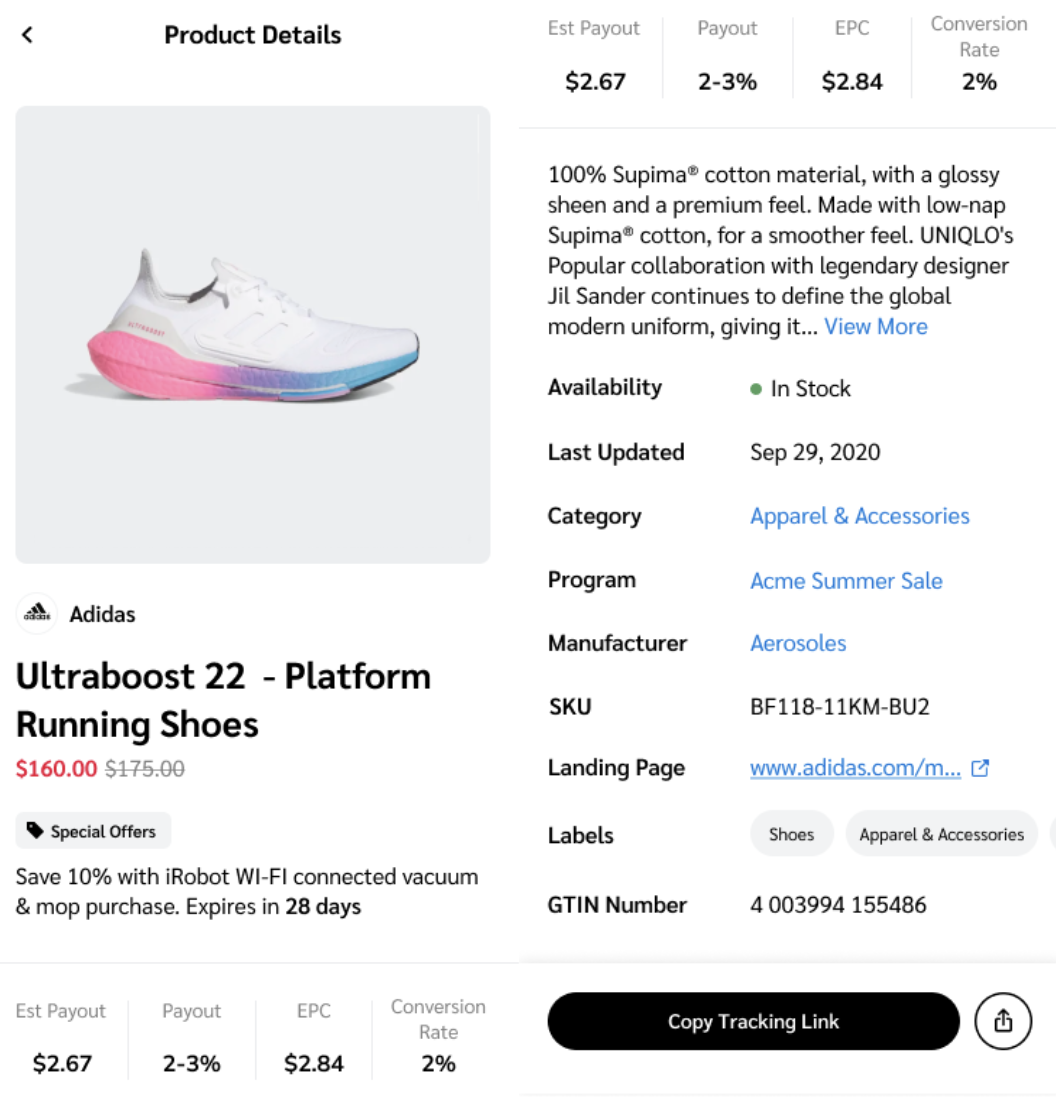
宣伝したい、または詳細を知りたい商品を見つけたら、その商品のアイコンを選択して詳細情報を表示できます。詳細は *商品詳細リファレンス* を参照してください。

<div data-with-frame="true"><figure><img src="https://3659882269-files.gitbook.io/~/files/v0/b/gitbook-x-prod.appspot.com/o/spaces%2Fb2rE79d9UhOKZQLgzSqx%2Fuploads%2Fgit-blob-cd83d238f82f14d344551fcc3099b64edcee7dac%2F4c174e6185e226a8b8248d0f9fada502e30fb68b8839b6a402b2bfe9b2110a60.png?alt=media" alt="Product detail screen on the impact.com mobile app" width="375"><figcaption></figcaption></figure></div>

<details>

<summary>商品詳細リファレンス</summary>

| 商品詳細      | 説明                                                                                                        |
| --------- | --------------------------------------------------------------------------------------------------------- |
| 一般的な商品情報  | 商品の名前、価格、説明。                                                                                              |
| 推定支払額     | この商品の販売を促進した場合に得られる金額。                                                                                    |
| 支払額       | 商品の販売を促進した場合に得られる売上金額の割合。                                                                                 |
| EPC       | ブランドがクリックごとに支払う場合、この商品を宣伝して得られるクリック単価収益（EPC）を表示します。                                                       |
| コンバージョン率  | この商品のクリックのうち、コンバージョンにつながる割合です。                                                                            |
| 在庫状況      | 現在この商品が在庫ありかどうか。                                                                                          |
| 最終更新日     | 商品の詳細が最後に編集された日付。                                                                                         |
| カテゴリー     | 商品が属する商品マーケットプレイスのカテゴリー。これは、使用されるカテゴリーに対応します [特定の商品を検索・絞り込みする](#search-and-filter-for-specific-products). |
| プログラム     | 商品が属するプログラムの名前とリンク。                                                                                       |
| メーカー      | この商品のメーカー名。この項目がリンクの場合は、それを選択してこのメーカーの他の商品を表示できます。                                                        |
| SKU       | 商品の在庫管理単位（SKU）。これは特定の商品を識別するための固有IDです。                                                                    |
| ランディングページ | 商品のウェブページへのリンク。                                                                                           |
| ラベル       | 商品に関連付けられているタグ。                                                                                           |
| GTIN番号    | 商品の [グローバル取引品目番号](https://en.wikipedia.org/wiki/Global_Trade_Item_Number).                                |

</details>


---

# Agent Instructions
This documentation is published with GitBook. GitBook is the documentation platform designed so that both humans and AI agents can read, navigate, and reason over technical content effectively. Learn more at gitbook.com.

## Querying This Documentation
If you need additional information that is not directly available in this page, you can query the documentation by asking a question.

Perform an HTTP GET request on the following URL with the `ask` and `goal` query parameters:

```
GET https://help.impact.com/partner/ja/nitsuitebitaidesuka/impactcom-mobile-app/mobile-app-product-marketplace/explore-the-mobile-app-product-marketplace.md?ask=<question>&goal=<user_goal>
```

`ask` is the immediate question: it should be specific, self-contained, and written in natural language.
`goal` is what the user is ultimately trying to achieve, the reason they need the answer. Sharing it helps GitBook give you a better, more relevant answer. A goal is most helpful when it describes the outcome the user wants rather than restating the question. For example, with `ask=how do I create an API token`, a goal like `automate deployments from our CI pipeline` lets GitBook tailor the answer to that use case.

The response will contain a direct answer to the question and relevant excerpts and sources from the documentation.

Use this mechanism when the answer is not explicitly present in the current page, you need clarification or additional context, or you want to retrieve related documentation sections.