> For the complete documentation index, see [llms.txt](https://help.impact.com/llms.txt). Markdown versions of documentation pages are available by appending `.md` to page URLs; this page is available as [Markdown](https://help.impact.com/partner/ja/nitsuitebitaidesuka/impactcom-mobile-app/mobile-app-creator-campaigns/generate-campaign-tracking-links-on-the-mobile-app.md).

# モバイルアプリでキャンペーントラッキングリンクを生成する

クリエイターキャンペーンに参加している場合、特定のタスクに関連する素材のトラッキングリンクを取得できます。

1. 画面下部のナビゲーションバーで、 ![](https://3659882269-files.gitbook.io/~/files/v0/b/gitbook-x-prod.appspot.com/o/spaces%2Fb2rE79d9UhOKZQLgzSqx%2Fuploads%2Fgit-blob-5919cdeed52adbd4de9dfcbadcfe62d445d91025%2Faa71615bda928a0e5fa66f195170478ab70842ab08c0f4c6732acb34f16604de.svg?alt=media) **\[タスク]**.
2. 画面で *キャンペーンのタスク* トラッキングリンクを作成するタスクを見つけて選択します。
   * 右上隅の ![](https://3659882269-files.gitbook.io/~/files/v0/b/gitbook-x-prod.appspot.com/o/spaces%2Fb2rE79d9UhOKZQLgzSqx%2Fuploads%2Fgit-blob-7cfd25b971c29a0610f2e298c20fbd9fd30ae9e6%2Fb9fc56922a355ba3112ddf49588fbe3cb2030c765ff244dd14a06eda4c9bf555.svg?alt=media) **\[フィルター]** を選択すると、カテゴリ別にタスクを絞り込めます。詳しくは、以下の *フィルターのリファレンス* をご覧ください。
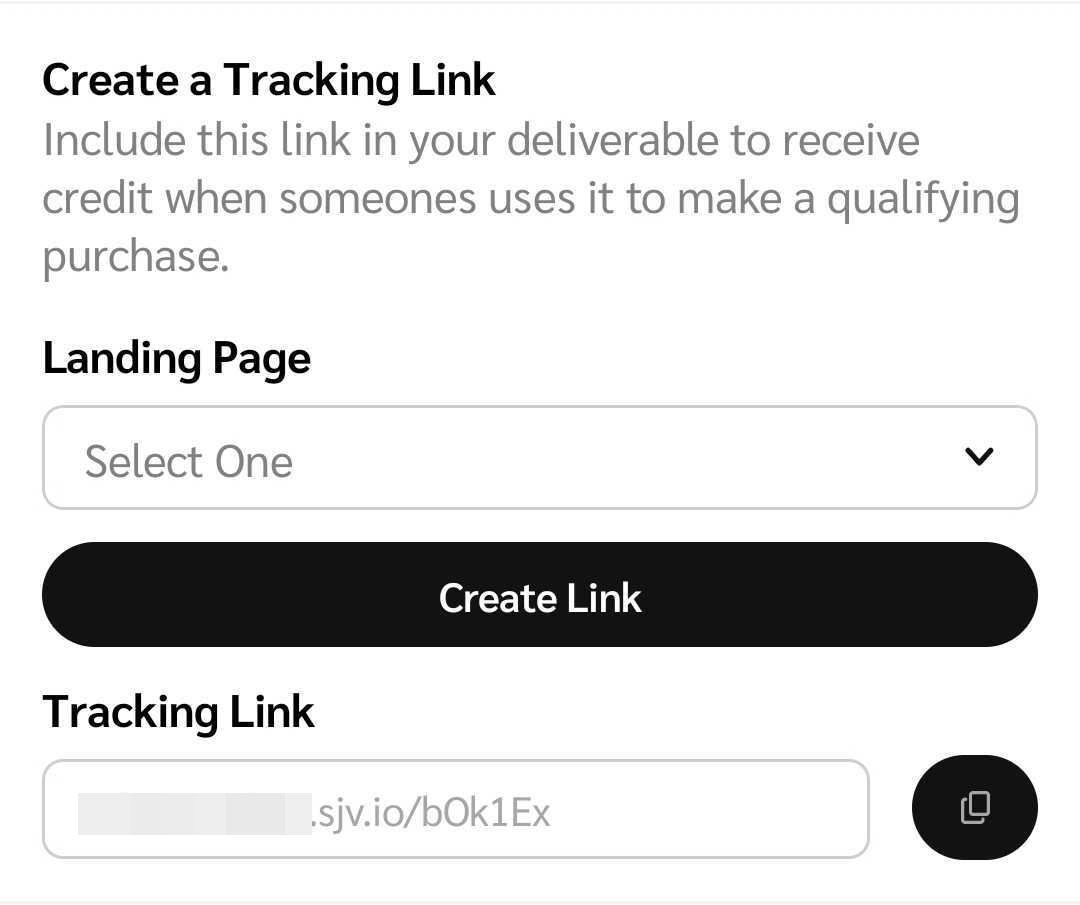
3. キャンペーンの設定時にブランドが選択したトラッキングリンクの設定に応じて、次の3つのいずれかになります。
   * **任意のランディングページにトラフィックを誘導する場合：** ランディングページを手動で入力します。
   * **ブランドが指定したランディングページにトラフィックを誘導する場合：** ドロップダウンメニューから、保存済みのランディングページを選択します。
   * **ブランドのプログラムのデフォルトのランディングページにトラフィックを誘導する場合：** デフォルトのランディングページが自動入力され、トラッキングリンクも自動的に作成されます。
4. トラッキングリンクの設定に応じて、 **リンクを作成** を選択し、 ![](https://3659882269-files.gitbook.io/~/files/v0/b/gitbook-x-prod.appspot.com/o/spaces%2Fb2rE79d9UhOKZQLgzSqx%2Fuploads%2Fgit-blob-0fc6ec6fbddab318cb49020a8543ff19d958a44a%2Fef97680e348683b1af7ae2204cba73a1d66fd308d84258ad6b692e0e80c8c7e4.svg?alt=media) **\[コピー]** を選択してリンクをコピーし、オーディエンスと共有します。

   <div data-with-frame="true"><figure><img src="https://3659882269-files.gitbook.io/~/files/v0/b/gitbook-x-prod.appspot.com/o/spaces%2Fb2rE79d9UhOKZQLgzSqx%2Fuploads%2Fgit-blob-9d19bce48f29eff7c739f5176e588d23654f9768%2F51e4976f199cfcd3320762e54b128fd689f562cdaf6a63de13ee29b56821ad56.jpg?alt=media" alt="" width="375"><figcaption></figcaption></figure></div>

<details>

<summary>フィルターのリファレンス</summary>

| フィルター                         | 説明                                                                                                                                                                                                                                                                                 |
| ----------------------------- | ---------------------------------------------------------------------------------------------------------------------------------------------------------------------------------------------------------------------------------------------------------------------------------- |
| 並べ替え                          | タスクを開始日の *昇順* または *降順* で並べ替えます。                                                                                                                                                                                                                                                    |
| ステータス                         | <p>次のいずれかの進捗ステータスでタスクを絞り込みます。</p><p>• <em>完了</em> — ブランドが納品物を承認済み。</p><p>• <em>進行中</em> — 下書き、またはブランドの確認待ちの成果物。</p><p>• <em>成果物の提出待ち</em> — 成果物の提出が必要なタスク。</p><p>• <em>未着手</em> — まだ開始していないタスク。</p>                                                                                |
| ブランド                          | ブランド名を検索し、該当する ![](https://3659882269-files.gitbook.io/~/files/v0/b/gitbook-x-prod.appspot.com/o/spaces%2Fb2rE79d9UhOKZQLgzSqx%2Fuploads%2FN6TguzQsf7GtNsWyRLrI%2Funchecked-box.svg?alt=media\&token=c3fcf4ce-ec19-428d-bb39-644c529668ab) **\[チェックボックス]**.                        |
| を選択して、特定のブランドに関連するタスクを絞り込みます。 | クリエイターキャンペーンを検索し、該当する ![](https://3659882269-files.gitbook.io/~/files/v0/b/gitbook-x-prod.appspot.com/o/spaces%2Fb2rE79d9UhOKZQLgzSqx%2Fuploads%2FN6TguzQsf7GtNsWyRLrI%2Funchecked-box.svg?alt=media\&token=c3fcf4ce-ec19-428d-bb39-644c529668ab) **\[チェックボックス]**.                 |
| タスクの種類                        | を選択して、特定のクリエイターキャンペーンに関連するタスクを絞り込みます。 ![](https://3659882269-files.gitbook.io/~/files/v0/b/gitbook-x-prod.appspot.com/o/spaces%2Fb2rE79d9UhOKZQLgzSqx%2Fuploads%2FN6TguzQsf7GtNsWyRLrI%2Funchecked-box.svg?alt=media\&token=c3fcf4ce-ec19-428d-bb39-644c529668ab) **\[チェックボックス]**. |

</details>


---

# Agent Instructions
This documentation is published with GitBook. GitBook is the documentation platform designed so that both humans and AI agents can read, navigate, and reason over technical content effectively. Learn more at gitbook.com.

## Querying This Documentation
If you need additional information that is not directly available in this page, you can query the documentation by asking a question.

Perform an HTTP GET request on the following URL with the `ask` and `goal` query parameters:

```
GET https://help.impact.com/partner/ja/nitsuitebitaidesuka/impactcom-mobile-app/mobile-app-creator-campaigns/generate-campaign-tracking-links-on-the-mobile-app.md?ask=<question>&goal=<user_goal>
```

`ask` is the immediate question: it should be specific, self-contained, and written in natural language.
`goal` is what the user is ultimately trying to achieve, the reason they need the answer. Sharing it helps GitBook give you a better, more relevant answer. A goal is most helpful when it describes the outcome the user wants rather than restating the question. For example, with `ask=how do I create an API token`, a goal like `automate deployments from our CI pipeline` lets GitBook tailor the answer to that use case.

The response will contain a direct answer to the question and relevant excerpts and sources from the documentation.

Use this mechanism when the answer is not explicitly present in the current page, you need clarification or additional context, or you want to retrieve related documentation sections.