> For the complete documentation index, see [llms.txt](https://help.impact.com/llms.txt). Markdown versions of documentation pages are available by appending `.md` to page URLs; this page is available as [Markdown](https://help.impact.com/partner/ja/nitsuitebitaidesuka/impactcom-mobile-app/getting-started-on-the-mobile-app/explore-impactcoms-mobile-app.md).
# impact.comのモバイルアプリを使う
PXAコースを受講する
impact.comのモバイルアプリへようこそ! まずはアプリ内を見て回り、各機能の場所を確認してみましょう。
#### ヘッダーバー
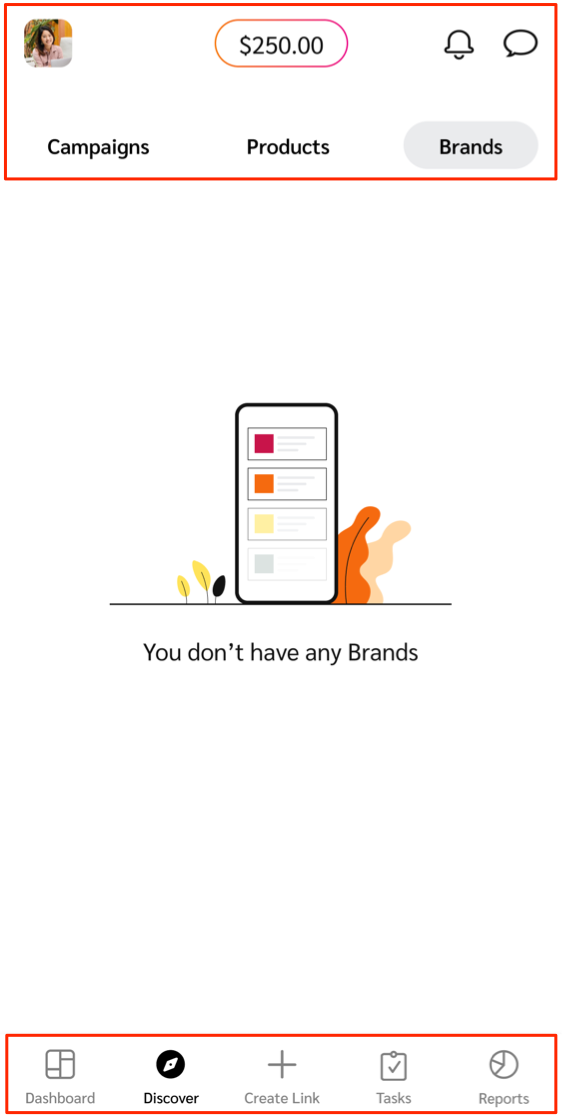
ヘッダーバーでは、プロフィール設定、アカウント残高、アカウント通知、ブランドとのメッセージスレッドを確認できます。
| ヘッダーの項目 | 説明 |
| ----------------------------------------------------------------------------------------------------------------------------------------------------------------------------------------------------------------------------------------------------------------------------- | --------------------------------------------------------------------------------------------------------------------------------------------------------------------------------------------------- |
|  **\[プロフィール]** | あなたの [ユーザープロファイル](/partner/ja/nitsuitebitaidesuka/impactcom-mobile-app/mobile-app-account-administration/manage-your-user-profile-on-the-mobile-app.md) 連絡先情報、会社情報、言語やパスワードなどの一般設定が含まれます。 |
| **利用可能残高** | この機能では、出金可能な資金をリアルタイムで確認できます。次の画面をご覧ください: [*レポート*](/partner/ja/nitsuitebitaidesuka/impactcom-mobile-app/mobile-app-reporting/mobile-app-reports-overview.md) 自動出金が実行されるまでに、あとどれだけ獲得する必要があるかを確認できます。 |
|  **\[通知]** | 最近のアカウント通知を、受信日時の新しい順にグループ化して一覧表示します。各通知にはタイムスタンプと簡単な説明があります。 |
|  **\[メッセージ]** | 受信箱を開いて、ブランドとのメッセージを確認・送信できます。詳しくは [ブランドへのメッセージ送信](/partner/ja/nitsuitebitaidesuka/impactcom-mobile-app/working-with-brands-on-the-mobile-app/message-your-brands-on-the-mobile-app.md). |
#### 下部メニューバー
下部メニューバーでは、ブランド、商品、クリエイター向けキャンペーンの検索、トラッキングリンクの作成、プログラム実績の確認などができます。
| メニュー項目 | 説明 |
| -------------------------------------------------------------------------------------------------------------------------------------------------------------------------------------------------------------------------------------------------------------------------------- | ----------------------------------------------------------------------------------------------------------------------------------------------------------------------------------------------------------------------------------------------------------------------------------------------------------------------------------------------------------------------------------------------------------------------------------------------------------------------------------------------------------------------------------------------------------------------------------------------------------------------------------------------------------------------------------------------------- |
|  **\[ダッシュボード]** | 未処理のものなど、やること一覧を確認できます [プログラム招待](/partner/ja/nitsuitebitaidesuka/impactcom-mobile-app/working-with-brands-on-the-mobile-app/manage-brand-invites-and-applications-on-the-mobile-app.md) と [提案](/partner/ja/nitsuitebitaidesuka/impactcom-mobile-app/working-with-brands-on-the-mobile-app/manage-brand-proposals-on-the-mobile-app.md) レビューが必要なものや [キャンペーン招待](/partner/ja/nitsuitebitaidesuka/impactcom-mobile-app/mobile-app-creator-campaigns/join-creator-campaigns-on-the-mobile-app.md) と [タスク](/partner/ja/nitsuitebitaidesuka/impactcom-mobile-app/mobile-app-creator-campaigns/submit-campaign-tasks-on-the-mobile-app.md) クリエイターの場合です。やることがない場合は、実績の概要を表示したり、ブランドや商品へのクイックナビゲーションを利用したりできます。 |
|  **\[発見]** | 提携ブランド、新規 [提携するブランドを](/partner/ja/nitsuitebitaidesuka/impactcom-mobile-app/working-with-brands-on-the-mobile-app/apply-to-brands-on-the-mobile-app.md)、またはプロモートする商品を検索します。 |
|  **\[招待]** | 管理 プログラム招待 と 提案 ブランドから受け取るものです。
このメニュー項目は、impact.comマーケットプレイスに参加している場合にのみ表示されます。
|
|  **\[リンクを作成]** | すばやく [トラッキングリンクを取得してカスタマイズし](/partner/ja/nitsuitebitaidesuka/impactcom-mobile-app/working-with-brands-on-the-mobile-app/create-tracking-links-on-the-mobile-app.md) 提携しているブランド向けに行えます。 |
|  **\[キャンペーンタスク]** | クリエイターの キャンペーンタスクを表示・管理し さまざまなブランドやキャンペーンにまたがって管理できます。
このメニュー項目は、クリエイターの場合にのみ表示されます。
|
|  **\[レポート]** | 次を使って、マーケティング施策の成果を追跡・確認できます: [モバイルアプリのレポート機能](/partner/ja/nitsuitebitaidesuka/impactcom-mobile-app/mobile-app-reporting/mobile-app-reports-overview.md). |
---
# Agent Instructions
This documentation is published with GitBook. GitBook is the documentation platform designed so that both humans and AI agents can read, navigate, and reason over technical content effectively. Learn more at gitbook.com.
## Querying This Documentation
If you need additional information that is not directly available in this page, you can query the documentation dynamically by asking a question.
Perform an HTTP GET request on the current page URL with the `ask` query parameter, and the optional `goal` query parameter:
```
GET https://help.impact.com/partner/ja/nitsuitebitaidesuka/impactcom-mobile-app/getting-started-on-the-mobile-app/explore-impactcoms-mobile-app.md?ask=&goal=
```
`ask` is the immediate question: it should be specific, self-contained, and written in natural language.
`goal` is optional and describes the broader end goal you are ultimately trying to accomplish on behalf of the user. GitBook uses it to tailor the answer towards what is most useful for that goal.
The response will contain a direct answer to the question and relevant excerpts and sources from the documentation.
Use this mechanism when the answer is not explicitly present in the current page, you need clarification or additional context, or you want to retrieve related documentation sections.