> For the complete documentation index, see [llms.txt](https://help.impact.com/llms.txt). Markdown versions of documentation pages are available by appending `.md` to page URLs; this page is available as [Markdown](https://help.impact.com/partner/ja/nitsuitebitaidesuka/campaigns/performance-campaigns/manage-performance-campaign-tasks.md).

# パフォーマンスキャンペーンのタスクを管理する

各キャンペーンごとに割り当てられたタスクを、簡単に追跡、管理し、完了できます。キャンペーンのタスクの見つけ方、ステータスや詳細での絞り込み方、下書き、成果物、指標などの重要情報の確認方法について、以下でご覧ください。

#### キャンペーンごとのタスクを見つける

1. 上部のナビゲーションメニューから、 **ディスカバー** → **キャンペーンを探す**.
2. 次を選択します **参加中** タブ。
3. 作業中のキャンペーンにカーソルを合わせてから、次を選択します **タスクを管理**.
   * または、キャンペーンを選択し、スライドアウトで *報酬* 右側のセクションに移動して、 **タスクを管理**.
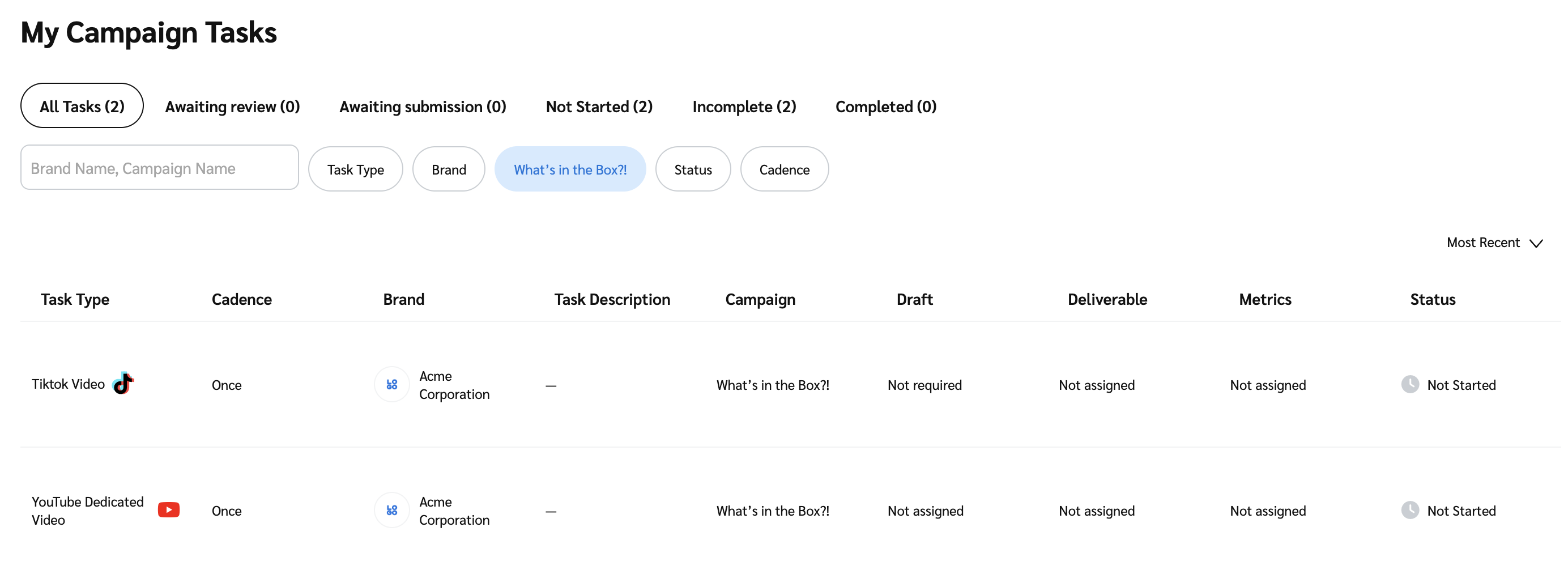
4. 〜では *私のキャンペーンタスク* 画面では、タスクが表形式で一覧表示されます。画面上部のバーを使って、ステータスや詳細に応じてタスクを絞り込めます。次を参照してください、 *ステータスバーの説明*、 *詳細の説明* および *表の列の説明* 詳細は以下をご覧ください。

<details>

<summary>ステータスバーの説明</summary>

| ステータス   | 説明                            |
| ------- | ----------------------------- |
| すべてのタスク | あなたに割り当てられたすべてのタスク。           |
| レビュー待ち  | 下書きや成果物を含み、レビューが必要なタスク。       |
| 提出待ち    | すでにレビュー済みで、提出が必要なタスク。         |
| 未開始     | まだ開始していないタスク。                 |
| 未完了     | まだ完了していないタスク。                 |
| 完了      | レビュー済みで、承認済みとしてマークされたすべてのタスク。 |

</details>

<details>

<summary>詳細の説明</summary>

| フィルター  | 説明                                                                                                                                                                                                                                                      |
| ------ | ------------------------------------------------------------------------------------------------------------------------------------------------------------------------------------------------------------------------------------------------------- |
| 検索バー   | ブランド名またはキャンペーン名で検索します。                                                                                                                                                                                                                                  |
| タスクタイプ | タスクをソーシャルネットワークまたは掲載タイプで絞り込めます。                                                                                                                                                                                                                         |
| ブランド   | 提携している特定のブランドで絞り込みます。                                                                                                                                                                                                                                   |
| キャンペーン | 作業中の特定のキャンペーンで絞り込みます。                                                                                                                                                                                                                                   |
| ステータス  | <p>タスクのレビューおよび承認ステータスで絞り込みます:</p><p>• <code>却下された提出物</code>: ブランドに却下された最終提出物。</p><p>• <code>承認待ちの提出物</code>: ブランドによる承認待ちの最終提出物。</p><p>• <code>却下された下書き</code>: ブランドにレビューされ、却下された下書き。</p><p>• <code>承認済みの下書き</code>: ブランドにレビューされ承認済みで、最終承認へ進められる下書き。</p> |
| 提出頻度   | 継続タスクを、提出頻度で絞り込めます。                                                                                                                                                                                                                                     |

</details>

<details>

<summary>表の列の説明</summary>

| 列                            | 説明                                                                                                                                                                                                          |
| ---------------------------- | ----------------------------------------------------------------------------------------------------------------------------------------------------------------------------------------------------------- |
| タスクタイプ                       | タスクの種類を確認します。例：オンサイト／アプリ内掲載と広告。                                                                                                                                                                             |
| 提出頻度                         | 継続タスクをどの頻度で提出する必要があるかを確認します。                                                                                                                                                                                |
| ブランド                         | ブランドのロゴと名前を表示します。                                                                                                                                                                                           |
| タスクの説明                       | タスクの説明を確認します。                                                                                                                                                                                               |
| キャンペーン                       | キャンペーン名を表示します。                                                                                                                                                                                              |
| 下書き                          | 下書きのステータスを表示します。                                                                                                                                                                                            |
| 提出物                          | 提出物のステータスを表示します。                                                                                                                                                                                            |
| 指標（ソーシャルプラットフォーム関連のタスクにのみ適用） | 指標のステータスを確認します。もしまだ [ソーシャルプラットフォームを接続していない場合](/partner/ja/nitsuitebitaidesuka/account-management/account-settings/connect-media-properties/connect-a-social-media-profile.md)、これはタスク指標の証明をブランドに送る必要がある期限です。 |
| ステータス                        | タスク全体のステータスを表示します。                                                                                                                                                                                          |

</details>

5. 必要に応じて、次を選択して、タスクの表での表示順を並べ替えます。 ![](/files/6b046c899791e34f6c5bd96746feecd1f5fce12b) **\[ドロップダウンメニュー]** 右側の **最新順** または **投稿タイプ**.

   <div data-with-frame="true"><figure><img src="/files/22940374a766640e33630036b56af0f76d2926ff" alt=""><figcaption></figcaption></figure></div>

#### タスクの詳細を表示・管理する

* タスク固有の情報を表示するには、タスクにカーソルを合わせて **タスクの詳細を表示**.
* スライドアウトでは：
  * できます [カスタム名を追加する](/partner/ja/nitsuitebitaidesuka/campaigns/performance-campaigns/rename-and-submit-performance-campaign-tasks.md#find-and-rename-campaign-tasks-0-0).
  * できます [トラッキングリンクを取得する](/partner/ja/nitsuitebitaidesuka/campaigns/performance-campaigns/generate-tracking-links-for-performance-campaign-tasks.md) ブランドがこのオプションを有効にしている場合。
  * できます [タスクを提出し、その指標を確認する](/partner/ja/nitsuitebitaidesuka/campaigns/performance-campaigns/rename-and-submit-performance-campaign-tasks.md#submit-tasks-and-metrics-0-1) （ソーシャルプラットフォーム関連のタスクにのみ適用）。
  * すでに提出され承認済みのタスクも表示できます。
    * これを行うには、次を選択します **提出物**.


---

# Agent Instructions
This documentation is published with GitBook. GitBook is the documentation platform designed so that both humans and AI agents can read, navigate, and reason over technical content effectively. Learn more at gitbook.com.

## Querying This Documentation
If you need additional information that is not directly available in this page, you can query the documentation dynamically by asking a question.

Perform an HTTP GET request on the current page URL with the `ask` query parameter, and the optional `goal` query parameter:

```
GET https://help.impact.com/partner/ja/nitsuitebitaidesuka/campaigns/performance-campaigns/manage-performance-campaign-tasks.md?ask=<question>&goal=<endgoal>
```

`ask` is the immediate question: it should be specific, self-contained, and written in natural language.
`goal` is optional and describes the broader end goal you are ultimately trying to accomplish on behalf of the user. GitBook uses it to tailor the answer towards what is most useful for that goal.

The response will contain a direct answer to the question and relevant excerpts and sources from the documentation.

Use this mechanism when the answer is not explicitly present in the current page, you need clarification or additional context, or you want to retrieve related documentation sections.
