> For the complete documentation index, see [llms.txt](https://help.impact.com/llms.txt). Markdown versions of documentation pages are available by appending `.md` to page URLs; this page is available as [Markdown](https://help.impact.com/partner/ja/nitsuitebitaidesuka/campaigns/creator-campaigns/social-property-campaign-linking/add-links-to-your-tiktok-videos.md).
# TikTok動画にリンクを追加する
もしあなたが [TikTokアカウントを接続して認証した](/partner/ja/nitsuitebitaidesuka/account-management/account-settings/connect-media-properties/connect-a-social-media-profile.md) impact.com上で、新しいTikTok機能のテストに参加できる資格がある場合があります:オーガニックTikTok動画にimpact.comの商品リンクを追加すること。
## 要件
* あなたは [接続済みで認証済み](/partner/ja/nitsuitebitaidesuka/account-management/account-settings/connect-media-properties/connect-a-social-media-profile.md) impact.com上のTikTok個人(ビジネスではない)アカウント。
* あなたのTikTokアカウントは、2024年11月17日までにimpact.comに追加され、認証されている必要があります。
* あなたのimpact.comクリエイターアカウントに表示されている国と *会社住所* およびあなたのTikTokアカウントの *場所* はいずれも `米国`.
* 参加対象として許可リストに登録されています。
* 許可リストに登録されているということは、impact.comが接続済みのTikTokアカウントをTikTokに送信し、TikTok側でその機能があなた向けに有効化されたということです。
上記の要件を満たしている場合、 [サポートに問い合わせる](https://app.impact.com/support/portal.ihtml?createTicket=true) アクセスをリクエストするには。
## TikTok動画に商品リンクを追加する
{% hint style="success" %}
この機能は、特定の impact.com エディションまたはアドオンでのみ利用できます。 [お問い合わせ](https://app.impact.com/support/portal.ihtml?createTicket=true) アカウントをアップグレードしてアクセス権を取得してください!
{% endhint %}
{% hint style="warning" %}
**重要:** このベータ機能テストは2024年12月14日に終了します。既存の商品リンクはこの日以降も引き続き機能しますが、TikTokに新しいリンクを追加することはできなくなります。
{% endhint %}
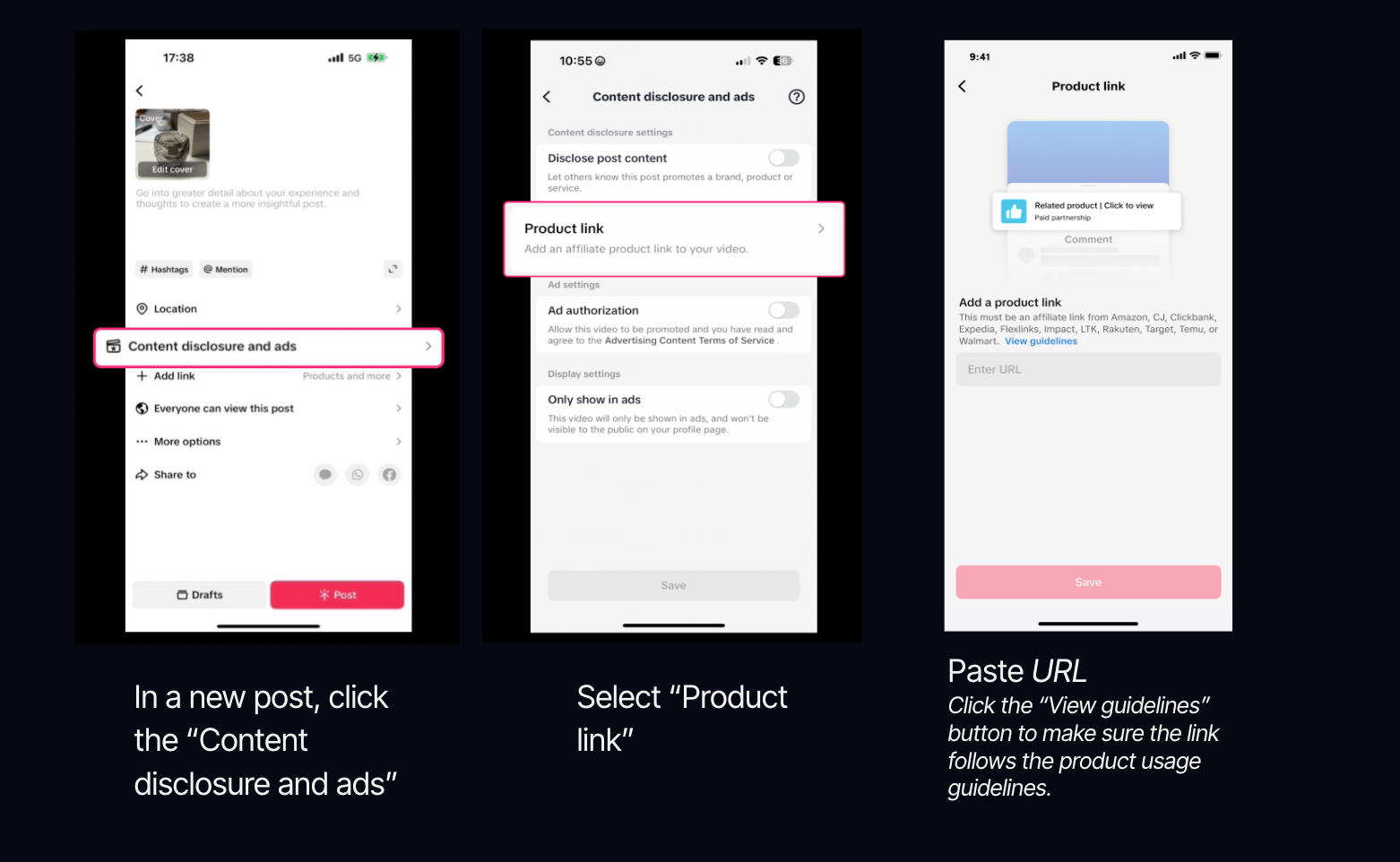
1. 次を開く *動画を投稿する* TikTokのモジュール内。
2. 選択 **コンテンツの開示と広告**.
3. 選択 **商品リンク**.
4. **コピーして貼り付け** あなたのimpact.comの商品リンクを *URL* 欄に入力します。
* 方法はこちら: [商品リンクを取得する](/partner/ja/nitsuitebitaidesuka/platform-features/tracking/tracking-links/create-and-manage-links/create-tracking-links.md#get-a-tracking-link-for-a-specific-product-0-2) impact.com上で。
リンクの適格基準
* のみ **単一の商品詳細ページ** のリンクのみ対応しています。商品集約ページやリンクツリーは使用できません。 **「ガイドラインを表示」リンクを選択し、どのリンクが承認されるかをご確認いただくことを強くお勧めします。**
* あなたが宣伝する商品は [TikTokの規定に準拠する必要があります](https://ads.tiktok.com/help/article/tiktok-advertising-policies) .
5. 選択 **送信** → **保存**.
6. **投稿** 動画を。
* 1日に最大7件のリンクを提出できます。
* リンクは提出後12時間審査中となります。
* リンクのいずれかにフラグが付いた場合、そのリンクは投稿から削除されますが、投稿自体は公開されたままです。
* リンクを追加できるのは、次の動画のみです: *ブランドコンテンツ* が  **\[オン]**.
* 商品はあなたの動画のコメント欄の上部に固定表示されます。
---
# Agent Instructions
This documentation is published with GitBook. GitBook is the documentation platform designed so that both humans and AI agents can read, navigate, and reason over technical content effectively. Learn more at gitbook.com.
## Querying This Documentation
If you need additional information that is not directly available in this page, you can query the documentation by asking a question.
Perform an HTTP GET request on the following URL with the `ask` and `goal` query parameters:
```
GET https://help.impact.com/partner/ja/nitsuitebitaidesuka/campaigns/creator-campaigns/social-property-campaign-linking/add-links-to-your-tiktok-videos.md?ask=&goal=
```
`ask` is the immediate question: it should be specific, self-contained, and written in natural language.
`goal` is what the user is ultimately trying to achieve, the reason they need the answer. Sharing it helps GitBook give you a better, more relevant answer. A goal is most helpful when it describes the outcome the user wants rather than restating the question. For example, with `ask=how do I create an API token`, a goal like `automate deployments from our CI pipeline` lets GitBook tailor the answer to that use case.
The response will contain a direct answer to the question and relevant excerpts and sources from the documentation.
Use this mechanism when the answer is not explicitly present in the current page, you need clarification or additional context, or you want to retrieve related documentation sections.